דילוג לתוכן

עזרה הדדית - בינה מלאכותית

565 נושאים 10.0k פוסטים

⚠ שימו לב!, אין לדון על נושאי בינה מלאכותית שאינן מועילות לתכנות ולמתכנתים.

  • איתוריא - כאפלקציה

    3
    0 הצבעות
    3 פוסטים
    50 צפיות
    ח
    לא כל אחד עובר על כללללל הודעה חדשה שיש רק לפי נושא חשבתי אולי יש שיראה כאן ולא כאן, ובזאת מחילה מכ"ת אם נגרם לו גמ"נ ולענינו, אני מחכה למישהו שירים את הכפפה אולי אף ככלי באוצריא
  • סקר | סקר | רק לי זה מפריע??? תופעת שיתוף יצירות של AI בפורום

    23
    17 הצבעות
    23 פוסטים
    240 צפיות
    מ
    @צדיק-0 בתור אחד שמשתמש ב-AI לתכנות Spoiler אני גם לומד תכנות לבד אבל עיקר התכונות שלי זה עם AI אני מודה לך על זה שעוררת אותי לעניין אני מוחק עכשיו את כל הנושאים שפרסמתי שלא אמורים להועיל לציבור אלא לי ספציפית ואשתדל להבא לעשות את מה ש @iosi-poli כתב בסקר | סקר | רק לי זה מפריע??? תופעת שיתוף יצירות של AI בפורום: אני כל הזמן יוצר לעצמי "מיני תוכנות" בAI, אבל בחיים לא מפרסם אותם, כי הם רלוונטיות רק לי! וגם אם יש סיכוי שהם רלוונטיות לאחרים, אני יבדוק 10 פעמים לפני אם שווה להטריד את הפורום בשביל זה, וגם אז, אני יכתוב פעמיים לפחות שזה מAI! תודה רבה! עריכה: לא הצלחתי למחוק את הכל כי היה לנושאים האלה מדי הרבה פוסטים אבל מה שאני יכול - מחקתי
  • להורדה | איתוריא / הורדה

    1
    0 הצבעות
    1 פוסטים
    14 צפיות
    אין תגובות
  • 0 הצבעות
    3 פוסטים
    46 צפיות
    cfopuserC
    @iosi-poli פשוט עניין של מזל, אני באופן אישי שמתי לב שכאשר מפעילים את ה pro אחרי מודל אחר הוא נוטה לפעול די גרוע ומבולגן. Spoiler בסך הכול עד כמה שזה נוח שהם בide לפעמים ההרצת פקודות ואז שהם שנכשלות וכדו' פשוט מבלבל אותם לגמרי וזה נוראי לפעמים. יש להם רצון לרצות את הבעלים אז הם עושים שטויות רק כדי שהכול "יעבוד"
  • המלצה | איתוריא - חיפוש תורני רב שלבי באמצעות AI

    164
    27 הצבעות
    164 פוסטים
    16k צפיות
    ח
    מטורף!!!!! לא יודע למה זה לא מפורסם מספיק ישנה אפשרות להורדת האתר כאפלקציה עבור אלו שלא משתמשים במחשב שלהם עם דפדפן, ואם א"א אופליין לפחות אונליין אבל ללא דפדפן וגלישה רק זה
  • בירור | בינה מלאכותית שאפשר לאמן/להכניס טקסט ויש לה API

    31
    0 הצבעות
    31 פוסטים
    154 צפיות
    ע
    @cubase אפשר שאלה על טקיוצ'ר? מעולם לא השתמשתי בו אבל זה נשמע מאוד איכותי ומהיר, חשוב לי החלק של המהיר. איך עושים את זה? בשביל לחסוך כמה שיותר זמן חשבתי להתקין שרת עם אסטריסק + בינה מלאכותית + מנוע TTS. ככה לא אשתמש במודל API אלא SIP שהוא אונליין ופשוט שיחת טלפון שאפשר לעשות עליה מניפולציות (רק אצטרך לעשות STT משירות חיצוני... שזה יקח זמן), אשאל את הבינה מלאכותית על השרת ואחסוך את הזמן של שליחת וקבלת התשובה ואצור את הTTS על השרת בחלקים קטנים (שוב חוסך זמן) ואשמיע ישירות בשיחה ככה לא צריך להעלות את ההקלטה לקו ולא יקח את הזמן עד שהשרת של ימות בונה את הTTS בעצמו. ואם כל זה, לדעתי יהיה דיליי רציני, איך עושים שיהיה כמה שיותר רציף? אם זה בסדר מבחינתך לענות על זה, תוכל לשלוח לי גם במייל stamandsefer של ג'ימייל
  • להורדה | הדרך המהירה ביותר לנווט בין קטעי קוד ב-Gemini או GPT

    10
    1
    8 הצבעות
    10 פוסטים
    181 צפיות
    D
    גרסה 2.4. ערכת הנושא האוטומטית פורסמה בחנות התוספים אגב, שימו לב לקיצור המקשים CTRL+↑\↓. מקווה שעזרתי
  • בירור | גרוק באתרוג, מישהו יודע האם יפתח מתי שהוא?

    1
    0 הצבעות
    1 פוסטים
    23 צפיות
    אין תגובות
  • שיתוף | בינה מלאכותית (AI) לשאלות תורניות

    61
    11 הצבעות
    61 פוסטים
    993 צפיות
    פ
    @יוסף3 מיוחד במינו!! השתמשתי בזה לחיפוש מקורות לשאלה וענה באופן מדויק ביותר!! עלה והצלח!
  • בקשה | עזרה ביצירת תמונה

    נפתר
    18
    2
    1 הצבעות
    18 פוסטים
    134 צפיות
    אורחלא
    @CSS-0 תודה על הרצון לעזור אבל @אברהם-גלסר כתב בבקשה | עזרה ביצירת תמונה: תודה רבה לכל העונים והמשיבים! תודה במיוחד ל @צדיק-וטוב-לו-0 שלקחתי את התמונה שלו
  • 4 הצבעות
    24 פוסטים
    1k צפיות
    פלמנמוניפ
    @החכם-התם לפעמים כך ולפעמים כך
  • 4 הצבעות
    1 פוסטים
    29 צפיות
    אין תגובות
  • בירור | שינוי מילים של שיר בעזרת AI

    1
    0 הצבעות
    1 פוסטים
    35 צפיות
    אין תגובות
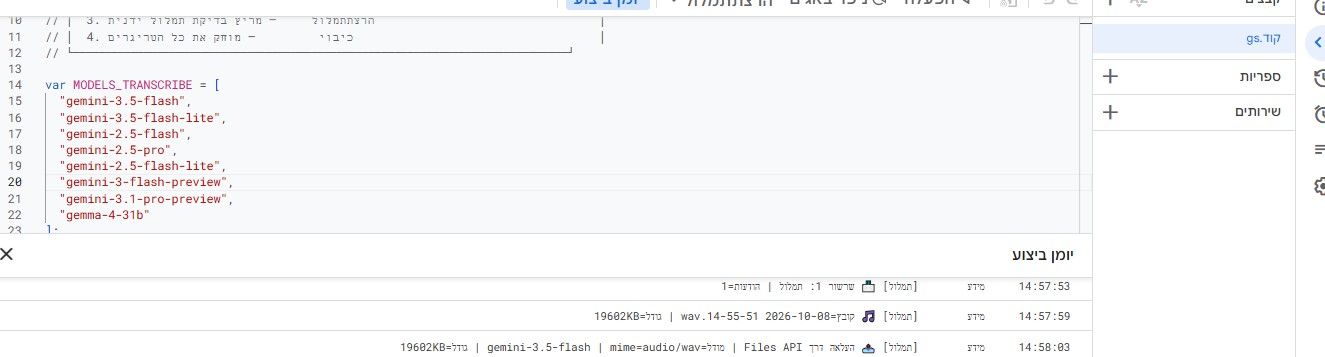
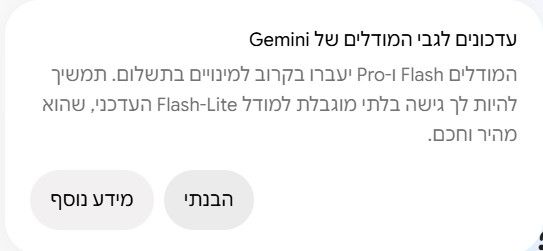
  • הסבר | סדר במודלים החינמיים של Gemini...

    19
    1
    17 הצבעות
    19 פוסטים
    474 צפיות
    C
    @חובבן-מקצועי (לא הצלחתי להכניס בספוילר) Grounding with Google Search connects the Gemini model to real-time web content and works with all available languages. This allows Gemini to provide more accurate answers and cite verifiable sources beyond its knowledge cutoff. Grounding helps you build applications that can: Increase factual accuracy: Reduce model hallucinations by basing responses on real-world information. Access real-time information: Answer questions about recent events and topics. Provide citations: Build user trust by showing the sources for the model's claims. Python from google import genai from google.genai import types client = genai.Client() grounding_tool = types.Tool( google_search=types.GoogleSearch() ) config = types.GenerateContentConfig( tools=[grounding_tool] ) response = client.models.generate_content( model="gemini-3-flash-preview", contents="Who won the euro 2024?", config=config, ) print(response.text) JavaScript import { GoogleGenAI } from "@google/genai"; const ai = new GoogleGenAI({}); const groundingTool = { googleSearch: {}, }; const config = { tools: [groundingTool], }; const response = await ai.models.generateContent({ model: "gemini-3-flash-preview", contents: "Who won the euro 2024?", config, }); console.log(response.text); REST curl "https://generativelanguage.googleapis.com/v1beta/models/gemini-3-flash-preview:generateContent" \ -H "x-goog-api-key: $GEMINI_API_KEY" \ -H "Content-Type: application/json" \ -X POST \ -d '{ "contents": [ { "parts": [ {"text": "Who won the euro 2024?"} ] } ], "tools": [ { "google_search": {} } ] }' You can learn more by trying the Search tool notebook. How grounding with Google Search works When you enable the google_search tool, the model handles the entire workflow of searching, processing, and citing information automatically. [image: google-search-tool-overview.png] User Prompt: Your application sends a user's prompt to the Gemini API with the google_search tool enabled. Prompt Analysis: The model analyzes the prompt and determines if a Google Search can improve the answer. Google Search: If needed, the model automatically generates one or multiple search queries and executes them. Search Results Processing: The model processes the search results, synthesizes the information, and formulates a response. Grounded Response: The API returns a final, user-friendly response that is grounded in the search results. This response includes the model's text answer and groundingMetadata with the search queries, web results, and citations. Understanding the grounding response When a response is successfully grounded, the response includes a groundingMetadata field. This structured data is essential for verifying claims and building a rich citation experience in your application. { "candidates": [ { "content": { "parts": [ { "text": "Spain won Euro 2024, defeating England 2-1 in the final. This victory marks Spain's record fourth European Championship title." } ], "role": "model" }, "groundingMetadata": { "webSearchQueries": [ "UEFA Euro 2024 winner", "who won euro 2024" ], "searchEntryPoint": { "renderedContent": "<!-- HTML and CSS for the search widget -->" }, "groundingChunks": [ {"web": {"uri": "https://vertexaisearch.cloud.google.com.....", "title": "aljazeera.com"}}, {"web": {"uri": "https://vertexaisearch.cloud.google.com.....", "title": "uefa.com"}} ], "groundingSupports": [ { "segment": {"startIndex": 0, "endIndex": 85, "text": "Spain won Euro 2024, defeatin..."}, "groundingChunkIndices": [0] }, { "segment": {"startIndex": 86, "endIndex": 210, "text": "This victory marks Spain's..."}, "groundingChunkIndices": [0, 1] } ] } } ] } The Gemini API returns the following information with the groundingMetadata: webSearchQueries : Array of the search queries used. This is useful for debugging and understanding the model's reasoning process. searchEntryPoint : Contains the HTML and CSS to render the required Search Suggestions. Full usage requirements are detailed in the Terms of Service. groundingChunks : Array of objects containing the web sources (uri and title). groundingSupports : Array of chunks to connect model response text to the sources in groundingChunks. Each chunk links a text segment (defined by startIndex and endIndex) to one or more groundingChunkIndices. This is the key to building inline citations. Grounding with Google Search can also be used in combination with the URL context tool to ground responses in both public web data and the specific URLs you provide. Attributing sources with inline citations The API returns structured citation data, giving you complete control over how you display sources in your user interface. You can use the groundingSupports and groundingChunks fields to link the model's statements directly to their sources. Here is a common pattern for processing the metadata to create a response with inline, clickable citations. Python def add_citations(response): text = response.text supports = response.candidates[0].grounding_metadata.grounding_supports chunks = response.candidates[0].grounding_metadata.grounding_chunks # Sort supports by end_index in descending order to avoid shifting issues when inserting. sorted_supports = sorted(supports, key=lambda s: s.segment.end_index, reverse=True) for support in sorted_supports: end_index = support.segment.end_index if support.grounding_chunk_indices: # Create citation string like [1](link1)[2](link2) citation_links = [] for i in support.grounding_chunk_indices: if i < len(chunks): uri = chunks[i].web.uri citation_links.append(f"[{i + 1}]({uri})") citation_string = ", ".join(citation_links) text = text[:end_index] + citation_string + text[end_index:] return text # Assuming response with grounding metadata text_with_citations = add_citations(response) print(text_with_citations) JavaScript function addCitations(response) { let text = response.text; const supports = response.candidates[0]?.groundingMetadata?.groundingSupports; const chunks = response.candidates[0]?.groundingMetadata?.groundingChunks; // Sort supports by end_index in descending order to avoid shifting issues when inserting. const sortedSupports = [...supports].sort( (a, b) => (b.segment?.endIndex ?? 0) - (a.segment?.endIndex ?? 0), ); for (const support of sortedSupports) { const endIndex = support.segment?.endIndex; if (endIndex === undefined || !support.groundingChunkIndices?.length) { continue; } const citationLinks = support.groundingChunkIndices .map(i => { const uri = chunks[i]?.web?.uri; if (uri) { return `[${i + 1}](${uri})`; } return null; }) .filter(Boolean); if (citationLinks.length > 0) { const citationString = citationLinks.join(", "); text = text.slice(0, endIndex) + citationString + text.slice(endIndex); } } return text; } const textWithCitations = addCitations(response); console.log(textWithCitations); The new response with inline citations will look like this: Spain won Euro 2024, defeating England 2-1 in the final.[1](https:/...), [2](https:/...), [4](https:/...), [5](https:/...) This victory marks Spain's record-breaking fourth European Championship title.[5]((https:/...), [2](https:/...), [3](https:/...), [4](https:/...) Pricing When you use Grounding with Google Search with Gemini 3, your project is billed for each search query that the model decides to execute. If the model decides to execute multiple search queries to answer a single prompt (for example, searching for "UEFA Euro 2024 winner" and "Spain vs England Euro 2024 final score" within the same API call), this counts as two billable uses of the tool for that request. For billing purposes, we ignore the empty web search queries when counting unique queries. This billing model only applies to Gemini 3 models; when you use search grounding with Gemini 2.5 or older models, your project is billed per prompt. For detailed pricing information, see the Gemini API pricing page. Supported models Experimental and Preview models are not included. You can find their capabilities on the model overview page. Model Grounding with Google Search Gemini 2.5 Pro ️ Gemini 2.5 Flash ️ Gemini 2.5 Flash-Lite ️ Gemini 2.0 Flash ️ | Note: Older models use a google_search_retrieval tool. For all current models, use the google_search tool as shown in the examples. Supported tools combinations You can use Grounding with Google Search with other tools like code execution and URL context to power more complex use cases. What's next Try the Grounding with Google Search in the Gemini API Cookbook. Learn about other available tools, like Function Calling. Learn how to augment prompts with specific URLs using the URL context tool.
  • בקשה | תמונות בחינם בבינה מלאכותית

    11
    0 הצבעות
    11 פוסטים
    203 צפיות
    א.מ.א
    @ישיבישער מה המפרט של המחשב שלך?
  • בירור | פענוח קאפצ'ה

    9
    1
    1 הצבעות
    9 פוסטים
    479 צפיות
    ד
    לכל מאן דבעי מצ"ב הקוד לפענוח הקפצ'ה להכניס ב tampermonkey ולהכניס בפנים מפתח API מגוגל סטודיו עובד מעולה בהצלחה // ==UserScript== // @name Telerik Solver with Gemini Flash // @namespace http://tampermonkey.net/ // @version 1.0 // @description Solve RadCaptcha using Google Gemini Flash Multimodal API // @author You // @match *://*/* // @grant GM_xmlhttpRequest // @grant GM_setValue // @grant GM_getValue // ==/UserScript== (function() { 'use strict'; // ========================================== // הגדרות משתמש // ========================================== const GOOGLE_API_KEY = "YOUR_GEMINI_API_KEY_HERE"; // הדבק כאן את המפתח מגוגל const MODEL_NAME = "gemini-2.5-flash"; // // ========================================== function addSolverUI() { const captchaContainer = document.querySelector('.tkCaptcha_bluediv') || document.querySelector('.RadCaptcha'); if (!captchaContainer || document.getElementById('gemini-solve-btn')) return; const btn = document.createElement('button'); btn.id = 'gemini-solve-btn'; btn.innerText = '⚡ פתור עם Gemini'; btn.style = 'background: #4285F4; color: white; border: none; padding: 5px 10px; margin: 5px; cursor: pointer; font-weight: bold; border-radius: 4px;'; btn.onclick = async (e) => { e.preventDefault(); btn.innerText = '⏳ מעבד...'; btn.disabled = true; await processCaptcha(btn); }; // הוספת הכפתור ליד שדה הטקסט או בראש הדיב const targetLocation = document.getElementById('ContentUsersPage_rc1_SpamProtectorPanel') || captchaContainer; targetLocation.prepend(btn); } async function processCaptcha(btn) { try { // 1. איתור כתובת האודיו const audioUrl = await getAudioSource(); if (!audioUrl) { alert('לא נמצא מקור שמע. נסה לרענן את הקפצ\'ה.'); resetBtn(btn); return; } console.log("Audio URL found:", audioUrl); // 2. הורדת האודיו (ArrayBuffer) const audioBase64 = await fetchAudioAsBase64(audioUrl); // 3. שליחה ל-Gemini const code = await sendToGemini(audioBase64); if (code) { fillInput(code); btn.innerText = '✅ פוצח: ' + code; } else { btn.innerText = '❌ נכשל'; setTimeout(() => resetBtn(btn), 3000); } } catch (error) { console.error("Critical Error:", error); alert('שגיאה בתהליך: ' + error.message); resetBtn(btn); } } function resetBtn(btn) { btn.disabled = false; btn.innerText = '⚡ פתור עם Gemini'; } // פונקציה למציאת ה-URL של האודיו מתוך ה-HTML של Telerik async function getAudioSource() { // ניסיון 1: תגית Audio קיימת let audioEl = document.querySelector('div.RadCaptcha audio'); if (audioEl && audioEl.src && audioEl.src.length > 10) { return audioEl.src; } // ניסיון 2: לינק להשמעה (נפוץ ב-Telerik) const linkObj = document.getElementById('ContentUsersPage_rc1_CaptchaAudioCodeUP'); if (linkObj) { // לפעמים ה-SRC נוצר רק אחרי לחיצה? // במקרה של Telerik, ה-href של הלינק הוא לעיתים קרובות javascript:void(0) // אבל ה-HTML ששלחת מראה שיש תגית audio מוכנה. // אם היא ריקה, ננסה לדמות לחיצה ולחכות שניה /* linkObj.click(); await new Promise(r => setTimeout(r, 1000)); audioEl = document.querySelector('div.RadCaptcha audio'); if (audioEl && audioEl.src) return audioEl.src; */ } // לפי ה-HTML ששלחת, ה-src נמצא בתוך ה-audio ישירות // אבל הנתיב הוא יחסי (/Emosek/...), לכן צריך להצמיד לדומיין if (audioEl && audioEl.getAttribute('src')) { return audioEl.src; // הדפדפן כבר משלים לדומיין מלא בדרך כלל } return null; } // שימוש ב-GM_xmlhttpRequest לעקיפת CORS והמרה ל-Base64 function fetchAudioAsBase64(url) { return new Promise((resolve, reject) => { GM_xmlhttpRequest({ method: "GET", url: url, responseType: "arraybuffer", onload: function(response) { if (response.status === 200) { const base64 = arrayBufferToBase64(response.response); resolve(base64); } else { reject(new Error("Failed to download audio. Status: " + response.status)); } }, onerror: function(err) { reject(err); } }); }); } // המרת באפר למחרוזת Base64 נקייה function arrayBufferToBase64(buffer) { let binary = ''; const bytes = new Uint8Array(buffer); const len = bytes.byteLength; for (let i = 0; i < len; i++) { binary += String.fromCharCode(bytes[i]); } return window.btoa(binary); } // התקשורת מול Gemini API function sendToGemini(base64Audio) { return new Promise((resolve, reject) => { const apiUrl = `https://generativelanguage.googleapis.com/v1beta/models/${MODEL_NAME}:generateContent?key=${GOOGLE_API_KEY}`; // הפרומפט - החלק הכי חשוב // Telerik מקריא אותיות ומספרים. הפרומפט מכוון את המודל לפורמט הזה. const promptText = ` You are a CAPTCHA solving expert. Listen to the audio file. It contains a sequence of letters and numbers spoken clearly (sometimes phonetically like "A as in Alpha"). Extract ONLY the characters of the code. Ignore background noise. Do not write explanation. Output strictly the alphanumeric code (e.g., "AB3D5"). `; const payload = { "contents": [{ "parts": [ { "text": promptText }, { "inline_data": { "mime_type": "audio/wav", // Telerik בד"כ שולח WAV "data": base64Audio } } ] }] }; GM_xmlhttpRequest({ method: "POST", url: apiUrl, headers: { "Content-Type": "application/json" }, data: JSON.stringify(payload), onload: function(response) { if (response.status === 200) { try { const data = JSON.parse(response.responseText); const text = data.candidates[0].content.parts[0].text; // ניקוי רווחים, ירידות שורה וסימנים מיותרים const cleanCode = text.trim().replace(/\s/g, '').replace(/\./g, ''); resolve(cleanCode); } catch (e) { reject(new Error("Failed to parse Gemini response")); } } else { console.error("Gemini API Error:", response.responseText); reject(new Error("Gemini API returned error " + response.status)); } } }); }); } function fillInput(code) { const input = document.getElementById('ContentUsersPage_rc1_CaptchaTextBox'); if (input) { input.value = code; // טריגר לאירועים כדי שהאתר יקלוט שהוזן טקסט input.dispatchEvent(new Event('input', { bubbles: true })); input.dispatchEvent(new Event('change', { bubbles: true })); input.dispatchEvent(new Event('blur', { bubbles: true })); } } // הפעלה ראשונית setTimeout(addSolverUI, 1500); })();```
  • בקשת מידע | אימון AI לזיהוי כתבי יד

    62
    1 הצבעות
    62 פוסטים
    1k צפיות
    ע
    @ישיבישער https://mitmachim.top/topic/92716/שיתוף-דף-html-להמרת-כתב-יד-לטקסט-מוקלד-ע-י-מודלים-מתקדמים-של-ג-מיני
  • בירור | תוספי AI לvscode

    24
    2 הצבעות
    24 פוסטים
    251 צפיות
    C
    @אלף-אלף [image: 1769281759725-19dbfad8-2b53-48dc-b0bf-c8ab283fceb6-image.png]
  • 43 הצבעות
    96 פוסטים
    4k צפיות
    א
    @א.מ.ד. יש החלטה?
  • בקשה | פיתוח זיהוי כתב יד בעברית יוצא לדרך! בואו והצטרפו!

    123
    3 הצבעות
    123 פוסטים
    4k צפיות
    ל
    @shalomke כתב בבקשה | פיתוח זיהוי כתב יד בעברית יוצא לדרך! בואו והצטרפו!: הדף מוציא שגיאה 403 גם לי לא נפתח, גם לא בחלוון גלישה בסתר שבדרך כלל מועיל בנטפרי