
מדריך | איך יוצרים אפליקציה ב Gemini canvas
-
קודם כל, מי שכבר יודע איך, שלא יקרא את זה, כי זה מדריך למתחילים יותר!
לאחר שנפתח נושא כאן של כל מיני אפליקציות שבנויות על צאט עם ג'ימיני,
הגיע הזמן ללמד בקצרה ובצורה הכי קלה איך ליצור כזה אפליקציהדברים שצריך לדעת |
1 - בשביל שיתוף אפליקציה כזאת, צריך שהתשובה הראשונה בג'ימיני תיהיה האפליקציה המושלמת ככה לא מסתבכים עם השיתוף,
2 - אם יצא טעות קטנה, או שאתם רוצים להוסיף דמות, אפשר להוסיף ידני, וככה זה ישאר על התשובה הראשונה בשיחה עם ג'ימיני
(3 - אני מאמין שזה יחסם בקרוב בנטפרי..)לכן אני מעלה כאן "קוד" של אפליקציה בסגנון, ומי שרוצה לבנות כזה, שיעתיק את הקוד וישלח לג'ימיני על מצב קנבס חובה, ויגיד לו מה הוא רוצה לשנות (דמויות , שם , אופי, או עיצוב טיפה שונה, כמה זמן תיהיה תגובה של הדמות, ועוד)
אממ לפני שאני יעלה את הקוד, לא ידוע לי שאפשר לשמור שיחות, או לשתף, או לשמור היסטוריה.. אם יש אופציה אני אשמח שיעדכנו אותיזה הקוד
import React, { useState, useRef, useEffect } from "react"; import { Send, CheckCircle2, Plus, X, User } from "lucide-react"; const defaultMembers = [ { id: "saba", role: "סבא", name: "ולדימיר", desc: "מרוסיה במקור, גר בתל אביב כבר 40 שנה. מדבר עם מבטא רוסי כבד, מספר סיפורים על המולדת, שותה תה עם ריבה.", color: "#7F77DD", gender: "m" }, { id: 1, role: "האח הגדול", name: "ג'קי", desc: "אקסצנטרי ומוזר! עונה קצר ומבלבל, תמיד מזכיר את הדגים שלו באקווריום. מתייחס לכל שיחה כאילו היא על דגים.", color: "#1D9E75", gender: "m" }, { id: 2, role: "אחות", name: "רונית", desc: "מנהלת משרד לשעבר, עכשיו מאמנת יוגה. שולחת המון סמיילים, אוהבת לצטט ספרי עזרה עצמית.", color: "#D4537E", gender: "f" }, { id: 3, role: "אח", name: "דורון", desc: "גיק טכנולוגיה מושבע, תושב הרצליה. מסביר כל דבר דרך אנלוגיות מהעולם הדיגיטלי. עונה בצורה מסודרת עם כותרות.", color: "#378ADD", gender: "m" }, { id: 4, role: "אח", name: "מוטי", desc: "שף חובב נלהב, תושב ראשון לציון. כל שיחה מסתיימת בהמלצת מתכון. תמיד שמח ומוסיף אמוג'י של אוכל.", color: "#639922", gender: "m" }, { id: 5, role: "אח", name: "בני", desc: "לשעבר שחקן כדורגל חובב, עכשיו אוהד נלהב. בטוח שהוא מבין בכדורגל יותר מכולם. קצת נוסטלגי.", color: "#BA7517", gender: "m" }, { id: 6, role: "אח", name: "שלומי", desc: "הנוסע הנצחי של המשפחה, חזר לפני חצי שנה מדרום אמריקה. תמיד משווה הכל לניסיון שלו בפרו או בברזיל.", color: "#D85A30", gender: "m" }, ]; const COLORS = ["#7F77DD","#1D9E75","#D4537E","#378ADD","#639922","#BA7517","#D85A30","#185FA5","#993556","#3B6D11"]; const MODES = [ { id: "short", label: "זריז", emoji: "⚡", desc: "תגובות קצרות ומהירות" }, { id: "normal", label: "רגיל", emoji: "💬", desc: "שיחה טבעית" }, { id: "deep", label: "מעמיק", emoji: "🧠", desc: "פירוט ועומק" }, ]; function getInitials(name) { return name?.slice(0, 2) || "?"; } function Avatar({ name, color, size = 36 }) { return ( <div style={{ width: size, height: size, borderRadius: "50%", background: color + "20", border: `2px solid ${color}50`, display: "flex", alignItems: "center", justifyContent: "center", fontSize: size * 0.36, fontWeight: 700, color, flexShrink: 0, letterSpacing: "-0.5px" }}> {getInitials(name)} </div> ); } function TypingBubble({ member }) { return ( <div style={{ display: "flex", alignItems: "flex-end", gap: 8, animation: "slideIn 0.25s ease-out" }}> <Avatar name={member.name} color={member.color} size={32} /> <div> <div style={{ fontSize: 11.5, fontWeight: 600, color: member.color, marginBottom: 3, marginRight: 4 }}> {member.name} {member.gender === "f" ? "מקלידה" : "מקליד"}... </div> <div style={{ background: "#fff", padding: "10px 16px", borderRadius: "4px 18px 18px 18px", boxShadow: "0 1px 3px rgba(0,0,0,0.1)", display: "flex", gap: 5, alignItems: "center", width: 54, }}> {[0, 1, 2].map(i => ( <div key={i} style={{ width: 7, height: 7, borderRadius: "50%", background: member.color, opacity: 0.7, animation: `bounce 1.1s ease-in-out ${i * 0.18}s infinite` }} /> ))} </div> </div> </div> ); } function MessageBubble({ msg, showSender }) { const isUser = msg.role === "user"; return ( <div style={{ display: "flex", justifyContent: isUser ? "flex-end" : "flex-start", animation: "slideIn 0.2s ease-out" }}> <div style={{ display: "flex", alignItems: "flex-end", gap: 8, maxWidth: "78%" }}> {!isUser && <Avatar name={msg.sender} color={msg.color} size={32} />} <div> {!isUser && showSender && ( <div style={{ fontSize: 11.5, fontWeight: 700, color: msg.color, marginBottom: 3, marginRight: 4 }}> {msg.sender} </div> )} <div style={{ background: isUser ? "#d9fdd3" : "#fff", color: "#111b21", padding: "8px 12px 9px", borderRadius: isUser ? "18px 4px 18px 18px" : (showSender ? "4px 18px 18px 18px" : "18px 18px 18px 4px"), fontSize: 14.5, lineHeight: 1.45, boxShadow: "0 1px 2px rgba(0,0,0,0.08)", position: "relative", wordBreak: "break-word" }}> {msg.text} <div style={{ fontSize: 10, color: "#8696a0", textAlign: "left", marginTop: 2 }}> {new Date().toLocaleTimeString("he-IL", { hour: "2-digit", minute: "2-digit" })} </div> </div> </div> {isUser && ( <div style={{ width: 32, height: 32, borderRadius: "50%", background: "#d9fdd3", display: "flex", alignItems: "center", justifyContent: "center", flexShrink: 0, boxShadow: "0 1px 2px rgba(0,0,0,0.1)" }}> <User size={15} color="#005c4b" /> </div> )} </div> </div> ); } // Helper to make API calls with retry const fetchWithRetry = async (url, options, retries = 5) => { const delays = [1000, 2000, 4000, 8000, 16000]; for (let i = 0; i < retries; i++) { try { const response = await fetch(url, options); if (!response.ok) throw new Error(`HTTP error! status: ${response.status}`); return await response.json(); } catch (e) { if (i === retries - 1) throw e; await new Promise(res => setTimeout(res, delays[i])); } } }; export default function App() { const [members, setMembers] = useState(defaultMembers); const [selected, setSelected] = useState(["saba", 1, 3]); const [messages, setMessages] = useState([]); const [input, setInput] = useState(""); const [loading, setLoading] = useState(false); const [typingMember, setTypingMember] = useState(null); const [mode, setMode] = useState("normal"); const [showAddModal, setShowAddModal] = useState(false); const [newName, setNewName] = useState(""); const [newRole, setNewRole] = useState(""); const [newDesc, setNewDesc] = useState(""); const [newGender, setNewGender] = useState("m"); const bottomRef = useRef(null); const abortRef = useRef(false); const textareaRef = useRef(null); useEffect(() => { bottomRef.current?.scrollIntoView({ behavior: "smooth" }); }, [messages, typingMember]); const toggle = (id) => setSelected(prev => prev.includes(id) ? prev.filter(x => x !== id) : [...prev, id]); const addMember = () => { if (!newName.trim()) return; const newId = Date.now(); const color = COLORS[members.length % COLORS.length]; setMembers(prev => [...prev, { id: newId, role: newRole.trim() || "קרוב משפחה", name: newName.trim(), desc: newDesc.trim() || "", color, gender: newGender }]); setSelected(prev => [...prev, newId]); setNewName(""); setNewRole(""); setNewDesc(""); setNewGender("m"); setShowAddModal(false); }; const removeMember = (id, e) => { e.stopPropagation(); setMembers(prev => prev.filter(m => m.id !== id)); setSelected(prev => prev.filter(x => x !== id)); }; const sleep = ms => new Promise(r => setTimeout(r, ms)); const sendMessage = async () => { const text = input.trim(); if (!text || selected.length === 0 || loading) return; setInput(""); abortRef.current = false; const userMsg = { role: "user", text, id: Date.now() }; setMessages(prev => [...prev, userMsg]); setLoading(true); const activeMembers = members.filter(m => selected.includes(m.id)); const membersDesc = activeMembers .map(m => `- ${m.name} (${m.role}): ${m.desc}`) .join("\n"); const modeInstruction = { short: "כל דמות עונה במשפט אחד-שניים לכל היותר. קצר וקולע.", normal: "כל דמות עונה ב-2-3 משפטים. טבעי וסגנון וואטסאפ.", deep: "כל דמות עונה ב-3-5 משפטים עם פרטים. מעורב ומפורט." }[mode]; const history = messages.slice(-10) .map(m => m.role === "user" ? `[אני]: ${m.text}` : `[${m.sender}]: ${m.text}`) .join("\n"); const systemPrompt = `אתה מדמה שיחת ווטסאפ משפחתית ישראלית אמיתית. בני המשפחה הפעילים: ${membersDesc} ${history ? `היסטוריית שיחה:\n${history}\n` : ""} כללים: - כל דמות מחוייבת לאישיותה המדויקת - אל תסטה ולו מעט - הם מגיבים גם אחד לשני, לא רק לשולח - שיחה אמיתית - ${modeInstruction} - עברית מדוברת, לא ספרותית - שפה נקייה ומכובדת בלבד - אפשר אמוג'י במינון נכון לפי אישיות הדמות - כל דמות מדברת בקול ייחודי שלה לחלוטין סדר הדמויות צריך להיות טבעי - כמו שיחה אמיתית. ענה תמיד במבנה המבוקש.`; const apiKey = ""; // API key is populated automatically in this environment const url = `https://generativelanguage.googleapis.com/v1beta/models/gemini-2.5-flash-preview-09-2025:generateContent?key=${apiKey}`; const payload = { contents: [{ parts: [{ text }] }], systemInstruction: { parts: [{ text: systemPrompt }] }, generationConfig: { responseMimeType: "application/json", responseSchema: { type: "OBJECT", properties: { responses: { type: "ARRAY", items: { type: "OBJECT", properties: { name: { type: "STRING", description: "שם הדמות שמדברת" }, text: { type: "STRING", description: "תוכן ההודעה" } }, required: ["name", "text"] } } }, required: ["responses"] } } }; try { const data = await fetchWithRetry(url, { method: "POST", headers: { "Content-Type": "application/json" }, body: JSON.stringify(payload) }); let responses = []; try { const resultText = data.candidates?.[0]?.content?.parts?.[0]?.text || "{}"; const parsed = JSON.parse(resultText); responses = parsed.responses || []; } catch (e) { console.error("Failed to parse response:", e); responses = []; } setLoading(false); for (const resp of responses) { if (abortRef.current) break; const member = activeMembers.find(m => m.name === resp.name || resp.name?.includes(m.name)); if (!member || !resp.text) continue; setTypingMember(member); const delay = Math.min(Math.max(resp.text.length * 28, 700), mode === "short" ? 1500 : mode === "deep" ? 3500 : 2500); await sleep(delay); if (abortRef.current) break; setTypingMember(null); await sleep(80); setMessages(prev => [...prev, { role: "bot", sender: member.name, text: resp.text, color: member.color, gender: member.gender, id: Date.now() + Math.random() }]); await sleep(350); } } catch (e) { console.error(e); setLoading(false); setMessages(prev => [...prev, { role: "bot", sender: "מערכת", text: "שגיאה בחיבור. נסה שוב.", color: "#888", id: Date.now() }]); } finally { setLoading(false); setTypingMember(null); } }; const handleKey = e => { if (e.key === "Enter" && !e.shiftKey) { e.preventDefault(); sendMessage(); } }; // Group consecutive messages from same sender const processedMessages = messages.map((msg, i) => ({ ...msg, showSender: i === 0 || messages[i-1].sender !== msg.sender || messages[i-1].role !== msg.role })); const isProcessing = loading || typingMember !== null; return ( <div dir="rtl" style={{ display: "flex", flexDirection: "column", height: "100vh", background: "#f0f2f5", fontFamily: "'Segoe UI', system-ui, -apple-system, sans-serif" }}> {/* Header */} <div style={{ background: "#128C7E", padding: "10px 16px", display: "flex", alignItems: "center", justifyContent: "space-between", boxShadow: "0 2px 6px rgba(0,0,0,0.2)", zIndex: 10 }}> <div style={{ display: "flex", alignItems: "center", gap: 12 }}> <div style={{ width: 40, height: 40, borderRadius: "50%", background: "#075E54", display: "flex", alignItems: "center", justifyContent: "center", fontSize: 20 }}>👨👩👧👦</div> <div> <div style={{ fontSize: 16, fontWeight: 600, color: "#fff" }}>קבוצת המשפחה</div> <div style={{ fontSize: 12, color: "rgba(255,255,255,0.75)", marginTop: 1 }}> {selected.length} משתתפים {typingMember && <span> · <span style={{ color: "#d9fdd3" }}>{typingMember.name} {typingMember.gender === "f" ? "מקלידה" : "מקליד"}...</span></span>} </div> </div> </div> <div style={{ display: "flex", gap: 6, alignItems: "center" }}> {members.filter(m => selected.includes(m.id)).slice(0, 6).map(m => ( <Avatar key={m.id} name={m.name} color="#fff" size={28} /> ))} </div> </div> <div style={{ flex: 1, display: "flex", overflow: "hidden" }}> {/* Sidebar */} <div style={{ width: 255, background: "#fff", borderLeft: "1px solid #e9edef", display: "flex", flexDirection: "column", overflowY: "auto", flexShrink: 0 }}> <div style={{ padding: "14px 16px 8px", fontSize: 11, fontWeight: 700, color: "#8696a0", letterSpacing: "0.8px", textTransform: "uppercase" }}>בני המשפחה</div> {members.map(m => { const isSel = selected.includes(m.id); const isCustom = !defaultMembers.find(d => d.id === m.id); return ( <div key={m.id} onClick={() => toggle(m.id)} style={{ display: "flex", alignItems: "center", gap: 10, padding: "9px 14px", cursor: "pointer", background: isSel ? m.color + "12" : "transparent", borderRight: isSel ? `3px solid ${m.color}` : "3px solid transparent", transition: "all 0.15s ease", position: "relative" }}> <Avatar name={m.name} color={isSel ? m.color : "#bbb"} size={36} /> <div style={{ flex: 1, minWidth: 0 }}> <div style={{ fontSize: 14, fontWeight: isSel ? 600 : 500, color: isSel ? "#111b21" : "#3b4a54", overflow: "hidden", textOverflow: "ellipsis", whiteSpace: "nowrap" }}>{m.name}</div> <div style={{ fontSize: 11.5, color: "#8696a0", marginTop: 1, overflow: "hidden", textOverflow: "ellipsis", whiteSpace: "nowrap" }}>{m.role}</div> </div> <div style={{ display: "flex", alignItems: "center", gap: 4 }}> {isSel && <CheckCircle2 size={15} color={m.color} />} {isCustom && ( <button onClick={e => removeMember(m.id, e)} style={{ background: "none", border: "none", cursor: "pointer", padding: "2px 4px", color: "#ccc", borderRadius: "50%", display: "flex", transition: "color 0.15s" }} onMouseEnter={e => e.currentTarget.style.color = "#f44"} onMouseLeave={e => e.currentTarget.style.color = "#ccc"}> <X size={13} /> </button> )} </div> </div> ); })} <button onClick={() => setShowAddModal(true)} style={{ margin: "12px", padding: "9px 12px", borderRadius: "8px", border: "1.5px dashed #d1d7db", background: "#f8f9fa", cursor: "pointer", display: "flex", alignItems: "center", justifyContent: "center", gap: 7, color: "#54656f", fontSize: 13, fontWeight: 500, transition: "all 0.15s" }} onMouseEnter={e => { e.currentTarget.style.background = "#f0f2f5"; e.currentTarget.style.borderColor = "#aaa"; }} onMouseLeave={e => { e.currentTarget.style.background = "#f8f9fa"; e.currentTarget.style.borderColor = "#d1d7db"; }}> <Plus size={14} /> הוספת בן משפחה </button> </div> {/* Chat Area */} <div style={{ flex: 1, display: "flex", flexDirection: "column", overflow: "hidden", background: "#e5ddd5", backgroundImage: `url("data:image/svg+xml,%3Csvg width='60' height='60' viewBox='0 0 60 60' xmlns='http://www.w3.org/2000/svg'%3E%3Cg fill='none' fill-rule='evenodd'%3E%3Cg fill='%23c4b8ae' fill-opacity='0.18'%3E%3Cpath d='M36 34v-4h-2v4h-4v2h4v4h2v-4h4v-2h-4zm0-30V0h-2v4h-4v2h4v4h2V6h4V4h-4zM6 34v-4H4v4H0v2h4v4h2v-4h4v-2H6zM6 4V0H4v4H0v2h4v4h2V6h4V4H6z'/%3E%3C/g%3E%3C/g%3E%3C/svg%3E")`, }}> {/* Messages */} <div style={{ flex: 1, overflowY: "auto", padding: "16px 24px", display: "flex", flexDirection: "column", gap: 3 }}> {messages.length === 0 && !isProcessing && ( <div style={{ textAlign: "center", marginTop: "18vh", background: "rgba(255,255,255,0.85)", padding: "20px 28px", borderRadius: "14px", alignSelf: "center", boxShadow: "0 1px 3px rgba(0,0,0,0.08)", backdropFilter: "blur(4px)" }}> <div style={{ fontSize: 42, marginBottom: 10 }}>💬</div> <div style={{ fontWeight: 600, color: "#111b21", fontSize: 15 }}>התחל שיחה עם המשפחה</div> <div style={{ fontSize: 12.5, color: "#667781", marginTop: 5 }}>בחר משתתפים מימין ושלח הודעה</div> </div> )} {processedMessages.map((msg, i) => ( <div key={msg.id} style={{ marginTop: msg.showSender && i > 0 && msg.role !== "user" ? 8 : 2 }}> <MessageBubble msg={msg} showSender={msg.showSender} /> </div> ))} {typingMember && ( <div style={{ marginTop: 6 }}> <TypingBubble member={typingMember} /> </div> )} <div ref={bottomRef} /> </div> {/* Input bar */} <div style={{ padding: "8px 12px 10px", background: "#f0f2f5", borderTop: "1px solid #e0e0e0" }}> {/* Mode selector */} <div style={{ display: "flex", gap: 6, marginBottom: 8, justifyContent: "flex-end" }}> {MODES.map(m => ( <button key={m.id} onClick={() => setMode(m.id)} title={m.desc} style={{ padding: "4px 11px", borderRadius: "20px", border: `1.5px solid ${mode === m.id ? "#128C7E" : "#d1d7db"}`, background: mode === m.id ? "#128C7E" : "#fff", color: mode === m.id ? "#fff" : "#54656f", fontSize: 12.5, fontWeight: 500, cursor: "pointer", display: "flex", alignItems: "center", gap: 4, transition: "all 0.15s" }}> <span>{m.emoji}</span> {m.label} </button> ))} </div> {selected.length === 0 ? ( <div style={{ textAlign: "center", color: "#8696a0", fontSize: 13, padding: "12px 0" }}>יש לבחור לפחות בן משפחה אחד</div> ) : ( <div style={{ display: "flex", gap: 10, alignItems: "flex-end" }}> <textarea ref={textareaRef} value={input} onChange={e => setInput(e.target.value)} onKeyDown={handleKey} placeholder="הקלד הודעה..." rows={1} style={{ flex: 1, padding: "11px 15px", borderRadius: "24px", border: "none", background: "#fff", fontSize: 14.5, outline: "none", color: "#111b21", resize: "none", lineHeight: 1.45, boxShadow: "0 1px 2px rgba(0,0,0,0.06)", maxHeight: 100, overflowY: "auto", fontFamily: "inherit" }} /> <button onClick={sendMessage} disabled={!input.trim() || isProcessing} style={{ width: 46, height: 46, borderRadius: "50%", flexShrink: 0, background: input.trim() && !isProcessing ? "#128C7E" : "#e9edef", border: "none", cursor: input.trim() && !isProcessing ? "pointer" : "default", display: "flex", alignItems: "center", justifyContent: "center", transition: "all 0.2s", boxShadow: input.trim() && !isProcessing ? "0 2px 6px rgba(18,140,126,0.35)" : "none" }}> <Send size={19} color={input.trim() && !isProcessing ? "#fff" : "#8696a0"} style={{ transform: "scaleX(-1)", marginLeft: 2 }} /> </button> </div> )} </div> </div> </div> {/* Add member modal */} {showAddModal && ( <div style={{ position: "fixed", inset: 0, background: "rgba(11,20,26,0.55)", display: "flex", alignItems: "center", justifyContent: "center", zIndex: 200, padding: 16, backdropFilter: "blur(2px)" }}> <div style={{ background: "#fff", borderRadius: "16px", padding: 28, width: "100%", maxWidth: 400, boxShadow: "0 16px 40px rgba(0,0,0,0.2)", animation: "slideIn 0.2s ease-out" }}> <div style={{ display: "flex", justifyContent: "space-between", alignItems: "center", marginBottom: 22 }}> <div style={{ fontSize: 17, fontWeight: 700, color: "#111b21" }}>בן משפחה חדש</div> <button onClick={() => setShowAddModal(false)} style={{ background: "none", border: "none", cursor: "pointer", color: "#8696a0", padding: 6, borderRadius: "50%", display: "flex", transition: "background 0.15s" }} onMouseEnter={e => e.currentTarget.style.background = "#f0f2f5"} onMouseLeave={e => e.currentTarget.style.background = "none"}> <X size={18} /> </button> </div> <div style={{ display: "flex", flexDirection: "column", gap: 14 }}> {[ { label: "שם *", value: newName, set: setNewName, ph: "לדוגמה: רחל" }, { label: "תפקיד במשפחה", value: newRole, set: setNewRole, ph: "דודה, אחות, בן דוד..." }, ].map(f => ( <div key={f.label}> <label style={{ fontSize: 12.5, fontWeight: 600, color: "#3b4a54", display: "block", marginBottom: 5 }}>{f.label}</label> <input value={f.value} onChange={e => f.set(e.target.value)} placeholder={f.ph} style={{ width: "100%", padding: "10px 12px", borderRadius: "8px", border: "1.5px solid #d1d7db", background: "#f0f2f5", fontSize: 14, outline: "none", color: "#111b21", boxSizing: "border-box", fontFamily: "inherit", transition: "border-color 0.15s" }} onFocus={e => e.target.style.borderColor = "#128C7E"} onBlur={e => e.target.style.borderColor = "#d1d7db"} /> </div> ))} <div> <label style={{ fontSize: 12.5, fontWeight: 600, color: "#3b4a54", display: "block", marginBottom: 5 }}>תיאור אישיות</label> <textarea value={newDesc} onChange={e => setNewDesc(e.target.value)} placeholder="אישיות, סגנון דיבור, מה מיוחד בו/ה..." rows={3} style={{ width: "100%", padding: "10px 12px", borderRadius: "8px", border: "1.5px solid #d1d7db", background: "#f0f2f5", fontSize: 14, outline: "none", color: "#111b21", resize: "none", boxSizing: "border-box", fontFamily: "inherit", transition: "border-color 0.15s" }} onFocus={e => e.target.style.borderColor = "#128C7E"} onBlur={e => e.target.style.borderColor = "#d1d7db"} /> </div> <div> <label style={{ fontSize: 12.5, fontWeight: 600, color: "#3b4a54", display: "block", marginBottom: 7 }}>מין</label> <div style={{ display: "flex", gap: 8 }}> {[{ v: "m", l: "זכר ♂" }, { v: "f", l: "נקבה ♀" }].map(g => ( <button key={g.v} onClick={() => setNewGender(g.v)} style={{ flex: 1, padding: "9px", borderRadius: "8px", border: `1.5px solid ${newGender === g.v ? "#128C7E" : "#d1d7db"}`, background: newGender === g.v ? "#e8f5f4" : "#f0f2f5", color: newGender === g.v ? "#128C7E" : "#54656f", fontSize: 13.5, fontWeight: newGender === g.v ? 600 : 400, cursor: "pointer", transition: "all 0.15s" }}>{g.l}</button> ))} </div> </div> <button onClick={addMember} disabled={!newName.trim()} style={{ padding: "12px", borderRadius: "28px", border: "none", background: newName.trim() ? "#128C7E" : "#e9edef", color: newName.trim() ? "#fff" : "#8696a0", fontSize: 15, fontWeight: 600, cursor: newName.trim() ? "pointer" : "default", marginTop: 6, transition: "all 0.2s", boxShadow: newName.trim() ? "0 2px 8px rgba(18,140,126,0.3)" : "none" }}> הוסף לקבוצה </button> </div> </div> </div> )} <style>{` @keyframes bounce { 0%, 60%, 100% { transform: translateY(0); } 30% { transform: translateY(-5px); } } @keyframes slideIn { from { opacity: 0; transform: translateY(6px); } to { opacity: 1; transform: translateY(0); } } ::-webkit-scrollbar { width: 5px; } ::-webkit-scrollbar-track { background: transparent; } ::-webkit-scrollbar-thumb { background: #c4b8ae; border-radius: 4px; } ::-webkit-scrollbar-thumb:hover { background: #8696a0; } * { box-sizing: border-box; } `}</style> </div> ); }פשוט תשלחו את הקוד, ותכתבו "תהפוך לי את זה לאפליקציה שיתופית"
בגדול הוא אמור ליצור כבר את זה, עכשיו זה החלק היותר רלוונטי למי שמחפש דמויות ממש ספציפיות
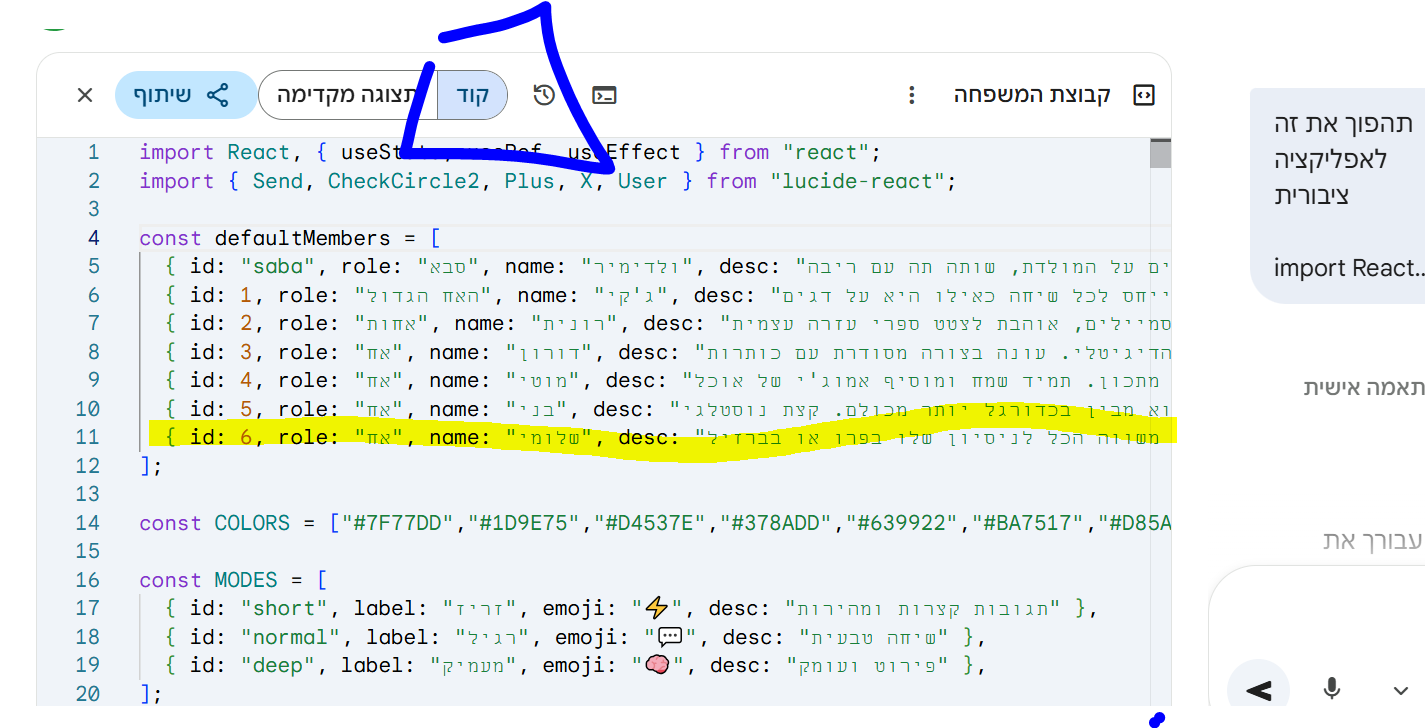
תשנו בקנבס למצב קוד, ותשנו "שם לדמות" או תסיפו שורה כזאת במקביל ותוסיף לבד תיאור \ שםוזהו תשמרו, ותשתפו

-
 ה היפ הופ התייחס לנושא זה
-
קודם כל, מי שכבר יודע איך, שלא יקרא את זה, כי זה מדריך למתחילים יותר!
לאחר שנפתח נושא כאן של כל מיני אפליקציות שבנויות על צאט עם ג'ימיני,
הגיע הזמן ללמד בקצרה ובצורה הכי קלה איך ליצור כזה אפליקציהדברים שצריך לדעת |
1 - בשביל שיתוף אפליקציה כזאת, צריך שהתשובה הראשונה בג'ימיני תיהיה האפליקציה המושלמת ככה לא מסתבכים עם השיתוף,
2 - אם יצא טעות קטנה, או שאתם רוצים להוסיף דמות, אפשר להוסיף ידני, וככה זה ישאר על התשובה הראשונה בשיחה עם ג'ימיני
(3 - אני מאמין שזה יחסם בקרוב בנטפרי..)לכן אני מעלה כאן "קוד" של אפליקציה בסגנון, ומי שרוצה לבנות כזה, שיעתיק את הקוד וישלח לג'ימיני על מצב קנבס חובה, ויגיד לו מה הוא רוצה לשנות (דמויות , שם , אופי, או עיצוב טיפה שונה, כמה זמן תיהיה תגובה של הדמות, ועוד)
אממ לפני שאני יעלה את הקוד, לא ידוע לי שאפשר לשמור שיחות, או לשתף, או לשמור היסטוריה.. אם יש אופציה אני אשמח שיעדכנו אותיזה הקוד
import React, { useState, useRef, useEffect } from "react"; import { Send, CheckCircle2, Plus, X, User } from "lucide-react"; const defaultMembers = [ { id: "saba", role: "סבא", name: "ולדימיר", desc: "מרוסיה במקור, גר בתל אביב כבר 40 שנה. מדבר עם מבטא רוסי כבד, מספר סיפורים על המולדת, שותה תה עם ריבה.", color: "#7F77DD", gender: "m" }, { id: 1, role: "האח הגדול", name: "ג'קי", desc: "אקסצנטרי ומוזר! עונה קצר ומבלבל, תמיד מזכיר את הדגים שלו באקווריום. מתייחס לכל שיחה כאילו היא על דגים.", color: "#1D9E75", gender: "m" }, { id: 2, role: "אחות", name: "רונית", desc: "מנהלת משרד לשעבר, עכשיו מאמנת יוגה. שולחת המון סמיילים, אוהבת לצטט ספרי עזרה עצמית.", color: "#D4537E", gender: "f" }, { id: 3, role: "אח", name: "דורון", desc: "גיק טכנולוגיה מושבע, תושב הרצליה. מסביר כל דבר דרך אנלוגיות מהעולם הדיגיטלי. עונה בצורה מסודרת עם כותרות.", color: "#378ADD", gender: "m" }, { id: 4, role: "אח", name: "מוטי", desc: "שף חובב נלהב, תושב ראשון לציון. כל שיחה מסתיימת בהמלצת מתכון. תמיד שמח ומוסיף אמוג'י של אוכל.", color: "#639922", gender: "m" }, { id: 5, role: "אח", name: "בני", desc: "לשעבר שחקן כדורגל חובב, עכשיו אוהד נלהב. בטוח שהוא מבין בכדורגל יותר מכולם. קצת נוסטלגי.", color: "#BA7517", gender: "m" }, { id: 6, role: "אח", name: "שלומי", desc: "הנוסע הנצחי של המשפחה, חזר לפני חצי שנה מדרום אמריקה. תמיד משווה הכל לניסיון שלו בפרו או בברזיל.", color: "#D85A30", gender: "m" }, ]; const COLORS = ["#7F77DD","#1D9E75","#D4537E","#378ADD","#639922","#BA7517","#D85A30","#185FA5","#993556","#3B6D11"]; const MODES = [ { id: "short", label: "זריז", emoji: "⚡", desc: "תגובות קצרות ומהירות" }, { id: "normal", label: "רגיל", emoji: "💬", desc: "שיחה טבעית" }, { id: "deep", label: "מעמיק", emoji: "🧠", desc: "פירוט ועומק" }, ]; function getInitials(name) { return name?.slice(0, 2) || "?"; } function Avatar({ name, color, size = 36 }) { return ( <div style={{ width: size, height: size, borderRadius: "50%", background: color + "20", border: `2px solid ${color}50`, display: "flex", alignItems: "center", justifyContent: "center", fontSize: size * 0.36, fontWeight: 700, color, flexShrink: 0, letterSpacing: "-0.5px" }}> {getInitials(name)} </div> ); } function TypingBubble({ member }) { return ( <div style={{ display: "flex", alignItems: "flex-end", gap: 8, animation: "slideIn 0.25s ease-out" }}> <Avatar name={member.name} color={member.color} size={32} /> <div> <div style={{ fontSize: 11.5, fontWeight: 600, color: member.color, marginBottom: 3, marginRight: 4 }}> {member.name} {member.gender === "f" ? "מקלידה" : "מקליד"}... </div> <div style={{ background: "#fff", padding: "10px 16px", borderRadius: "4px 18px 18px 18px", boxShadow: "0 1px 3px rgba(0,0,0,0.1)", display: "flex", gap: 5, alignItems: "center", width: 54, }}> {[0, 1, 2].map(i => ( <div key={i} style={{ width: 7, height: 7, borderRadius: "50%", background: member.color, opacity: 0.7, animation: `bounce 1.1s ease-in-out ${i * 0.18}s infinite` }} /> ))} </div> </div> </div> ); } function MessageBubble({ msg, showSender }) { const isUser = msg.role === "user"; return ( <div style={{ display: "flex", justifyContent: isUser ? "flex-end" : "flex-start", animation: "slideIn 0.2s ease-out" }}> <div style={{ display: "flex", alignItems: "flex-end", gap: 8, maxWidth: "78%" }}> {!isUser && <Avatar name={msg.sender} color={msg.color} size={32} />} <div> {!isUser && showSender && ( <div style={{ fontSize: 11.5, fontWeight: 700, color: msg.color, marginBottom: 3, marginRight: 4 }}> {msg.sender} </div> )} <div style={{ background: isUser ? "#d9fdd3" : "#fff", color: "#111b21", padding: "8px 12px 9px", borderRadius: isUser ? "18px 4px 18px 18px" : (showSender ? "4px 18px 18px 18px" : "18px 18px 18px 4px"), fontSize: 14.5, lineHeight: 1.45, boxShadow: "0 1px 2px rgba(0,0,0,0.08)", position: "relative", wordBreak: "break-word" }}> {msg.text} <div style={{ fontSize: 10, color: "#8696a0", textAlign: "left", marginTop: 2 }}> {new Date().toLocaleTimeString("he-IL", { hour: "2-digit", minute: "2-digit" })} </div> </div> </div> {isUser && ( <div style={{ width: 32, height: 32, borderRadius: "50%", background: "#d9fdd3", display: "flex", alignItems: "center", justifyContent: "center", flexShrink: 0, boxShadow: "0 1px 2px rgba(0,0,0,0.1)" }}> <User size={15} color="#005c4b" /> </div> )} </div> </div> ); } // Helper to make API calls with retry const fetchWithRetry = async (url, options, retries = 5) => { const delays = [1000, 2000, 4000, 8000, 16000]; for (let i = 0; i < retries; i++) { try { const response = await fetch(url, options); if (!response.ok) throw new Error(`HTTP error! status: ${response.status}`); return await response.json(); } catch (e) { if (i === retries - 1) throw e; await new Promise(res => setTimeout(res, delays[i])); } } }; export default function App() { const [members, setMembers] = useState(defaultMembers); const [selected, setSelected] = useState(["saba", 1, 3]); const [messages, setMessages] = useState([]); const [input, setInput] = useState(""); const [loading, setLoading] = useState(false); const [typingMember, setTypingMember] = useState(null); const [mode, setMode] = useState("normal"); const [showAddModal, setShowAddModal] = useState(false); const [newName, setNewName] = useState(""); const [newRole, setNewRole] = useState(""); const [newDesc, setNewDesc] = useState(""); const [newGender, setNewGender] = useState("m"); const bottomRef = useRef(null); const abortRef = useRef(false); const textareaRef = useRef(null); useEffect(() => { bottomRef.current?.scrollIntoView({ behavior: "smooth" }); }, [messages, typingMember]); const toggle = (id) => setSelected(prev => prev.includes(id) ? prev.filter(x => x !== id) : [...prev, id]); const addMember = () => { if (!newName.trim()) return; const newId = Date.now(); const color = COLORS[members.length % COLORS.length]; setMembers(prev => [...prev, { id: newId, role: newRole.trim() || "קרוב משפחה", name: newName.trim(), desc: newDesc.trim() || "", color, gender: newGender }]); setSelected(prev => [...prev, newId]); setNewName(""); setNewRole(""); setNewDesc(""); setNewGender("m"); setShowAddModal(false); }; const removeMember = (id, e) => { e.stopPropagation(); setMembers(prev => prev.filter(m => m.id !== id)); setSelected(prev => prev.filter(x => x !== id)); }; const sleep = ms => new Promise(r => setTimeout(r, ms)); const sendMessage = async () => { const text = input.trim(); if (!text || selected.length === 0 || loading) return; setInput(""); abortRef.current = false; const userMsg = { role: "user", text, id: Date.now() }; setMessages(prev => [...prev, userMsg]); setLoading(true); const activeMembers = members.filter(m => selected.includes(m.id)); const membersDesc = activeMembers .map(m => `- ${m.name} (${m.role}): ${m.desc}`) .join("\n"); const modeInstruction = { short: "כל דמות עונה במשפט אחד-שניים לכל היותר. קצר וקולע.", normal: "כל דמות עונה ב-2-3 משפטים. טבעי וסגנון וואטסאפ.", deep: "כל דמות עונה ב-3-5 משפטים עם פרטים. מעורב ומפורט." }[mode]; const history = messages.slice(-10) .map(m => m.role === "user" ? `[אני]: ${m.text}` : `[${m.sender}]: ${m.text}`) .join("\n"); const systemPrompt = `אתה מדמה שיחת ווטסאפ משפחתית ישראלית אמיתית. בני המשפחה הפעילים: ${membersDesc} ${history ? `היסטוריית שיחה:\n${history}\n` : ""} כללים: - כל דמות מחוייבת לאישיותה המדויקת - אל תסטה ולו מעט - הם מגיבים גם אחד לשני, לא רק לשולח - שיחה אמיתית - ${modeInstruction} - עברית מדוברת, לא ספרותית - שפה נקייה ומכובדת בלבד - אפשר אמוג'י במינון נכון לפי אישיות הדמות - כל דמות מדברת בקול ייחודי שלה לחלוטין סדר הדמויות צריך להיות טבעי - כמו שיחה אמיתית. ענה תמיד במבנה המבוקש.`; const apiKey = ""; // API key is populated automatically in this environment const url = `https://generativelanguage.googleapis.com/v1beta/models/gemini-2.5-flash-preview-09-2025:generateContent?key=${apiKey}`; const payload = { contents: [{ parts: [{ text }] }], systemInstruction: { parts: [{ text: systemPrompt }] }, generationConfig: { responseMimeType: "application/json", responseSchema: { type: "OBJECT", properties: { responses: { type: "ARRAY", items: { type: "OBJECT", properties: { name: { type: "STRING", description: "שם הדמות שמדברת" }, text: { type: "STRING", description: "תוכן ההודעה" } }, required: ["name", "text"] } } }, required: ["responses"] } } }; try { const data = await fetchWithRetry(url, { method: "POST", headers: { "Content-Type": "application/json" }, body: JSON.stringify(payload) }); let responses = []; try { const resultText = data.candidates?.[0]?.content?.parts?.[0]?.text || "{}"; const parsed = JSON.parse(resultText); responses = parsed.responses || []; } catch (e) { console.error("Failed to parse response:", e); responses = []; } setLoading(false); for (const resp of responses) { if (abortRef.current) break; const member = activeMembers.find(m => m.name === resp.name || resp.name?.includes(m.name)); if (!member || !resp.text) continue; setTypingMember(member); const delay = Math.min(Math.max(resp.text.length * 28, 700), mode === "short" ? 1500 : mode === "deep" ? 3500 : 2500); await sleep(delay); if (abortRef.current) break; setTypingMember(null); await sleep(80); setMessages(prev => [...prev, { role: "bot", sender: member.name, text: resp.text, color: member.color, gender: member.gender, id: Date.now() + Math.random() }]); await sleep(350); } } catch (e) { console.error(e); setLoading(false); setMessages(prev => [...prev, { role: "bot", sender: "מערכת", text: "שגיאה בחיבור. נסה שוב.", color: "#888", id: Date.now() }]); } finally { setLoading(false); setTypingMember(null); } }; const handleKey = e => { if (e.key === "Enter" && !e.shiftKey) { e.preventDefault(); sendMessage(); } }; // Group consecutive messages from same sender const processedMessages = messages.map((msg, i) => ({ ...msg, showSender: i === 0 || messages[i-1].sender !== msg.sender || messages[i-1].role !== msg.role })); const isProcessing = loading || typingMember !== null; return ( <div dir="rtl" style={{ display: "flex", flexDirection: "column", height: "100vh", background: "#f0f2f5", fontFamily: "'Segoe UI', system-ui, -apple-system, sans-serif" }}> {/* Header */} <div style={{ background: "#128C7E", padding: "10px 16px", display: "flex", alignItems: "center", justifyContent: "space-between", boxShadow: "0 2px 6px rgba(0,0,0,0.2)", zIndex: 10 }}> <div style={{ display: "flex", alignItems: "center", gap: 12 }}> <div style={{ width: 40, height: 40, borderRadius: "50%", background: "#075E54", display: "flex", alignItems: "center", justifyContent: "center", fontSize: 20 }}>👨👩👧👦</div> <div> <div style={{ fontSize: 16, fontWeight: 600, color: "#fff" }}>קבוצת המשפחה</div> <div style={{ fontSize: 12, color: "rgba(255,255,255,0.75)", marginTop: 1 }}> {selected.length} משתתפים {typingMember && <span> · <span style={{ color: "#d9fdd3" }}>{typingMember.name} {typingMember.gender === "f" ? "מקלידה" : "מקליד"}...</span></span>} </div> </div> </div> <div style={{ display: "flex", gap: 6, alignItems: "center" }}> {members.filter(m => selected.includes(m.id)).slice(0, 6).map(m => ( <Avatar key={m.id} name={m.name} color="#fff" size={28} /> ))} </div> </div> <div style={{ flex: 1, display: "flex", overflow: "hidden" }}> {/* Sidebar */} <div style={{ width: 255, background: "#fff", borderLeft: "1px solid #e9edef", display: "flex", flexDirection: "column", overflowY: "auto", flexShrink: 0 }}> <div style={{ padding: "14px 16px 8px", fontSize: 11, fontWeight: 700, color: "#8696a0", letterSpacing: "0.8px", textTransform: "uppercase" }}>בני המשפחה</div> {members.map(m => { const isSel = selected.includes(m.id); const isCustom = !defaultMembers.find(d => d.id === m.id); return ( <div key={m.id} onClick={() => toggle(m.id)} style={{ display: "flex", alignItems: "center", gap: 10, padding: "9px 14px", cursor: "pointer", background: isSel ? m.color + "12" : "transparent", borderRight: isSel ? `3px solid ${m.color}` : "3px solid transparent", transition: "all 0.15s ease", position: "relative" }}> <Avatar name={m.name} color={isSel ? m.color : "#bbb"} size={36} /> <div style={{ flex: 1, minWidth: 0 }}> <div style={{ fontSize: 14, fontWeight: isSel ? 600 : 500, color: isSel ? "#111b21" : "#3b4a54", overflow: "hidden", textOverflow: "ellipsis", whiteSpace: "nowrap" }}>{m.name}</div> <div style={{ fontSize: 11.5, color: "#8696a0", marginTop: 1, overflow: "hidden", textOverflow: "ellipsis", whiteSpace: "nowrap" }}>{m.role}</div> </div> <div style={{ display: "flex", alignItems: "center", gap: 4 }}> {isSel && <CheckCircle2 size={15} color={m.color} />} {isCustom && ( <button onClick={e => removeMember(m.id, e)} style={{ background: "none", border: "none", cursor: "pointer", padding: "2px 4px", color: "#ccc", borderRadius: "50%", display: "flex", transition: "color 0.15s" }} onMouseEnter={e => e.currentTarget.style.color = "#f44"} onMouseLeave={e => e.currentTarget.style.color = "#ccc"}> <X size={13} /> </button> )} </div> </div> ); })} <button onClick={() => setShowAddModal(true)} style={{ margin: "12px", padding: "9px 12px", borderRadius: "8px", border: "1.5px dashed #d1d7db", background: "#f8f9fa", cursor: "pointer", display: "flex", alignItems: "center", justifyContent: "center", gap: 7, color: "#54656f", fontSize: 13, fontWeight: 500, transition: "all 0.15s" }} onMouseEnter={e => { e.currentTarget.style.background = "#f0f2f5"; e.currentTarget.style.borderColor = "#aaa"; }} onMouseLeave={e => { e.currentTarget.style.background = "#f8f9fa"; e.currentTarget.style.borderColor = "#d1d7db"; }}> <Plus size={14} /> הוספת בן משפחה </button> </div> {/* Chat Area */} <div style={{ flex: 1, display: "flex", flexDirection: "column", overflow: "hidden", background: "#e5ddd5", backgroundImage: `url("data:image/svg+xml,%3Csvg width='60' height='60' viewBox='0 0 60 60' xmlns='http://www.w3.org/2000/svg'%3E%3Cg fill='none' fill-rule='evenodd'%3E%3Cg fill='%23c4b8ae' fill-opacity='0.18'%3E%3Cpath d='M36 34v-4h-2v4h-4v2h4v4h2v-4h4v-2h-4zm0-30V0h-2v4h-4v2h4v4h2V6h4V4h-4zM6 34v-4H4v4H0v2h4v4h2v-4h4v-2H6zM6 4V0H4v4H0v2h4v4h2V6h4V4H6z'/%3E%3C/g%3E%3C/g%3E%3C/svg%3E")`, }}> {/* Messages */} <div style={{ flex: 1, overflowY: "auto", padding: "16px 24px", display: "flex", flexDirection: "column", gap: 3 }}> {messages.length === 0 && !isProcessing && ( <div style={{ textAlign: "center", marginTop: "18vh", background: "rgba(255,255,255,0.85)", padding: "20px 28px", borderRadius: "14px", alignSelf: "center", boxShadow: "0 1px 3px rgba(0,0,0,0.08)", backdropFilter: "blur(4px)" }}> <div style={{ fontSize: 42, marginBottom: 10 }}>💬</div> <div style={{ fontWeight: 600, color: "#111b21", fontSize: 15 }}>התחל שיחה עם המשפחה</div> <div style={{ fontSize: 12.5, color: "#667781", marginTop: 5 }}>בחר משתתפים מימין ושלח הודעה</div> </div> )} {processedMessages.map((msg, i) => ( <div key={msg.id} style={{ marginTop: msg.showSender && i > 0 && msg.role !== "user" ? 8 : 2 }}> <MessageBubble msg={msg} showSender={msg.showSender} /> </div> ))} {typingMember && ( <div style={{ marginTop: 6 }}> <TypingBubble member={typingMember} /> </div> )} <div ref={bottomRef} /> </div> {/* Input bar */} <div style={{ padding: "8px 12px 10px", background: "#f0f2f5", borderTop: "1px solid #e0e0e0" }}> {/* Mode selector */} <div style={{ display: "flex", gap: 6, marginBottom: 8, justifyContent: "flex-end" }}> {MODES.map(m => ( <button key={m.id} onClick={() => setMode(m.id)} title={m.desc} style={{ padding: "4px 11px", borderRadius: "20px", border: `1.5px solid ${mode === m.id ? "#128C7E" : "#d1d7db"}`, background: mode === m.id ? "#128C7E" : "#fff", color: mode === m.id ? "#fff" : "#54656f", fontSize: 12.5, fontWeight: 500, cursor: "pointer", display: "flex", alignItems: "center", gap: 4, transition: "all 0.15s" }}> <span>{m.emoji}</span> {m.label} </button> ))} </div> {selected.length === 0 ? ( <div style={{ textAlign: "center", color: "#8696a0", fontSize: 13, padding: "12px 0" }}>יש לבחור לפחות בן משפחה אחד</div> ) : ( <div style={{ display: "flex", gap: 10, alignItems: "flex-end" }}> <textarea ref={textareaRef} value={input} onChange={e => setInput(e.target.value)} onKeyDown={handleKey} placeholder="הקלד הודעה..." rows={1} style={{ flex: 1, padding: "11px 15px", borderRadius: "24px", border: "none", background: "#fff", fontSize: 14.5, outline: "none", color: "#111b21", resize: "none", lineHeight: 1.45, boxShadow: "0 1px 2px rgba(0,0,0,0.06)", maxHeight: 100, overflowY: "auto", fontFamily: "inherit" }} /> <button onClick={sendMessage} disabled={!input.trim() || isProcessing} style={{ width: 46, height: 46, borderRadius: "50%", flexShrink: 0, background: input.trim() && !isProcessing ? "#128C7E" : "#e9edef", border: "none", cursor: input.trim() && !isProcessing ? "pointer" : "default", display: "flex", alignItems: "center", justifyContent: "center", transition: "all 0.2s", boxShadow: input.trim() && !isProcessing ? "0 2px 6px rgba(18,140,126,0.35)" : "none" }}> <Send size={19} color={input.trim() && !isProcessing ? "#fff" : "#8696a0"} style={{ transform: "scaleX(-1)", marginLeft: 2 }} /> </button> </div> )} </div> </div> </div> {/* Add member modal */} {showAddModal && ( <div style={{ position: "fixed", inset: 0, background: "rgba(11,20,26,0.55)", display: "flex", alignItems: "center", justifyContent: "center", zIndex: 200, padding: 16, backdropFilter: "blur(2px)" }}> <div style={{ background: "#fff", borderRadius: "16px", padding: 28, width: "100%", maxWidth: 400, boxShadow: "0 16px 40px rgba(0,0,0,0.2)", animation: "slideIn 0.2s ease-out" }}> <div style={{ display: "flex", justifyContent: "space-between", alignItems: "center", marginBottom: 22 }}> <div style={{ fontSize: 17, fontWeight: 700, color: "#111b21" }}>בן משפחה חדש</div> <button onClick={() => setShowAddModal(false)} style={{ background: "none", border: "none", cursor: "pointer", color: "#8696a0", padding: 6, borderRadius: "50%", display: "flex", transition: "background 0.15s" }} onMouseEnter={e => e.currentTarget.style.background = "#f0f2f5"} onMouseLeave={e => e.currentTarget.style.background = "none"}> <X size={18} /> </button> </div> <div style={{ display: "flex", flexDirection: "column", gap: 14 }}> {[ { label: "שם *", value: newName, set: setNewName, ph: "לדוגמה: רחל" }, { label: "תפקיד במשפחה", value: newRole, set: setNewRole, ph: "דודה, אחות, בן דוד..." }, ].map(f => ( <div key={f.label}> <label style={{ fontSize: 12.5, fontWeight: 600, color: "#3b4a54", display: "block", marginBottom: 5 }}>{f.label}</label> <input value={f.value} onChange={e => f.set(e.target.value)} placeholder={f.ph} style={{ width: "100%", padding: "10px 12px", borderRadius: "8px", border: "1.5px solid #d1d7db", background: "#f0f2f5", fontSize: 14, outline: "none", color: "#111b21", boxSizing: "border-box", fontFamily: "inherit", transition: "border-color 0.15s" }} onFocus={e => e.target.style.borderColor = "#128C7E"} onBlur={e => e.target.style.borderColor = "#d1d7db"} /> </div> ))} <div> <label style={{ fontSize: 12.5, fontWeight: 600, color: "#3b4a54", display: "block", marginBottom: 5 }}>תיאור אישיות</label> <textarea value={newDesc} onChange={e => setNewDesc(e.target.value)} placeholder="אישיות, סגנון דיבור, מה מיוחד בו/ה..." rows={3} style={{ width: "100%", padding: "10px 12px", borderRadius: "8px", border: "1.5px solid #d1d7db", background: "#f0f2f5", fontSize: 14, outline: "none", color: "#111b21", resize: "none", boxSizing: "border-box", fontFamily: "inherit", transition: "border-color 0.15s" }} onFocus={e => e.target.style.borderColor = "#128C7E"} onBlur={e => e.target.style.borderColor = "#d1d7db"} /> </div> <div> <label style={{ fontSize: 12.5, fontWeight: 600, color: "#3b4a54", display: "block", marginBottom: 7 }}>מין</label> <div style={{ display: "flex", gap: 8 }}> {[{ v: "m", l: "זכר ♂" }, { v: "f", l: "נקבה ♀" }].map(g => ( <button key={g.v} onClick={() => setNewGender(g.v)} style={{ flex: 1, padding: "9px", borderRadius: "8px", border: `1.5px solid ${newGender === g.v ? "#128C7E" : "#d1d7db"}`, background: newGender === g.v ? "#e8f5f4" : "#f0f2f5", color: newGender === g.v ? "#128C7E" : "#54656f", fontSize: 13.5, fontWeight: newGender === g.v ? 600 : 400, cursor: "pointer", transition: "all 0.15s" }}>{g.l}</button> ))} </div> </div> <button onClick={addMember} disabled={!newName.trim()} style={{ padding: "12px", borderRadius: "28px", border: "none", background: newName.trim() ? "#128C7E" : "#e9edef", color: newName.trim() ? "#fff" : "#8696a0", fontSize: 15, fontWeight: 600, cursor: newName.trim() ? "pointer" : "default", marginTop: 6, transition: "all 0.2s", boxShadow: newName.trim() ? "0 2px 8px rgba(18,140,126,0.3)" : "none" }}> הוסף לקבוצה </button> </div> </div> </div> )} <style>{` @keyframes bounce { 0%, 60%, 100% { transform: translateY(0); } 30% { transform: translateY(-5px); } } @keyframes slideIn { from { opacity: 0; transform: translateY(6px); } to { opacity: 1; transform: translateY(0); } } ::-webkit-scrollbar { width: 5px; } ::-webkit-scrollbar-track { background: transparent; } ::-webkit-scrollbar-thumb { background: #c4b8ae; border-radius: 4px; } ::-webkit-scrollbar-thumb:hover { background: #8696a0; } * { box-sizing: border-box; } `}</style> </div> ); }פשוט תשלחו את הקוד, ותכתבו "תהפוך לי את זה לאפליקציה שיתופית"
בגדול הוא אמור ליצור כבר את זה, עכשיו זה החלק היותר רלוונטי למי שמחפש דמויות ממש ספציפיות
תשנו בקנבס למצב קוד, ותשנו "שם לדמות" או תסיפו שורה כזאת במקביל ותוסיף לבד תיאור \ שםוזהו תשמרו, ותשתפו
שלום! נראה שהשיחה הזו מעניינת אותך, אבל עדיין אין לך חשבון.
נמאס לכם לגלול בין אותם הפוסטים בכל ביקור? כשנרשמים לחשבון, תמיד תחזרו בדיוק למקום שבו הייתם קודם, ותוכלו לבחור לקבל התראות על תגובות חדשות (בין אם במייל, ובין אם בהתראת פוש). תוכלו גם לשמור סימניות ולפרגן ב-upvote לפוסטים כדי להביע הערכה לחברי קהילה אחרים.
בעזרת התרומה שלך, הפוסט הזה יכול להיות אפילו טוב יותר 💗
הרשמה התחברות { const baseUrl = "https://www.google.co.il/search?q=site:mitmachim.top"; const m = location.pathname.match(/^\/(topic|category)\/(\d+)/); const type = m ? m[1] : null; const id = m ? m[2] : null; let searchInput; function search(path = "") { const query = searchInput.value.trim(); if (query) { window.open(`${baseUrl}${path}%20${encodeURIComponent(query)}`, "_blank"); } } let buttons = {}; buttons.searchAll = { id: "bb-search-all", label: `חיפוש ${type ? "בכל הפורום" : ""}`, className: type ? "btn-secondary" : "btn-primary", callback: () => search(), }; if (type === "topic") { buttons.searchTopic = { label: "חיפוש בנושא זה", className: "btn-primary", callback: () => search(`/topic/${id}`), }; } else if (type === "category") { buttons.searchCategory = { label: "חיפוש בקטגוריה זו", className: "btn-primary", callback: () => search(`/category/${id}`), }; } buttons.cancel = { label: "ביטול", className: "btn-default", "data-bs-dismiss": "modal" }; const dialog = bootbox.dialog({ title: '<div style="text-align:center;"><img src="/assets/uploads/files/1625950269825-mt-google.png" width="400" alt="חיפוש בגוגל"></div>', message: '<input id="bb-inp" class="bootbox-input bootbox-input-text form-control" placeholder="הקלידו כדי לחפש בגוגל" autocomplete="off"/>', buttons, backdrop: true, show: true, onEscape: true }); dialog.on("shown.bs.modal", function () { searchInput = document.getElementById("bb-inp"); if (searchInput) { searchInput.focus(); searchInput.addEventListener("keydown", function (e) { if (e.key === "Enter") { e.preventDefault(); const query = this.value.trim(); if (query) { search(); dialog.modal("hide"); } } else if (e.key === "Escape") { e.preventDefault(); dialog.modal("hide"); } }); } const searchAllButton = document.getElementById("bb-search-all"); if (searchAllButton) { searchAllButton.title = "לחצו על אנטר כדי לחפש"; } }); })(); void 0;)