דילוג לתוכן
  • חוקי הפורום
  • פופולרי
  • לא נפתר
  • משתמשים
  • חיפוש גוגל בפורום
  • צור קשר
עיצובים
  • Light
  • Brite
  • Cerulean
  • Cosmo
  • Flatly
  • Journal
  • Litera
  • Lumen
  • Lux
  • Materia
  • Minty
  • Morph
  • Pulse
  • Sandstone
  • Simplex
  • Sketchy
  • Spacelab
  • United
  • Yeti
  • Zephyr
  • Dark
  • Cyborg
  • Darkly
  • Quartz
  • Slate
  • Solar
  • Superhero
  • Vapor

  • ברירת מחדל (ללא עיצוב (ברירת מחדל))
  • ללא עיצוב (ברירת מחדל)
כיווץ
מתמחים טופ
  1. דף הבית
  2. מחשבים וטכנולוגיה
  3. עזרה הדדית - מחשבים וטכנולוגיה
  4. בקשת מידע | AI אופליין

בקשת מידע | AI אופליין

מתוזמן נעוץ נעול הועבר עזרה הדדית - מחשבים וטכנולוגיה
140 פוסטים 15 כותבים 935 צפיות 18 עוקבים
  • מהישן לחדש
  • מהחדש לישן
  • הכי הרבה הצבעות
תגובה
  • תגובה כנושא
התחברו כדי לפרסם תגובה
נושא זה נמחק. רק משתמשים עם הרשאות מתאימות יוכלו לצפות בו.
  • המלאךה המלאך

    @CSS-0 ממש לא נכון.
    באיזה מחשבון היית משתמש ביום יום? בשל קוואן שמסודר מבחינה וויזאולית או בקודם? שמיועד להקרנות 😄 .

    ברור שתגיד הקודם. אבל ברצינות אתה חושב כך? 😂 😂 בוא נפתח סקר בפורום סבבה?

    CSS 0C מחובר
    CSS 0C מחובר
    CSS 0
    כתב נערך לאחרונה על ידי
    #83

    @המלאך בקודם...

    תגובה 1 תגובה אחרונה
    0
    • CSS 0C CSS 0

      @המלאך לא יודע מבחינת עיצוב זה הרבה יותר טוב לא עברתי על הקודים...

      א.מ.ד.א מחובר
      א.מ.ד.א מחובר
      א.מ.ד.
      כתב נערך לאחרונה על ידי א.מ.ד.
      #84

      @CSS-0 תנסה לבקש מ-GEMMA 3 את הפרומפט באנגלית. אם זה מה שיצא לך בעברית מסתבר שבאנגלית ייצא יותר טוב.
      יצרתי פרומפט מדוייק באנגלית, תדביק אותו ל-GEMMA 3 ותעלה פה את הקוד, נראה מה יצא. (עדיף שתעשה את זה בצ'אט חדש שלא ייתבלבל):

      Create for me a fully functional calculator HTML file, with a beautiful and up-to-date design with rounded corners. Add a hidden function in the code, so that when you double-click the division key, today's date will be written in the result line. Pay attention to the order of the buttons, so that it looks like a calculator,
      

      מפתח אפליקציות אנדרואיד
      em0548438097@gmail.com

      CSS 0C בנימין מחשביםב 2 תגובות תגובה אחרונה
      0
      • א.מ.ד.א א.מ.ד.

        @CSS-0 תנסה לבקש מ-GEMMA 3 את הפרומפט באנגלית. אם זה מה שיצא לך בעברית מסתבר שבאנגלית ייצא יותר טוב.
        יצרתי פרומפט מדוייק באנגלית, תדביק אותו ל-GEMMA 3 ותעלה פה את הקוד, נראה מה יצא. (עדיף שתעשה את זה בצ'אט חדש שלא ייתבלבל):

        Create for me a fully functional calculator HTML file, with a beautiful and up-to-date design with rounded corners. Add a hidden function in the code, so that when you double-click the division key, today's date will be written in the result line. Pay attention to the order of the buttons, so that it looks like a calculator,
        
        CSS 0C מחובר
        CSS 0C מחובר
        CSS 0
        כתב נערך לאחרונה על ידי CSS 0
        #85

        @א.מ.ד. יקח קצת זמן..
        הוא משום מה עושה לי את זה בשלושה קבצים נפרדים במקום ב HTML יחיד...

        א.מ.ד.א תגובה 1 תגובה אחרונה
        2
        • CSS 0C CSS 0

          @א.מ.ד. יקח קצת זמן..
          הוא משום מה עושה לי את זה בשלושה קבצים נפרדים במקום ב HTML יחיד...

          א.מ.ד.א מחובר
          א.מ.ד.א מחובר
          א.מ.ד.
          כתב נערך לאחרונה על ידי א.מ.ד.
          #86

          @CSS-0 בסדר רק תשים אותם באותה תיקייה.
          או שתעשה יצירה מחדש.

          אני בינתיים ביקשתי מ-QWEN שיתקן את הבעיות בקוד הקודם.

          מפתח אפליקציות אנדרואיד
          em0548438097@gmail.com

          CSS 0C תגובה 1 תגובה אחרונה
          0
          • המלאךה המלאך

            @CSS-0 ממש לא נכון.
            באיזה מחשבון היית משתמש ביום יום? בשל קוואן שמסודר מבחינה וויזאולית או בקודם? שמיועד להקרנות 😄 .

            ברור שתגיד הקודם. אבל ברצינות אתה חושב כך? 😂 😂 בוא נפתח סקר בפורום סבבה?

            חובבן מקצועיח מנותק
            חובבן מקצועיח מנותק
            חובבן מקצועי
            כתב נערך לאחרונה על ידי
            #87

            @המלאך כתב בבקשת מידע | AI אופליין:

            באיזה מחשבון היית משתמש ביום יום? בשל קוואן שמסודר מבחינה וויזאולית או בקודם? שמיועד להקרנות .

            טוב, הוא עשה לי אותו כזה, כי ביקשתי.
            סתם מחשבון - הוא יצר לי את זה ככה..

            <!DOCTYPE html>
            <html lang="he" dir="rtl">
            <head>
                <meta charset="UTF-8">
                <meta name="viewport" content="width=device-width, initial-scale=1.0">
                <title>מחשבון פשוט</title>
                <style>
                    body {
                        display: flex;
                        justify-content: center;
                        align-items: center;
                        height: 100vh;
                        background-color: #f4f4f4;
                        font-family: 'Arial', sans-serif;
                    }
            
                    .calculator {
                        background-color: #333;
                        border-radius: 10px;
                        padding: 20px;
                        box-shadow: 0 10px 20px rgba(0, 0, 0, 0.5);
                    }
            
                    .display {
                        background-color: #222;
                        color: white;
                        font-size: 2.5em;
                        padding: 15px;
                        margin-bottom: 20px;
                        text-align: right;
                        border-radius: 5px;
                        height: 50px;
                        overflow: hidden;
                        white-space: nowrap;
                    }
            
                    .buttons {
                        display: grid;
                        grid-template-columns: repeat(4, 1fr);
                        gap: 10px;
                    }
            
                    button {
                        padding: 20px;
                        font-size: 1.2em;
                        border: none;
                        border-radius: 5px;
                        cursor: pointer;
                        transition: background-color 0.2s;
                    }
            
                    button:hover {
                        opacity: 0.9;
                    }
            
                    .number-button {
                        background-color: #555;
                        color: white;
                    }
            
                    .operator-button {
                        background-color: #ff9500;
                        color: white;
                    }
            
                    .clear-button {
                        background-color: #d9534f;
                        color: white;
                    }
            
                    .equals-button {
                        background-color: #4CAF50;
                        color: white;
                        grid-column: span 2; /* Makes the equals button wider */
                    }
                </style>
            </head>
            <body>
            
                <div class="calculator">
                    <div class="display" id="display">0</div>
                    <div class="buttons">
                        
                        <!-- Row 1 -->
                        <button class="clear-button" onclick="clearDisplay()">AC</button>
                        <button class="operator-button" onclick="appendOperator('/')">/</button>
                        <button class="operator-button" onclick="appendOperator('*')">x</button>
                        <button class="operator-button" onclick="appendOperator('-')">-</button>
                        
                        <!-- Row 2 -->
                        <button class="number-button" onclick="appendDigit('7')">7</button>
                        <button class="number-button" onclick="appendDigit('8')">8</button>
                        <button class="number-button" onclick="appendDigit('9')">9</button>
                        <button class="operator-button" onclick="appendOperator('+')">+</button>
                        
                        <!-- Row 3 -->
                        <button class="number-button" onclick="appendDigit('4')">4</button>
                        <button class="number-button" onclick="appendDigit('5')">5</button>
                        <button class="number-button" onclick="appendDigit('6')">6</button>
                        
                        <!-- Row 4 -->
                        <button class="number-button" onclick="appendDigit('1')">1</button>
                        <button class="number-button" onclick="appendDigit('2')">2</button>
                        <button class="number-button" onclick="appendDigit('3')">3</button>
                        
                        <!-- Row 5 -->
                        <button class="number-button" onclick="appendDigit('0')">0</button>
                        <button class="number-button" onclick="appendDecimal()">.</button>
                        <button class="equals-button" onclick="calculateResult()">=</button>
                    </div>
                </div>
            
                <script>
                    const display = document.getElementById('display');
                    let currentInput = '';
            
                    // Function to append a digit to the display
                    function appendDigit(digit) {
                        if (currentInput === '0' && digit !== '.') {
                            currentInput = digit;
                        } else {
                            currentInput += digit;
                        }
                        display.textContent = currentInput;
                    }
            
                    // Function to handle operators (+, -, *, /)
                    function appendOperator(operator) {
                        // Simple check to prevent multiple operators in a row (basic logic)
                        if (currentInput.slice(-1).match(/[+\-*/]/)) {
                            currentInput = currentInput.slice(0, -1) + operator;
                        } else {
                            currentInput += operator;
                        }
                        display.textContent = currentInput;
                    }
            
                    // Function to handle decimal point
                    function appendDecimal() {
                        if (!currentInput.includes('.')) {
                            currentInput += '.';
                            display.textContent = currentInput;
                        }
                    }
            
                    // Function to clear the display
                    function clearDisplay() {
                        currentInput = '';
                        display.textContent = '0';
                    }
            
                    // Function to calculate the result
                    function calculateResult() {
                        try {
                            // eval() is powerful but should be used carefully. 
                            // For a simple calculator, it suffices.
                            let result = eval(currentInput);
                            
                            // Display the result and reset the input for the next calculation
                            display.textContent = result;
                            currentInput = String(result); 
            
                        } catch (e) {
                            display.textContent = 'Error';
                            currentInput = '';
                        }
                    }
                </script>
            </body>
            </html>
            

            המלאךה תגובה 1 תגובה אחרונה
            0
            • חובבן מקצועיח חובבן מקצועי

              @המלאך כתב בבקשת מידע | AI אופליין:

              באיזה מחשבון היית משתמש ביום יום? בשל קוואן שמסודר מבחינה וויזאולית או בקודם? שמיועד להקרנות .

              טוב, הוא עשה לי אותו כזה, כי ביקשתי.
              סתם מחשבון - הוא יצר לי את זה ככה..

              <!DOCTYPE html>
              <html lang="he" dir="rtl">
              <head>
                  <meta charset="UTF-8">
                  <meta name="viewport" content="width=device-width, initial-scale=1.0">
                  <title>מחשבון פשוט</title>
                  <style>
                      body {
                          display: flex;
                          justify-content: center;
                          align-items: center;
                          height: 100vh;
                          background-color: #f4f4f4;
                          font-family: 'Arial', sans-serif;
                      }
              
                      .calculator {
                          background-color: #333;
                          border-radius: 10px;
                          padding: 20px;
                          box-shadow: 0 10px 20px rgba(0, 0, 0, 0.5);
                      }
              
                      .display {
                          background-color: #222;
                          color: white;
                          font-size: 2.5em;
                          padding: 15px;
                          margin-bottom: 20px;
                          text-align: right;
                          border-radius: 5px;
                          height: 50px;
                          overflow: hidden;
                          white-space: nowrap;
                      }
              
                      .buttons {
                          display: grid;
                          grid-template-columns: repeat(4, 1fr);
                          gap: 10px;
                      }
              
                      button {
                          padding: 20px;
                          font-size: 1.2em;
                          border: none;
                          border-radius: 5px;
                          cursor: pointer;
                          transition: background-color 0.2s;
                      }
              
                      button:hover {
                          opacity: 0.9;
                      }
              
                      .number-button {
                          background-color: #555;
                          color: white;
                      }
              
                      .operator-button {
                          background-color: #ff9500;
                          color: white;
                      }
              
                      .clear-button {
                          background-color: #d9534f;
                          color: white;
                      }
              
                      .equals-button {
                          background-color: #4CAF50;
                          color: white;
                          grid-column: span 2; /* Makes the equals button wider */
                      }
                  </style>
              </head>
              <body>
              
                  <div class="calculator">
                      <div class="display" id="display">0</div>
                      <div class="buttons">
                          
                          <!-- Row 1 -->
                          <button class="clear-button" onclick="clearDisplay()">AC</button>
                          <button class="operator-button" onclick="appendOperator('/')">/</button>
                          <button class="operator-button" onclick="appendOperator('*')">x</button>
                          <button class="operator-button" onclick="appendOperator('-')">-</button>
                          
                          <!-- Row 2 -->
                          <button class="number-button" onclick="appendDigit('7')">7</button>
                          <button class="number-button" onclick="appendDigit('8')">8</button>
                          <button class="number-button" onclick="appendDigit('9')">9</button>
                          <button class="operator-button" onclick="appendOperator('+')">+</button>
                          
                          <!-- Row 3 -->
                          <button class="number-button" onclick="appendDigit('4')">4</button>
                          <button class="number-button" onclick="appendDigit('5')">5</button>
                          <button class="number-button" onclick="appendDigit('6')">6</button>
                          
                          <!-- Row 4 -->
                          <button class="number-button" onclick="appendDigit('1')">1</button>
                          <button class="number-button" onclick="appendDigit('2')">2</button>
                          <button class="number-button" onclick="appendDigit('3')">3</button>
                          
                          <!-- Row 5 -->
                          <button class="number-button" onclick="appendDigit('0')">0</button>
                          <button class="number-button" onclick="appendDecimal()">.</button>
                          <button class="equals-button" onclick="calculateResult()">=</button>
                      </div>
                  </div>
              
                  <script>
                      const display = document.getElementById('display');
                      let currentInput = '';
              
                      // Function to append a digit to the display
                      function appendDigit(digit) {
                          if (currentInput === '0' && digit !== '.') {
                              currentInput = digit;
                          } else {
                              currentInput += digit;
                          }
                          display.textContent = currentInput;
                      }
              
                      // Function to handle operators (+, -, *, /)
                      function appendOperator(operator) {
                          // Simple check to prevent multiple operators in a row (basic logic)
                          if (currentInput.slice(-1).match(/[+\-*/]/)) {
                              currentInput = currentInput.slice(0, -1) + operator;
                          } else {
                              currentInput += operator;
                          }
                          display.textContent = currentInput;
                      }
              
                      // Function to handle decimal point
                      function appendDecimal() {
                          if (!currentInput.includes('.')) {
                              currentInput += '.';
                              display.textContent = currentInput;
                          }
                      }
              
                      // Function to clear the display
                      function clearDisplay() {
                          currentInput = '';
                          display.textContent = '0';
                      }
              
                      // Function to calculate the result
                      function calculateResult() {
                          try {
                              // eval() is powerful but should be used carefully. 
                              // For a simple calculator, it suffices.
                              let result = eval(currentInput);
                              
                              // Display the result and reset the input for the next calculation
                              display.textContent = result;
                              currentInput = String(result); 
              
                          } catch (e) {
                              display.textContent = 'Error';
                              currentInput = '';
                          }
                      }
                  </script>
              </body>
              </html>
              

              המלאךה מנותק
              המלאךה מנותק
              המלאך
              כתב נערך לאחרונה על ידי
              #88

              @חובבן-מקצועי זה יותר טוב מבחינת עיצוב פשוט אבל בלי פונקציות..
              וגם אין התאמה למובייל - לדברי ג'מיני, כי כבר אין לי כח לקרוא קודים היום.

              תגובה 1 תגובה אחרונה
              0
              • א.מ.ד.א א.מ.ד.

                @CSS-0 בסדר רק תשים אותם באותה תיקייה.
                או שתעשה יצירה מחדש.

                אני בינתיים ביקשתי מ-QWEN שיתקן את הבעיות בקוד הקודם.

                CSS 0C מחובר
                CSS 0C מחובר
                CSS 0
                כתב נערך לאחרונה על ידי CSS 0
                #89

                @א.מ.ד. היי הוא עשה את זה מדוייק כמו שלך...
                מחשבון.zip
                הכפתורים לא במיקום שלהם...


                2e6d7603-b756-4db5-a972-6f3330cf2543-image.png

                א.מ.ד.א תגובה 1 תגובה אחרונה
                1
                • CSS 0C CSS 0

                  @א.מ.ד. היי הוא עשה את זה מדוייק כמו שלך...
                  מחשבון.zip
                  הכפתורים לא במיקום שלהם...


                  2e6d7603-b756-4db5-a972-6f3330cf2543-image.png

                  א.מ.ד.א מחובר
                  א.מ.ד.א מחובר
                  א.מ.ד.
                  כתב נערך לאחרונה על ידי
                  #90

                  @CSS-0 איזה מוזר, איך שניהם הגיעו לאותה טעות בקוד, עם אותו עיצוב? הבאת לו את הקוד שלי? באנגלית?

                  מפתח אפליקציות אנדרואיד
                  em0548438097@gmail.com

                  CSS 0C תגובה 1 תגובה אחרונה
                  0
                  • א.מ.ד.א א.מ.ד.

                    @CSS-0 איזה מוזר, איך שניהם הגיעו לאותה טעות בקוד, עם אותו עיצוב? הבאת לו את הקוד שלי? באנגלית?

                    CSS 0C מחובר
                    CSS 0C מחובר
                    CSS 0
                    כתב נערך לאחרונה על ידי
                    #91

                    @א.מ.ד. הבאתי לו את הפורמט שאמרת לי להביא לו...

                    א.מ.ד.א תגובה 1 תגובה אחרונה
                    0
                    • CSS 0C CSS 0

                      @א.מ.ד. הבאתי לו את הפורמט שאמרת לי להביא לו...

                      א.מ.ד.א מחובר
                      א.מ.ד.א מחובר
                      א.מ.ד.
                      כתב נערך לאחרונה על ידי
                      #92

                      @CSS-0 מוזר.. תנסה שוב בצ'אט חדש עם הפרומפט הנ"ל

                      מפתח אפליקציות אנדרואיד
                      em0548438097@gmail.com

                      CSS 0C 2 תגובות תגובה אחרונה
                      0
                      • א.מ.ד.א א.מ.ד.

                        @CSS-0 מוזר.. תנסה שוב בצ'אט חדש עם הפרומפט הנ"ל

                        CSS 0C מחובר
                        CSS 0C מחובר
                        CSS 0
                        כתב נערך לאחרונה על ידי
                        #93

                        @א.מ.ד. יקח קצת זמן... (שיניתי קצת מהפורמט כדי שיעשה את זה HTML יחיד אז זה הפורמט שהכנסתי לו:

                        Create a fully functional calculator HTML file for me, with a beautiful and up-to-date design with rounded corners. Keep the design clean and tidy, similar to Material Design. Pay attention to the arrangement of the buttons, so that it looks like a real calculator, and do everything in a single HTML that contains the css html and js, make a very modern and cool design.
                        
                        CSS 0C תגובה 1 תגובה אחרונה
                        1
                        • CSS 0C CSS 0

                          @א.מ.ד. יקח קצת זמן... (שיניתי קצת מהפורמט כדי שיעשה את זה HTML יחיד אז זה הפורמט שהכנסתי לו:

                          Create a fully functional calculator HTML file for me, with a beautiful and up-to-date design with rounded corners. Keep the design clean and tidy, similar to Material Design. Pay attention to the arrangement of the buttons, so that it looks like a real calculator, and do everything in a single HTML that contains the css html and js, make a very modern and cool design.
                          
                          CSS 0C מחובר
                          CSS 0C מחובר
                          CSS 0
                          כתב נערך לאחרונה על ידי
                          #94

                          הוא מתעקש לעשות את זה בקבצים שונים...

                          תגובה 1 תגובה אחרונה
                          1
                          • א.מ.ד.א א.מ.ד.

                            @CSS-0 מוזר.. תנסה שוב בצ'אט חדש עם הפרומפט הנ"ל

                            CSS 0C מחובר
                            CSS 0C מחובר
                            CSS 0
                            כתב נערך לאחרונה על ידי
                            #95

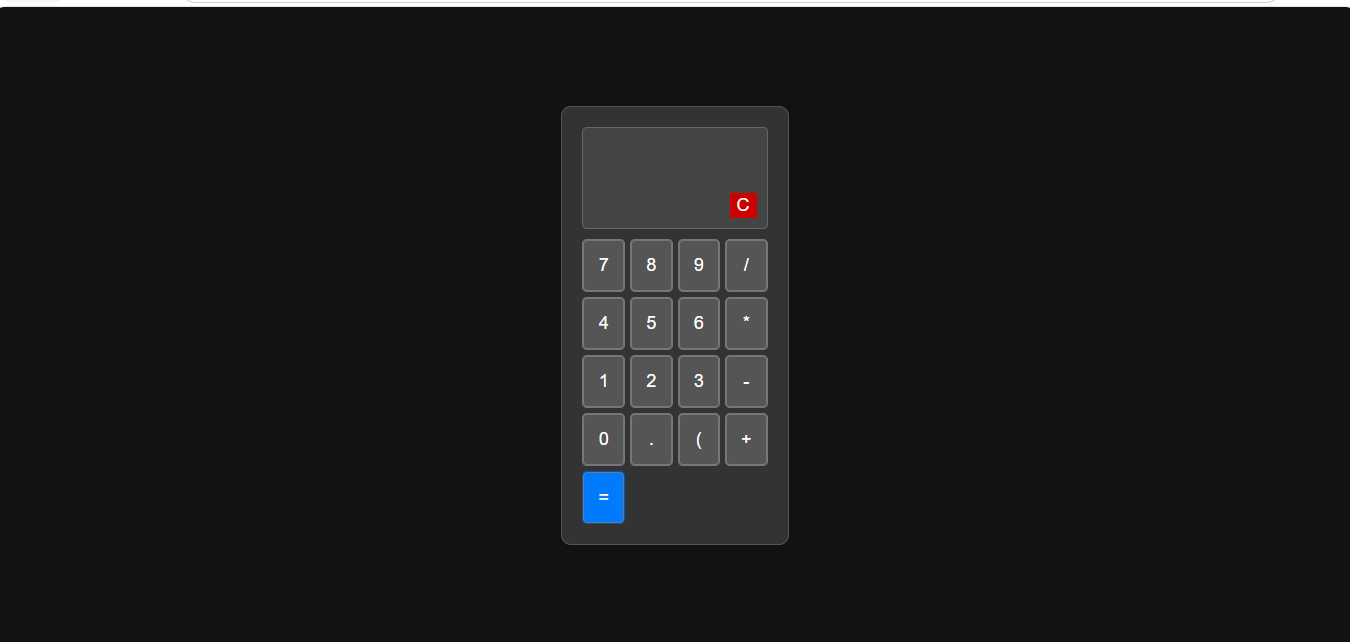
                            @א.מ.ד. הוא עשה עכשיו כפתורים תקינים וקוד יחסית תקין, רק שהעיצוב נוראי..

                            מחשבון 2.zip
                            9ccf6349-94fb-4c76-8a07-4bf3d651cb80-image.png

                            תגובה 1 תגובה אחרונה
                            0
                            • דוד משה 1ד מנותק
                              דוד משה 1ד מנותק
                              דוד משה 1
                              כתב נערך לאחרונה על ידי דוד משה 1
                              #96

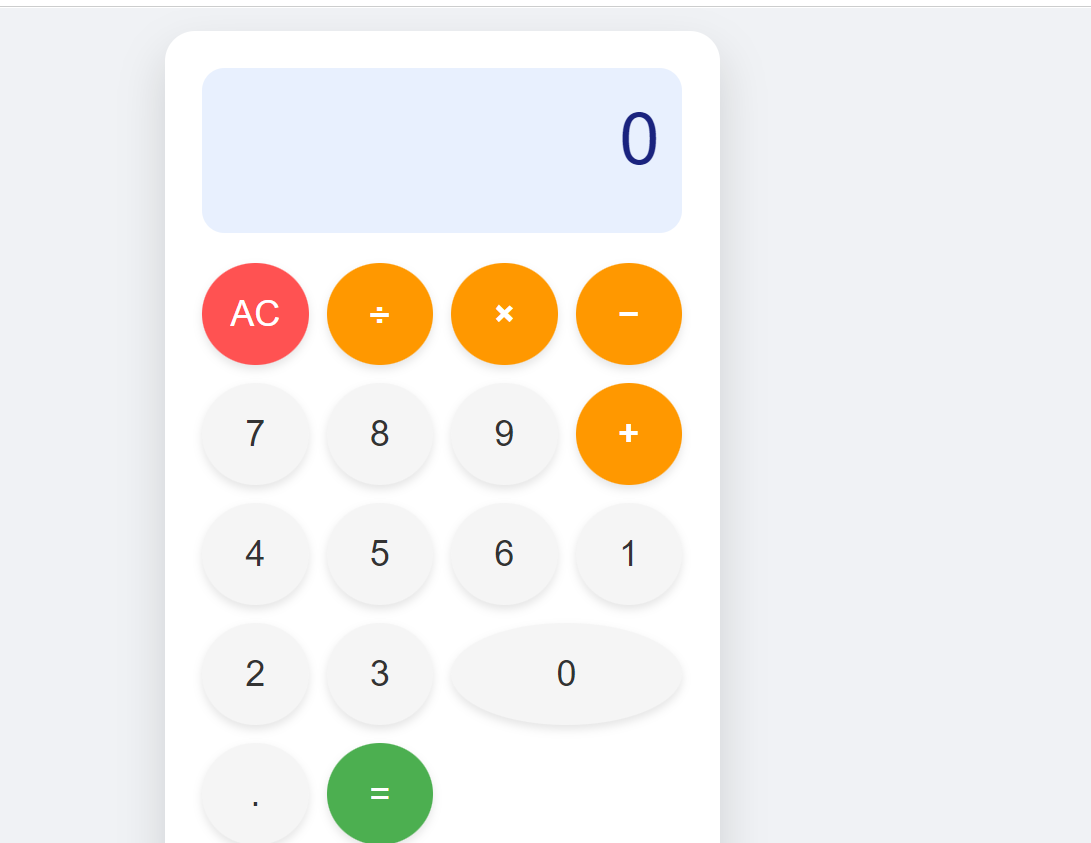
                              הבאתי לגמאה 4

                              bd16193b-a343-45d2-9700-e46d57604205-image.png

                              <!DOCTYPE html>
                              <html lang="en">
                              <head>
                                  <meta charset="UTF-8">
                                  <meta name="viewport" content="width=device-width, initial-scale=1.0">
                                  <title>Modern Calculator</title>
                                  <style>
                                      /* Global Reset and Body Styling */
                                      body {
                                          display: flex;
                                          justify-content: center;
                                          align-items: center;
                                          min-height: 100vh;
                                          margin: 0;
                                          background-color: #f0f2f5; /* Light grey background for a modern feel */
                                          font-family: 'Roboto', sans-serif; /* Using a clean, modern font stack */
                                      }
                              
                                      /* Calculator Container Styling (The main card) */
                                      .calculator {
                                          background-color: #ffffff;
                                          border-radius: 20px; /* Large rounded corners for the whole unit */
                                          box-shadow: 0 15px 30px rgba(0, 0, 0, 0.15); /* Soft shadow like Material Design elevation */
                                          width: 320px;
                                          padding: 25px;
                                      }
                              
                                      /* Display Screen Styling */
                                      #display {
                                          background-color: #e8f0fe; /* Very light blue/blue tint for the display area */
                                          color: #1a237e; /* Deep indigo color for text */
                                          font-size: 3em;
                                          padding: 20px 15px;
                                          text-align: right;
                                          border-radius: 15px; /* Rounded corners on the display area */
                                          margin-bottom: 20px;
                                          overflow: hidden;
                                          height: 70px;
                                          white-space: nowrap; /* Prevent numbers from wrapping */
                                      }
                              
                                      /* Button Grid Layout */
                                      .buttons {
                                          display: grid;
                                          grid-template-columns: repeat(4, 1fr); /* Four equal columns */
                                          gap: 12px; /* Spacing between buttons */
                                      }
                              
                                      /* Base Button Styling */
                                      button {
                                          border: none;
                                          padding: 20px 0;
                                          font-size: 1.5em;
                                          cursor: pointer;
                                          border-radius: 50%; /* Makes the button perfectly round when square */
                                          transition: background-color 0.2s ease, transform 0.1s ease;
                                          box-shadow: 0 3px 6px rgba(0, 0, 0, 0.1); /* Subtle shadow for depth */
                                      }
                              
                                      /* Specific Styling for Number/Operator Buttons (Default look) */
                                      button:not(.operator):not(.clear):not(.equals) {
                                          background-color: #f5f5f5; /* Light grey background */
                                          color: #333;
                                      }
                              
                                      button:hover:not(.operator):not(.clear):not(.equals) {
                                          background-color: #eeeeee;
                                      }
                              
                                      /* Styling for Operator Buttons (+, -, *, /) - Highlighting interaction */
                                      .operator {
                                          background-color: #ff9800; /* Amber/Orange color for operations */
                                          color: white;
                                          font-weight: bold;
                                      }
                              
                                      .operator:hover {
                                          background-color: #fb8c00;
                                      }
                              
                                      /* Styling for Clear and AC buttons - Distinctive look */
                                      .clear {
                                          background-color: #ff5252; /* Reddish color for clear/delete */
                                          color: white;
                                      }
                              
                                      .clear:hover {
                                          background-color: #e53935;
                                      }
                              
                                      /* Styling for the Equals button - Primary action highlight */
                                      .equals {
                                          background-color: #4caf50; /* Green color for equals */
                                          color: white;
                                          grid-column: span 1; /* Ensures it takes one spot */
                                      }
                                      
                                      .equals:hover {
                                          background-color: #388e3c;
                                      }
                              
                                      /* State when the button is pressed (Active state) */
                                      button:active {
                                          transform: scale(0.95); /* Slight press down effect */
                                          box-shadow: 0 1px 2px rgba(0, 0, 0, 0.1);
                                      }
                              
                                      /* Adjusting grid for specific button sizes if needed (though not strictly necessary here) */
                                      button[data-value="0"] {
                                           grid-column: span 1; /* Ensure zero spans one column */
                                      }
                              
                              
                                  </style>
                              </head>
                              <body>
                              
                                  <div class="calculator">
                                      <!-- Display Screen -->
                                      <div id="display">0</div>
                              
                                      <!-- Buttons Grid -->
                                      <div class="buttons">
                                          <!-- Row 1 -->
                                          <button class="clear" data-action="AC">AC</button>
                                          <button class="operator" data-value="/">÷</button>
                                          <button class="operator" data-value="*">×</button>
                                          <button class="operator" data-value="-">−</button>
                              
                                          <!-- Row 2 -->
                                          <button data-value="7">7</button>
                                          <button data-value="8">8</button>
                                          <button data-value="9">9</button>
                                          <button class="operator" data-value="+">+</button>
                              
                                          <!-- Row 3 -->
                                          <button data-value="4">4</button>
                                          <button data-value="5">5</button>
                                          <button data-value="6">6</button>
                                          <!-- The plus sign in row 2 is replaced by a button that spans two rows if we wanted, but here we stick to standard layout -->
                              
                                          <!-- Row 4 -->
                                          <button data-value="1">1</button>
                                          <button data-value="2">2</button>
                                          <button data-value="3">3</button>
                                          <!-- We use the space below for the equals button and zero layout logic -->
                              
                                          <!-- Row 5 (Adjusting for better flow, we'll place 0 and = in the last row) -->
                                          <button data-value="0" style="grid-column: span 2;">0</button>
                                          <button data-value=".">.</button>
                                          <button class="equals" data-action="calculate">=</button>
                                      </div>
                                  </div>
                              
                                  <script>
                                      const display = document.getElementById('display');
                                      const buttons = document.querySelector('.buttons');
                              
                                      let currentInput = '0';
                                      let firstOperand = null;
                                      let operator = null;
                                      let waitingForSecondOperand = false;
                              
                                      // Function to update the display element
                                      function updateDisplay() {
                                          display.textContent = currentInput;
                                      }
                              
                                      // Core calculation logic function
                                      async function calculate(first, second, op) {
                                          const num1 = parseFloat(first);
                                          const num2 = parseFloat(second);
                              
                                          if (op === '+') return num1 + num2;
                                          if (op === '-') return num1 - num2;
                                          if (op === '*') return num1 * num2;
                                          if (op === '/') {
                                              if (num2 === 0) {
                                                  return 'Error: Div by zero';
                                              }
                                              return num1 / num2;
                                          }
                                          return num2; // Should not happen if logic is correct
                                      }
                              
                              
                                      // Event listener for button clicks
                                      buttons.addEventListener('click', (event) => {
                                          const target = event.target;
                                          if (!target.matches('button')) return;
                              
                                          const value = target.dataset.value;
                                          const action = target.dataset.action;
                              
                                          // 1. Handle Number/Decimal Input
                                          if (value !== undefined && !isNaN(parseFloat(value))) {
                                              if (waitingForSecondOperand === true) {
                                                  // Start a new number after an operation was pressed
                                                  currentInput = value;
                                                  waitingForSecondOperand = false;
                                              } else {
                                                  // Standard digit entry
                                                  if (currentInput === '0' && value !== '.') {
                                                      currentInput = value; // Replace initial zero
                                                  } else if (value === '.' && currentInput.includes('.')) {
                                                      return; // Prevent multiple decimals
                                                  } else {
                                                      currentInput += value;
                                                  }
                                              }
                                              updateDisplay();
                                          } 
                                          // 2. Handle Operators (+, -, *, /)
                                          else if (value !== undefined && ['+', '-', '*', '/'].includes(value)) {
                                              const inputValue = parseFloat(currentInput);
                              
                                              if (operator && waitingForSecondOperand) {
                                                  // If an operator was pressed immediately after another one, just change the operator
                                                  operator = value;
                                                  return;
                                              }
                              
                                              if (firstOperand === null) {
                                                  // First operand is being set
                                                  firstOperand = inputValue;
                                              } else if (operator) {
                                                  // Perform calculation with the current input as the second operand
                                                  const result = await calculate(firstOperand, inputValue, operator);
                                                  currentInput = String(result).substring(0, 12); // Limit length for display
                                                  firstOperand = parseFloat(currentInput);
                                                  updateDisplay();
                                              }
                              
                                              // Set up for the next calculation step
                                              operator = value;
                                              waitingForSecondOperand = true;
                                          } 
                                          // 3. Handle Equals (=)
                                          else if (action === 'calculate') {
                                              if (firstOperand === null || operator === null) return; // Do nothing if incomplete
                              
                                              const secondOperand = waitingForSecondOperand ? parseFloat(currentInput) : firstOperand;
                                              
                                              const result = await calculate(firstOperand, secondOperand, operator);
                                              
                                              currentInput = String(result).substring(0, 12);
                                              firstOperand = null; // Reset state after calculation
                                              operator = null;
                                              waitingForSecondOperand = false;
                                              updateDisplay();
                                          }
                                          // 4. Handle All Clear (AC)
                                          else if (action === 'AC') {
                                              currentInput = '0';
                                              firstOperand = null;
                                              operator = null;
                                              waitingForSecondOperand = false;
                                              updateDisplay();
                                          }
                                      });
                              
                                      // Initialize display on load
                                      updateDisplay();
                                  </script>
                              
                              </body>
                              </html>


                              בתכלס לא עובד

                              תגובה 1 תגובה אחרונה
                              0
                              • א.מ.ד.א מחובר
                                א.מ.ד.א מחובר
                                א.מ.ד.
                                כתב נערך לאחרונה על ידי א.מ.ד.
                                #97

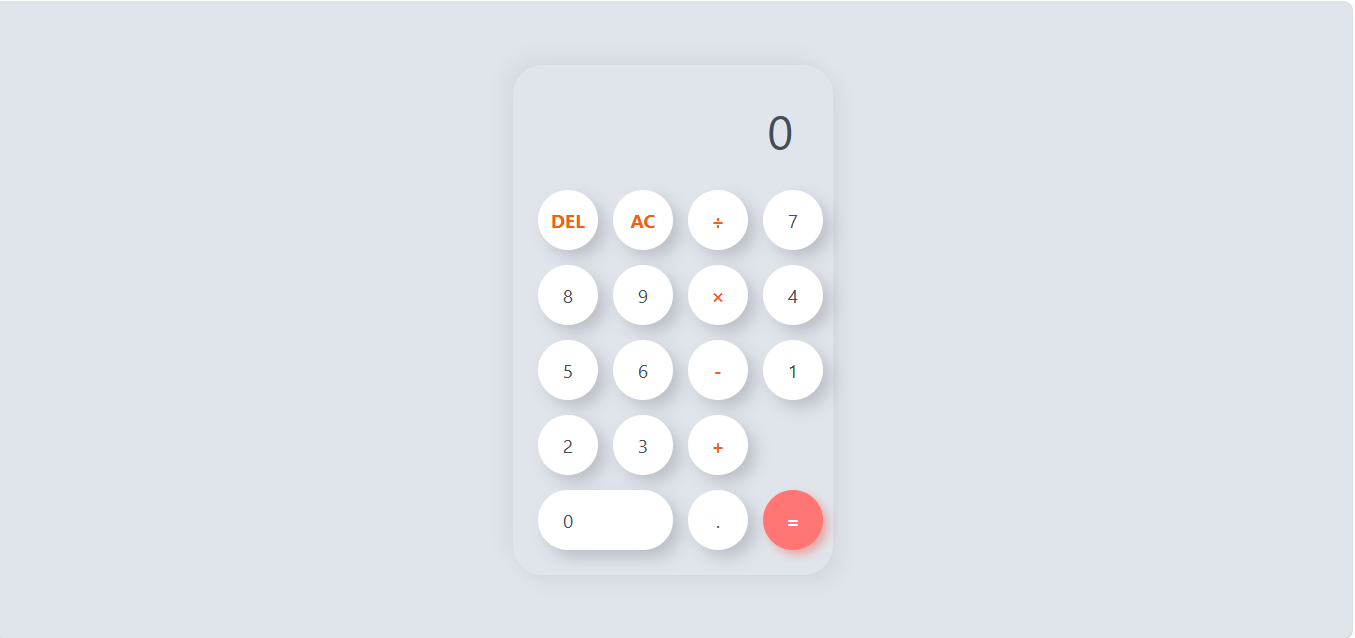
                                ביקשתי מ-QWEN שיתקן את הקוד הקודם, והנה התוצאה, עובד כמו שצריך!
                                הזוי שזה כולה מודל 4B...
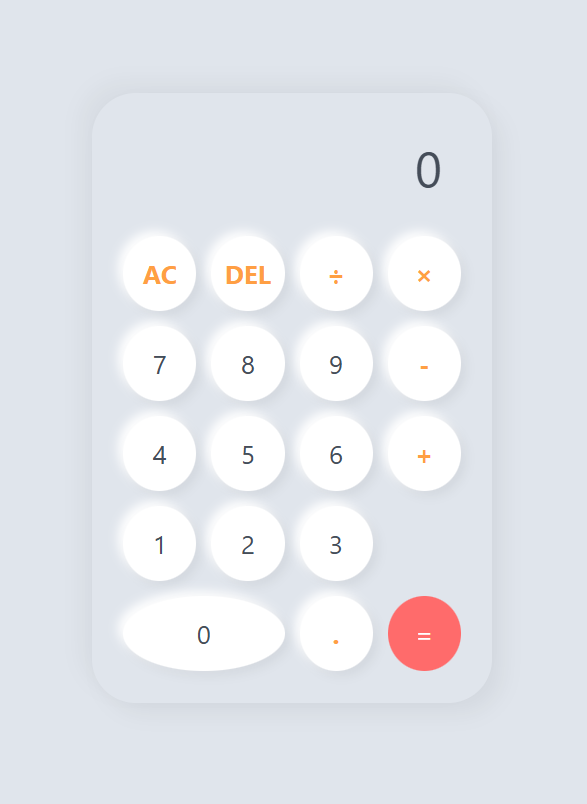
                                916fd761-88c3-4cb7-840f-9f7e51059370-image.png

                                <!DOCTYPE html>
                                <html lang="en">
                                <head>
                                    <meta charset="UTF-8">
                                    <meta name="viewport" content="width=device-width, initial-scale=1.0">
                                    <title>Perfect Calculator</title>
                                    <style>
                                        /* --- CSS STYLES --- */
                                        
                                        :root {
                                            --bg-color: #e0e5ec;
                                            --cal-bg: #e0e5ec;
                                            --btn-bg: #ffffff;
                                            --btn-shadow: #ffffff;
                                            --operator-color: #ff9f43; /* Nice Orange/Pink */
                                            --equals-bg: #ff6b6b;      /* Soft Red */
                                        }
                                
                                        * {
                                            box-sizing: border-box;
                                            font-family: 'Segoe UI', Roboto, Helvetica, Arial, sans-serif;
                                        }
                                
                                        body {
                                            background-color: var(--bg-color);
                                            display: flex;
                                            justify-content: center;
                                            align-items: center;
                                            min-height: 100vh;
                                            margin: 0;
                                        }
                                
                                        .calculator {
                                            background-color: var(--cal-bg);
                                            padding: 25px;
                                            border-radius: 35px; /* Rounded Container */
                                            box-shadow: 9px 9px 16px rgba(0, 0, 0, 0.05),
                                                        -9px -9px 16px rgba(0, 0, 0, 0.04);
                                            width: 320px; /* Fixed width */
                                        }
                                
                                        .display {
                                            width: 100%;
                                            height: 70px;
                                            margin-bottom: 20px;
                                            border: none;
                                            text-align: right;
                                            padding-right: 15px;
                                            font-size: 2.5rem; /* Adjusted size */
                                            color: #454d59;
                                            outline: none;
                                            background: transparent;
                                        }
                                
                                        /* Key Grid - This is the fix for layout alignment */
                                        .buttons {
                                            display: grid;
                                            grid-template-columns: repeat(4, 1fr); /* Creates 4 equal columns */
                                            gap: 12px; /* Space between buttons */
                                            width: 100%;
                                        }
                                
                                        /* Button Styling - Rounded Pills */
                                        button {
                                            border: none;
                                            background-color: var(--btn-bg);
                                            color: #454d59;
                                            height: 60px; /* Fixed height for uniformity */
                                            width: 100%; /* Takes up the grid column width */
                                            border-radius: 50%; /* Circular buttons, or change to 25px for pill shape */
                                            font-size: 1.3rem;
                                            box-shadow: 4px 4px 8px rgba(0, 0, 0, 0.06), -4px -4px 8px rgba(255, 255, 255, 1); /* Inner highlight */
                                            cursor: pointer;
                                            transition: transform 0.1s ease, box-shadow 0.1s ease;
                                            display: flex;
                                            justify-content: center; /* Centers text */
                                            align-items: center;
                                        }
                                
                                        button:hover {
                                            transform: scale(0.95);
                                            box-shadow: inset 2px 2px 5px rgba(0,0,0,0.1);
                                        }
                                
                                        button:active {
                                            transform: scale(0.96);
                                        }
                                
                                        /* Operators Styling */
                                        button.operator {
                                            color: var(--operator-color);
                                            font-weight: bold;
                                        }
                                
                                        .equals-btn {
                                            background-color: var(--equals-bg);
                                            color: white;
                                            box-shadow: none;
                                        }
                                        
                                        .zero-btn {
                                            grid-column: span 2; /* The Zero button is now exactly twice the width of others */
                                        }
                                
                                    </style>
                                </head>
                                <body>
                                
                                    <div class="calculator">
                                        <!-- Display Screen -->
                                        <input type="text" class="display" id="display" value="0" readonly>
                                        
                                        <!-- Keypad - 4 Columns x 5 Rows (Standard Layout) -->
                                        <div class="buttons">
                                            <!-- Row 1: AC, DEL, /, * -->
                                            <button class="operator" onclick="clearDisplay()">AC</button>
                                            <button class="operator" onclick="deleteNumber()">DEL</button>
                                            <button class="operator" onclick="appendOperator('/')">÷</button>
                                            <button class="operator" onclick="appendOperator('*')">×</button>
                                
                                            <!-- Row 2: 7, 8, 9, - -->
                                            <button onclick="appendNumber('7')">7</button>
                                            <button onclick="appendNumber('8')">8</button>
                                            <button onclick="appendNumber('9')">9</button>
                                            <button class="operator" onclick="appendOperator('-')">-</button>
                                
                                            <!-- Row 3: 4, 5, 6, + -->
                                            <button onclick="appendNumber('4')">4</button>
                                            <button onclick="appendNumber('5')">5</button>
                                            <button onclick="appendNumber('6')">6</button>
                                            <button class="operator" onclick="appendOperator('+')">+</button>
                                
                                            <!-- Row 4: 1, 2, 3, = (Spans two rows vertically in some designs, here we keep standard) -->
                                            <button onclick="appendNumber('1')">1</button>
                                            <button onclick="appendNumber('2')">2</button>
                                            <button onclick="appendNumber('3')">3</button>
                                            
                                            <!-- The Equals button spans 2 rows vertically and 1 column horizontally, or sits in a separate area? 
                                                 Let's stick to a clean grid. Standard is = at bottom right. 
                                                 To fix layout alignment perfectly: I will add a spacer row for the equals button -->
                                            
                                            <!-- Row 5 Spacer/Equals -->
                                            <button onclick="appendNumber('0')" class="zero-btn">0</button>
                                            <button class="operator" onclick="appendDecimal()">.</button>
                                            <button class="equals-btn" onclick="calculateResult()">=</button>
                                        </div>
                                    </div>
                                
                                    <script>
                                        const display = document.getElementById('display');
                                
                                        // Appends a number
                                        function appendNumber(number) {
                                            if (display.value === '0' || display.value === 'Error') {
                                                display.value = number;
                                            } else {
                                                display.value += number;
                                            }
                                        }
                                
                                        // Append operator
                                        function appendOperator(operator) {
                                            const lastChar = display.value.slice(-1);
                                            if (['+', '-', '*', '/'].includes(lastChar)) return;
                                            display.value += operator;
                                        }
                                
                                        // Calculate Result
                                        function calculateResult() {
                                            try {
                                                let expression = display.value;
                                                if(expression === "") return;
                                                
                                                // Safety check for empty calculation like just "="
                                                if(expression.split('').every(c => c === '0')) return;
                                
                                                let result = new Function('return ' + expression)(); 
                                
                                                // Round to avoid floating point errors
                                                result = Math.round(result * 100000000) / 100000000; 
                                                
                                                display.value = result;
                                            } catch (error) {
                                                display.value = "Error";
                                            }
                                        }
                                
                                        // Clear all
                                        function clearDisplay() {
                                            display.value = '0';
                                        }
                                
                                        // Delete last char
                                        function deleteNumber() {
                                            if(display.value === 'Error' || display.value === 'AC') {
                                                return;
                                            }
                                            
                                            const val = display.value.slice(0, -1);
                                            display.value = val === '' ? '0' : val;
                                        }
                                
                                        // Append decimal
                                        function appendDecimal() {
                                            if (display.value === 'Error') {
                                                display.value = '.';
                                                return;
                                            }
                                            
                                            if (!display.value.includes('.')) {
                                                display.value += '.';
                                            }
                                        }
                                    </script>
                                </body>
                                </html>


                                מפתח אפליקציות אנדרואיד
                                em0548438097@gmail.com

                                חובבן מקצועיח תגובה 1 תגובה אחרונה
                                0
                                • א.מ.ד.א א.מ.ד.

                                  ביקשתי מ-QWEN שיתקן את הקוד הקודם, והנה התוצאה, עובד כמו שצריך!
                                  הזוי שזה כולה מודל 4B...

                                  916fd761-88c3-4cb7-840f-9f7e51059370-image.png

                                  <!DOCTYPE html>
                                  <html lang="en">
                                  <head>
                                      <meta charset="UTF-8">
                                      <meta name="viewport" content="width=device-width, initial-scale=1.0">
                                      <title>Perfect Calculator</title>
                                      <style>
                                          /* --- CSS STYLES --- */
                                          
                                          :root {
                                              --bg-color: #e0e5ec;
                                              --cal-bg: #e0e5ec;
                                              --btn-bg: #ffffff;
                                              --btn-shadow: #ffffff;
                                              --operator-color: #ff9f43; /* Nice Orange/Pink */
                                              --equals-bg: #ff6b6b;      /* Soft Red */
                                          }
                                  
                                          * {
                                              box-sizing: border-box;
                                              font-family: 'Segoe UI', Roboto, Helvetica, Arial, sans-serif;
                                          }
                                  
                                          body {
                                              background-color: var(--bg-color);
                                              display: flex;
                                              justify-content: center;
                                              align-items: center;
                                              min-height: 100vh;
                                              margin: 0;
                                          }
                                  
                                          .calculator {
                                              background-color: var(--cal-bg);
                                              padding: 25px;
                                              border-radius: 35px; /* Rounded Container */
                                              box-shadow: 9px 9px 16px rgba(0, 0, 0, 0.05),
                                                          -9px -9px 16px rgba(0, 0, 0, 0.04);
                                              width: 320px; /* Fixed width */
                                          }
                                  
                                          .display {
                                              width: 100%;
                                              height: 70px;
                                              margin-bottom: 20px;
                                              border: none;
                                              text-align: right;
                                              padding-right: 15px;
                                              font-size: 2.5rem; /* Adjusted size */
                                              color: #454d59;
                                              outline: none;
                                              background: transparent;
                                          }
                                  
                                          /* Key Grid - This is the fix for layout alignment */
                                          .buttons {
                                              display: grid;
                                              grid-template-columns: repeat(4, 1fr); /* Creates 4 equal columns */
                                              gap: 12px; /* Space between buttons */
                                              width: 100%;
                                          }
                                  
                                          /* Button Styling - Rounded Pills */
                                          button {
                                              border: none;
                                              background-color: var(--btn-bg);
                                              color: #454d59;
                                              height: 60px; /* Fixed height for uniformity */
                                              width: 100%; /* Takes up the grid column width */
                                              border-radius: 50%; /* Circular buttons, or change to 25px for pill shape */
                                              font-size: 1.3rem;
                                              box-shadow: 4px 4px 8px rgba(0, 0, 0, 0.06), -4px -4px 8px rgba(255, 255, 255, 1); /* Inner highlight */
                                              cursor: pointer;
                                              transition: transform 0.1s ease, box-shadow 0.1s ease;
                                              display: flex;
                                              justify-content: center; /* Centers text */
                                              align-items: center;
                                          }
                                  
                                          button:hover {
                                              transform: scale(0.95);
                                              box-shadow: inset 2px 2px 5px rgba(0,0,0,0.1);
                                          }
                                  
                                          button:active {
                                              transform: scale(0.96);
                                          }
                                  
                                          /* Operators Styling */
                                          button.operator {
                                              color: var(--operator-color);
                                              font-weight: bold;
                                          }
                                  
                                          .equals-btn {
                                              background-color: var(--equals-bg);
                                              color: white;
                                              box-shadow: none;
                                          }
                                          
                                          .zero-btn {
                                              grid-column: span 2; /* The Zero button is now exactly twice the width of others */
                                          }
                                  
                                      </style>
                                  </head>
                                  <body>
                                  
                                      <div class="calculator">
                                          <!-- Display Screen -->
                                          <input type="text" class="display" id="display" value="0" readonly>
                                          
                                          <!-- Keypad - 4 Columns x 5 Rows (Standard Layout) -->
                                          <div class="buttons">
                                              <!-- Row 1: AC, DEL, /, * -->
                                              <button class="operator" onclick="clearDisplay()">AC</button>
                                              <button class="operator" onclick="deleteNumber()">DEL</button>
                                              <button class="operator" onclick="appendOperator('/')">÷</button>
                                              <button class="operator" onclick="appendOperator('*')">×</button>
                                  
                                              <!-- Row 2: 7, 8, 9, - -->
                                              <button onclick="appendNumber('7')">7</button>
                                              <button onclick="appendNumber('8')">8</button>
                                              <button onclick="appendNumber('9')">9</button>
                                              <button class="operator" onclick="appendOperator('-')">-</button>
                                  
                                              <!-- Row 3: 4, 5, 6, + -->
                                              <button onclick="appendNumber('4')">4</button>
                                              <button onclick="appendNumber('5')">5</button>
                                              <button onclick="appendNumber('6')">6</button>
                                              <button class="operator" onclick="appendOperator('+')">+</button>
                                  
                                              <!-- Row 4: 1, 2, 3, = (Spans two rows vertically in some designs, here we keep standard) -->
                                              <button onclick="appendNumber('1')">1</button>
                                              <button onclick="appendNumber('2')">2</button>
                                              <button onclick="appendNumber('3')">3</button>
                                              
                                              <!-- The Equals button spans 2 rows vertically and 1 column horizontally, or sits in a separate area? 
                                                   Let's stick to a clean grid. Standard is = at bottom right. 
                                                   To fix layout alignment perfectly: I will add a spacer row for the equals button -->
                                              
                                              <!-- Row 5 Spacer/Equals -->
                                              <button onclick="appendNumber('0')" class="zero-btn">0</button>
                                              <button class="operator" onclick="appendDecimal()">.</button>
                                              <button class="equals-btn" onclick="calculateResult()">=</button>
                                          </div>
                                      </div>
                                  
                                      <script>
                                          const display = document.getElementById('display');
                                  
                                          // Appends a number
                                          function appendNumber(number) {
                                              if (display.value === '0' || display.value === 'Error') {
                                                  display.value = number;
                                              } else {
                                                  display.value += number;
                                              }
                                          }
                                  
                                          // Append operator
                                          function appendOperator(operator) {
                                              const lastChar = display.value.slice(-1);
                                              if (['+', '-', '*', '/'].includes(lastChar)) return;
                                              display.value += operator;
                                          }
                                  
                                          // Calculate Result
                                          function calculateResult() {
                                              try {
                                                  let expression = display.value;
                                                  if(expression === "") return;
                                                  
                                                  // Safety check for empty calculation like just "="
                                                  if(expression.split('').every(c => c === '0')) return;
                                  
                                                  let result = new Function('return ' + expression)(); 
                                  
                                                  // Round to avoid floating point errors
                                                  result = Math.round(result * 100000000) / 100000000; 
                                                  
                                                  display.value = result;
                                              } catch (error) {
                                                  display.value = "Error";
                                              }
                                          }
                                  
                                          // Clear all
                                          function clearDisplay() {
                                              display.value = '0';
                                          }
                                  
                                          // Delete last char
                                          function deleteNumber() {
                                              if(display.value === 'Error' || display.value === 'AC') {
                                                  return;
                                              }
                                              
                                              const val = display.value.slice(0, -1);
                                              display.value = val === '' ? '0' : val;
                                          }
                                  
                                          // Append decimal
                                          function appendDecimal() {
                                              if (display.value === 'Error') {
                                                  display.value = '.';
                                                  return;
                                              }
                                              
                                              if (!display.value.includes('.')) {
                                                  display.value += '.';
                                              }
                                          }
                                      </script>
                                  </body>
                                  </html>
                                  
                                  
                                  חובבן מקצועיח מנותק
                                  חובבן מקצועיח מנותק
                                  חובבן מקצועי
                                  כתב נערך לאחרונה על ידי חובבן מקצועי
                                  #98

                                  @א.מ.ד. כתב בבקשת מידע | AI אופליין:

                                  ביקשתי מ-QWEN שיתקן את הקוד הקודם, והנה התוצאה, עובד כמו שצריך!

                                  אז ה-@המלאך צודק?

                                  המלאךה א.מ.ד.א 2 תגובות תגובה אחרונה
                                  0
                                  • חובבן מקצועיח חובבן מקצועי

                                    @א.מ.ד. כתב בבקשת מידע | AI אופליין:

                                    ביקשתי מ-QWEN שיתקן את הקוד הקודם, והנה התוצאה, עובד כמו שצריך!

                                    אז ה-@המלאך צודק?

                                    המלאךה מנותק
                                    המלאךה מנותק
                                    המלאך
                                    כתב נערך לאחרונה על ידי המלאך
                                    #99

                                    @חובבן-מקצועי מבחינות מסויימות.
                                    מצד אחד זה בנוי בצורה הרבה יותר נכונה.
                                    וכמובן העיצוב מאוד יפה - אהבתי.
                                    אבל אין (מצד שני גם במה שֲ@css-0 הביא לא היה) תמיכה במובייל ובכפתורי מקלדת.
                                    וכמובן שיש באג שתוקן רק בקוואן בגירסה הקודמת שזה אם המשתמש ישלח שני נקודות (שזה לא חוקי לתרגיל).
                                    לסיכום: הקוד של קוואן הרבה יותר על רמה.

                                    א.מ.ד.א תגובה 1 תגובה אחרונה
                                    0
                                    • חובבן מקצועיח חובבן מקצועי

                                      @א.מ.ד. כתב בבקשת מידע | AI אופליין:

                                      ביקשתי מ-QWEN שיתקן את הקוד הקודם, והנה התוצאה, עובד כמו שצריך!

                                      אז ה-@המלאך צודק?

                                      א.מ.ד.א מחובר
                                      א.מ.ד.א מחובר
                                      א.מ.ד.
                                      כתב נערך לאחרונה על ידי
                                      #100

                                      @חובבן-מקצועי בנושא קידוד חד משמעית, טענתי ככה מההתחלה ואם אני זוכר נכון אני שכנעתי אותו בזה...

                                      מפתח אפליקציות אנדרואיד
                                      em0548438097@gmail.com

                                      תגובה 1 תגובה אחרונה
                                      0
                                      • המלאךה המלאך

                                        @חובבן-מקצועי מבחינות מסויימות.
                                        מצד אחד זה בנוי בצורה הרבה יותר נכונה.
                                        וכמובן העיצוב מאוד יפה - אהבתי.
                                        אבל אין (מצד שני גם במה שֲ@css-0 הביא לא היה) תמיכה במובייל ובכפתורי מקלדת.
                                        וכמובן שיש באג שתוקן רק בקוואן בגירסה הקודמת שזה אם המשתמש ישלח שני נקודות (שזה לא חוקי לתרגיל).
                                        לסיכום: הקוד של קוואן הרבה יותר על רמה.

                                        א.מ.ד.א מחובר
                                        א.מ.ד.א מחובר
                                        א.מ.ד.
                                        כתב נערך לאחרונה על ידי א.מ.ד.
                                        #101

                                        @המלאך אני פשוט יבקש את זה בפרומפט נוסף

                                        מפתח אפליקציות אנדרואיד
                                        em0548438097@gmail.com

                                        י המלאךה 2 תגובות תגובה אחרונה
                                        0
                                        • א.מ.ד.א א.מ.ד.

                                          @המלאך אני פשוט יבקש את זה בפרומפט נוסף

                                          י מנותק
                                          י מנותק
                                          ישראל 1111
                                          כתב נערך לאחרונה על ידי ישראל 1111
                                          #102

                                          @א.מ.ד. דיברו על הנושא הזה כאן https://mitmachim.top/topic/95328/בקשת-מידע-בקשת-מידע-על-מודלי-ai-אופליין/38?_=1775764021522

                                          תגובה 1 תגובה אחרונה
                                          0

                                          • התחברות

                                          • אין לך חשבון עדיין? הרשמה

                                          • התחברו או הירשמו כדי לחפש.
                                          • פוסט ראשון
                                            פוסט אחרון
                                          0
                                          • חוקי הפורום
                                          • פופולרי
                                          • לא נפתר
                                          • משתמשים
                                          • חיפוש גוגל בפורום
                                          • צור קשר