
בקשת מידע | AI אופליין
-
@המלאך הנה מפרומפט אחד:
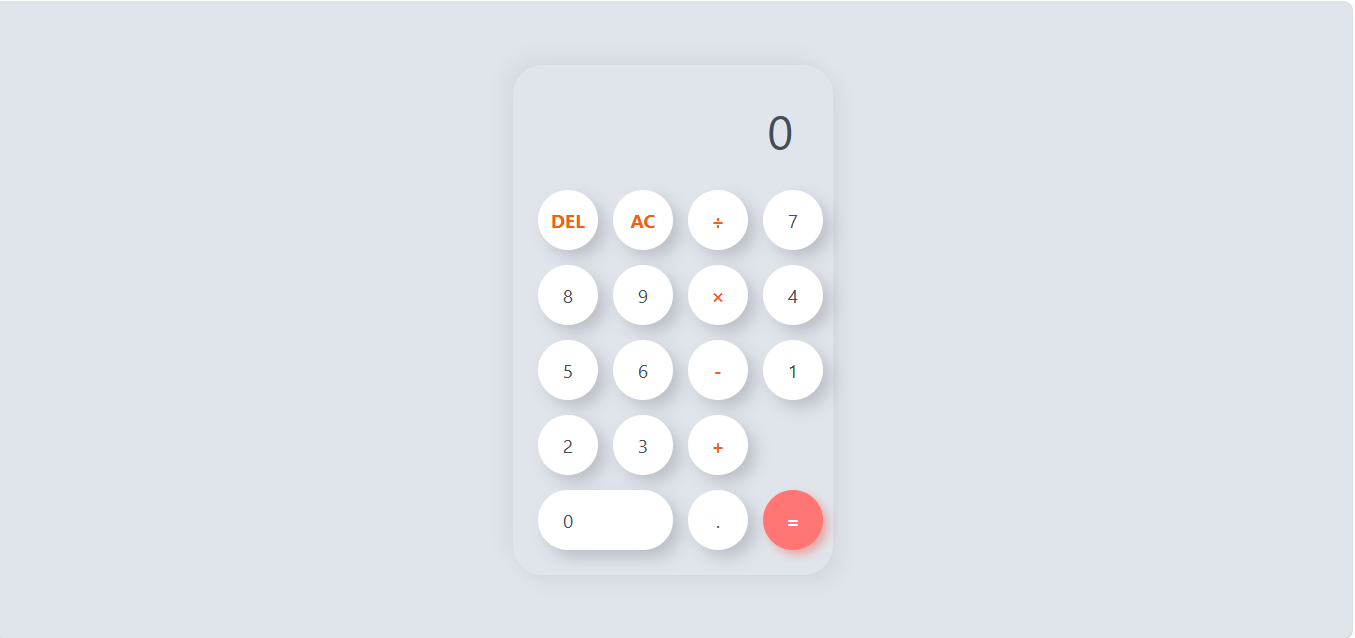
<!DOCTYPE html> <html lang="en"> <head> <meta charset="UTF-8"> <meta name="viewport" content="width=device-width, initial-scale=1.0"> <title>Modern Calculator</title> <style> /* --- CSS STYLES --- */ :root { --bg-color: #e0e5ec; --cal-bg: #e0e5ec; --btn-bg: #ffffff; --btn-shadow: #ffffff; --btn-active: #b2bec3; --text-main: #454d59; --operator-color: #ef620f; /* Orange */ --equals-bg: #ff7675; /* Soft Red */ --equals-text: white; } * { box-sizing: border-box; font-family: 'Segoe UI', Roboto, Helvetica, Arial, sans-serif; } body { background-color: var(--bg-color); display: flex; justify-content: center; align-items: center; min-height: 100vh; margin: 0; } .calculator { background-color: var(--cal-bg); padding: 25px; border-radius: 30px; /* Rounded corners */ box-shadow: 9px 9px 16px rgba(0, 0, 0, 0.05), -9px -9px 16px rgba(0, 0, 0, 0.04); width: 320px; /* Fixed width for neatness */ } .display { width: 100%; height: 80px; margin-bottom: 20px; border: none; text-align: right; padding-right: 15px; font-size: 3rem; color: var(--text-main); outline: none; background: transparent; } /* The grid of buttons */ .buttons { display: grid; grid-template-columns: repeat(4, 1fr); /* 4 columns */ gap: 15px; } /* Button Styling */ button { border: none; background-color: var(--btn-bg); color: var(--text-main); height: 60px; width: 60px; border-radius: 50%; /* Circular buttons */ font-size: 1.2rem; box-shadow: 8px 8px 16px rgba(133, 133, 139, 0.4); /* Soft shadow depth */ cursor: pointer; transition: transform 0.1s ease, background-color 0.2s; display: flex; justify-content: center; align-items: center; } button:hover { background-color: #f9f9f9; /* Lighter on hover */ } button:active { transform: scale(0.95); /* Press effect */ box-shadow: inset 4px 4px 8px rgba(133, 133, 139, 0.4); } /* Operator buttons (Orange) */ button.operator { color: var(--operator-color); font-weight: bold; } button.operator:hover { background-color: #ffeaa7; } .span-two { grid-column: span 2; width: 100%; /* Fill the two columns */ border-radius: 30px; justify-content: flex-start; /* Align text to left of rounded shape */ padding-left: 25px; } .equals { background-color: var(--equals-bg); color: var(--equals-text); font-weight: bold; box-shadow: 5px 5px 10px rgba(239, 68, 47, 0.4); } .equals:hover { background-color: #ff7675; } /* Mobile Responsiveness */ @media (max-width: 400px) { body { padding: 20px; } .calculator { width: 95%; padding: 15px; } button { width: 100%; height: 60px; border-radius: 30px; } /* Make buttons rounded squares on mobile */ } </style> </head> <body> <div class="calculator"> <!-- Display Screen --> <input type="text" class="display" id="display" value="0" readonly> <!-- Keypad --> <div class="buttons"> <!-- Row 1 --> <button class="operator" onclick="deleteNumber()">DEL</button> <button class="operator" onclick="clearDisplay()">AC</button> <button class="operator" onclick="appendOperator('/')">÷</button> <!-- Row 2 --> <button onclick="appendNumber('7')">7</button> <button onclick="appendNumber('8')">8</button> <button onclick="appendNumber('9')">9</button> <button class="operator" onclick="appendOperator('*')">×</button> <!-- Row 3 --> <button onclick="appendNumber('4')">4</button> <button onclick="appendNumber('5')">5</button> <button onclick="appendNumber('6')">6</button> <button class="operator" onclick="appendOperator('-')">-</button> <!-- Row 4 --> <button onclick="appendNumber('1')">1</button> <button onclick="appendNumber('2')">2</button> <button onclick="appendNumber('3')">3</button> <button class="operator" onclick="appendOperator('+')">+</button> <!-- Row 5 --> <button onclick="appendNumber('0')" class="span-two">0</button> <button onclick="appendDecimal()">.</button> <button class="equals" onclick="calculateResult()">=</button> </div> </div> <script> /* --- JAVASCRIPT LOGIC --- */ const display = document.getElementById('display'); // Appends a number to the display function appendNumber(number) { if (display.value === '0' || display.value === 'Error') { display.value = number; } else { // Prevent multiple decimals in one sequence const isCurrentDecimal = display.value.slice(-1) === '.'; if(!isCurrentDecimal){ display.value += number; } } } // Appends an operator (+, -, *, /) function appendOperator(operator) { const lastChar = display.value.slice(-1); // Prevent double operators (e.g., ++ or +-) if (['+', '-', '*', '/'].includes(lastChar)) { return; } display.value += operator; } // Calculates the result using safe evaluation function calculateResult() { try { // Note: eval is used here for simplicity. In a production app // with complex input, a custom parser would be safer. let expression = display.value; // If it contains only "AC" or something weird, handle gracefully if(expression === "") return; // Replace visual symbols with JS operators (already handled in UI mostly) // Check for syntax errors let result = new Function('return ' + expression)(); // Handle floating point precision issues (e.g. 0.1 + 0.2) if (!Number.isInteger(result)) { result = Math.round(result * 100000000) / 100000000; } display.value = result; } catch (error) { display.value = "Error"; } } // Clears all input (Reset to 0) function clearDisplay() { display.value = '0'; } // Deletes the last character only (Backspace) function deleteNumber() { if(display.value === 'Error') { clearDisplay(); return; } const newValue = display.value.slice(0, -1); // If result was just a number like 5. and user deletes, remove the dot too? // Or allow empty input? Let's default to clearing if empty. if (newValue === "") { display.value = '0'; } else { display.value = newValue; } } // Append a decimal point function appendDecimal() { if (display.value === 'Error') { display.value = '.'; return; } const isLastCharDot = display.value.slice(-1) === '.'; // If user typed 1.2 and clicks decimal, it becomes 1.2. if (display.value.includes('.')) { return; } display.value += '.'; } /* --- Keyboard Support --- */ document.addEventListener('keydown', function(event) { const key = event.key; // Numbers 0-9 if (/^[0-9]$/.test(key)) { appendNumber(key); } // Operators else if (key === '+' || key === '-' || key === '*' || key === '/') { appendOperator(key); } // Function keys else if (key === 'Enter') { event.preventDefault(); // Prevent default form submission/scrolling calculateResult(); } else if (key === 'Backspace') { deleteNumber(); } else if (key === 'Escape') { clearDisplay(); } }); </script> </body> </html>@א.מ.ד. וואו.הקוד הזה יותר מהקוד הראשון השני ושל @חובבן-מקצועי ביחד!
דרך אגב, של @חובבן-מקצועי יותר טוב משל @css-0 -
@א.מ.ד. אין סיכוי!! שאני ניסיתי הוא לא הוציא לי קוד אלא איזה חירבוש בראש...
שזה היה מספרים בריבועים אחד מעל השני שלחצו עליהם לא עשו כלום.. -
@א.מ.ד. וואו.הקוד הזה יותר מהקוד הראשון השני ושל @חובבן-מקצועי ביחד!
דרך אגב, של @חובבן-מקצועי יותר טוב משל @css-0 -
@CSS-0 אתה בטוח שניסית את gemma 4?
(שלח לי בפרטי קישור למה שהורדת)@חובבן-מקצועי כתב בבקשת מידע | AI אופליין:
לא אני ניסיתי את gemma3:4b
כתבתי את זה דיי מפורש.. -
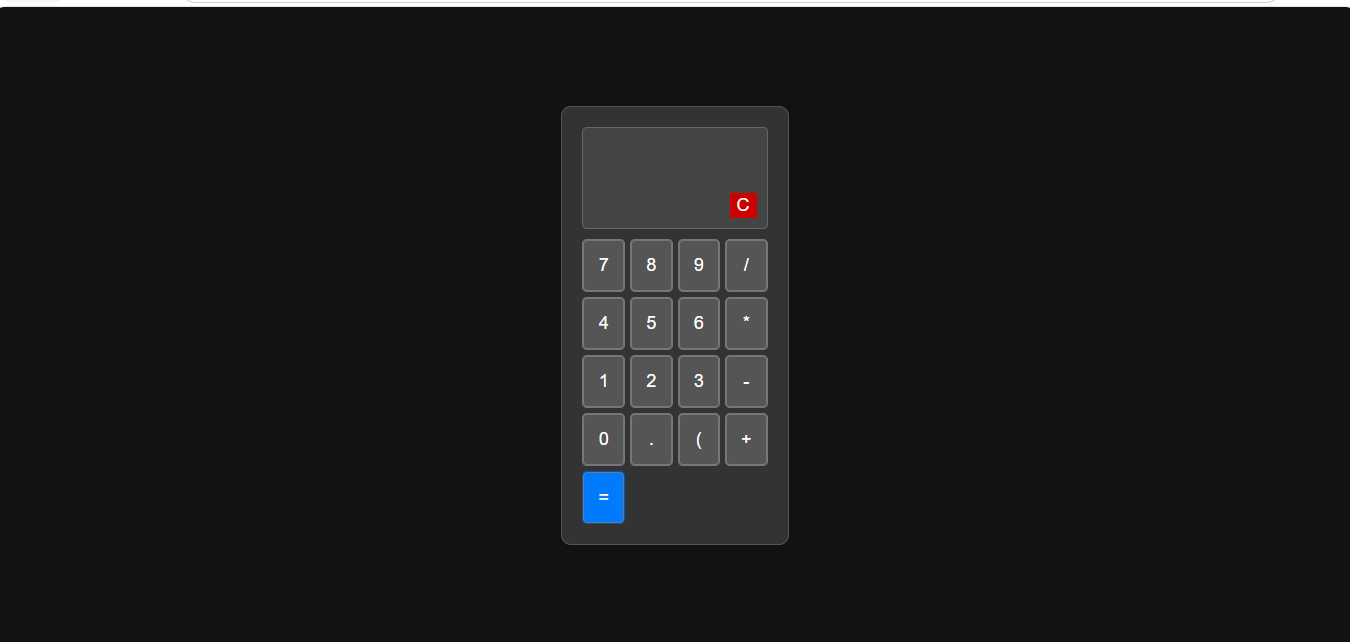
@המלאך לא הקוד הזה לא יותר משל @חובבן-מקצועי !
-
@CSS-0 בדקת?
יש בו תמיכה במקלדת, מחיקה, ומבנה יותר הגיוני של CSS, וזה במבט שטחי.
אם כי בהסתכלות שניה הקודם היה טוב יותר באופורטורים. -
-
@CSS-0 ממש לא נכון.
באיזה מחשבון היית משתמש ביום יום? בשל קוואן שמסודר מבחינה וויזאולית או בקודם? שמיועד להקרנות .
.ברור שתגיד הקודם. אבל ברצינות אתה חושב כך?
 בוא נפתח סקר בפורום סבבה?
 -
@CSS-0 תנסה לבקש מ-GEMMA 3 את הפרומפט באנגלית. אם זה מה שיצא לך בעברית מסתבר שבאנגלית ייצא יותר טוב.
יצרתי פרומפט מדוייק באנגלית, תדביק אותו ל-GEMMA 3 ותעלה פה את הקוד, נראה מה יצא. (עדיף שתעשה את זה בצ'אט חדש שלא ייתבלבל):Create for me a fully functional calculator HTML file, with a beautiful and up-to-date design with rounded corners. Add a hidden function in the code, so that when you double-click the division key, today's date will be written in the result line. Pay attention to the order of the buttons, so that it looks like a calculator,מפתח אפליקציות אנדרואיד ויישומי ומודלי AI
-
@CSS-0 תנסה לבקש מ-GEMMA 3 את הפרומפט באנגלית. אם זה מה שיצא לך בעברית מסתבר שבאנגלית ייצא יותר טוב.
יצרתי פרומפט מדוייק באנגלית, תדביק אותו ל-GEMMA 3 ותעלה פה את הקוד, נראה מה יצא. (עדיף שתעשה את זה בצ'אט חדש שלא ייתבלבל):Create for me a fully functional calculator HTML file, with a beautiful and up-to-date design with rounded corners. Add a hidden function in the code, so that when you double-click the division key, today's date will be written in the result line. Pay attention to the order of the buttons, so that it looks like a calculator, -
@CSS-0 ממש לא נכון.
באיזה מחשבון היית משתמש ביום יום? בשל קוואן שמסודר מבחינה וויזאולית או בקודם? שמיועד להקרנות .ברור שתגיד הקודם. אבל ברצינות אתה חושב כך?
בוא נפתח סקר בפורום סבבה?@המלאך כתב בבקשת מידע | AI אופליין:
באיזה מחשבון היית משתמש ביום יום? בשל קוואן שמסודר מבחינה וויזאולית או בקודם? שמיועד להקרנות .
טוב, הוא עשה לי אותו כזה, כי ביקשתי.
סתם מחשבון - הוא יצר לי את זה ככה..<!DOCTYPE html> <html lang="he" dir="rtl"> <head> <meta charset="UTF-8"> <meta name="viewport" content="width=device-width, initial-scale=1.0"> <title>מחשבון פשוט</title> <style> body { display: flex; justify-content: center; align-items: center; height: 100vh; background-color: #f4f4f4; font-family: 'Arial', sans-serif; } .calculator { background-color: #333; border-radius: 10px; padding: 20px; box-shadow: 0 10px 20px rgba(0, 0, 0, 0.5); } .display { background-color: #222; color: white; font-size: 2.5em; padding: 15px; margin-bottom: 20px; text-align: right; border-radius: 5px; height: 50px; overflow: hidden; white-space: nowrap; } .buttons { display: grid; grid-template-columns: repeat(4, 1fr); gap: 10px; } button { padding: 20px; font-size: 1.2em; border: none; border-radius: 5px; cursor: pointer; transition: background-color 0.2s; } button:hover { opacity: 0.9; } .number-button { background-color: #555; color: white; } .operator-button { background-color: #ff9500; color: white; } .clear-button { background-color: #d9534f; color: white; } .equals-button { background-color: #4CAF50; color: white; grid-column: span 2; /* Makes the equals button wider */ } </style> </head> <body> <div class="calculator"> <div class="display" id="display">0</div> <div class="buttons"> <!-- Row 1 --> <button class="clear-button" onclick="clearDisplay()">AC</button> <button class="operator-button" onclick="appendOperator('/')">/</button> <button class="operator-button" onclick="appendOperator('*')">x</button> <button class="operator-button" onclick="appendOperator('-')">-</button> <!-- Row 2 --> <button class="number-button" onclick="appendDigit('7')">7</button> <button class="number-button" onclick="appendDigit('8')">8</button> <button class="number-button" onclick="appendDigit('9')">9</button> <button class="operator-button" onclick="appendOperator('+')">+</button> <!-- Row 3 --> <button class="number-button" onclick="appendDigit('4')">4</button> <button class="number-button" onclick="appendDigit('5')">5</button> <button class="number-button" onclick="appendDigit('6')">6</button> <!-- Row 4 --> <button class="number-button" onclick="appendDigit('1')">1</button> <button class="number-button" onclick="appendDigit('2')">2</button> <button class="number-button" onclick="appendDigit('3')">3</button> <!-- Row 5 --> <button class="number-button" onclick="appendDigit('0')">0</button> <button class="number-button" onclick="appendDecimal()">.</button> <button class="equals-button" onclick="calculateResult()">=</button> </div> </div> <script> const display = document.getElementById('display'); let currentInput = ''; // Function to append a digit to the display function appendDigit(digit) { if (currentInput === '0' && digit !== '.') { currentInput = digit; } else { currentInput += digit; } display.textContent = currentInput; } // Function to handle operators (+, -, *, /) function appendOperator(operator) { // Simple check to prevent multiple operators in a row (basic logic) if (currentInput.slice(-1).match(/[+\-*/]/)) { currentInput = currentInput.slice(0, -1) + operator; } else { currentInput += operator; } display.textContent = currentInput; } // Function to handle decimal point function appendDecimal() { if (!currentInput.includes('.')) { currentInput += '.'; display.textContent = currentInput; } } // Function to clear the display function clearDisplay() { currentInput = ''; display.textContent = '0'; } // Function to calculate the result function calculateResult() { try { // eval() is powerful but should be used carefully. // For a simple calculator, it suffices. let result = eval(currentInput); // Display the result and reset the input for the next calculation display.textContent = result; currentInput = String(result); } catch (e) { display.textContent = 'Error'; currentInput = ''; } } </script> </body> </html> -
@המלאך כתב בבקשת מידע | AI אופליין:
באיזה מחשבון היית משתמש ביום יום? בשל קוואן שמסודר מבחינה וויזאולית או בקודם? שמיועד להקרנות .
טוב, הוא עשה לי אותו כזה, כי ביקשתי.
סתם מחשבון - הוא יצר לי את זה ככה..<!DOCTYPE html> <html lang="he" dir="rtl"> <head> <meta charset="UTF-8"> <meta name="viewport" content="width=device-width, initial-scale=1.0"> <title>מחשבון פשוט</title> <style> body { display: flex; justify-content: center; align-items: center; height: 100vh; background-color: #f4f4f4; font-family: 'Arial', sans-serif; } .calculator { background-color: #333; border-radius: 10px; padding: 20px; box-shadow: 0 10px 20px rgba(0, 0, 0, 0.5); } .display { background-color: #222; color: white; font-size: 2.5em; padding: 15px; margin-bottom: 20px; text-align: right; border-radius: 5px; height: 50px; overflow: hidden; white-space: nowrap; } .buttons { display: grid; grid-template-columns: repeat(4, 1fr); gap: 10px; } button { padding: 20px; font-size: 1.2em; border: none; border-radius: 5px; cursor: pointer; transition: background-color 0.2s; } button:hover { opacity: 0.9; } .number-button { background-color: #555; color: white; } .operator-button { background-color: #ff9500; color: white; } .clear-button { background-color: #d9534f; color: white; } .equals-button { background-color: #4CAF50; color: white; grid-column: span 2; /* Makes the equals button wider */ } </style> </head> <body> <div class="calculator"> <div class="display" id="display">0</div> <div class="buttons"> <!-- Row 1 --> <button class="clear-button" onclick="clearDisplay()">AC</button> <button class="operator-button" onclick="appendOperator('/')">/</button> <button class="operator-button" onclick="appendOperator('*')">x</button> <button class="operator-button" onclick="appendOperator('-')">-</button> <!-- Row 2 --> <button class="number-button" onclick="appendDigit('7')">7</button> <button class="number-button" onclick="appendDigit('8')">8</button> <button class="number-button" onclick="appendDigit('9')">9</button> <button class="operator-button" onclick="appendOperator('+')">+</button> <!-- Row 3 --> <button class="number-button" onclick="appendDigit('4')">4</button> <button class="number-button" onclick="appendDigit('5')">5</button> <button class="number-button" onclick="appendDigit('6')">6</button> <!-- Row 4 --> <button class="number-button" onclick="appendDigit('1')">1</button> <button class="number-button" onclick="appendDigit('2')">2</button> <button class="number-button" onclick="appendDigit('3')">3</button> <!-- Row 5 --> <button class="number-button" onclick="appendDigit('0')">0</button> <button class="number-button" onclick="appendDecimal()">.</button> <button class="equals-button" onclick="calculateResult()">=</button> </div> </div> <script> const display = document.getElementById('display'); let currentInput = ''; // Function to append a digit to the display function appendDigit(digit) { if (currentInput === '0' && digit !== '.') { currentInput = digit; } else { currentInput += digit; } display.textContent = currentInput; } // Function to handle operators (+, -, *, /) function appendOperator(operator) { // Simple check to prevent multiple operators in a row (basic logic) if (currentInput.slice(-1).match(/[+\-*/]/)) { currentInput = currentInput.slice(0, -1) + operator; } else { currentInput += operator; } display.textContent = currentInput; } // Function to handle decimal point function appendDecimal() { if (!currentInput.includes('.')) { currentInput += '.'; display.textContent = currentInput; } } // Function to clear the display function clearDisplay() { currentInput = ''; display.textContent = '0'; } // Function to calculate the result function calculateResult() { try { // eval() is powerful but should be used carefully. // For a simple calculator, it suffices. let result = eval(currentInput); // Display the result and reset the input for the next calculation display.textContent = result; currentInput = String(result); } catch (e) { display.textContent = 'Error'; currentInput = ''; } } </script> </body> </html>@חובבן-מקצועי זה יותר טוב מבחינת עיצוב פשוט אבל בלי פונקציות..
וגם אין התאמה למובייל - לדברי ג'מיני, כי כבר אין לי כח לקרוא קודים היום. -
@CSS-0 בסדר רק תשים אותם באותה תיקייה.
או שתעשה יצירה מחדש.אני בינתיים ביקשתי מ-QWEN שיתקן את הבעיות בקוד הקודם.
-
-
@CSS-0 איזה מוזר, איך שניהם הגיעו לאותה טעות בקוד, עם אותו עיצוב? הבאת לו את הקוד שלי? באנגלית?
-
@א.מ.ד. יקח קצת זמן... (שיניתי קצת מהפורמט כדי שיעשה את זה HTML יחיד אז זה הפורמט שהכנסתי לו:
Create a fully functional calculator HTML file for me, with a beautiful and up-to-date design with rounded corners. Keep the design clean and tidy, similar to Material Design. Pay attention to the arrangement of the buttons, so that it looks like a real calculator, and do everything in a single HTML that contains the css html and js, make a very modern and cool design. -
@א.מ.ד. יקח קצת זמן... (שיניתי קצת מהפורמט כדי שיעשה את זה HTML יחיד אז זה הפורמט שהכנסתי לו:
Create a fully functional calculator HTML file for me, with a beautiful and up-to-date design with rounded corners. Keep the design clean and tidy, similar to Material Design. Pay attention to the arrangement of the buttons, so that it looks like a real calculator, and do everything in a single HTML that contains the css html and js, make a very modern and cool design.





שלום! נראה שהשיחה הזו מעניינת אותך, אבל עדיין אין לך חשבון.
נמאס לכם לגלול בין אותם הפוסטים בכל ביקור? כשנרשמים לחשבון, תמיד תחזרו בדיוק למקום שבו הייתם קודם, ותוכלו לבחור לקבל התראות על תגובות חדשות (בין אם במייל, ובין אם בהתראת פוש). תוכלו גם לשמור סימניות ולפרגן ב-upvote לפוסטים כדי להביע הערכה לחברי קהילה אחרים.
בעזרת התרומה שלך, הפוסט הזה יכול להיות אפילו טוב יותר 💗
הרשמה התחברות { const baseUrl = "https://www.google.co.il/search?q=site:mitmachim.top"; const m = location.pathname.match(/^\/(topic|category)\/(\d+)/); const type = m ? m[1] : null; const id = m ? m[2] : null; let searchInput; function search(path = "") { const query = searchInput.value.trim(); if (query) { window.open(`${baseUrl}${path}%20${encodeURIComponent(query)}`, "_blank"); } } let buttons = {}; buttons.searchAll = { id: "bb-search-all", label: `חיפוש ${type ? "בכל הפורום" : ""}`, className: type ? "btn-secondary" : "btn-primary", callback: () => search(), }; if (type === "topic") { buttons.searchTopic = { label: "חיפוש בנושא זה", className: "btn-primary", callback: () => search(`/topic/${id}`), }; } else if (type === "category") { buttons.searchCategory = { label: "חיפוש בקטגוריה זו", className: "btn-primary", callback: () => search(`/category/${id}`), }; } buttons.cancel = { label: "ביטול", className: "btn-default", "data-bs-dismiss": "modal" }; const dialog = bootbox.dialog({ title: '<div style="text-align:center;"><img src="/assets/uploads/files/1625950269825-mt-google.png" width="400" alt="חיפוש בגוגל"></div>', message: '<input id="bb-inp" class="bootbox-input bootbox-input-text form-control" placeholder="הקלידו כדי לחפש בגוגל" autocomplete="off"/>', buttons, backdrop: true, show: true, onEscape: true }); dialog.on("shown.bs.modal", function () { searchInput = document.getElementById("bb-inp"); if (searchInput) { searchInput.focus(); searchInput.addEventListener("keydown", function (e) { if (e.key === "Enter") { e.preventDefault(); const query = this.value.trim(); if (query) { search(); dialog.modal("hide"); } } else if (e.key === "Escape") { e.preventDefault(); dialog.modal("hide"); } }); } const searchAllButton = document.getElementById("bb-search-all"); if (searchAllButton) { searchAllButton.title = "לחצו על אנטר כדי לחפש"; } }); })(); void 0;)