דילוג לתוכן
  • חוקי הפורום
  • פופולרי
  • לא נפתר
  • משתמשים
  • חיפוש גוגל בפורום
  • צור קשר
עיצובים
  • בהיר
  • Brite
  • Cerulean
  • Cosmo
  • Flatly
  • Journal
  • Litera
  • Lumen
  • Lux
  • Materia
  • Minty
  • Morph
  • Pulse
  • Sandstone
  • Simplex
  • Sketchy
  • Spacelab
  • United
  • Yeti
  • Zephyr
  • כהה
  • Cyborg
  • Darkly
  • Quartz
  • Slate
  • Solar
  • Superhero
  • Vapor

  • ברירת מחדל (ללא עיצוב (ברירת מחדל))
  • ללא עיצוב (ברירת מחדל)
כיווץ
מתמחים טופ
  1. דף הבית
  2. מחשבים וטכנולוגיה
  3. עזרה הדדית - מחשבים וטכנולוגיה
  4. בקשת מידע | AI אופליין

בקשת מידע | AI אופליין

מתוזמן נעוץ נעול הועבר עזרה הדדית - מחשבים וטכנולוגיה
143 פוסטים 15 כותבים 4.3k צפיות 18 עוקבים
  • מהישן לחדש
  • מהחדש לישן
  • הכי הרבה הצבעות
תגובה
  • תגובה כנושא
התחברו כדי לפרסם תגובה
נושא זה נמחק. רק משתמשים עם הרשאות מתאימות יוכלו לצפות בו.
  • המלאךה המלאך

    @א.מ.ד. וואו.הקוד הזה יותר מהקוד הראשון השני ושל @חובבן-מקצועי ביחד!
    דרך אגב, של @חובבן-מקצועי יותר טוב משל @css-0

    CSS 0C מחובר
    CSS 0C מחובר
    CSS 0
    מדריכים
    כתב נערך לאחרונה על ידי
    #78

    @המלאך לא הקוד הזה לא יותר משל @חובבן-מקצועי !

    https://iosii123212-hub.github.io/ani/

    המלאךה תגובה 1 תגובה אחרונה
    0
    • חובבן מקצועיח חובבן מקצועי

      @CSS-0 אתה בטוח שניסית את gemma 4?
      (שלח לי בפרטי קישור למה שהורדת)

      CSS 0C מחובר
      CSS 0C מחובר
      CSS 0
      מדריכים
      כתב נערך לאחרונה על ידי CSS 0
      #79

      @חובבן-מקצועי כתב בבקשת מידע | AI אופליין:

      לא אני ניסיתי את gemma3:4b
      כתבתי את זה דיי מפורש..

      https://iosii123212-hub.github.io/ani/

      תגובה 1 תגובה אחרונה
      0
      • CSS 0C CSS 0

        @המלאך לא הקוד הזה לא יותר משל @חובבן-מקצועי !

        המלאךה מנותק
        המלאךה מנותק
        המלאך
        כתב נערך לאחרונה על ידי המלאך
        #80

        @CSS-0 בדקת?
        יש בו תמיכה במקלדת, מחיקה, ומבנה יותר הגיוני של CSS, וזה במבט שטחי.
        אם כי בהסתכלות שניה הקודם היה טוב יותר באופורטורים.

        "Code shapes logic, AI expands vision."

        CSS 0C תגובה 1 תגובה אחרונה
        0
        • המלאךה המלאך

          @CSS-0 בדקת?
          יש בו תמיכה במקלדת, מחיקה, ומבנה יותר הגיוני של CSS, וזה במבט שטחי.
          אם כי בהסתכלות שניה הקודם היה טוב יותר באופורטורים.

          CSS 0C מחובר
          CSS 0C מחובר
          CSS 0
          מדריכים
          כתב נערך לאחרונה על ידי
          #81

          @המלאך לא יודע מבחינת עיצוב זה הרבה יותר טוב לא עברתי על הקודים...

          https://iosii123212-hub.github.io/ani/

          המלאךה א.מ.ד.א 2 תגובות תגובה אחרונה
          0
          • CSS 0C CSS 0

            @המלאך לא יודע מבחינת עיצוב זה הרבה יותר טוב לא עברתי על הקודים...

            המלאךה מנותק
            המלאךה מנותק
            המלאך
            כתב נערך לאחרונה על ידי המלאך
            #82

            @CSS-0 ממש לא נכון.
            באיזה מחשבון היית משתמש ביום יום? בשל קוואן שמסודר מבחינה וויזאולית או בקודם? שמיועד להקרנות 😄 .

            ברור שתגיד הקודם. אבל ברצינות אתה חושב כך? 😂 😂 בוא נפתח סקר בפורום סבבה?

            "Code shapes logic, AI expands vision."

            CSS 0C חובבן מקצועיח 2 תגובות תגובה אחרונה
            0
            • המלאךה המלאך

              @CSS-0 ממש לא נכון.
              באיזה מחשבון היית משתמש ביום יום? בשל קוואן שמסודר מבחינה וויזאולית או בקודם? שמיועד להקרנות 😄 .

              ברור שתגיד הקודם. אבל ברצינות אתה חושב כך? 😂 😂 בוא נפתח סקר בפורום סבבה?

              CSS 0C מחובר
              CSS 0C מחובר
              CSS 0
              מדריכים
              כתב נערך לאחרונה על ידי
              #83

              @המלאך בקודם...

              https://iosii123212-hub.github.io/ani/

              תגובה 1 תגובה אחרונה
              0
              • CSS 0C CSS 0

                @המלאך לא יודע מבחינת עיצוב זה הרבה יותר טוב לא עברתי על הקודים...

                א.מ.ד.א מחובר
                א.מ.ד.א מחובר
                א.מ.ד.
                מדריכים
                כתב נערך לאחרונה על ידי א.מ.ד.
                #84

                @CSS-0 תנסה לבקש מ-GEMMA 3 את הפרומפט באנגלית. אם זה מה שיצא לך בעברית מסתבר שבאנגלית ייצא יותר טוב.
                יצרתי פרומפט מדוייק באנגלית, תדביק אותו ל-GEMMA 3 ותעלה פה את הקוד, נראה מה יצא. (עדיף שתעשה את זה בצ'אט חדש שלא ייתבלבל):

                Create for me a fully functional calculator HTML file, with a beautiful and up-to-date design with rounded corners. Add a hidden function in the code, so that when you double-click the division key, today's date will be written in the result line. Pay attention to the order of the buttons, so that it looks like a calculator,
                

                מפתח אפליקציות אנדרואיד ויישומי ומודלי AI

                CSS 0C בנימין מחשביםב 2 תגובות תגובה אחרונה
                0
                • א.מ.ד.א א.מ.ד.

                  @CSS-0 תנסה לבקש מ-GEMMA 3 את הפרומפט באנגלית. אם זה מה שיצא לך בעברית מסתבר שבאנגלית ייצא יותר טוב.
                  יצרתי פרומפט מדוייק באנגלית, תדביק אותו ל-GEMMA 3 ותעלה פה את הקוד, נראה מה יצא. (עדיף שתעשה את זה בצ'אט חדש שלא ייתבלבל):

                  Create for me a fully functional calculator HTML file, with a beautiful and up-to-date design with rounded corners. Add a hidden function in the code, so that when you double-click the division key, today's date will be written in the result line. Pay attention to the order of the buttons, so that it looks like a calculator,
                  
                  CSS 0C מחובר
                  CSS 0C מחובר
                  CSS 0
                  מדריכים
                  כתב נערך לאחרונה על ידי CSS 0
                  #85

                  @א.מ.ד. יקח קצת זמן..
                  הוא משום מה עושה לי את זה בשלושה קבצים נפרדים במקום ב HTML יחיד...

                  https://iosii123212-hub.github.io/ani/

                  א.מ.ד.א תגובה 1 תגובה אחרונה
                  2
                  • CSS 0C CSS 0

                    @א.מ.ד. יקח קצת זמן..
                    הוא משום מה עושה לי את זה בשלושה קבצים נפרדים במקום ב HTML יחיד...

                    א.מ.ד.א מחובר
                    א.מ.ד.א מחובר
                    א.מ.ד.
                    מדריכים
                    כתב נערך לאחרונה על ידי א.מ.ד.
                    #86

                    @CSS-0 בסדר רק תשים אותם באותה תיקייה.
                    או שתעשה יצירה מחדש.

                    אני בינתיים ביקשתי מ-QWEN שיתקן את הבעיות בקוד הקודם.

                    מפתח אפליקציות אנדרואיד ויישומי ומודלי AI

                    CSS 0C תגובה 1 תגובה אחרונה
                    0
                    • המלאךה המלאך

                      @CSS-0 ממש לא נכון.
                      באיזה מחשבון היית משתמש ביום יום? בשל קוואן שמסודר מבחינה וויזאולית או בקודם? שמיועד להקרנות 😄 .

                      ברור שתגיד הקודם. אבל ברצינות אתה חושב כך? 😂 😂 בוא נפתח סקר בפורום סבבה?

                      חובבן מקצועיח מנותק
                      חובבן מקצועיח מנותק
                      חובבן מקצועי
                      כתב נערך לאחרונה על ידי
                      #87

                      @המלאך כתב בבקשת מידע | AI אופליין:

                      באיזה מחשבון היית משתמש ביום יום? בשל קוואן שמסודר מבחינה וויזאולית או בקודם? שמיועד להקרנות .

                      טוב, הוא עשה לי אותו כזה, כי ביקשתי.
                      סתם מחשבון - הוא יצר לי את זה ככה..

                      <!DOCTYPE html>
                      <html lang="he" dir="rtl">
                      <head>
                          <meta charset="UTF-8">
                          <meta name="viewport" content="width=device-width, initial-scale=1.0">
                          <title>מחשבון פשוט</title>
                          <style>
                              body {
                                  display: flex;
                                  justify-content: center;
                                  align-items: center;
                                  height: 100vh;
                                  background-color: #f4f4f4;
                                  font-family: 'Arial', sans-serif;
                              }
                      
                              .calculator {
                                  background-color: #333;
                                  border-radius: 10px;
                                  padding: 20px;
                                  box-shadow: 0 10px 20px rgba(0, 0, 0, 0.5);
                              }
                      
                              .display {
                                  background-color: #222;
                                  color: white;
                                  font-size: 2.5em;
                                  padding: 15px;
                                  margin-bottom: 20px;
                                  text-align: right;
                                  border-radius: 5px;
                                  height: 50px;
                                  overflow: hidden;
                                  white-space: nowrap;
                              }
                      
                              .buttons {
                                  display: grid;
                                  grid-template-columns: repeat(4, 1fr);
                                  gap: 10px;
                              }
                      
                              button {
                                  padding: 20px;
                                  font-size: 1.2em;
                                  border: none;
                                  border-radius: 5px;
                                  cursor: pointer;
                                  transition: background-color 0.2s;
                              }
                      
                              button:hover {
                                  opacity: 0.9;
                              }
                      
                              .number-button {
                                  background-color: #555;
                                  color: white;
                              }
                      
                              .operator-button {
                                  background-color: #ff9500;
                                  color: white;
                              }
                      
                              .clear-button {
                                  background-color: #d9534f;
                                  color: white;
                              }
                      
                              .equals-button {
                                  background-color: #4CAF50;
                                  color: white;
                                  grid-column: span 2; /* Makes the equals button wider */
                              }
                          </style>
                      </head>
                      <body>
                      
                          <div class="calculator">
                              <div class="display" id="display">0</div>
                              <div class="buttons">
                                  
                                  <!-- Row 1 -->
                                  <button class="clear-button" onclick="clearDisplay()">AC</button>
                                  <button class="operator-button" onclick="appendOperator('/')">/</button>
                                  <button class="operator-button" onclick="appendOperator('*')">x</button>
                                  <button class="operator-button" onclick="appendOperator('-')">-</button>
                                  
                                  <!-- Row 2 -->
                                  <button class="number-button" onclick="appendDigit('7')">7</button>
                                  <button class="number-button" onclick="appendDigit('8')">8</button>
                                  <button class="number-button" onclick="appendDigit('9')">9</button>
                                  <button class="operator-button" onclick="appendOperator('+')">+</button>
                                  
                                  <!-- Row 3 -->
                                  <button class="number-button" onclick="appendDigit('4')">4</button>
                                  <button class="number-button" onclick="appendDigit('5')">5</button>
                                  <button class="number-button" onclick="appendDigit('6')">6</button>
                                  
                                  <!-- Row 4 -->
                                  <button class="number-button" onclick="appendDigit('1')">1</button>
                                  <button class="number-button" onclick="appendDigit('2')">2</button>
                                  <button class="number-button" onclick="appendDigit('3')">3</button>
                                  
                                  <!-- Row 5 -->
                                  <button class="number-button" onclick="appendDigit('0')">0</button>
                                  <button class="number-button" onclick="appendDecimal()">.</button>
                                  <button class="equals-button" onclick="calculateResult()">=</button>
                              </div>
                          </div>
                      
                          <script>
                              const display = document.getElementById('display');
                              let currentInput = '';
                      
                              // Function to append a digit to the display
                              function appendDigit(digit) {
                                  if (currentInput === '0' && digit !== '.') {
                                      currentInput = digit;
                                  } else {
                                      currentInput += digit;
                                  }
                                  display.textContent = currentInput;
                              }
                      
                              // Function to handle operators (+, -, *, /)
                              function appendOperator(operator) {
                                  // Simple check to prevent multiple operators in a row (basic logic)
                                  if (currentInput.slice(-1).match(/[+\-*/]/)) {
                                      currentInput = currentInput.slice(0, -1) + operator;
                                  } else {
                                      currentInput += operator;
                                  }
                                  display.textContent = currentInput;
                              }
                      
                              // Function to handle decimal point
                              function appendDecimal() {
                                  if (!currentInput.includes('.')) {
                                      currentInput += '.';
                                      display.textContent = currentInput;
                                  }
                              }
                      
                              // Function to clear the display
                              function clearDisplay() {
                                  currentInput = '';
                                  display.textContent = '0';
                              }
                      
                              // Function to calculate the result
                              function calculateResult() {
                                  try {
                                      // eval() is powerful but should be used carefully. 
                                      // For a simple calculator, it suffices.
                                      let result = eval(currentInput);
                                      
                                      // Display the result and reset the input for the next calculation
                                      display.textContent = result;
                                      currentInput = String(result); 
                      
                                  } catch (e) {
                                      display.textContent = 'Error';
                                      currentInput = '';
                                  }
                              }
                          </script>
                      </body>
                      </html>
                      

                      המלאךה תגובה 1 תגובה אחרונה
                      0
                      • חובבן מקצועיח חובבן מקצועי

                        @המלאך כתב בבקשת מידע | AI אופליין:

                        באיזה מחשבון היית משתמש ביום יום? בשל קוואן שמסודר מבחינה וויזאולית או בקודם? שמיועד להקרנות .

                        טוב, הוא עשה לי אותו כזה, כי ביקשתי.
                        סתם מחשבון - הוא יצר לי את זה ככה..

                        <!DOCTYPE html>
                        <html lang="he" dir="rtl">
                        <head>
                            <meta charset="UTF-8">
                            <meta name="viewport" content="width=device-width, initial-scale=1.0">
                            <title>מחשבון פשוט</title>
                            <style>
                                body {
                                    display: flex;
                                    justify-content: center;
                                    align-items: center;
                                    height: 100vh;
                                    background-color: #f4f4f4;
                                    font-family: 'Arial', sans-serif;
                                }
                        
                                .calculator {
                                    background-color: #333;
                                    border-radius: 10px;
                                    padding: 20px;
                                    box-shadow: 0 10px 20px rgba(0, 0, 0, 0.5);
                                }
                        
                                .display {
                                    background-color: #222;
                                    color: white;
                                    font-size: 2.5em;
                                    padding: 15px;
                                    margin-bottom: 20px;
                                    text-align: right;
                                    border-radius: 5px;
                                    height: 50px;
                                    overflow: hidden;
                                    white-space: nowrap;
                                }
                        
                                .buttons {
                                    display: grid;
                                    grid-template-columns: repeat(4, 1fr);
                                    gap: 10px;
                                }
                        
                                button {
                                    padding: 20px;
                                    font-size: 1.2em;
                                    border: none;
                                    border-radius: 5px;
                                    cursor: pointer;
                                    transition: background-color 0.2s;
                                }
                        
                                button:hover {
                                    opacity: 0.9;
                                }
                        
                                .number-button {
                                    background-color: #555;
                                    color: white;
                                }
                        
                                .operator-button {
                                    background-color: #ff9500;
                                    color: white;
                                }
                        
                                .clear-button {
                                    background-color: #d9534f;
                                    color: white;
                                }
                        
                                .equals-button {
                                    background-color: #4CAF50;
                                    color: white;
                                    grid-column: span 2; /* Makes the equals button wider */
                                }
                            </style>
                        </head>
                        <body>
                        
                            <div class="calculator">
                                <div class="display" id="display">0</div>
                                <div class="buttons">
                                    
                                    <!-- Row 1 -->
                                    <button class="clear-button" onclick="clearDisplay()">AC</button>
                                    <button class="operator-button" onclick="appendOperator('/')">/</button>
                                    <button class="operator-button" onclick="appendOperator('*')">x</button>
                                    <button class="operator-button" onclick="appendOperator('-')">-</button>
                                    
                                    <!-- Row 2 -->
                                    <button class="number-button" onclick="appendDigit('7')">7</button>
                                    <button class="number-button" onclick="appendDigit('8')">8</button>
                                    <button class="number-button" onclick="appendDigit('9')">9</button>
                                    <button class="operator-button" onclick="appendOperator('+')">+</button>
                                    
                                    <!-- Row 3 -->
                                    <button class="number-button" onclick="appendDigit('4')">4</button>
                                    <button class="number-button" onclick="appendDigit('5')">5</button>
                                    <button class="number-button" onclick="appendDigit('6')">6</button>
                                    
                                    <!-- Row 4 -->
                                    <button class="number-button" onclick="appendDigit('1')">1</button>
                                    <button class="number-button" onclick="appendDigit('2')">2</button>
                                    <button class="number-button" onclick="appendDigit('3')">3</button>
                                    
                                    <!-- Row 5 -->
                                    <button class="number-button" onclick="appendDigit('0')">0</button>
                                    <button class="number-button" onclick="appendDecimal()">.</button>
                                    <button class="equals-button" onclick="calculateResult()">=</button>
                                </div>
                            </div>
                        
                            <script>
                                const display = document.getElementById('display');
                                let currentInput = '';
                        
                                // Function to append a digit to the display
                                function appendDigit(digit) {
                                    if (currentInput === '0' && digit !== '.') {
                                        currentInput = digit;
                                    } else {
                                        currentInput += digit;
                                    }
                                    display.textContent = currentInput;
                                }
                        
                                // Function to handle operators (+, -, *, /)
                                function appendOperator(operator) {
                                    // Simple check to prevent multiple operators in a row (basic logic)
                                    if (currentInput.slice(-1).match(/[+\-*/]/)) {
                                        currentInput = currentInput.slice(0, -1) + operator;
                                    } else {
                                        currentInput += operator;
                                    }
                                    display.textContent = currentInput;
                                }
                        
                                // Function to handle decimal point
                                function appendDecimal() {
                                    if (!currentInput.includes('.')) {
                                        currentInput += '.';
                                        display.textContent = currentInput;
                                    }
                                }
                        
                                // Function to clear the display
                                function clearDisplay() {
                                    currentInput = '';
                                    display.textContent = '0';
                                }
                        
                                // Function to calculate the result
                                function calculateResult() {
                                    try {
                                        // eval() is powerful but should be used carefully. 
                                        // For a simple calculator, it suffices.
                                        let result = eval(currentInput);
                                        
                                        // Display the result and reset the input for the next calculation
                                        display.textContent = result;
                                        currentInput = String(result); 
                        
                                    } catch (e) {
                                        display.textContent = 'Error';
                                        currentInput = '';
                                    }
                                }
                            </script>
                        </body>
                        </html>
                        

                        המלאךה מנותק
                        המלאךה מנותק
                        המלאך
                        כתב נערך לאחרונה על ידי
                        #88

                        @חובבן-מקצועי זה יותר טוב מבחינת עיצוב פשוט אבל בלי פונקציות..
                        וגם אין התאמה למובייל - לדברי ג'מיני, כי כבר אין לי כח לקרוא קודים היום.

                        "Code shapes logic, AI expands vision."

                        תגובה 1 תגובה אחרונה
                        0
                        • א.מ.ד.א א.מ.ד.

                          @CSS-0 בסדר רק תשים אותם באותה תיקייה.
                          או שתעשה יצירה מחדש.

                          אני בינתיים ביקשתי מ-QWEN שיתקן את הבעיות בקוד הקודם.

                          CSS 0C מחובר
                          CSS 0C מחובר
                          CSS 0
                          מדריכים
                          כתב נערך לאחרונה על ידי CSS 0
                          #89

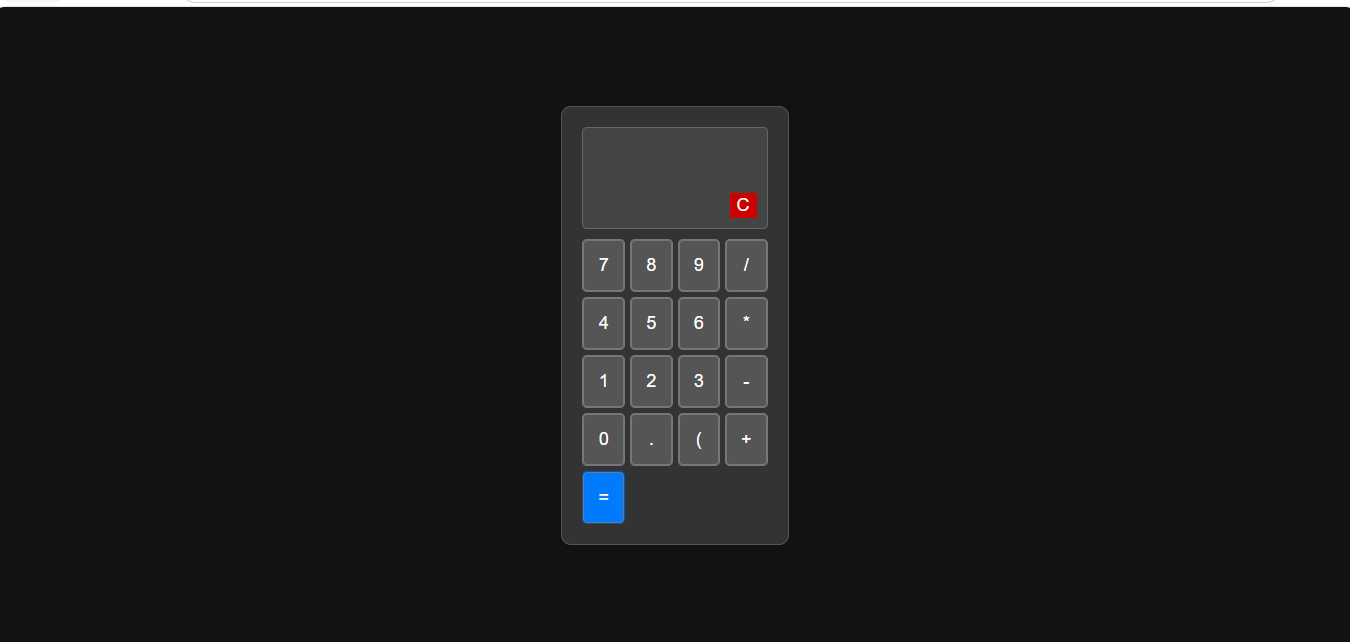
                          @א.מ.ד. היי הוא עשה את זה מדוייק כמו שלך...
                          מחשבון.zip
                          הכפתורים לא במיקום שלהם...


                          2e6d7603-b756-4db5-a972-6f3330cf2543-image.png

                          https://iosii123212-hub.github.io/ani/

                          א.מ.ד.א תגובה 1 תגובה אחרונה
                          1
                          • CSS 0C CSS 0

                            @א.מ.ד. היי הוא עשה את זה מדוייק כמו שלך...
                            מחשבון.zip
                            הכפתורים לא במיקום שלהם...


                            2e6d7603-b756-4db5-a972-6f3330cf2543-image.png

                            א.מ.ד.א מחובר
                            א.מ.ד.א מחובר
                            א.מ.ד.
                            מדריכים
                            כתב נערך לאחרונה על ידי
                            #90

                            @CSS-0 איזה מוזר, איך שניהם הגיעו לאותה טעות בקוד, עם אותו עיצוב? הבאת לו את הקוד שלי? באנגלית?

                            מפתח אפליקציות אנדרואיד ויישומי ומודלי AI

                            CSS 0C תגובה 1 תגובה אחרונה
                            0
                            • א.מ.ד.א א.מ.ד.

                              @CSS-0 איזה מוזר, איך שניהם הגיעו לאותה טעות בקוד, עם אותו עיצוב? הבאת לו את הקוד שלי? באנגלית?

                              CSS 0C מחובר
                              CSS 0C מחובר
                              CSS 0
                              מדריכים
                              כתב נערך לאחרונה על ידי
                              #91

                              @א.מ.ד. הבאתי לו את הפורמט שאמרת לי להביא לו...

                              https://iosii123212-hub.github.io/ani/

                              א.מ.ד.א תגובה 1 תגובה אחרונה
                              0
                              • CSS 0C CSS 0

                                @א.מ.ד. הבאתי לו את הפורמט שאמרת לי להביא לו...

                                א.מ.ד.א מחובר
                                א.מ.ד.א מחובר
                                א.מ.ד.
                                מדריכים
                                כתב נערך לאחרונה על ידי
                                #92

                                @CSS-0 מוזר.. תנסה שוב בצ'אט חדש עם הפרומפט הנ"ל

                                מפתח אפליקציות אנדרואיד ויישומי ומודלי AI

                                CSS 0C 2 תגובות תגובה אחרונה
                                0
                                • א.מ.ד.א א.מ.ד.

                                  @CSS-0 מוזר.. תנסה שוב בצ'אט חדש עם הפרומפט הנ"ל

                                  CSS 0C מחובר
                                  CSS 0C מחובר
                                  CSS 0
                                  מדריכים
                                  כתב נערך לאחרונה על ידי
                                  #93

                                  @א.מ.ד. יקח קצת זמן... (שיניתי קצת מהפורמט כדי שיעשה את זה HTML יחיד אז זה הפורמט שהכנסתי לו:

                                  Create a fully functional calculator HTML file for me, with a beautiful and up-to-date design with rounded corners. Keep the design clean and tidy, similar to Material Design. Pay attention to the arrangement of the buttons, so that it looks like a real calculator, and do everything in a single HTML that contains the css html and js, make a very modern and cool design.
                                  

                                  https://iosii123212-hub.github.io/ani/

                                  CSS 0C תגובה 1 תגובה אחרונה
                                  1
                                  • CSS 0C CSS 0

                                    @א.מ.ד. יקח קצת זמן... (שיניתי קצת מהפורמט כדי שיעשה את זה HTML יחיד אז זה הפורמט שהכנסתי לו:

                                    Create a fully functional calculator HTML file for me, with a beautiful and up-to-date design with rounded corners. Keep the design clean and tidy, similar to Material Design. Pay attention to the arrangement of the buttons, so that it looks like a real calculator, and do everything in a single HTML that contains the css html and js, make a very modern and cool design.
                                    
                                    CSS 0C מחובר
                                    CSS 0C מחובר
                                    CSS 0
                                    מדריכים
                                    כתב נערך לאחרונה על ידי
                                    #94

                                    הוא מתעקש לעשות את זה בקבצים שונים...

                                    https://iosii123212-hub.github.io/ani/

                                    תגובה 1 תגובה אחרונה
                                    1
                                    • א.מ.ד.א א.מ.ד.

                                      @CSS-0 מוזר.. תנסה שוב בצ'אט חדש עם הפרומפט הנ"ל

                                      CSS 0C מחובר
                                      CSS 0C מחובר
                                      CSS 0
                                      מדריכים
                                      כתב נערך לאחרונה על ידי
                                      #95

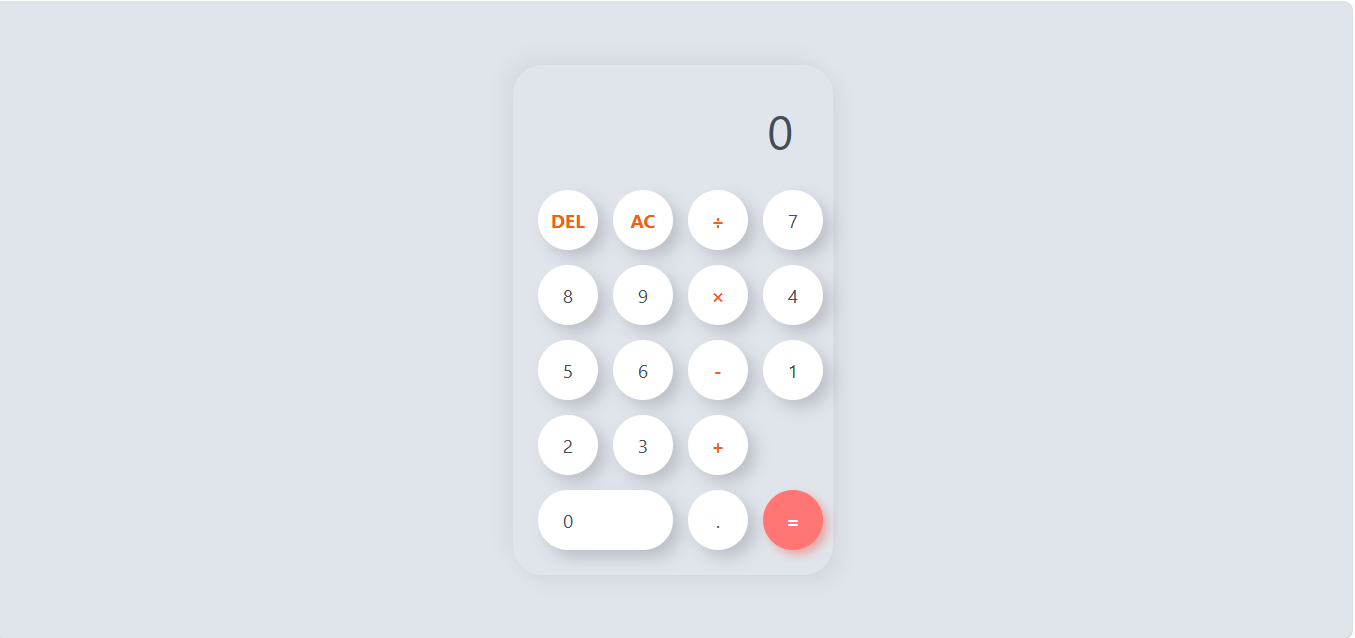
                                      @א.מ.ד. הוא עשה עכשיו כפתורים תקינים וקוד יחסית תקין, רק שהעיצוב נוראי..

                                      מחשבון 2.zip
                                      9ccf6349-94fb-4c76-8a07-4bf3d651cb80-image.png

                                      https://iosii123212-hub.github.io/ani/

                                      תגובה 1 תגובה אחרונה
                                      0
                                      • דוד משה 1ד מנותק
                                        דוד משה 1ד מנותק
                                        דוד משה 1
                                        כתב נערך לאחרונה על ידי דוד משה 1
                                        #96

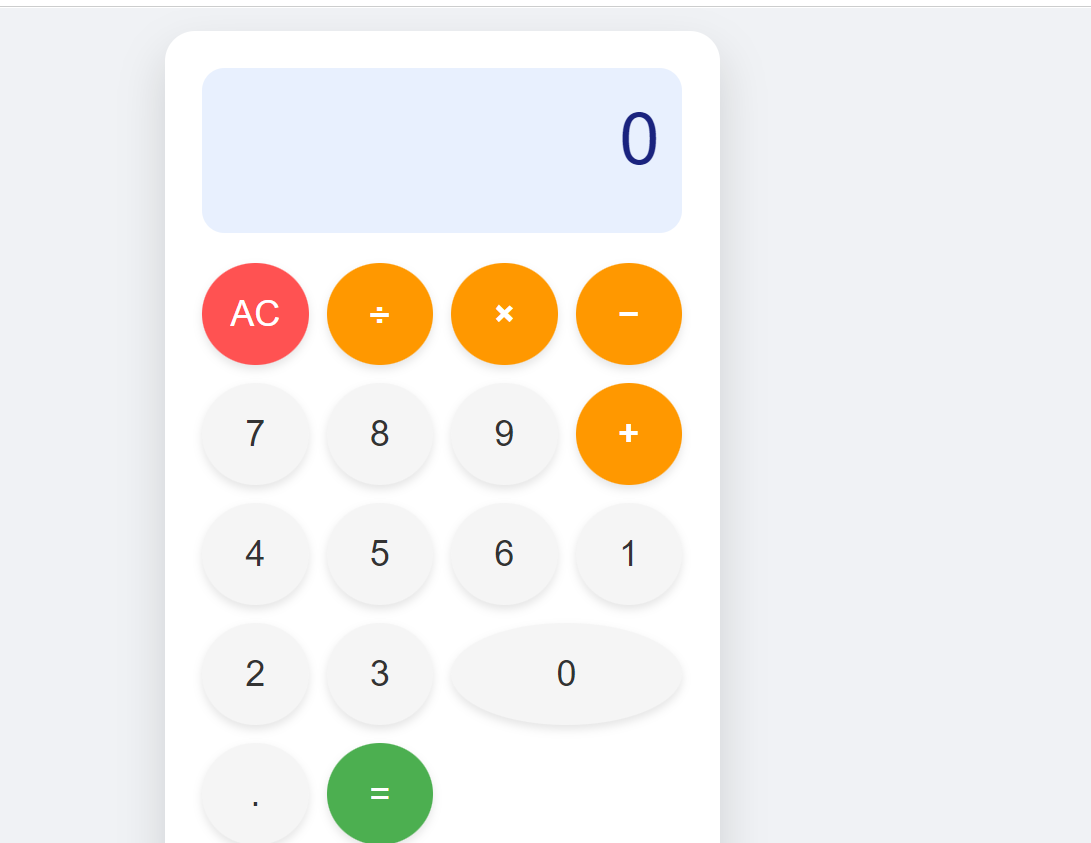
                                        הבאתי לגמאה 4

                                        bd16193b-a343-45d2-9700-e46d57604205-image.png

                                        <!DOCTYPE html>
                                        <html lang="en">
                                        <head>
                                            <meta charset="UTF-8">
                                            <meta name="viewport" content="width=device-width, initial-scale=1.0">
                                            <title>Modern Calculator</title>
                                            <style>
                                                /* Global Reset and Body Styling */
                                                body {
                                                    display: flex;
                                                    justify-content: center;
                                                    align-items: center;
                                                    min-height: 100vh;
                                                    margin: 0;
                                                    background-color: #f0f2f5; /* Light grey background for a modern feel */
                                                    font-family: 'Roboto', sans-serif; /* Using a clean, modern font stack */
                                                }
                                        
                                                /* Calculator Container Styling (The main card) */
                                                .calculator {
                                                    background-color: #ffffff;
                                                    border-radius: 20px; /* Large rounded corners for the whole unit */
                                                    box-shadow: 0 15px 30px rgba(0, 0, 0, 0.15); /* Soft shadow like Material Design elevation */
                                                    width: 320px;
                                                    padding: 25px;
                                                }
                                        
                                                /* Display Screen Styling */
                                                #display {
                                                    background-color: #e8f0fe; /* Very light blue/blue tint for the display area */
                                                    color: #1a237e; /* Deep indigo color for text */
                                                    font-size: 3em;
                                                    padding: 20px 15px;
                                                    text-align: right;
                                                    border-radius: 15px; /* Rounded corners on the display area */
                                                    margin-bottom: 20px;
                                                    overflow: hidden;
                                                    height: 70px;
                                                    white-space: nowrap; /* Prevent numbers from wrapping */
                                                }
                                        
                                                /* Button Grid Layout */
                                                .buttons {
                                                    display: grid;
                                                    grid-template-columns: repeat(4, 1fr); /* Four equal columns */
                                                    gap: 12px; /* Spacing between buttons */
                                                }
                                        
                                                /* Base Button Styling */
                                                button {
                                                    border: none;
                                                    padding: 20px 0;
                                                    font-size: 1.5em;
                                                    cursor: pointer;
                                                    border-radius: 50%; /* Makes the button perfectly round when square */
                                                    transition: background-color 0.2s ease, transform 0.1s ease;
                                                    box-shadow: 0 3px 6px rgba(0, 0, 0, 0.1); /* Subtle shadow for depth */
                                                }
                                        
                                                /* Specific Styling for Number/Operator Buttons (Default look) */
                                                button:not(.operator):not(.clear):not(.equals) {
                                                    background-color: #f5f5f5; /* Light grey background */
                                                    color: #333;
                                                }
                                        
                                                button:hover:not(.operator):not(.clear):not(.equals) {
                                                    background-color: #eeeeee;
                                                }
                                        
                                                /* Styling for Operator Buttons (+, -, *, /) - Highlighting interaction */
                                                .operator {
                                                    background-color: #ff9800; /* Amber/Orange color for operations */
                                                    color: white;
                                                    font-weight: bold;
                                                }
                                        
                                                .operator:hover {
                                                    background-color: #fb8c00;
                                                }
                                        
                                                /* Styling for Clear and AC buttons - Distinctive look */
                                                .clear {
                                                    background-color: #ff5252; /* Reddish color for clear/delete */
                                                    color: white;
                                                }
                                        
                                                .clear:hover {
                                                    background-color: #e53935;
                                                }
                                        
                                                /* Styling for the Equals button - Primary action highlight */
                                                .equals {
                                                    background-color: #4caf50; /* Green color for equals */
                                                    color: white;
                                                    grid-column: span 1; /* Ensures it takes one spot */
                                                }
                                                
                                                .equals:hover {
                                                    background-color: #388e3c;
                                                }
                                        
                                                /* State when the button is pressed (Active state) */
                                                button:active {
                                                    transform: scale(0.95); /* Slight press down effect */
                                                    box-shadow: 0 1px 2px rgba(0, 0, 0, 0.1);
                                                }
                                        
                                                /* Adjusting grid for specific button sizes if needed (though not strictly necessary here) */
                                                button[data-value="0"] {
                                                     grid-column: span 1; /* Ensure zero spans one column */
                                                }
                                        
                                        
                                            </style>
                                        </head>
                                        <body>
                                        
                                            <div class="calculator">
                                                <!-- Display Screen -->
                                                <div id="display">0</div>
                                        
                                                <!-- Buttons Grid -->
                                                <div class="buttons">
                                                    <!-- Row 1 -->
                                                    <button class="clear" data-action="AC">AC</button>
                                                    <button class="operator" data-value="/">÷</button>
                                                    <button class="operator" data-value="*">×</button>
                                                    <button class="operator" data-value="-">−</button>
                                        
                                                    <!-- Row 2 -->
                                                    <button data-value="7">7</button>
                                                    <button data-value="8">8</button>
                                                    <button data-value="9">9</button>
                                                    <button class="operator" data-value="+">+</button>
                                        
                                                    <!-- Row 3 -->
                                                    <button data-value="4">4</button>
                                                    <button data-value="5">5</button>
                                                    <button data-value="6">6</button>
                                                    <!-- The plus sign in row 2 is replaced by a button that spans two rows if we wanted, but here we stick to standard layout -->
                                        
                                                    <!-- Row 4 -->
                                                    <button data-value="1">1</button>
                                                    <button data-value="2">2</button>
                                                    <button data-value="3">3</button>
                                                    <!-- We use the space below for the equals button and zero layout logic -->
                                        
                                                    <!-- Row 5 (Adjusting for better flow, we'll place 0 and = in the last row) -->
                                                    <button data-value="0" style="grid-column: span 2;">0</button>
                                                    <button data-value=".">.</button>
                                                    <button class="equals" data-action="calculate">=</button>
                                                </div>
                                            </div>
                                        
                                            <script>
                                                const display = document.getElementById('display');
                                                const buttons = document.querySelector('.buttons');
                                        
                                                let currentInput = '0';
                                                let firstOperand = null;
                                                let operator = null;
                                                let waitingForSecondOperand = false;
                                        
                                                // Function to update the display element
                                                function updateDisplay() {
                                                    display.textContent = currentInput;
                                                }
                                        
                                                // Core calculation logic function
                                                async function calculate(first, second, op) {
                                                    const num1 = parseFloat(first);
                                                    const num2 = parseFloat(second);
                                        
                                                    if (op === '+') return num1 + num2;
                                                    if (op === '-') return num1 - num2;
                                                    if (op === '*') return num1 * num2;
                                                    if (op === '/') {
                                                        if (num2 === 0) {
                                                            return 'Error: Div by zero';
                                                        }
                                                        return num1 / num2;
                                                    }
                                                    return num2; // Should not happen if logic is correct
                                                }
                                        
                                        
                                                // Event listener for button clicks
                                                buttons.addEventListener('click', (event) => {
                                                    const target = event.target;
                                                    if (!target.matches('button')) return;
                                        
                                                    const value = target.dataset.value;
                                                    const action = target.dataset.action;
                                        
                                                    // 1. Handle Number/Decimal Input
                                                    if (value !== undefined && !isNaN(parseFloat(value))) {
                                                        if (waitingForSecondOperand === true) {
                                                            // Start a new number after an operation was pressed
                                                            currentInput = value;
                                                            waitingForSecondOperand = false;
                                                        } else {
                                                            // Standard digit entry
                                                            if (currentInput === '0' && value !== '.') {
                                                                currentInput = value; // Replace initial zero
                                                            } else if (value === '.' && currentInput.includes('.')) {
                                                                return; // Prevent multiple decimals
                                                            } else {
                                                                currentInput += value;
                                                            }
                                                        }
                                                        updateDisplay();
                                                    } 
                                                    // 2. Handle Operators (+, -, *, /)
                                                    else if (value !== undefined && ['+', '-', '*', '/'].includes(value)) {
                                                        const inputValue = parseFloat(currentInput);
                                        
                                                        if (operator && waitingForSecondOperand) {
                                                            // If an operator was pressed immediately after another one, just change the operator
                                                            operator = value;
                                                            return;
                                                        }
                                        
                                                        if (firstOperand === null) {
                                                            // First operand is being set
                                                            firstOperand = inputValue;
                                                        } else if (operator) {
                                                            // Perform calculation with the current input as the second operand
                                                            const result = await calculate(firstOperand, inputValue, operator);
                                                            currentInput = String(result).substring(0, 12); // Limit length for display
                                                            firstOperand = parseFloat(currentInput);
                                                            updateDisplay();
                                                        }
                                        
                                                        // Set up for the next calculation step
                                                        operator = value;
                                                        waitingForSecondOperand = true;
                                                    } 
                                                    // 3. Handle Equals (=)
                                                    else if (action === 'calculate') {
                                                        if (firstOperand === null || operator === null) return; // Do nothing if incomplete
                                        
                                                        const secondOperand = waitingForSecondOperand ? parseFloat(currentInput) : firstOperand;
                                                        
                                                        const result = await calculate(firstOperand, secondOperand, operator);
                                                        
                                                        currentInput = String(result).substring(0, 12);
                                                        firstOperand = null; // Reset state after calculation
                                                        operator = null;
                                                        waitingForSecondOperand = false;
                                                        updateDisplay();
                                                    }
                                                    // 4. Handle All Clear (AC)
                                                    else if (action === 'AC') {
                                                        currentInput = '0';
                                                        firstOperand = null;
                                                        operator = null;
                                                        waitingForSecondOperand = false;
                                                        updateDisplay();
                                                    }
                                                });
                                        
                                                // Initialize display on load
                                                updateDisplay();
                                            </script>
                                        
                                        </body>
                                        </html>


                                        בתכלס לא עובד

                                        תגובה 1 תגובה אחרונה
                                        0
                                        • א.מ.ד.א מחובר
                                          א.מ.ד.א מחובר
                                          א.מ.ד.
                                          מדריכים
                                          כתב נערך לאחרונה על ידי א.מ.ד.
                                          #97

                                          ביקשתי מ-QWEN שיתקן את הקוד הקודם, והנה התוצאה, עובד כמו שצריך!
                                          הזוי שזה כולה מודל 4B...
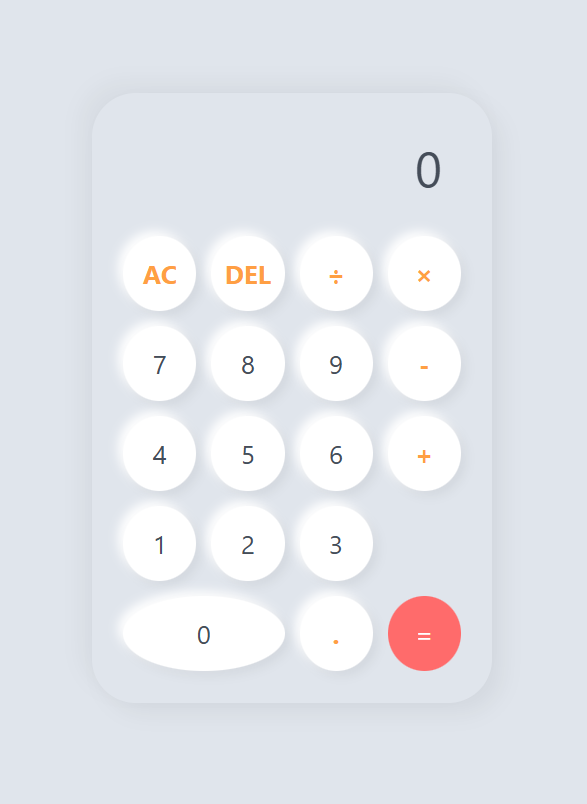
                                          916fd761-88c3-4cb7-840f-9f7e51059370-image.png

                                          <!DOCTYPE html>
                                          <html lang="en">
                                          <head>
                                              <meta charset="UTF-8">
                                              <meta name="viewport" content="width=device-width, initial-scale=1.0">
                                              <title>Perfect Calculator</title>
                                              <style>
                                                  /* --- CSS STYLES --- */
                                                  
                                                  :root {
                                                      --bg-color: #e0e5ec;
                                                      --cal-bg: #e0e5ec;
                                                      --btn-bg: #ffffff;
                                                      --btn-shadow: #ffffff;
                                                      --operator-color: #ff9f43; /* Nice Orange/Pink */
                                                      --equals-bg: #ff6b6b;      /* Soft Red */
                                                  }
                                          
                                                  * {
                                                      box-sizing: border-box;
                                                      font-family: 'Segoe UI', Roboto, Helvetica, Arial, sans-serif;
                                                  }
                                          
                                                  body {
                                                      background-color: var(--bg-color);
                                                      display: flex;
                                                      justify-content: center;
                                                      align-items: center;
                                                      min-height: 100vh;
                                                      margin: 0;
                                                  }
                                          
                                                  .calculator {
                                                      background-color: var(--cal-bg);
                                                      padding: 25px;
                                                      border-radius: 35px; /* Rounded Container */
                                                      box-shadow: 9px 9px 16px rgba(0, 0, 0, 0.05),
                                                                  -9px -9px 16px rgba(0, 0, 0, 0.04);
                                                      width: 320px; /* Fixed width */
                                                  }
                                          
                                                  .display {
                                                      width: 100%;
                                                      height: 70px;
                                                      margin-bottom: 20px;
                                                      border: none;
                                                      text-align: right;
                                                      padding-right: 15px;
                                                      font-size: 2.5rem; /* Adjusted size */
                                                      color: #454d59;
                                                      outline: none;
                                                      background: transparent;
                                                  }
                                          
                                                  /* Key Grid - This is the fix for layout alignment */
                                                  .buttons {
                                                      display: grid;
                                                      grid-template-columns: repeat(4, 1fr); /* Creates 4 equal columns */
                                                      gap: 12px; /* Space between buttons */
                                                      width: 100%;
                                                  }
                                          
                                                  /* Button Styling - Rounded Pills */
                                                  button {
                                                      border: none;
                                                      background-color: var(--btn-bg);
                                                      color: #454d59;
                                                      height: 60px; /* Fixed height for uniformity */
                                                      width: 100%; /* Takes up the grid column width */
                                                      border-radius: 50%; /* Circular buttons, or change to 25px for pill shape */
                                                      font-size: 1.3rem;
                                                      box-shadow: 4px 4px 8px rgba(0, 0, 0, 0.06), -4px -4px 8px rgba(255, 255, 255, 1); /* Inner highlight */
                                                      cursor: pointer;
                                                      transition: transform 0.1s ease, box-shadow 0.1s ease;
                                                      display: flex;
                                                      justify-content: center; /* Centers text */
                                                      align-items: center;
                                                  }
                                          
                                                  button:hover {
                                                      transform: scale(0.95);
                                                      box-shadow: inset 2px 2px 5px rgba(0,0,0,0.1);
                                                  }
                                          
                                                  button:active {
                                                      transform: scale(0.96);
                                                  }
                                          
                                                  /* Operators Styling */
                                                  button.operator {
                                                      color: var(--operator-color);
                                                      font-weight: bold;
                                                  }
                                          
                                                  .equals-btn {
                                                      background-color: var(--equals-bg);
                                                      color: white;
                                                      box-shadow: none;
                                                  }
                                                  
                                                  .zero-btn {
                                                      grid-column: span 2; /* The Zero button is now exactly twice the width of others */
                                                  }
                                          
                                              </style>
                                          </head>
                                          <body>
                                          
                                              <div class="calculator">
                                                  <!-- Display Screen -->
                                                  <input type="text" class="display" id="display" value="0" readonly>
                                                  
                                                  <!-- Keypad - 4 Columns x 5 Rows (Standard Layout) -->
                                                  <div class="buttons">
                                                      <!-- Row 1: AC, DEL, /, * -->
                                                      <button class="operator" onclick="clearDisplay()">AC</button>
                                                      <button class="operator" onclick="deleteNumber()">DEL</button>
                                                      <button class="operator" onclick="appendOperator('/')">÷</button>
                                                      <button class="operator" onclick="appendOperator('*')">×</button>
                                          
                                                      <!-- Row 2: 7, 8, 9, - -->
                                                      <button onclick="appendNumber('7')">7</button>
                                                      <button onclick="appendNumber('8')">8</button>
                                                      <button onclick="appendNumber('9')">9</button>
                                                      <button class="operator" onclick="appendOperator('-')">-</button>
                                          
                                                      <!-- Row 3: 4, 5, 6, + -->
                                                      <button onclick="appendNumber('4')">4</button>
                                                      <button onclick="appendNumber('5')">5</button>
                                                      <button onclick="appendNumber('6')">6</button>
                                                      <button class="operator" onclick="appendOperator('+')">+</button>
                                          
                                                      <!-- Row 4: 1, 2, 3, = (Spans two rows vertically in some designs, here we keep standard) -->
                                                      <button onclick="appendNumber('1')">1</button>
                                                      <button onclick="appendNumber('2')">2</button>
                                                      <button onclick="appendNumber('3')">3</button>
                                                      
                                                      <!-- The Equals button spans 2 rows vertically and 1 column horizontally, or sits in a separate area? 
                                                           Let's stick to a clean grid. Standard is = at bottom right. 
                                                           To fix layout alignment perfectly: I will add a spacer row for the equals button -->
                                                      
                                                      <!-- Row 5 Spacer/Equals -->
                                                      <button onclick="appendNumber('0')" class="zero-btn">0</button>
                                                      <button class="operator" onclick="appendDecimal()">.</button>
                                                      <button class="equals-btn" onclick="calculateResult()">=</button>
                                                  </div>
                                              </div>
                                          
                                              <script>
                                                  const display = document.getElementById('display');
                                          
                                                  // Appends a number
                                                  function appendNumber(number) {
                                                      if (display.value === '0' || display.value === 'Error') {
                                                          display.value = number;
                                                      } else {
                                                          display.value += number;
                                                      }
                                                  }
                                          
                                                  // Append operator
                                                  function appendOperator(operator) {
                                                      const lastChar = display.value.slice(-1);
                                                      if (['+', '-', '*', '/'].includes(lastChar)) return;
                                                      display.value += operator;
                                                  }
                                          
                                                  // Calculate Result
                                                  function calculateResult() {
                                                      try {
                                                          let expression = display.value;
                                                          if(expression === "") return;
                                                          
                                                          // Safety check for empty calculation like just "="
                                                          if(expression.split('').every(c => c === '0')) return;
                                          
                                                          let result = new Function('return ' + expression)(); 
                                          
                                                          // Round to avoid floating point errors
                                                          result = Math.round(result * 100000000) / 100000000; 
                                                          
                                                          display.value = result;
                                                      } catch (error) {
                                                          display.value = "Error";
                                                      }
                                                  }
                                          
                                                  // Clear all
                                                  function clearDisplay() {
                                                      display.value = '0';
                                                  }
                                          
                                                  // Delete last char
                                                  function deleteNumber() {
                                                      if(display.value === 'Error' || display.value === 'AC') {
                                                          return;
                                                      }
                                                      
                                                      const val = display.value.slice(0, -1);
                                                      display.value = val === '' ? '0' : val;
                                                  }
                                          
                                                  // Append decimal
                                                  function appendDecimal() {
                                                      if (display.value === 'Error') {
                                                          display.value = '.';
                                                          return;
                                                      }
                                                      
                                                      if (!display.value.includes('.')) {
                                                          display.value += '.';
                                                      }
                                                  }
                                              </script>
                                          </body>
                                          </html>


                                          מפתח אפליקציות אנדרואיד ויישומי ומודלי AI

                                          חובבן מקצועיח תגובה 1 תגובה אחרונה
                                          0

                                          שלום! נראה שהשיחה הזו מעניינת אותך, אבל עדיין אין לך חשבון.

                                          נמאס לכם לגלול בין אותם הפוסטים בכל ביקור? כשנרשמים לחשבון, תמיד תחזרו בדיוק למקום שבו הייתם קודם, ותוכלו לבחור לקבל התראות על תגובות חדשות (בין אם במייל, ובין אם בהתראת פוש). תוכלו גם לשמור סימניות ולפרגן ב-upvote לפוסטים כדי להביע הערכה לחברי קהילה אחרים.

                                          בעזרת התרומה שלך, הפוסט הזה יכול להיות אפילו טוב יותר 💗

                                          הרשמה התחברות

                                          • התחברות

                                          • אין לך חשבון עדיין? הרשמה

                                          • התחברו או הירשמו כדי לחפש.
                                          • פוסט ראשון
                                            פוסט אחרון
                                          0
                                          • חוקי הפורום
                                          • פופולרי
                                          • לא נפתר
                                          • משתמשים
                                          • חיפוש גוגל בפורום
                                          • צור קשר