
הסבר | סדר במודלים החינמיים של Gemini...
-
@א.מ.ד. יש לך מושג למה כשאני מבצע קריאה ל-Gemini 3 - זו התשובה שאני מקבל?:
{
  "error": {
    "code": 429,
    "message": "You exceeded your current quota, please check your plan and billing details. For more information on this error, head to: https://ai.google.dev/gemini-api/docs/rate-limits. To monitor your current usage, head to: https://ai.dev/rate-limit. ",
    "status": "RESOURCE_EXHAUSTED",
    "details": [
      {
        "@type": "type.googleapis.com/google.rpc.Help",
        "links": [
          {
            "description": "Learn more about Gemini API quotas",
            "url": "https://ai.google.dev/gemini-api/docs/rate-limits"
          }
        ]
      }
    ]
  }
}
למרות שמעולם לא נגעתי ב-API של המודל הזה עד עכשיו.
ומה שיותר מוזר זה שהבעיה הזו קורית רק בפנייה מהשרת, כשאני פונה מפוסטמן חוזרת תשובה תקנית.
ובנוסף לכך, משהו מאוד מוזר בשגיאת ה-429 הזו, אין שום פירוט של המגבלה או משהו בשונה ממגבלות של דקה או יום שחוזרת שגיאה כזו:
{ "error": { "code": 429, "message": "You exceeded your current quota, please check your plan and billing details. For more information on this error, head to: https://ai.google.dev/gemini-api/docs/rate-limits. To monitor your current usage, head to: https://ai.dev/rate-limit. \n* Quota exceeded for metric: generativelanguage.googleapis.com/generate_content_free_tier_requests, limit: 5, model: gemini-3-flash\nPlease retry in 19.125333688s.", "status": "RESOURCE_EXHAUSTED", "details": [ { "@type": "type.googleapis.com/google.rpc.Help", "links": [ { "description": "Learn more about Gemini API quotas", "url": "https://ai.google.dev/gemini-api/docs/rate-limits" } ] }, { "@type": "type.googleapis.com/google.rpc.QuotaFailure", "violations": [ { "quotaMetric": "generativelanguage.googleapis.com/generate_content_free_tier_requests", "quotaId": "GenerateRequestsPerMinutePerProjectPerModel-FreeTier", "quotaDimensions": { "location": "global", "model": "gemini-3-flash" }, "quotaValue": "5" } ] }, { "@type": "type.googleapis.com/google.rpc.RetryInfo", "retryDelay": "19s" } ] } } -
@א.מ.ד. יש לך מושג למה כשאני מבצע קריאה ל-Gemini 3 - זו התשובה שאני מקבל?:
{
  "error": {
    "code": 429,
    "message": "You exceeded your current quota, please check your plan and billing details. For more information on this error, head to: https://ai.google.dev/gemini-api/docs/rate-limits. To monitor your current usage, head to: https://ai.dev/rate-limit. ",
    "status": "RESOURCE_EXHAUSTED",
    "details": [
      {
        "@type": "type.googleapis.com/google.rpc.Help",
        "links": [
          {
            "description": "Learn more about Gemini API quotas",
            "url": "https://ai.google.dev/gemini-api/docs/rate-limits"
          }
        ]
      }
    ]
  }
}
למרות שמעולם לא נגעתי ב-API של המודל הזה עד עכשיו.
ומה שיותר מוזר זה שהבעיה הזו קורית רק בפנייה מהשרת, כשאני פונה מפוסטמן חוזרת תשובה תקנית.
ובנוסף לכך, משהו מאוד מוזר בשגיאת ה-429 הזו, אין שום פירוט של המגבלה או משהו בשונה ממגבלות של דקה או יום שחוזרת שגיאה כזו:
{ "error": { "code": 429, "message": "You exceeded your current quota, please check your plan and billing details. For more information on this error, head to: https://ai.google.dev/gemini-api/docs/rate-limits. To monitor your current usage, head to: https://ai.dev/rate-limit. \n* Quota exceeded for metric: generativelanguage.googleapis.com/generate_content_free_tier_requests, limit: 5, model: gemini-3-flash\nPlease retry in 19.125333688s.", "status": "RESOURCE_EXHAUSTED", "details": [ { "@type": "type.googleapis.com/google.rpc.Help", "links": [ { "description": "Learn more about Gemini API quotas", "url": "https://ai.google.dev/gemini-api/docs/rate-limits" } ] }, { "@type": "type.googleapis.com/google.rpc.QuotaFailure", "violations": [ { "quotaMetric": "generativelanguage.googleapis.com/generate_content_free_tier_requests", "quotaId": "GenerateRequestsPerMinutePerProjectPerModel-FreeTier", "quotaDimensions": { "location": "global", "model": "gemini-3-flash" }, "quotaValue": "5" } ] }, { "@type": "type.googleapis.com/google.rpc.RetryInfo", "retryDelay": "19s" } ] } }תנסה עם הקוד הזה? עדיין אותה שגיאה עולה לך?! (שים לב, לשנות את הAPI)
import requests API_KEY = "הכנס כאן את המפתח" URL = f"https://generativelanguage.googleapis.com/v1beta/models/gemini-3-flash-preview:generateContent?key={API_KEY}" def ask(text): # מבנה הבקשה לפי הפרוטוקול של Gemini payload = {"contents": [{"parts": [{"text": text}]}]} # שליחת הבקשה ופענוח ה-JSON res = requests.post(URL, json=payload).json() # שליפת התשובה הטקסטואלית מהמבנה return res['candidates'][0]['content']['parts'][0]['text'] print(ask("מה המצב?"))לכאורה זה לא מוסיף לך הרבה, כי כפי שאמרת זה כן רץ לך במקומי, אבל בכל זאת, לך תדע, הקוד שהבאתי הוא כמעט הכי מינימאלי כדי לשאול שאלה את גמיני בAPI..
-
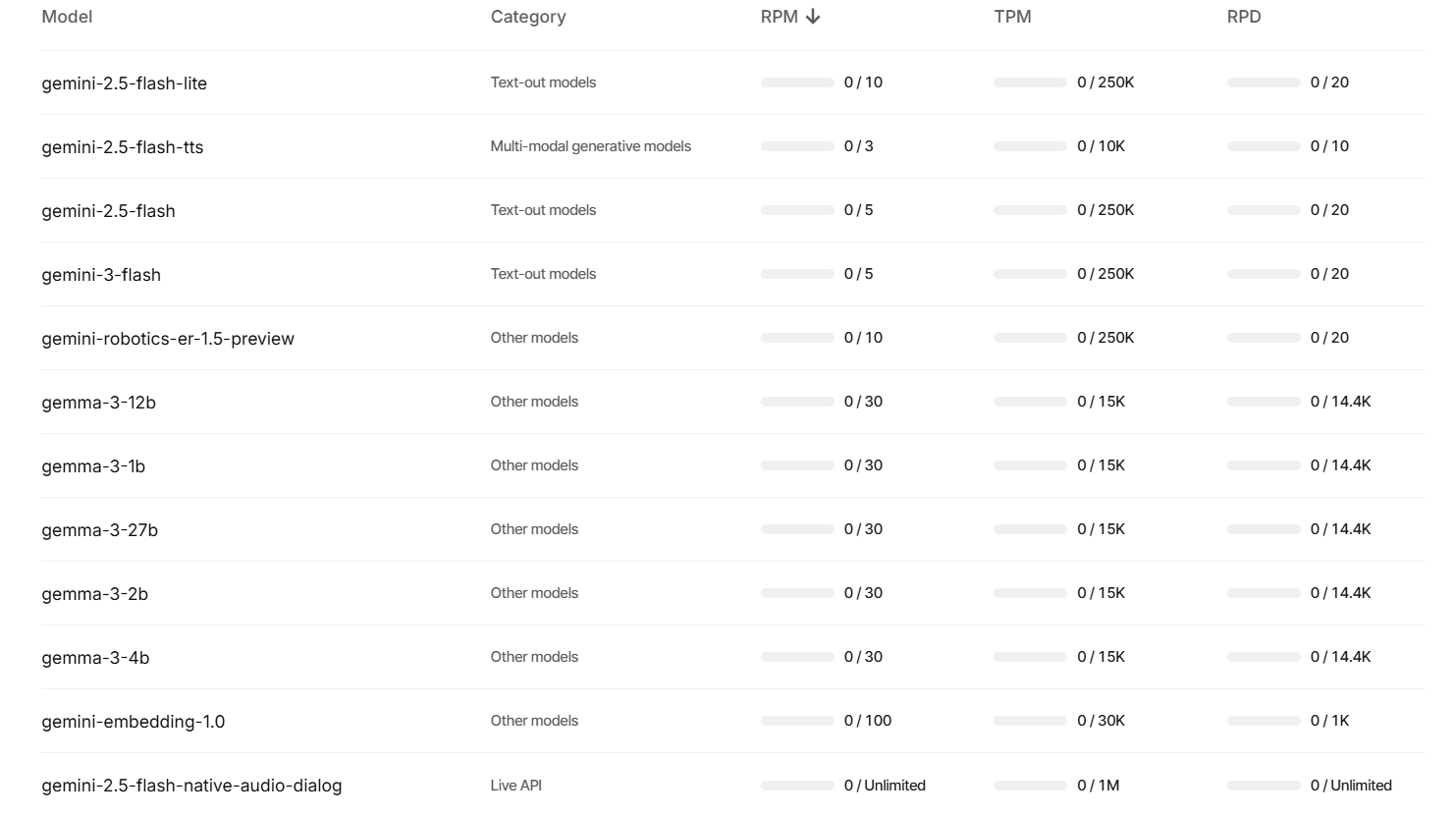
ראיתי בכמה נושאים בפורום שיש אי סדר לגבי המודלים הזמינים בחינם ב-API של Gemini, אז הנה טבלה מפורטת של מגבלות הקצב של המודלים השונים של גוגל (הזמינים בחינם בלבד!).
העמודה הראשונה מימין (RPD) זה מספר בקשות ליום, העמודה אחריה (TPM) זה מספר טוקנים לדקה (בד"כ פחות רלוונטי), והעמודה אחריה (RPM) זה מספר בקשות לדקה.
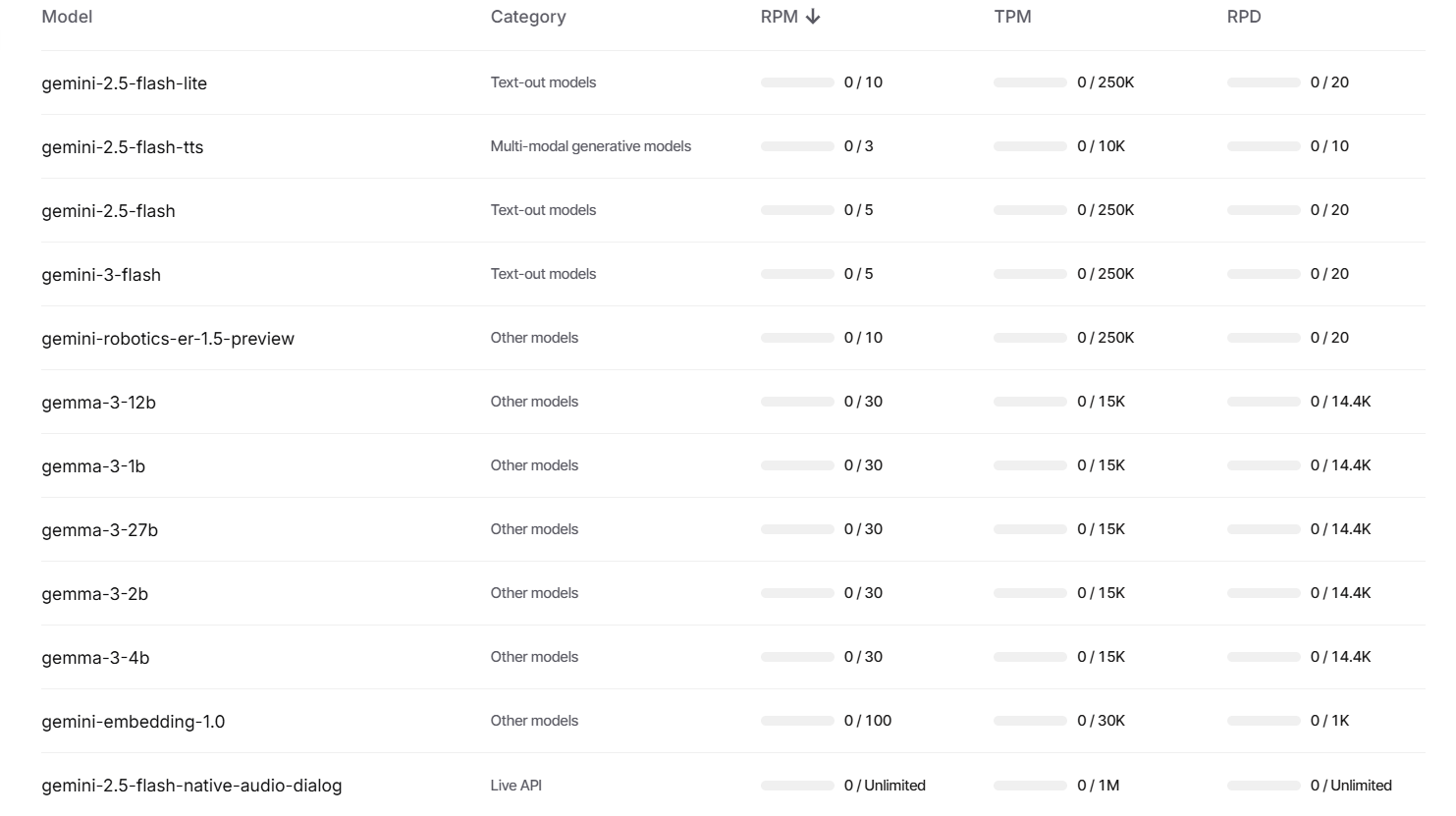
ניתן לעקוב כאן אחרי התקדמות המימוש של המודלים על ידיכם.
@א.מ.ד. אשמח אם תכתוב גם מה השמות שצריך לכתוב בקוד כדי שזה יעבוד.. (לדוגמה שצריך לכתוב preview אחרי gemini-3-flash)
-
תנסה עם הקוד הזה? עדיין אותה שגיאה עולה לך?! (שים לב, לשנות את הAPI)
import requests API_KEY = "הכנס כאן את המפתח" URL = f"https://generativelanguage.googleapis.com/v1beta/models/gemini-3-flash-preview:generateContent?key={API_KEY}" def ask(text): # מבנה הבקשה לפי הפרוטוקול של Gemini payload = {"contents": [{"parts": [{"text": text}]}]} # שליחת הבקשה ופענוח ה-JSON res = requests.post(URL, json=payload).json() # שליפת התשובה הטקסטואלית מהמבנה return res['candidates'][0]['content']['parts'][0]['text'] print(ask("מה המצב?"))לכאורה זה לא מוסיף לך הרבה, כי כפי שאמרת זה כן רץ לך במקומי, אבל בכל זאת, לך תדע, הקוד שהבאתי הוא כמעט הכי מינימאלי כדי לשאול שאלה את גמיני בAPI..
-
@חובבן-מקצועי אני טמבל?!
הקוד שלי עבד מצויין עם
gemini-2.5-flash, התחיל לעשות בעיות רק עםgemini-3-flash-preview
@א.מ.ד. אין סיכוי, קובץ שמע של 3 שניות באיכות נמוכה והוראות מערכת של 118 שורות.
-
ראיתי בכמה נושאים בפורום שיש אי סדר לגבי המודלים הזמינים בחינם ב-API של Gemini, אז הנה טבלה מפורטת של מגבלות הקצב של המודלים השונים של גוגל (הזמינים בחינם בלבד!).
העמודה הראשונה מימין (RPD) זה מספר בקשות ליום, העמודה אחריה (TPM) זה מספר טוקנים לדקה (בד"כ פחות רלוונטי), והעמודה אחריה (RPM) זה מספר בקשות לדקה.
ניתן לעקוב כאן אחרי התקדמות המימוש של המודלים על ידיכם.
-
@א.מ.ד. מה השם של גאממה 3 27 B לשימוש בAPI?
-
@CUBASE אולי פשוט תעלה את הקוד של הבקשה? ייתכן ששילבת כלי כלשהו שזמין רק בתשלום.
אגב, 118 שורות מערכת פלוס הבקשה עצמה יכול איכשהו להגיע למיליון טוקנים. תנסה להסיר את שורות המערכת ולבצע בקשת טקסט-לטקסט פשוטה ותראה אם יש תגובה מה-api. -
@א.מ.ד. התברר שהבעיה היתה בכלי googleSearch שאינו זמין בג׳מיני 3 בשכבה החינמית, באסה..
יש לך פתרון אחר לשילוב חיפוש באינטרנט אפי' לא של גוגל? (לכאו' ע"י הפעלת פונקציה, השאלה מה?)
@CUBASE חשדתי שזו היתה הבעיה. תראה לפני כמה פוסטים.
מה שאני עשיתי בעבר זה לעשות סוכן חיפוש עם כמה שכבות - בשלב ראשון המודל מקבל את כל ההקשר עם קריאה לפונקציה של חיפוש עם ארגומנט של מחרוזת החיפוש, ואז לשלוח בקשה ל-api של חיפוש גוגל מותאם אישית מוגבל ל-5 תוצאות, ולהריץ גרידת אתר על תוצאת החיפוש הראשונה, ולשלוח אותה שוב למודל עם ההקשר והוראות מערכת מתאימות, שאם תוכן האתר עונה על השאלה - להשיב תשובה סופית, ואם לא - להשיב סימן שזה לא מספיק ואז לגרד את תוצאת החיפוש הבאה וכן הלאה, עד לתוצאה סופית.
התוצאות אמנם לא כמו כלי החיפוש המובנה, אבל סבירות+. לפעמים זה אפילו היה טוב יותר מבחינת הזיות.
למרבה הבאסה, כשסיימתי לבנות את הכלי המורכב הזה עבור הסייען שפיתחתי - סמארטי, גוגל פתחו את כלי החיפוש לשכבה החינמית...
אתה יכול גם להשתמש בג'מיני 2.5 אם זה לא כזה משמעותי. -
@CUBASE חשדתי שזו היתה הבעיה. תראה לפני כמה פוסטים.
מה שאני עשיתי בעבר זה לעשות סוכן חיפוש עם כמה שכבות - בשלב ראשון המודל מקבל את כל ההקשר עם קריאה לפונקציה של חיפוש עם ארגומנט של מחרוזת החיפוש, ואז לשלוח בקשה ל-api של חיפוש גוגל מותאם אישית מוגבל ל-5 תוצאות, ולהריץ גרידת אתר על תוצאת החיפוש הראשונה, ולשלוח אותה שוב למודל עם ההקשר והוראות מערכת מתאימות, שאם תוכן האתר עונה על השאלה - להשיב תשובה סופית, ואם לא - להשיב סימן שזה לא מספיק ואז לגרד את תוצאת החיפוש הבאה וכן הלאה, עד לתוצאה סופית.
התוצאות אמנם לא כמו כלי החיפוש המובנה, אבל סבירות+. לפעמים זה אפילו היה טוב יותר מבחינת הזיות.
למרבה הבאסה, כשסיימתי לבנות את הכלי המורכב הזה עבור הסייען שפיתחתי - סמארטי, גוגל פתחו את כלי החיפוש לשכבה החינמית...
אתה יכול גם להשתמש בג'מיני 2.5 אם זה לא כזה משמעותי.@א.מ.ד. כתב בהסבר | סדר במודלים החינמיים של Gemini...:
גוגל פתחו את כלי החיפוש לשכבה החינמית...
יש אפשרות לקבל בAPI חינמי חיפוש עדכני ברשת?
-
@א.מ.ד. כתב בהסבר | סדר במודלים החינמיים של Gemini...:
גוגל פתחו את כלי החיפוש לשכבה החינמית...
יש אפשרות לקבל בAPI חינמי חיפוש עדכני ברשת?
@חובבן-מקצועי בג'מיני 2.5
-
@חובבן-מקצועי בג'מיני 2.5
-
@א.מ.ד. אם אבקש ממנו לחפש הוא יחפש או שצריך להגדיר משהו כלשהו בבקשה?
@חובבן-מקצועי צריך להוסיף את כלי החיפוש
אם אתה עובד עם התיעוד הרשמי תראה את זה שם -
@חובבן-מקצועי צריך להוסיף את כלי החיפוש
אם אתה עובד עם התיעוד הרשמי תראה את זה שם@א.מ.ד. התיעוד חסום אצלי בסינון (כרגע עם אתרוג, לא יודע מה עם נטפרי כרגע על אתרוג, בהמשך אבדוק גם דרך נטפרי) - אשמח אם תעלה את החלק הספציפי הזה מהתיעוד?
-
@א.מ.ד. התיעוד חסום אצלי בסינון (כרגע עם אתרוג, לא יודע מה עם נטפרי כרגע על אתרוג, בהמשך אבדוק גם דרך נטפרי) - אשמח אם תעלה את החלק הספציפי הזה מהתיעוד?
@חובבן-מקצועי (לא הצלחתי להכניס בספוילר)
Grounding with Google Search connects the Gemini model to real-time web content
and works with all available languages. This allows
Gemini to provide more accurate answers and cite verifiable sources beyond its
knowledge cutoff.Grounding helps you build applications that can:
- Increase factual accuracy: Reduce model hallucinations by basing responses on real-world information.
- Access real-time information: Answer questions about recent events and topics.
- Provide citations: Build user trust by showing the sources for the
model's claims.
Python
from google import genai
from google.genai import types

client = genai.Client()

grounding_tool = types.Tool(
    google_search=types.GoogleSearch()
)

config = types.GenerateContentConfig(
    tools=[grounding_tool]
)

response = client.models.generate_content(
    model="gemini-3-flash-preview",
    contents="Who won the euro 2024?",
    config=config,
)

print(response.text)
JavaScript
import { GoogleGenAI } from "@google/genai";

const ai = new GoogleGenAI({});

const groundingTool = {
  googleSearch: {},
};

const config = {
  tools: [groundingTool],
};

const response = await ai.models.generateContent({
  model: "gemini-3-flash-preview",
  contents: "Who won the euro 2024?",
  config,
});

console.log(response.text);
REST
curl "https://generativelanguage.googleapis.com/v1beta/models/gemini-3-flash-preview:generateContent" \
  -H "x-goog-api-key: $GEMINI_API_KEY" \
  -H "Content-Type: application/json" \
  -X POST \
  -d '{
    "contents": [
      {
        "parts": [
          {"text": "Who won the euro 2024?"}
        ]
      }
    ],
    "tools": [
      {
        "google_search": {}
      }
    ]
  }'
You can learn more by trying the Search tool
notebook.How grounding with Google Search works
When you enable the
google_searchtool, the model handles the entire workflow
of searching, processing, and citing information automatically.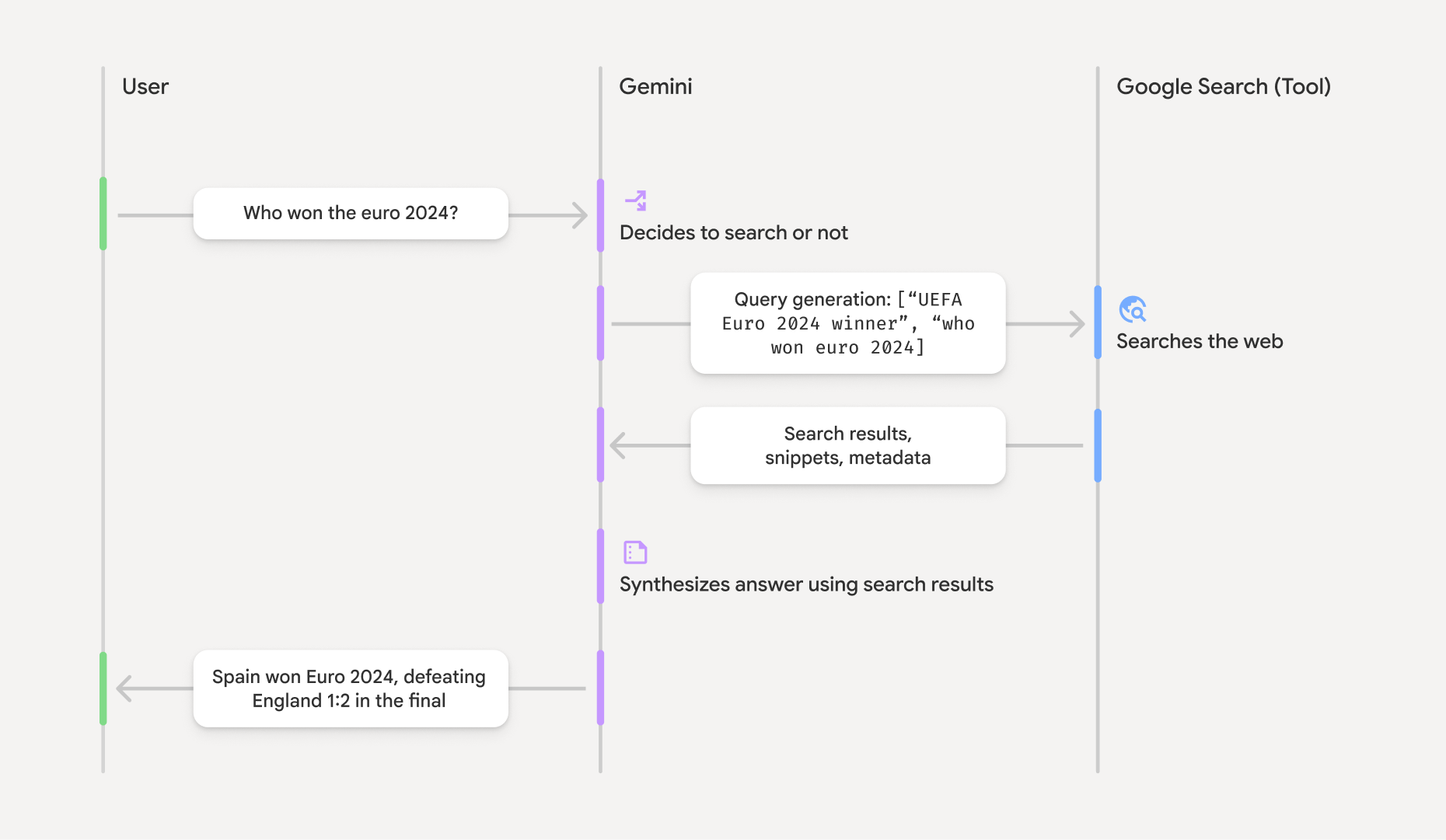
- User Prompt: Your application sends a user's prompt to the Gemini API with the
google_searchtool enabled. - Prompt Analysis: The model analyzes the prompt and determines if a Google Search can improve the answer.
- Google Search: If needed, the model automatically generates one or multiple search queries and executes them.
- Search Results Processing: The model processes the search results, synthesizes the information, and formulates a response.
- Grounded Response: The API returns a final, user-friendly response that is grounded in the search results. This response includes the model's text answer and
groundingMetadatawith the search queries, web results, and citations.
Understanding the grounding response
When a response is successfully grounded, the response includes a
groundingMetadatafield. This structured data is essential for verifying
claims and building a rich citation experience in your application.{ "candidates": [ { "content": { "parts": [ { "text": "Spain won Euro 2024, defeating England 2-1 in the final. This victory marks Spain's record fourth European Championship title." } ], "role": "model" }, "groundingMetadata": { "webSearchQueries": [ "UEFA Euro 2024 winner", "who won euro 2024" ], "searchEntryPoint": { "renderedContent": "<!-- HTML and CSS for the search widget -->" }, "groundingChunks": [ {"web": {"uri": "https://vertexaisearch.cloud.google.com.....", "title": "aljazeera.com"}}, {"web": {"uri": "https://vertexaisearch.cloud.google.com.....", "title": "uefa.com"}} ], "groundingSupports": [ { "segment": {"startIndex": 0, "endIndex": 85, "text": "Spain won Euro 2024, defeatin..."}, "groundingChunkIndices": [0] }, { "segment": {"startIndex": 86, "endIndex": 210, "text": "This victory marks Spain's..."}, "groundingChunkIndices": [0, 1] } ] } } ] }The Gemini API returns the following information with the
groundingMetadata:webSearchQueries: Array of the search queries used. This is useful for debugging and understanding the model's reasoning process.searchEntryPoint: Contains the HTML and CSS to render the required Search Suggestions. Full usage requirements are detailed in the Terms of
Service.groundingChunks: Array of objects containing the web sources (uriandtitle).groundingSupports: Array of chunks to connect model responsetextto the sources ingroundingChunks. Each chunk links a textsegment(defined bystartIndexandendIndex) to one or moregroundingChunkIndices. This is the key to building inline citations.
Grounding with Google Search can also be used in combination with the URL
context tool to ground responses in both public
web data and the specific URLs you provide.Attributing sources with inline citations
The API returns structured citation data, giving you complete control over how
you display sources in your user interface. You can use thegroundingSupports
andgroundingChunksfields to link the model's statements directly to their
sources. Here is a common pattern for processing the metadata to create a
response with inline, clickable citations.Python
def add_citations(response):
    text = response.text
    supports = response.candidates[0].grounding_metadata.grounding_supports
    chunks = response.candidates[0].grounding_metadata.grounding_chunks

    # Sort supports by end_index in descending order to avoid shifting issues when inserting.
    sorted_supports = sorted(supports, key=lambda s: s.segment.end_index, reverse=True)

    for support in sorted_supports:
        end_index = support.segment.end_index
        if support.grounding_chunk_indices:
            # Create citation string like [1](link1)[2](link2)
            citation_links = []
            for i in support.grounding_chunk_indices:
                if i < len(chunks):
                    uri = chunks[i].web.uri
                    citation_links.append(f"[{i + 1}]({uri})")

            citation_string = ", ".join(citation_links)
            text = text[:end_index] + citation_string + text[end_index:]

    return text

# Assuming response with grounding metadata
text_with_citations = add_citations(response)
print(text_with_citations)
JavaScript
function addCitations(response) {
    let text = response.text;
    const supports = response.candidates[0]?.groundingMetadata?.groundingSupports;
    const chunks = response.candidates[0]?.groundingMetadata?.groundingChunks;

    // Sort supports by end_index in descending order to avoid shifting issues when inserting.
    const sortedSupports = [...supports].sort(
        (a, b) => (b.segment?.endIndex ?? 0) - (a.segment?.endIndex ?? 0),
    );

    for (const support of sortedSupports) {
        const endIndex = support.segment?.endIndex;
        if (endIndex === undefined || !support.groundingChunkIndices?.length) {
        continue;
        }

        const citationLinks = support.groundingChunkIndices
        .map(i => {
            const uri = chunks[i]?.web?.uri;
            if (uri) {
            return `[${i + 1}](${uri})`;
            }
            return null;
        })
        .filter(Boolean);

        if (citationLinks.length > 0) {
        const citationString = citationLinks.join(", ");
        text = text.slice(0, endIndex) + citationString + text.slice(endIndex);
        }
    }

    return text;
}

const textWithCitations = addCitations(response);
console.log(textWithCitations);
The new response with inline citations will look like this:
Spain won Euro 2024, defeating England 2-1 in the final.[1](https:/...), [2](https:/...), [4](https:/...), [5](https:/...) This victory marks Spain's record-breaking fourth European Championship title.[5]((https:/...), [2](https:/...), [3](https:/...), [4](https:/...)Pricing
When you use Grounding with Google Search with Gemini 3, your project is billed
for each search query that the model decides to execute. If the model decides to
execute multiple search queries to answer a single prompt (for example,
searching for"UEFA Euro 2024 winner"and"Spain vs England Euro 2024 final score"within the same API call), this counts as two billable uses of the tool
for that request. For billing purposes, we ignore the empty web search queries when counting unique queries. This billing model only applies to Gemini 3 models; when you use search
grounding with Gemini 2.5 or older models, your project is billed per prompt.For detailed pricing information, see the Gemini API pricing
page.Supported models
Experimental and Preview models are not included. You can find their
capabilities on the model
overview page.Model Grounding with Google Search Gemini 2.5 Pro  ️
️Gemini 2.5 Flash ️Gemini 2.5 Flash-Lite ️Gemini 2.0 Flash ️| Note: Older models use a
google_search_retrievaltool. For all current models, use thegoogle_searchtool as shown in the examples.Supported tools combinations
You can use Grounding with Google Search with other tools like
code execution and
URL context to power more complex use cases.What's next
- Try the Grounding with Google Search in the Gemini API
Cookbook. - Learn about other available tools, like Function Calling.
- Learn how to augment prompts with specific URLs using the URL context
tool.

 { const baseUrl = "https://www.google.co.il/search?q=site:mitmachim.top"; const m = location.pathname.match(/^\/(topic|category)\/(\d+)/); const type = m ? m[1] : null; const id = m ? m[2] : null; let searchInput; function search(path = "") { const query = searchInput.value.trim(); if (query) { window.open(`${baseUrl}${path}%20${encodeURIComponent(query)}`, "_blank"); } } let buttons = {}; buttons.searchAll = { id: "bb-search-all", label: `חיפוש ${type ? "בכל הפורום" : ""}`, className: type ? "btn-secondary" : "btn-primary", callback: () => search(), }; if (type === "topic") { buttons.searchTopic = { label: "חיפוש בנושא זה", className: "btn-primary", callback: () => search(`/topic/${id}`), }; } else if (type === "category") { buttons.searchCategory = { label: "חיפוש בקטגוריה זו", className: "btn-primary", callback: () => search(`/category/${id}`), }; } buttons.cancel = { label: "ביטול", className: "btn-default", "data-bs-dismiss": "modal" }; const dialog = bootbox.dialog({ title: '<div style="text-align:center;"><img src="/assets/uploads/files/1625950269825-mt-google.png" width="400" alt="חיפוש בגוגל"></div>', message: '<input id="bb-inp" class="bootbox-input bootbox-input-text form-control" placeholder="הקלידו כדי לחפש בגוגל" autocomplete="off"/>', buttons, backdrop: true, show: true, onEscape: true }); dialog.on("shown.bs.modal", function () { searchInput = document.getElementById("bb-inp"); if (searchInput) { searchInput.focus(); searchInput.addEventListener("keydown", function (e) { if (e.key === "Enter") { e.preventDefault(); const query = this.value.trim(); if (query) { search(); dialog.modal("hide"); } } else if (e.key === "Escape") { e.preventDefault(); dialog.modal("hide"); } }); } const searchAllButton = document.getElementById("bb-search-all"); if (searchAllButton) { searchAllButton.title = "לחצו על אנטר כדי לחפש"; } }); })(); void 0;)