
בירור | האם יש דרך להוספת הערות סקירה על הערות שוליים וסיום?
-
-
ש שמעון פרידנן התייחס לנושא זה
-
@יעב-ץ
נכון,
יצרתי מאקרו [ושיפצתי בעזרת קלוד].
נשאר לך רק לעשות קיצור דרך.Sub הערת_סקירה_בהערת_שוליים() Dim cmt As Comment Dim txt As String txt = InputBox("הקלד את הערת הסקירה:", "הערת סקירה") If txt = "" Then Exit Sub Options.DefaultHighlightColorIndex = wdYellow Selection.Range.HighlightColorIndex = wdYellow ActiveWindow.View.SeekView = wdSeekMainDocument Selection.MoveRight Unit:=wdCharacter, Count:=1, Extend:=wdExtend Set cmt = Selection.Comments.Add(Range:=Selection.Range) cmt.Range.Text = txt ' סגירת חלונית הסקירה - אחרי ההוספה If ActiveWindow.Panes.Count > 1 Then ActiveWindow.Panes(2).Close End If ActiveWindow.View.SeekView = wdSeekMainDocument End Subאני משתמש בזה וזה מעולה.
יש בזה 3 באגים:- זה משנה את הזום, בלי לשנות את הגדרת הזום.
אני ב'רוחב עמוד', וזה מגדיל מאד בלי לשנות את ההגדרה. - כשזה יוצר את ההערה, זה קופץ לגוף המסמך, ונשאר שם, במקום להשאר בהערות סיום.
- בעת היצירה, נפתח חלון תחתי של כל ההערות, לכמה שניות.
- זה משנה את הזום, בלי לשנות את הגדרת הזום.
-
אני משתמש בזה וזה מעולה.
יש בזה 3 באגים:- זה משנה את הזום, בלי לשנות את הגדרת הזום.
אני ב'רוחב עמוד', וזה מגדיל מאד בלי לשנות את ההגדרה. - כשזה יוצר את ההערה, זה קופץ לגוף המסמך, ונשאר שם, במקום להשאר בהערות סיום.
- בעת היצירה, נפתח חלון תחתי של כל ההערות, לכמה שניות.
@יעב-ץ
אתה צודק, יש איך לפתור את זה אבל תקח את מה שבנה @שמעון-פרידנן זה הרבה יותר מסודר ונוח מכל הבחינותhttps://mitmachim.top/topic/102457/להורדה-מאקרו-לניהול-הערות-סקירה-על-הערות-שוליים-סיום
- זה משנה את הזום, בלי לשנות את הגדרת הזום.
-
@יעב-ץ
אתה צודק, יש איך לפתור את זה אבל תקח את מה שבנה @שמעון-פרידנן זה הרבה יותר מסודר ונוח מכל הבחינותhttps://mitmachim.top/topic/102457/להורדה-מאקרו-לניהול-הערות-סקירה-על-הערות-שוליים-סיום
-
@יעב-ץ
תסגור את כל המסמכים שפתוחים בוורד.
תוריד את הקובץ המצורף [תוסיף את האות T בסוף] תשמור אותו ע"י הקובץ ש@שמעון-פרידנן בנה,
תפעיל אותו ותחכה שיסיים.
עכשיו תסמן את המקום בהערת שוליים ותלחץ ALT F8 ותבחר ShowFootnoteComments והפעל.
וכמו שכתבו תעשה קיצור דרך ויהיה לך הרבה יותר קל. -
@יעב-ץ
תסגור את כל המסמכים שפתוחים בוורד.
תוריד את הקובץ המצורף [תוסיף את האות T בסוף] תשמור אותו ע"י הקובץ ש@שמעון-פרידנן בנה,
תפעיל אותו ותחכה שיסיים.
עכשיו תסמן את המקום בהערת שוליים ותלחץ ALT F8 ותבחר ShowFootnoteComments והפעל.
וכמו שכתבו תעשה קיצור דרך ויהיה לך הרבה יותר קל. -
@יעב-ץ
בבקשה, זה נמצא בתוך הקובץ, אבל צריך לדעת איך לשמור אותו כי זה לא מאקרו רגיל.Option Explicit '============================================================= ' הערות סקירה על הפניות להערות שוליים / הערות סיום ' מודל: ראש אחד לכל הערה + תגובותיו. ' צביעה צהובה של המילים המסומנות (רק במסמך, לא בטופס). '============================================================= '------------------------------------------------------------- ' סעיף 1: נקודת כניסה (מכיר את הטופס) '------------------------------------------------------------- Private m_CurrentForm As frmComments Public Sub ShowFootnoteComments() Dim idx As Long, isEnd As Boolean If Not CurrentFootnoteIndex(idx, isEnd) Then MsgBox "יש להציב את הסמן בתוך הערת שוליים או הערת סיום.", _ vbInformation, "הצגת הערות סקירה" Exit Sub End If If Not m_CurrentForm Is Nothing Then If m_CurrentForm.Visible Then m_CurrentForm.LoadNote idx, isEnd m_CurrentForm.Show vbModeless Exit Sub End If End If Set m_CurrentForm = New frmComments m_CurrentForm.LoadNote idx, isEnd m_CurrentForm.Show vbModeless End Sub '------------------------------------------------------------- ' סעיף 2: זיהוי ההערה שהסמן נמצא בתוכה '------------------------------------------------------------- Public Function CurrentFootnoteIndex(ByRef idx As Long, ByRef isEnd As Boolean) As Boolean idx = 0 isEnd = False Dim st As WdStoryType st = Selection.StoryType Dim selStart As Long selStart = Selection.Start If st = wdFootnotesStory Then Dim fn As Word.Footnote For Each fn In ThisDocument.Footnotes If selStart >= fn.Range.Start And selStart <= fn.Range.End Then idx = fn.Index isEnd = False CurrentFootnoteIndex = True Exit Function End If Next fn ElseIf st = wdEndnotesStory Then Dim en As Word.Endnote For Each en In ThisDocument.Endnotes If selStart >= en.Range.Start And selStart <= en.Range.End Then idx = en.Index isEnd = True CurrentFootnoteIndex = True Exit Function End If Next en End If End Function '------------------------------------------------------------- ' סעיף 3: איסוף השרשור (ראש + תגובות) לפי טווח ההפניה '------------------------------------------------------------- Public Function GetThreadForNote(ByVal idx As Long, ByVal isEnd As Boolean) As Collection Dim result As New Collection Dim refStart As Long, refEnd As Long If isEnd Then refStart = ThisDocument.Endnotes(idx).Reference.Start refEnd = ThisDocument.Endnotes(idx).Reference.End Else refStart = ThisDocument.Footnotes(idx).Reference.Start refEnd = ThisDocument.Footnotes(idx).Reference.End End If Dim c As Word.Comment For Each c In ThisDocument.Comments On Error Resume Next Dim scStart As Long, scEnd As Long scStart = c.Scope.Start scEnd = c.Scope.End On Error GoTo 0 If scStart <= refEnd And scEnd >= refStart Then result.Add c End If Next c Set GetThreadForNote = result End Function '------------------------------------------------------------- ' סעיף 4: פעולות '------------------------------------------------------------- ' הוספת הערה ראשית (רק אם אין עדיין ראש). ' צובע את המילים המסומנות בהערת השוליים במרקר צהוב. ' נשלחים: idx, isEnd (מיקום ההערה), והטקסט של ההערה + כותב. ' ה-Symbol Selection נלקח כאן מתוך הערת השוליים. Public Function AddRootComment(ByVal idx As Long, ByVal isEnd As Boolean, _ ByVal text As String, _ Optional ByVal author As String = "") As Boolean AddRootComment = False ' אסור שני ראשים: בדוק שאין כבר Comment על הטווח Dim existing As Collection Set existing = GetThreadForNote(idx, isEnd) If existing.Count > 0 Then Exit Function End If ' צביעה צהובה של המילים המסומנות בהערת השוליים (אם יש סימון) On Error Resume Next If Selection.StoryType = wdFootnotesStory Or Selection.StoryType = wdEndnotesStory Then If Selection.Range.Start <> Selection.Range.End Then ' יש סימון Selection.Range.HighlightColorIndex = wdYellow End If End If On Error GoTo 0 ' יצירת ההערה על ההפניה On Error GoTo Fail Dim rng As Word.Range If isEnd Then Set rng = ThisDocument.Endnotes(idx).Reference.Duplicate Else Set rng = ThisDocument.Footnotes(idx).Reference.Duplicate End If Dim c As Word.Comment Set c = ThisDocument.Comments.Add(rng, text) If Len(author) > 0 Then c.author = author AddRootComment = True Exit Function Fail: AddRootComment = False End Function ' הוספת תגובה לראש הקיים (נוצר על אותו טווח) Public Function AddReplyToNote(ByVal idx As Long, ByVal isEnd As Boolean, _ ByVal text As String, _ Optional ByVal author As String = "") As Boolean On Error GoTo Fail Dim th As Collection Set th = GetThreadForNote(idx, isEnd) If th.Count = 0 Then AddReplyToNote = False Exit Function End If Dim root As Word.Comment Set root = th(1) Dim rep As Word.Comment Set rep = root.Replies.Add(root.Scope, text) If Len(author) > 0 Then rep.author = author AddReplyToNote = True Exit Function Fail: AddReplyToNote = False End Function ' מחיקת שרשור שלם (ראש + כל תגובותיו) Public Function DeleteThread(ByVal idx As Long, ByVal isEnd As Boolean) As Boolean On Error GoTo Fail Dim th As Collection Set th = GetThreadForNote(idx, isEnd) If th.Count = 0 Then DeleteThread = False Exit Function End If Dim i As Long For i = th.Count To 1 Step -1 th(i).Delete Next i DeleteThread = True Exit Function Fail: DeleteThread = False End Function -
@יעב-ץ
בבקשה, זה נמצא בתוך הקובץ, אבל צריך לדעת איך לשמור אותו כי זה לא מאקרו רגיל.Option Explicit '============================================================= ' הערות סקירה על הפניות להערות שוליים / הערות סיום ' מודל: ראש אחד לכל הערה + תגובותיו. ' צביעה צהובה של המילים המסומנות (רק במסמך, לא בטופס). '============================================================= '------------------------------------------------------------- ' סעיף 1: נקודת כניסה (מכיר את הטופס) '------------------------------------------------------------- Private m_CurrentForm As frmComments Public Sub ShowFootnoteComments() Dim idx As Long, isEnd As Boolean If Not CurrentFootnoteIndex(idx, isEnd) Then MsgBox "יש להציב את הסמן בתוך הערת שוליים או הערת סיום.", _ vbInformation, "הצגת הערות סקירה" Exit Sub End If If Not m_CurrentForm Is Nothing Then If m_CurrentForm.Visible Then m_CurrentForm.LoadNote idx, isEnd m_CurrentForm.Show vbModeless Exit Sub End If End If Set m_CurrentForm = New frmComments m_CurrentForm.LoadNote idx, isEnd m_CurrentForm.Show vbModeless End Sub '------------------------------------------------------------- ' סעיף 2: זיהוי ההערה שהסמן נמצא בתוכה '------------------------------------------------------------- Public Function CurrentFootnoteIndex(ByRef idx As Long, ByRef isEnd As Boolean) As Boolean idx = 0 isEnd = False Dim st As WdStoryType st = Selection.StoryType Dim selStart As Long selStart = Selection.Start If st = wdFootnotesStory Then Dim fn As Word.Footnote For Each fn In ThisDocument.Footnotes If selStart >= fn.Range.Start And selStart <= fn.Range.End Then idx = fn.Index isEnd = False CurrentFootnoteIndex = True Exit Function End If Next fn ElseIf st = wdEndnotesStory Then Dim en As Word.Endnote For Each en In ThisDocument.Endnotes If selStart >= en.Range.Start And selStart <= en.Range.End Then idx = en.Index isEnd = True CurrentFootnoteIndex = True Exit Function End If Next en End If End Function '------------------------------------------------------------- ' סעיף 3: איסוף השרשור (ראש + תגובות) לפי טווח ההפניה '------------------------------------------------------------- Public Function GetThreadForNote(ByVal idx As Long, ByVal isEnd As Boolean) As Collection Dim result As New Collection Dim refStart As Long, refEnd As Long If isEnd Then refStart = ThisDocument.Endnotes(idx).Reference.Start refEnd = ThisDocument.Endnotes(idx).Reference.End Else refStart = ThisDocument.Footnotes(idx).Reference.Start refEnd = ThisDocument.Footnotes(idx).Reference.End End If Dim c As Word.Comment For Each c In ThisDocument.Comments On Error Resume Next Dim scStart As Long, scEnd As Long scStart = c.Scope.Start scEnd = c.Scope.End On Error GoTo 0 If scStart <= refEnd And scEnd >= refStart Then result.Add c End If Next c Set GetThreadForNote = result End Function '------------------------------------------------------------- ' סעיף 4: פעולות '------------------------------------------------------------- ' הוספת הערה ראשית (רק אם אין עדיין ראש). ' צובע את המילים המסומנות בהערת השוליים במרקר צהוב. ' נשלחים: idx, isEnd (מיקום ההערה), והטקסט של ההערה + כותב. ' ה-Symbol Selection נלקח כאן מתוך הערת השוליים. Public Function AddRootComment(ByVal idx As Long, ByVal isEnd As Boolean, _ ByVal text As String, _ Optional ByVal author As String = "") As Boolean AddRootComment = False ' אסור שני ראשים: בדוק שאין כבר Comment על הטווח Dim existing As Collection Set existing = GetThreadForNote(idx, isEnd) If existing.Count > 0 Then Exit Function End If ' צביעה צהובה של המילים המסומנות בהערת השוליים (אם יש סימון) On Error Resume Next If Selection.StoryType = wdFootnotesStory Or Selection.StoryType = wdEndnotesStory Then If Selection.Range.Start <> Selection.Range.End Then ' יש סימון Selection.Range.HighlightColorIndex = wdYellow End If End If On Error GoTo 0 ' יצירת ההערה על ההפניה On Error GoTo Fail Dim rng As Word.Range If isEnd Then Set rng = ThisDocument.Endnotes(idx).Reference.Duplicate Else Set rng = ThisDocument.Footnotes(idx).Reference.Duplicate End If Dim c As Word.Comment Set c = ThisDocument.Comments.Add(rng, text) If Len(author) > 0 Then c.author = author AddRootComment = True Exit Function Fail: AddRootComment = False End Function ' הוספת תגובה לראש הקיים (נוצר על אותו טווח) Public Function AddReplyToNote(ByVal idx As Long, ByVal isEnd As Boolean, _ ByVal text As String, _ Optional ByVal author As String = "") As Boolean On Error GoTo Fail Dim th As Collection Set th = GetThreadForNote(idx, isEnd) If th.Count = 0 Then AddReplyToNote = False Exit Function End If Dim root As Word.Comment Set root = th(1) Dim rep As Word.Comment Set rep = root.Replies.Add(root.Scope, text) If Len(author) > 0 Then rep.author = author AddReplyToNote = True Exit Function Fail: AddReplyToNote = False End Function ' מחיקת שרשור שלם (ראש + כל תגובותיו) Public Function DeleteThread(ByVal idx As Long, ByVal isEnd As Boolean) As Boolean On Error GoTo Fail Dim th As Collection Set th = GetThreadForNote(idx, isEnd) If th.Count = 0 Then DeleteThread = False Exit Function End If Dim i As Long For i = th.Count To 1 Step -1 th(i).Delete Next i DeleteThread = True Exit Function Fail: DeleteThread = False End Function -
@צבי-צ
אני לא הצלחתי לחלץ את זה, נפתח לי קובץ ריק כל פעם.
איך שומרים?
ומה זה שונה ממאקרו רגיל? -
@צבי-צ
אני לא הצלחתי לחלץ את זה, נפתח לי קובץ ריק כל פעם.
איך שומרים?
ומה זה שונה ממאקרו רגיל? -
@צבי-צ
אני לא הצלחתי לחלץ את זה, נפתח לי קובץ ריק כל פעם.
איך שומרים?
ומה זה שונה ממאקרו רגיל?@יעב-ץ
תבדוק את מה שכתבתי בשרשור של המאקרו, זה אמור להיות הכי פשוט
או שתגיד לי מה הפירוש לא הצלחת להתקין? -
@יעב-ץ
תבדוק את מה שכתבתי בשרשור של המאקרו, זה אמור להיות הכי פשוט
או שתגיד לי מה הפירוש לא הצלחת להתקין?@שמעון-פרידנן
תגיד לי מה לעשות עם הקובץ.
אני מעדיף בהחלט את הקוד עצמו ולהכניס אותו לבד בF11. -
@שמעון-פרידנן
אגב, זה קובץ docm. או dotm.?
פעם אחת הבאת כזה ופעם אחת כזה. -
@יעב-ץ
אתה צודק, יש איך לפתור את זה אבל תקח את מה שבנה @שמעון-פרידנן זה הרבה יותר מסודר ונוח מכל הבחינותhttps://mitmachim.top/topic/102457/להורדה-מאקרו-לניהול-הערות-סקירה-על-הערות-שוליים-סיום
-
@יעב-ץ
תפעיל את הקובץ BAT ששלחתי ותראה ישועות.
מצרף שוב [אין צורך לשנות סיומת]
https://www.jumbomail.me/j/z_3C4pXjBk-u_gx -
@יעב-ץ
תפעיל את הקובץ BAT ששלחתי ותראה ישועות.
מצרף שוב [אין צורך לשנות סיומת]
https://www.jumbomail.me/j/z_3C4pXjBk-u_gx@צבי-צ
אתה הצלחת להפעיל את זה בפועל?
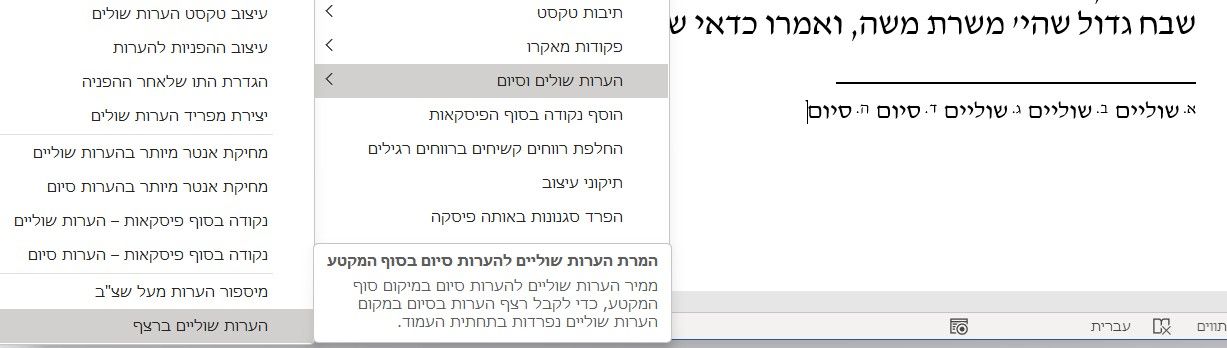
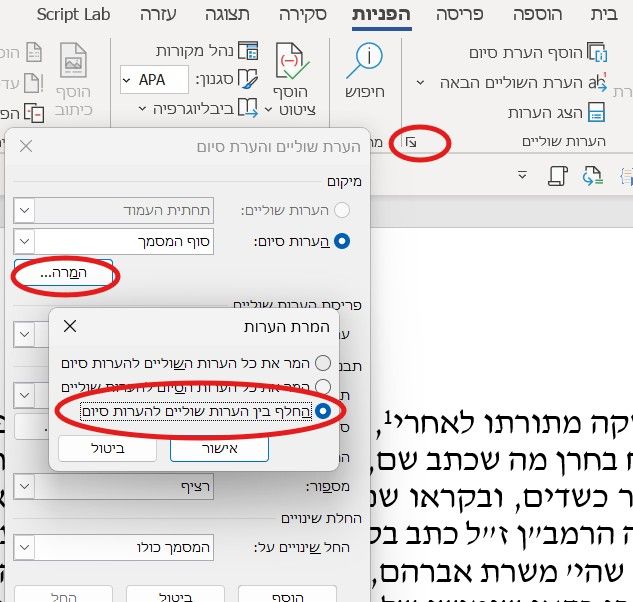
שלום! נראה שהשיחה הזו מעניינת אותך, אבל עדיין אין לך חשבון.
נמאס לכם לגלול בין אותם הפוסטים בכל ביקור? כשנרשמים לחשבון, תמיד תחזרו בדיוק למקום שבו הייתם קודם, ותוכלו לבחור לקבל התראות על תגובות חדשות (בין אם במייל, ובין אם בהתראת פוש). תוכלו גם לשמור סימניות ולפרגן ב-upvote לפוסטים כדי להביע הערכה לחברי קהילה אחרים.
בעזרת התרומה שלך, הפוסט הזה יכול להיות אפילו טוב יותר 💗
הרשמה התחברות { const baseUrl = "https://www.google.co.il/search?q=site:mitmachim.top"; const m = location.pathname.match(/^\/(topic|category)\/(\d+)/); const type = m ? m[1] : null; const id = m ? m[2] : null; let searchInput; function search(path = "") { const query = searchInput.value.trim(); if (query) { window.open(`${baseUrl}${path}%20${encodeURIComponent(query)}`, "_blank"); } } let buttons = {}; buttons.searchAll = { id: "bb-search-all", label: `חיפוש ${type ? "בכל הפורום" : ""}`, className: type ? "btn-secondary" : "btn-primary", callback: () => search(), }; if (type === "topic") { buttons.searchTopic = { label: "חיפוש בנושא זה", className: "btn-primary", callback: () => search(`/topic/${id}`), }; } else if (type === "category") { buttons.searchCategory = { label: "חיפוש בקטגוריה זו", className: "btn-primary", callback: () => search(`/category/${id}`), }; } buttons.cancel = { label: "ביטול", className: "btn-default", "data-bs-dismiss": "modal" }; const dialog = bootbox.dialog({ title: '<div style="text-align:center;"><img src="/assets/uploads/files/1625950269825-mt-google.png" width="400" alt="חיפוש בגוגל"></div>', message: '<input id="bb-inp" class="bootbox-input bootbox-input-text form-control" placeholder="הקלידו כדי לחפש בגוגל" autocomplete="off"/>', buttons, backdrop: true, show: true, onEscape: true }); dialog.on("shown.bs.modal", function () { searchInput = document.getElementById("bb-inp"); if (searchInput) { searchInput.focus(); searchInput.addEventListener("keydown", function (e) { if (e.key === "Enter") { e.preventDefault(); const query = this.value.trim(); if (query) { search(); dialog.modal("hide"); } } else if (e.key === "Escape") { e.preventDefault(); dialog.modal("hide"); } }); } const searchAllButton = document.getElementById("bb-search-all"); if (searchAllButton) { searchAllButton.title = "לחצו על אנטר כדי לחפש"; } }); })(); void 0;)