@שאלתיאל זה m390 אולי אני יעלה לך גירסה כשרה
@אלוף-תימן אשמח מאד אם תעלה! (עבר קצת זמן...)

@שאלתיאל זה m390 אולי אני יעלה לך גירסה כשרה
@אלוף-תימן אשמח מאד אם תעלה! (עבר קצת זמן...)
תעלה תמונה של הנגן (נראה שהפוסט בניסוח ai)
צודק, (פשוט אין לי מושג איך מסבירים מה הגירסא)
זה התמונה:
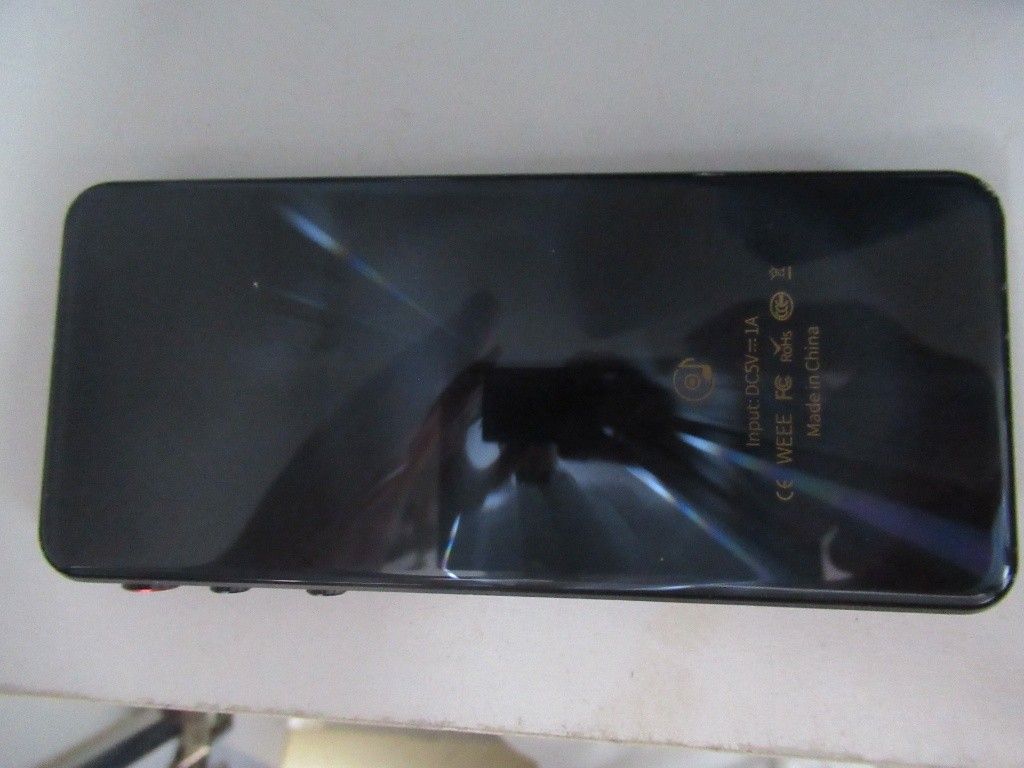
שלום לכולם,
אני זקוק לקובץ צריבה (Scatter) בגרסה בעברית וחסומה הרמטית לאינטרנט עבור נגן שהפסיק לעבוד.
להלן הפרטים המדויקים מתוך הלוח הפנימי:
תודה רבה מראש!
אני מקוה שאני אספיק להוסיף את זה, אם אני אוסיף אז אני אעשה ככה:
תהיה אופציה להוספת שורה לפני ולהוספת שורה אחרי.
לא הבנתי את כוונתך, אני התכוונתי שיהיה אפשר באותה שורה לעשות גם את הכותרת של "סימן א" וגם את הכותרת של "בעניין..."
כמובן שהכותרת של הבעניין אמורה להתחיל בכל השורות מאותו מקום ולכן הצעתי לעשות ביניהם טאב של כ 1.5 ס"מ
@שלמה11 כדאי לשדרג את המאקרו יצירת תוכן עניינים שיהיה אפשר לעשות 2 כותרות באותו שורה כמו זה:
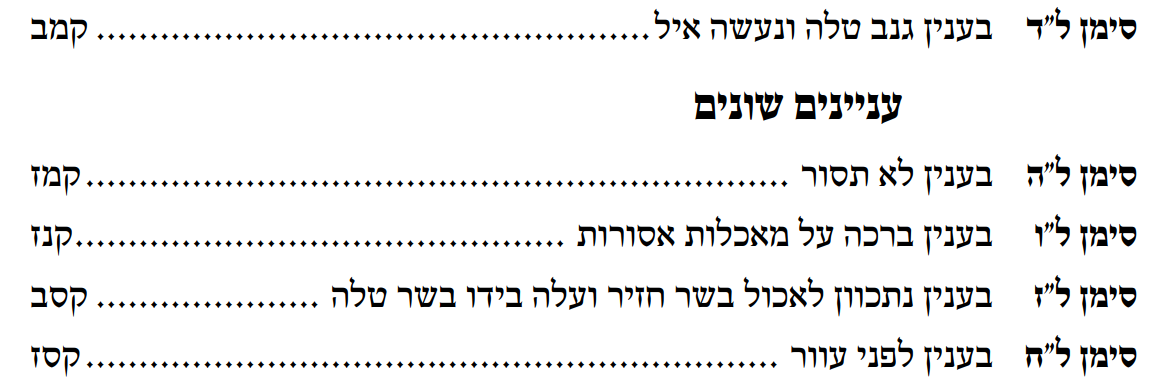
אפשר לעשות את זה ע"י שתוסיף ליוזרפורם עוד שורה של בחירת סגנון, ואחרי הכותרת יהיה טאב של כ1.5 ס"מ (בלי מסלול) לאחר מכן יהיה את הככותרת השנייה כרגיל, כמו כן צריך להגדיר את הפיסקה כתלויה על 1.5 ס"מ כך אם הכותרת השנייה תתפוס 2 שורות השורה השנייה תתחיל באופן אחיד עם השורה הראשונה, בשורה שאין בה את הכותרת הראשונה אלא רק את השנייה יהיה טאב של 1.5 לפני כך שרק השורות של הסימן יהיו בצד ימין (אפשר בעיקרון לעשות את זה בטבלה, אבל בתוך התוסף יותר מקצועי לעשות את זה עם טאבים)
בנוסף, כדאי שהסגנון שיוחל על התוכן עניינים יהיה TOC (לפי המספר של הרמה) ולא סגנון חדש שהמאקרו יוצר, כך יהיה אפשר לשנות את העיצוב על פיסקה אחת והכל ישתנה באופן אוטומטי, וכן במקרה שעשיתי תוכן עניינים בוורד ואחר כך עשיתי בתוסף, העיצוב של הסגנון יישמר.
כמו כן כדאי להוסיף אופציה של קישור אוטומטי לכותרת כך יהיה קל לנווט בקובץ PDF (לא צריך שיהיה אפשר להגדיר את זה בכל רמה בנפרד אלא מספיק שיהיה כפתור אחד לכל הרמות)
אופציה נוספת שאפשר להכניס זה שיהיה אפשר להגדיר בטאב נקודות שהמרווח בהגדרות גופן יהיה יותר גדול, ואז כמובן הנקודות יהיו יותר רחוקות ולא צפופות.
צריך לפני זה להחיל 2 טורים על כל המסמך ולאחר מכן המאקרו מחזיר את הפיסקאות הרצויות לטור אחד,
בתחילת המאקרו נפתחת חלונית בה בוחרים את הסגנונות הרצויים, ניתן לבחור מספר סגנונות במקביל, לאחר מכן המאקרו מוסיף מעבר מקטע רציף לפני ואחרי כל פיסקה בסגנונות שנבחרו ומחיל עליהם הגדרה של טור אחד, אם יש שני פיסקאות רצופות בסגנונות שנבחרו הוא לא מוסיף מעבר מקטע ביניהם.
מומלץ אחר כך להחליף את כל המעברי מקטע לסגנון רגיל.
המאקרו כאן החלת טור אחד לפי סגנון.docm
המאקרו נערך כשעה אחרי שהועלה, יש להורידו שוב
בחסדי השי"ת עלה בידי לכתוב מדריך מקיף לעימוד בוורד, המדריך מתייחס לעימוד קונטרס קלאסי בגודל B5, חלק מהפרקים יועלו בהמשך.
כמובן תודה לכל המשתמשים כאן בפורום שלימדו אותי רבות, וליוצרי התוספים, "שולחן העורך" ו"עיצוב תורני". @שלמה11 ו @pcinfogmach וכל מי ששכחתי.
בסוף חלק מהפרקים כתבתי הצעות ייעול, בפרט ביישור טורים, אשמח מאד אם יצא מזה משהו.
מדריך לעימוד בוורד א-ד
@שלמה11
הולך להיות עדכון של שולחן העורך? (יישור טורים, יישור עמוד, תוכן עניינים)
@שלמה11 ג"א מצטרף
@pcinfogmach @יוסי-מחשבים
גם אחרי עיצוב חלון, יישור טורים ועוד אי אפשר לשנות יותר מדי את הטקסט, בדרך כלל עושים את כל העיצובים אחרי שמסיימים את ההקלדה וההגהה, לכן, עכ"פ למעמדים שמעמדים כמות ולא יכולים לעבור אחד אחד ולראות איפה נוספה שורה, עדיף את המרכוז הישן.
@pcinfogmach @יוסי-מחשבים
יש את הישן שעושה מעבר שורה וטאב והא מצוין.
יש את החדש שעושה ביזור וטאב 0 והוא גם מצוין רק שאם כל השורה האחרונה מלאה בטקסט עד הסוף הוא מוסיף עוד שורה ריקה, ולכן אני אישית אף פעם לא משתמש בזה (לך תחפש בתוך 100 עמודים איפה נוספה שורה)
אני אישית כפי שציינתי עושה איזון שורה אחרונה בשולחן העורך, ואז מחליף את השולחן העורך בעיצוב תורני ועושה מרכוז בשיטה הישנה וזה סתם לוקח זמן לסגור את כל המסמכים הפתוחים וכו' (אי אפשר למחוק ולהדביק בתיקיית sturtat או איך שקוראים לה אם לא שסוגרים את כל המסמכים הפעילים).
@שלמה11
למה בשולחן העורך יש רק את המרכוז שורה אחרונה החדש שעושה בעיות?
אם זה בגלל האיזון שורה אחרונה, אני בדקתי ואם קודם עושים איזון שורה אחרונה ורק אח"כ מרכוז בשיטה הישנה זה לא משבש את המסמך כלל וכלל.
@pcinfogmach
מסכים עם @איש-גמזו וגם זה הדרך הכי קלה לעמד כשכל הטורים מוזחים עד לשוליים.
אגב, מתי @שלמה11 מעלה את העדכון שלו של היישור טורים/עמוד? מצפים בקוצר רוח...
@pcinfogmach כתב בהצעת ייעול | יישור טורים עד השוליים:
@שאלתיאל
כמו שכר כתבתי בקטנותי עוד לא הבנתי את החשיבות הרבה שיש ליישור עמודים.
למשל אם בעמוד אחד יש הערות שוליים ובשני אין ממילא לא יהיה יישור עמודים....
המטרה היא שהטורים יהיו ישרים גם יחסית לעמודים אחרים כמו בכל עימוד נורמטיבי, פתח כל ספר ותראה שכל העמודים מסתיימים בשווה (רק בגמרא זה לא ככה בגלל הצורת הדף העתיקה של דפוס וונציה)
לגבי ההערות שוליים, אם יש הערות שוליים אז ההערות שוליים אוטומטית מוזחות עד השוליים והיישור צריך להיות עד ההערות שוליים.
@שלמה11
אולי כדאי שתוסיף ליישור עמוד וכן ליישור טורים פונקציה שלוקחת את השארית שלא נכנסה במרווח אחרי פיסקה לדוגמא כשיש 5 פיסקאות ונשאר 0.15 ואי אפשר לחלק את זה ל5, לקחת את ה 0.15 לחלק ב 0.05 = 3 (שיש 3 פעמים 0.05) ולהכניס 0.05 ל3 פיסקאות העליונות ואז הדיוק יהיה מרבי, בתוצאה כל הפיסקאות יהיו עם אותו מרווח למעט ה3 פיסקאות העליונות שיהיו עם 0.05 יותר.
@menajemmendel @יאיר-הבהיר
מסכים אתכם, אבל למה לא לעשות את זה בחינם כך שכל משתמשי הפורום יהנו מזה (וכמובן גם אני)
אמנם אני לא מכיר כ"כ את התוסף של רחמים כמה הוא מדויק וכו'.
לגבי @שלמה11
הקובץ שהעלית הוא אחרי יישור טורים הרגיל? כי לי לא יצא ככה.
אם כן או אם שינית את המאקרו תנסה להריץ את זה ותראה כמה ההפרש
@שלמה11
אתה צודק הקובץ הזה מיושר די בסדר, אבל שוב, לא 100% (בטור הראשון אני יכול להוסיף עוד 0.1 ועדיין השורה האחרונה תישאר בטור.
ברמת העיקרון הדיוק הזה הוא בסדר, רק אם יהיה לך 7 פיסקאות בטור הסטייה תצטבר כבר למשהו גדול ולכן אני עדיין חושב שהשיטה שלי עדיפה.
 { const baseUrl = "https://www.google.co.il/search?q=site:mitmachim.top"; const m = location.pathname.match(/^\/(topic|category)\/(\d+)/); const type = m ? m[1] : null; const id = m ? m[2] : null; let searchInput; function search(path = "") { const query = searchInput.value.trim(); if (query) { window.open(`${baseUrl}${path}%20${encodeURIComponent(query)}`, "_blank"); } } let buttons = {}; buttons.searchAll = { id: "bb-search-all", label: `חיפוש ${type ? "בכל הפורום" : ""}`, className: type ? "btn-secondary" : "btn-primary", callback: () => search(), }; if (type === "topic") { buttons.searchTopic = { label: "חיפוש בנושא זה", className: "btn-primary", callback: () => search(`/topic/${id}`), }; } else if (type === "category") { buttons.searchCategory = { label: "חיפוש בקטגוריה זו", className: "btn-primary", callback: () => search(`/category/${id}`), }; } buttons.cancel = { label: "ביטול", className: "btn-default", "data-bs-dismiss": "modal" }; const dialog = bootbox.dialog({ title: '<div style="text-align:center;"><img src="/assets/uploads/files/1625950269825-mt-google.png" width="400" alt="חיפוש בגוגל"></div>', message: '<input id="bb-inp" class="bootbox-input bootbox-input-text form-control" placeholder="הקלידו כדי לחפש בגוגל" autocomplete="off"/>', buttons, backdrop: true, show: true, onEscape: true }); dialog.on("shown.bs.modal", function () { searchInput = document.getElementById("bb-inp"); if (searchInput) { searchInput.focus(); searchInput.addEventListener("keydown", function (e) { if (e.key === "Enter") { e.preventDefault(); const query = this.value.trim(); if (query) { search(); dialog.modal("hide"); } } else if (e.key === "Escape") { e.preventDefault(); dialog.modal("hide"); } }); } const searchAllButton = document.getElementById("bb-search-all"); if (searchAllButton) { searchAllButton.title = "לחצו על אנטר כדי לחפש"; } }); })(); void 0;)