
בקשת מידע | המרת אותיות למספרים באקסל
-
@ח-ש
תעלה את הקובץ (אפשר גם בפרטי או במייל) ובלי נדר אשתדל לעזור. בוורד כבר יש לי משהו דומה רק צריך להתאים לאקסל.@pcinfogmach ישר כח.
בלנ"ד מחר אביא את הקובץ ואשלח לך. -
קוד מאקרו (לאקסל) להמיר מספור אותיות למספרים ולהוסיף/להפחית מספר קבוע ואח"כ להמיר שוב לאותיות.
עריכה:
המאקרו עובר בלולאה על כל התאים המסומנים לפי בחירהבלי לשון נקיה
 Sub הגדל_מספור_אותיות()

    Dim MyArray() As Variant
    Dim MyaArray() As Variant
    Dim inputString As String
    Dim outputNumber As Long
    Dim plusNumber As Integer

    Dim i As Integer
    Dim j As Integer

    plusNumber = InputBox("הזן במפרים בכמה רצונך להגדיל את המספור")

    Dim cell As Range
    For Each cell In Selection

    ' replacement arrays
    MyArray = Array("ת", "ש", "ר", "ק", "צ", "פ", "ע", "ס", "נ", "מ", "ל", "כ", "י", "ט", "ח", "ז", "ו", "ה", "ד", "ג", "ב", "א")
    MyaArray = Array("400", "300", "200", "100", "90", "80", "70", "60", "50", "40", "30", "20", "10", "9", "8", "7", "6", "5", "4", "3", "2", "1")


        inputString = cell.Value
'        If IsNumeric(inputString) Then GoTo nxt

        ' Loop through each character in the input string
        For i = 1 To Len(inputString)
            ' Loop through the MyArray to find a match for the character
            For j = LBound(MyArray) To UBound(MyArray)
                If Mid(inputString, i, 1) = MyArray(j) Then
                    outputNumber = outputNumber + MyaArray(j)
                    Exit For
                End If
            Next j
        Next i

        outputNumber = outputNumber + plusNumber

        ' Replace the word with the output number

       cell.Value = ConvertToHebrew(outputNumber)

       outputNumber = 0

       Next cell

End Sub

Function ConvertToHebrew(ByVal ftnoteNumber As Long) As String
    Dim MyArray As Variant
    Dim MyaArray As Variant
    Dim v As Long
    Dim s As String
    Dim i As Long

s = ""

MyArray = Array(400, 300, 200, 100, 90, 80, 70, 60, 50, 40, 30, 20, 10, 9, 8, 7, 6, 5, 4, 3, 2, 1)
MyaArray = Array("ת", "ש", "ר", "ק", "צ", "פ", "ע", "ס", "נ", "מ", "ל", "כ", _
"י", "ט", "ח", "ז", "ו", "ה", "ד", "ג", "ב", "א")
v = Val(ftnoteNumber)
Do While v > 0
If v = 15 Or v = 16 Then
s = s & "ט"
v = v - 9
End If
  For i = 0 To UBound(MyArray)
    If v >= MyArray(i) Then
      s = s & MyaArray(i)
      v = v - MyArray(i)
      Exit For
    End If
  Next i
Loop

ConvertToHebrew = s

End Function
עם לשון נקיה
 Sub הגדל_מספור_אותיות()

    Dim MyArray() As Variant
    Dim MyaArray() As Variant
    Dim inputString As String
    Dim outputNumber As Long
    Dim plusNumber As Integer

    Dim i As Integer
    Dim j As Integer

    plusNumber = InputBox("הזן במפרים בכמה רצונך להגדיל את המספור")

    Dim cell As Range
    For Each cell In Selection

    ' replacement arrays
    MyArray = Array("ת", "ש", "ר", "ק", "צ", "פ", "ע", "ס", "נ", "מ", "ל", "כ", "י", "ט", "ח", "ז", "ו", "ה", "ד", "ג", "ב", "א")
    MyaArray = Array("400", "300", "200", "100", "90", "80", "70", "60", "50", "40", "30", "20", "10", "9", "8", "7", "6", "5", "4", "3", "2", "1")


        inputString = cell.Value
'        If IsNumeric(inputString) Then GoTo nxt

        ' Loop through each character in the input string
        For i = 1 To Len(inputString)
            ' Loop through the MyArray to find a match for the character
            For j = LBound(MyArray) To UBound(MyArray)
                If Mid(inputString, i, 1) = MyArray(j) Then
                    outputNumber = outputNumber + MyaArray(j)
                    Exit For
                End If
            Next j
        Next i

        outputNumber = outputNumber + plusNumber

        ' Replace the word with the output number

       cell.Value = ConvertToHebrew(outputNumber)

       outputNumber = 0

       Next cell

End Sub

Function ConvertToHebrew(ByVal ftnoteNumber As Long) As String
    Dim MyArray As Variant
    Dim MyaArray As Variant
    Dim v As Long
    Dim s As String
    Dim i As Long

s = ""

MyArray = Array(400, 300, 200, 100, 90, 80, 70, 60, 50, 40, 30, 20, 10, 9, 8, 7, 6, 5, 4, 3, 2, 1)
MyaArray = Array("ת", "ש", "ר", "ק", "צ", "פ", "ע", "ס", "נ", "מ", "ל", "כ", _
"י", "ט", "ח", "ז", "ו", "ה", "ד", "ג", "ב", "א")
v = Val(ftnoteNumber)
Do While v > 0
If v = 15 Or v = 16 Then
s = s & "ט"
v = v - 9
End If
  For i = 0 To UBound(MyArray)
    If v >= MyArray(i) Then
      s = s & MyaArray(i)
      v = v - MyArray(i)
      Exit For
    End If
  Next i
Loop

If s = "רצח" Then s = "רחצ"
If s = "רע" Then s = "ער"
If s = "רעב" Then s = "ערב"
If s = "שד" Then s = "דש"
If s = "שמד" Then s = "שדמ"
If s = "תשמד" Then s = "תדשם"
If s = "רעה" Then s = "ערה"
If s = "רעד" Then s = "עדר"

ConvertToHebrew = s

End Function
גמ"ח עזרה וייעוץ בנושאי מחשבים
-
קוד מאקרו (לאקסל) להמיר מספור אותיות למספרים ולהוסיף/להפחית מספר קבוע ואח"כ להמיר שוב לאותיות.
עריכה:
המאקרו עובר בלולאה על כל התאים המסומנים לפי בחירהבלי לשון נקיה
 Sub הגדל_מספור_אותיות()

    Dim MyArray() As Variant
    Dim MyaArray() As Variant
    Dim inputString As String
    Dim outputNumber As Long
    Dim plusNumber As Integer

    Dim i As Integer
    Dim j As Integer

    plusNumber = InputBox("הזן במפרים בכמה רצונך להגדיל את המספור")

    Dim cell As Range
    For Each cell In Selection

    ' replacement arrays
    MyArray = Array("ת", "ש", "ר", "ק", "צ", "פ", "ע", "ס", "נ", "מ", "ל", "כ", "י", "ט", "ח", "ז", "ו", "ה", "ד", "ג", "ב", "א")
    MyaArray = Array("400", "300", "200", "100", "90", "80", "70", "60", "50", "40", "30", "20", "10", "9", "8", "7", "6", "5", "4", "3", "2", "1")


        inputString = cell.Value
'        If IsNumeric(inputString) Then GoTo nxt

        ' Loop through each character in the input string
        For i = 1 To Len(inputString)
            ' Loop through the MyArray to find a match for the character
            For j = LBound(MyArray) To UBound(MyArray)
                If Mid(inputString, i, 1) = MyArray(j) Then
                    outputNumber = outputNumber + MyaArray(j)
                    Exit For
                End If
            Next j
        Next i

        outputNumber = outputNumber + plusNumber

        ' Replace the word with the output number

       cell.Value = ConvertToHebrew(outputNumber)

       outputNumber = 0

       Next cell

End Sub

Function ConvertToHebrew(ByVal ftnoteNumber As Long) As String
    Dim MyArray As Variant
    Dim MyaArray As Variant
    Dim v As Long
    Dim s As String
    Dim i As Long

s = ""

MyArray = Array(400, 300, 200, 100, 90, 80, 70, 60, 50, 40, 30, 20, 10, 9, 8, 7, 6, 5, 4, 3, 2, 1)
MyaArray = Array("ת", "ש", "ר", "ק", "צ", "פ", "ע", "ס", "נ", "מ", "ל", "כ", _
"י", "ט", "ח", "ז", "ו", "ה", "ד", "ג", "ב", "א")
v = Val(ftnoteNumber)
Do While v > 0
If v = 15 Or v = 16 Then
s = s & "ט"
v = v - 9
End If
  For i = 0 To UBound(MyArray)
    If v >= MyArray(i) Then
      s = s & MyaArray(i)
      v = v - MyArray(i)
      Exit For
    End If
  Next i
Loop

ConvertToHebrew = s

End Function
עם לשון נקיה
Sub הגדל_מספור_אותיות() Dim MyArray() As Variant Dim MyaArray() As Variant Dim inputString As String Dim outputNumber As Long Dim plusNumber As Integer Dim i As Integer Dim j As Integer plusNumber = InputBox("הזן במפרים בכמה רצונך להגדיל את המספור") Dim cell As Range For Each cell In Selection ' replacement arrays MyArray = Array("ת", "ש", "ר", "ק", "צ", "פ", "ע", "ס", "נ", "מ", "ל", "כ", "י", "ט", "ח", "ז", "ו", "ה", "ד", "ג", "ב", "א") MyaArray = Array("400", "300", "200", "100", "90", "80", "70", "60", "50", "40", "30", "20", "10", "9", "8", "7", "6", "5", "4", "3", "2", "1") inputString = cell.Value ' If IsNumeric(inputString) Then GoTo nxt ' Loop through each character in the input string For i = 1 To Len(inputString) ' Loop through the MyArray to find a match for the character For j = LBound(MyArray) To UBound(MyArray) If Mid(inputString, i, 1) = MyArray(j) Then outputNumber = outputNumber + MyaArray(j) Exit For End If Next j Next i outputNumber = outputNumber + plusNumber ' Replace the word with the output number cell.Value = ConvertToHebrew(outputNumber) outputNumber = 0 Next cell End Sub Function ConvertToHebrew(ByVal ftnoteNumber As Long) As String Dim MyArray As Variant Dim MyaArray As Variant Dim v As Long Dim s As String Dim i As Long s = "" MyArray = Array(400, 300, 200, 100, 90, 80, 70, 60, 50, 40, 30, 20, 10, 9, 8, 7, 6, 5, 4, 3, 2, 1) MyaArray = Array("ת", "ש", "ר", "ק", "צ", "פ", "ע", "ס", "נ", "מ", "ל", "כ", _ "י", "ט", "ח", "ז", "ו", "ה", "ד", "ג", "ב", "א") v = Val(ftnoteNumber) Do While v > 0 If v = 15 Or v = 16 Then s = s & "ט" v = v - 9 End If For i = 0 To UBound(MyArray) If v >= MyArray(i) Then s = s & MyaArray(i) v = v - MyArray(i) Exit For End If Next i Loop If s = "רצח" Then s = "רחצ" If s = "רע" Then s = "ער" If s = "רעב" Then s = "ערב" If s = "שד" Then s = "דש" If s = "שמד" Then s = "שדמ" If s = "תשמד" Then s = "תדשם" If s = "רעה" Then s = "ערה" If s = "רעד" Then s = "עדר" ConvertToHebrew = s End Functionכדי להקטין את המספור יש להחליף שורה זו
outputNumber = outputNumber + plusNumberב-
outputNumber = outputNumber - plusNumber -
קוד מאקרו (לאקסל) להמיר מספור אותיות למספרים ולהוסיף/להפחית מספר קבוע ואח"כ להמיר שוב לאותיות.
עריכה:
המאקרו עובר בלולאה על כל התאים המסומנים לפי בחירהבלי לשון נקיה
 Sub הגדל_מספור_אותיות()

    Dim MyArray() As Variant
    Dim MyaArray() As Variant
    Dim inputString As String
    Dim outputNumber As Long
    Dim plusNumber As Integer

    Dim i As Integer
    Dim j As Integer

    plusNumber = InputBox("הזן במפרים בכמה רצונך להגדיל את המספור")

    Dim cell As Range
    For Each cell In Selection

    ' replacement arrays
    MyArray = Array("ת", "ש", "ר", "ק", "צ", "פ", "ע", "ס", "נ", "מ", "ל", "כ", "י", "ט", "ח", "ז", "ו", "ה", "ד", "ג", "ב", "א")
    MyaArray = Array("400", "300", "200", "100", "90", "80", "70", "60", "50", "40", "30", "20", "10", "9", "8", "7", "6", "5", "4", "3", "2", "1")


        inputString = cell.Value
'        If IsNumeric(inputString) Then GoTo nxt

        ' Loop through each character in the input string
        For i = 1 To Len(inputString)
            ' Loop through the MyArray to find a match for the character
            For j = LBound(MyArray) To UBound(MyArray)
                If Mid(inputString, i, 1) = MyArray(j) Then
                    outputNumber = outputNumber + MyaArray(j)
                    Exit For
                End If
            Next j
        Next i

        outputNumber = outputNumber + plusNumber

        ' Replace the word with the output number

       cell.Value = ConvertToHebrew(outputNumber)

       outputNumber = 0

       Next cell

End Sub

Function ConvertToHebrew(ByVal ftnoteNumber As Long) As String
    Dim MyArray As Variant
    Dim MyaArray As Variant
    Dim v As Long
    Dim s As String
    Dim i As Long

s = ""

MyArray = Array(400, 300, 200, 100, 90, 80, 70, 60, 50, 40, 30, 20, 10, 9, 8, 7, 6, 5, 4, 3, 2, 1)
MyaArray = Array("ת", "ש", "ר", "ק", "צ", "פ", "ע", "ס", "נ", "מ", "ל", "כ", _
"י", "ט", "ח", "ז", "ו", "ה", "ד", "ג", "ב", "א")
v = Val(ftnoteNumber)
Do While v > 0
If v = 15 Or v = 16 Then
s = s & "ט"
v = v - 9
End If
  For i = 0 To UBound(MyArray)
    If v >= MyArray(i) Then
      s = s & MyaArray(i)
      v = v - MyArray(i)
      Exit For
    End If
  Next i
Loop

ConvertToHebrew = s

End Function
עם לשון נקיה
Sub הגדל_מספור_אותיות() Dim MyArray() As Variant Dim MyaArray() As Variant Dim inputString As String Dim outputNumber As Long Dim plusNumber As Integer Dim i As Integer Dim j As Integer plusNumber = InputBox("הזן במפרים בכמה רצונך להגדיל את המספור") Dim cell As Range For Each cell In Selection ' replacement arrays MyArray = Array("ת", "ש", "ר", "ק", "צ", "פ", "ע", "ס", "נ", "מ", "ל", "כ", "י", "ט", "ח", "ז", "ו", "ה", "ד", "ג", "ב", "א") MyaArray = Array("400", "300", "200", "100", "90", "80", "70", "60", "50", "40", "30", "20", "10", "9", "8", "7", "6", "5", "4", "3", "2", "1") inputString = cell.Value ' If IsNumeric(inputString) Then GoTo nxt ' Loop through each character in the input string For i = 1 To Len(inputString) ' Loop through the MyArray to find a match for the character For j = LBound(MyArray) To UBound(MyArray) If Mid(inputString, i, 1) = MyArray(j) Then outputNumber = outputNumber + MyaArray(j) Exit For End If Next j Next i outputNumber = outputNumber + plusNumber ' Replace the word with the output number cell.Value = ConvertToHebrew(outputNumber) outputNumber = 0 Next cell End Sub Function ConvertToHebrew(ByVal ftnoteNumber As Long) As String Dim MyArray As Variant Dim MyaArray As Variant Dim v As Long Dim s As String Dim i As Long s = "" MyArray = Array(400, 300, 200, 100, 90, 80, 70, 60, 50, 40, 30, 20, 10, 9, 8, 7, 6, 5, 4, 3, 2, 1) MyaArray = Array("ת", "ש", "ר", "ק", "צ", "פ", "ע", "ס", "נ", "מ", "ל", "כ", _ "י", "ט", "ח", "ז", "ו", "ה", "ד", "ג", "ב", "א") v = Val(ftnoteNumber) Do While v > 0 If v = 15 Or v = 16 Then s = s & "ט" v = v - 9 End If For i = 0 To UBound(MyArray) If v >= MyArray(i) Then s = s & MyaArray(i) v = v - MyArray(i) Exit For End If Next i Loop If s = "רצח" Then s = "רחצ" If s = "רע" Then s = "ער" If s = "רעב" Then s = "ערב" If s = "שד" Then s = "דש" If s = "שמד" Then s = "שדמ" If s = "תשמד" Then s = "תדשם" If s = "רעה" Then s = "ערה" If s = "רעד" Then s = "עדר" ConvertToHebrew = s End Function@pcinfogmach מה זה לשון נקיה?
הקמת מערכות טלפוניות בימות המשיח! 19smuel@gmail.com
כל לקוחותי מרוצים ויהיו מרוצים בעז"ה! -
@pcinfogmach מה זה לשון נקיה?
@שמואל-ש כתב בבקשת מידע | המרת אותיות למספרים באקסל:
מה זה לשון נקיה?
לשון נקיה זה 'ערב' במקום 'רעב' או 'ער' במקום 'רע' וכל כיו"ב
-
@שמואל-ש כתב בבקשת מידע | המרת אותיות למספרים באקסל:
מה זה לשון נקיה?
לשון נקיה זה 'ערב' במקום 'רעב' או 'ער' במקום 'רע' וכל כיו"ב
-
@pcinfogmach
איך אני משתמש בו?@ח-ש
סגור את אקסלהעתק קובץ זה
הגדלת מספור עברי.xltm
אל תוך תיקייה זו%AppData%\Microsoft\Word\STARTUPואז המאקרו יהיה זמין לך בתפריט המאקרו
(ייתכן שתצטרך לאשר את המאקרו שלא יהיה חסום במחשב בעת פתיחת excel פעם ראשונה אחרי ההתקנה)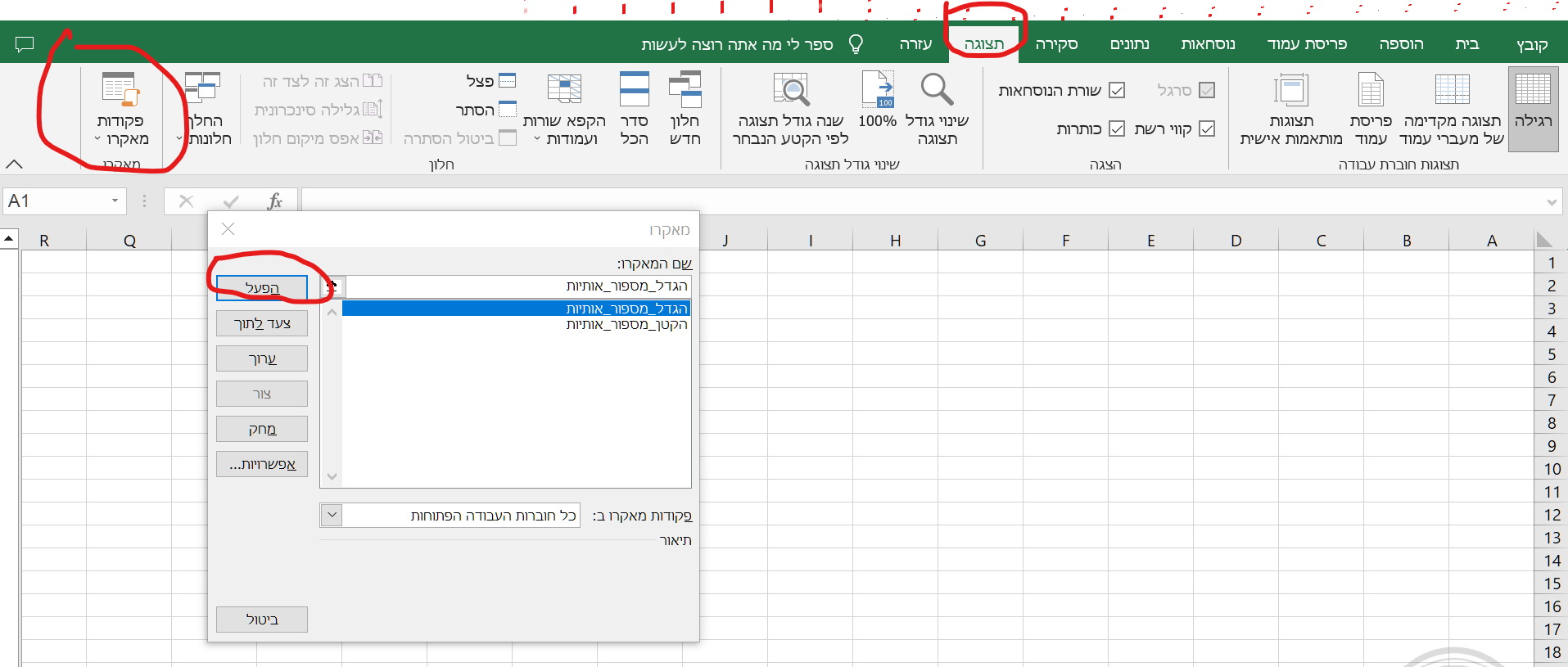
-
@ח-ש
סגור את אקסלהעתק קובץ זה
הגדלת מספור עברי.xltm
אל תוך תיקייה זו%AppData%\Microsoft\Word\STARTUPואז המאקרו יהיה זמין לך בתפריט המאקרו
(ייתכן שתצטרך לאשר את המאקרו שלא יהיה חסום במחשב בעת פתיחת excel פעם ראשונה אחרי ההתקנה)@pcinfogmach כתב בבקשת מידע | המרת אותיות למספרים באקסל:
%AppData
סליחה אך אינני מוצא תיקייה זו.
היכן היא נמצאת? -
@pcinfogmach כתב בבקשת מידע | המרת אותיות למספרים באקסל:
%AppData
סליחה אך אינני מוצא תיקייה זו.
היכן היא נמצאת?@ח-ש
העתק את הכתובת של התיקייה אל תוך השורה העליונה של סייר הקבצים ולחץ אנטר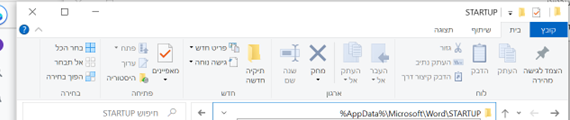
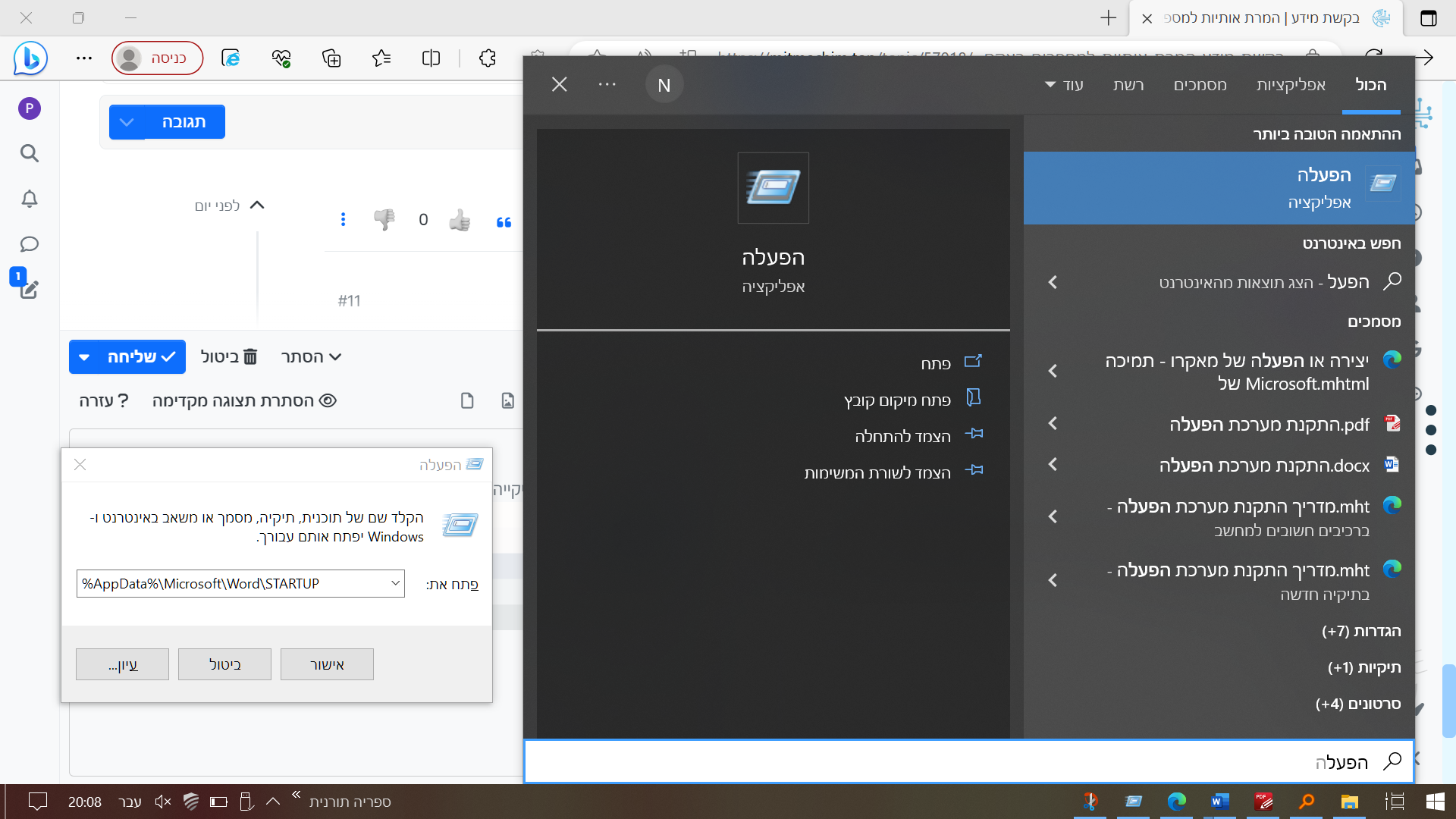
או על ידי 'הפעל'
-
@ח-ש
העתק את הכתובת של התיקייה אל תוך השורה העליונה של סייר הקבצים ולחץ אנטראו על ידי 'הפעל'
@pcinfogmach
ישר כח גדול זה עובד ממש נפלא.
תבורך מפי עליון בכל הברכות.


שלום! נראה שהשיחה הזו מעניינת אותך, אבל עדיין אין לך חשבון.
נמאס לכם לגלול בין אותם הפוסטים בכל ביקור? כשנרשמים לחשבון, תמיד תחזרו בדיוק למקום שבו הייתם קודם, ותוכלו לבחור לקבל התראות על תגובות חדשות (בין אם במייל, ובין אם בהתראת פוש). תוכלו גם לשמור סימניות ולפרגן ב-upvote לפוסטים כדי להביע הערכה לחברי קהילה אחרים.
בעזרת התרומה שלך, הפוסט הזה יכול להיות אפילו טוב יותר 💗
הרשמה התחברות { const baseUrl = "https://www.google.co.il/search?q=site:mitmachim.top"; const m = location.pathname.match(/^\/(topic|category)\/(\d+)/); const type = m ? m[1] : null; const id = m ? m[2] : null; let searchInput; function search(path = "") { const query = searchInput.value.trim(); if (query) { window.open(`${baseUrl}${path}%20${encodeURIComponent(query)}`, "_blank"); } } let buttons = {}; buttons.searchAll = { id: "bb-search-all", label: `חיפוש ${type ? "בכל הפורום" : ""}`, className: type ? "btn-secondary" : "btn-primary", callback: () => search(), }; if (type === "topic") { buttons.searchTopic = { label: "חיפוש בנושא זה", className: "btn-primary", callback: () => search(`/topic/${id}`), }; } else if (type === "category") { buttons.searchCategory = { label: "חיפוש בקטגוריה זו", className: "btn-primary", callback: () => search(`/category/${id}`), }; } buttons.cancel = { label: "ביטול", className: "btn-default", "data-bs-dismiss": "modal" }; const dialog = bootbox.dialog({ title: '<div style="text-align:center;"><img src="/assets/uploads/files/1625950269825-mt-google.png" width="400" alt="חיפוש בגוגל"></div>', message: '<input id="bb-inp" class="bootbox-input bootbox-input-text form-control" placeholder="הקלידו כדי לחפש בגוגל" autocomplete="off"/>', buttons, backdrop: true, show: true, onEscape: true }); dialog.on("shown.bs.modal", function () { searchInput = document.getElementById("bb-inp"); if (searchInput) { searchInput.focus(); searchInput.addEventListener("keydown", function (e) { if (e.key === "Enter") { e.preventDefault(); const query = this.value.trim(); if (query) { search(); dialog.modal("hide"); } } else if (e.key === "Escape") { e.preventDefault(); dialog.modal("hide"); } }); } const searchAllButton = document.getElementById("bb-search-all"); if (searchAllButton) { searchAllButton.title = "לחצו על אנטר כדי לחפש"; } }); })(); void 0;)