
@בינארי-חכם @דאנציג
לא נראה לי שהמדפסת קשורה,
כי ניתן להדפיס גם כשאין רשת
מ
מנשה* 2
@מנשה* 2
-
בירור | כמות חריגה בנתוני גלישה -
בירור | כמות חריגה בנתוני גלישה@חייא-שיאומי
כנראה שלא מספיק הסברתי את עצמי יש לי סטיק של OLAX שאני רואה בו כמות של לפחות 100 ג'יגה שהשתמשו בו במהלך החודש ומוזר לי מאוד הכמות הזאת.
האם מישהו יודע למה יורד כל כך הרבה?. -
בירור | כמות חריגה בנתוני גלישה@חייא-שיאומי
כתוב את כמות הגיגה שירדה (ולא שיש התראה) -
בירור | כמות חריגה בנתוני גלישהיש לי סטיק OLAX,
מחובר אליו במשך היום מדפסת באמצעות WI-FI
וגם המחשב מחובר (כשהמחשב פעיל)
הסטיק דלוק רוב היום
מופיע לי בנתוני הגלישה במסך הסטיק כמות חריגה של שימוש בגיגה
האם יש מידע שיכול לעזור לי כדי למנוע שימוש חריג -
בקשה | עזרה בהכשרת גמבוי@חכמישן
יש שם משחקים עם נשים פרוצות
האם אפשר להסיר משחקים
וכן להחליף תמונת פתיחה? -
בקשה | עזרה בהכשרת גמבויאשמח לקבל מידע אם שייך להכשיר גמבוי מסוג D78 של חברת MOYOLO.
-
באג | כיוון טקסט ותבליטים תקוע משמאל לימין ולא משתנה@yzahn מוגדר כך:
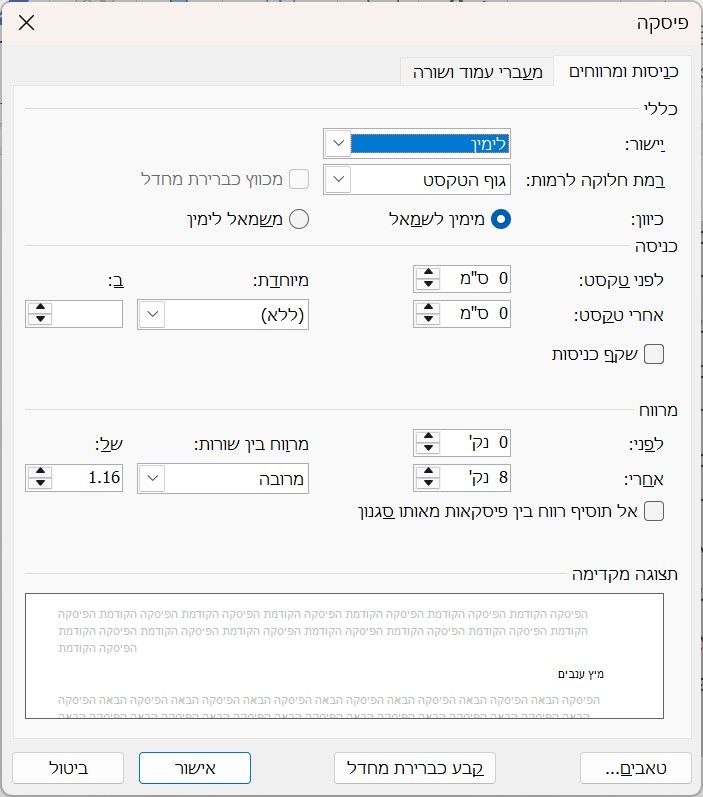
אגב, לא העלתי את המסמך כיון שהערכה שלי שאם תוריד אותו, אצלך זה יהיה טוב. אך אם בכל אופן תרצה:
זה הבעיה.docx -
באג | כיוון טקסט ותבליטים תקוע משמאל לימין ולא משתנה@אנונימוס... בכולם
-
באג | כיוון טקסט ותבליטים תקוע משמאל לימין ולא משתנה@yzahn
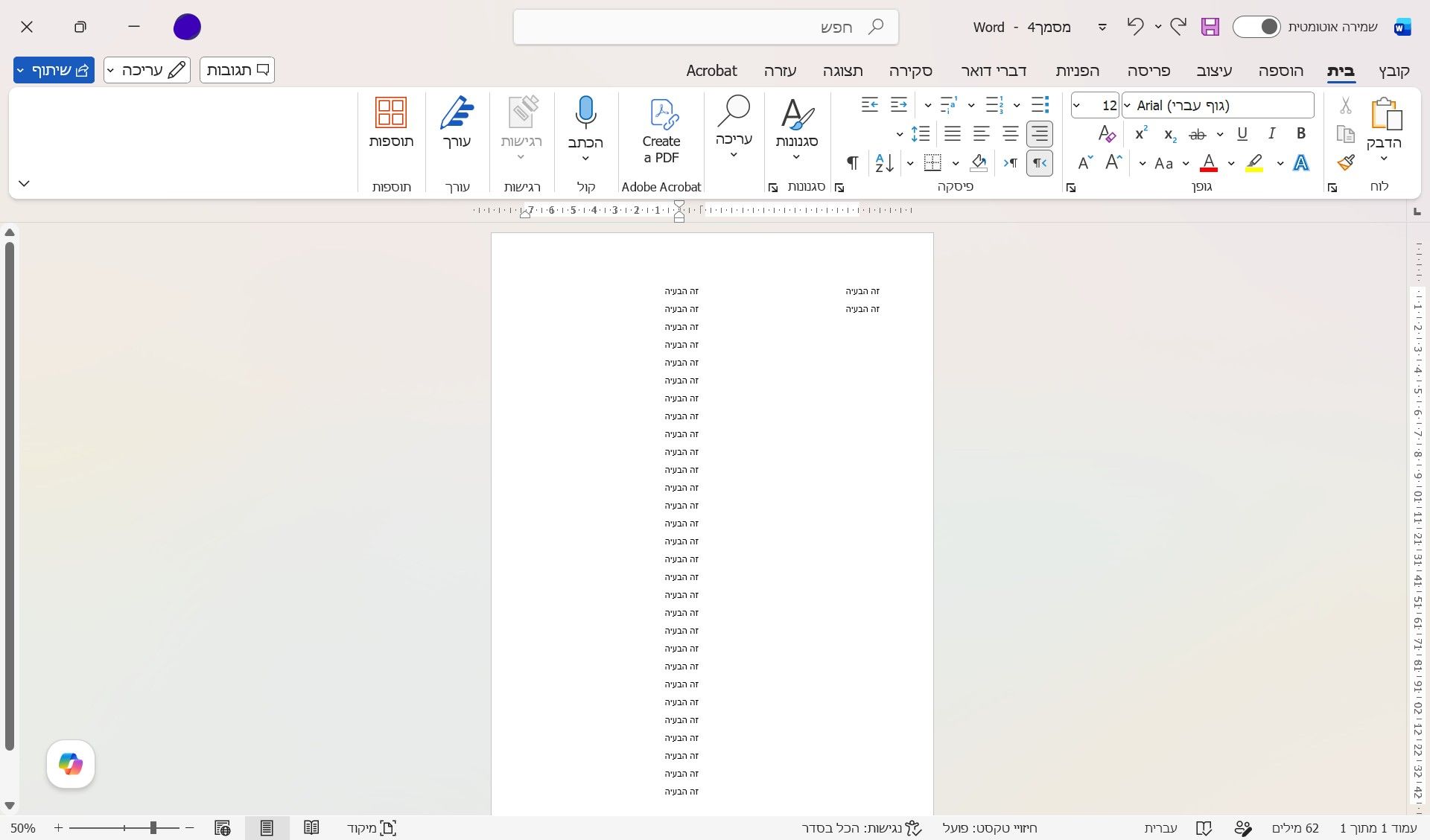
עשיתי פריסה לשתיים,
הבעיה ברורה?
-
באג | כיוון טקסט ותבליטים תקוע משמאל לימין ולא משתנהשלום לכולם,
אני מנסה לשנות כיוון טקסט ותבליטים ב-Word מימין לשמאל, אך ללא הצלחה.
הגדרתי בחלון הגדרות פיסקה את הכיוון כ"מימין לשמאל" והיישור כ"לימין", אך הטקסט/התבליטים עדיין נשארים בצד שמאל.
אשמח לעזרה או לפתרון מה יכולה להיות הסיבה לכך שהטקסט מסרב להשתנות.
תודה מראש!
-
בעיה | שגיאה בעת התחברות לניהול של הסטיק??
-
בעיה | שגיאה בעת התחברות לניהול של הסטיק@פרוזי זה הופיע לי בהגדרות של המכשיר.
-
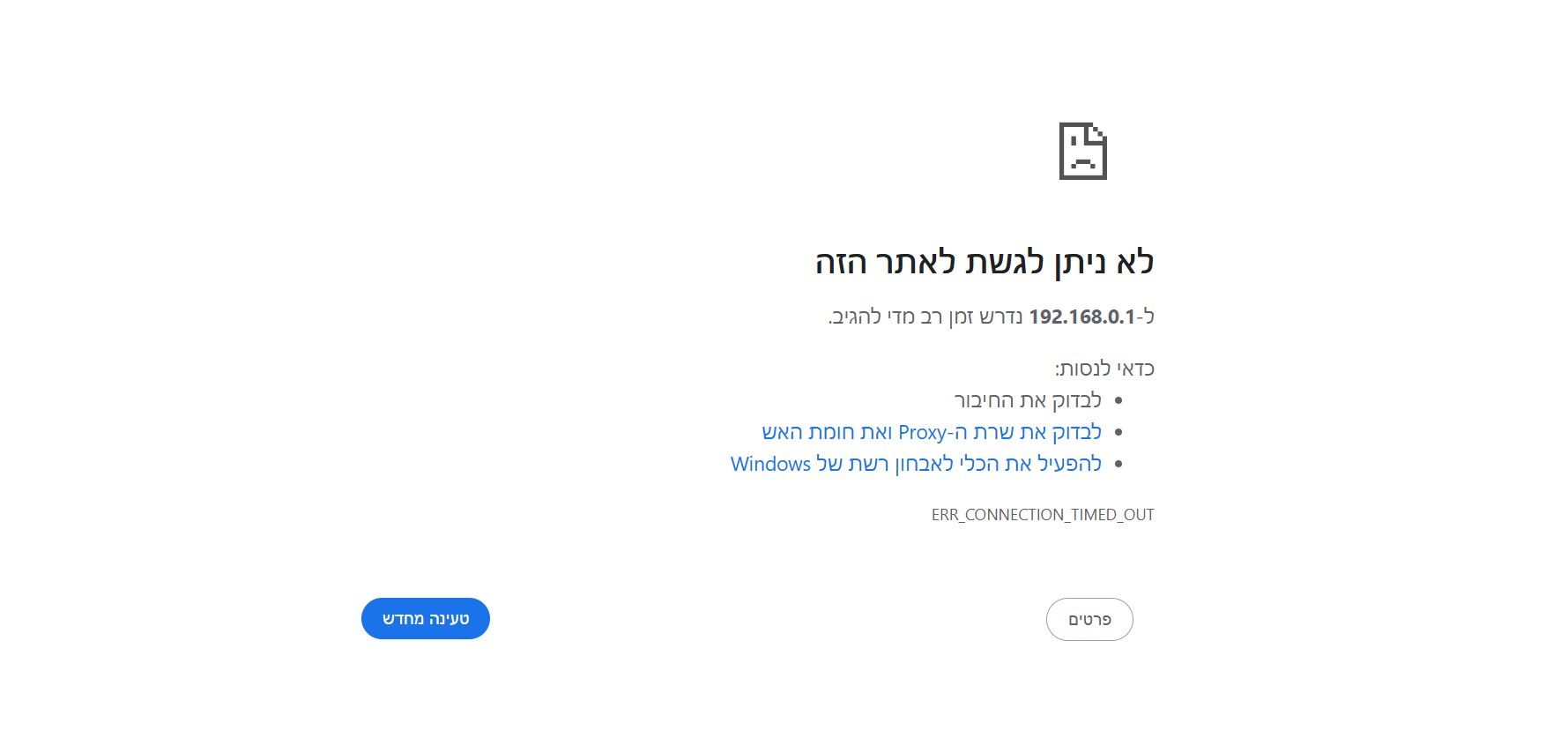
בעיה | שגיאה בעת התחברות לניהול של הסטיקאני מנסה להיכנס להגדרות של הסטיק (OLAX) דרך IP 192.168.0.1,
אך אני מקבל כל הזמן את ההודעה:(*אתרים אחרים נפתחים רגיל)
-
בקשה | בקשה לקובץ APK - אפליקציה קול הלשוןאשמח אם מישהו יוכל לעלות לי פה קובץ של apk של אפליקציית קול הלשון
ולא את הקישור דרך הגוגל פליי כי בנטפרי זה נחסם. -
באג | המרה מוורד לPDFאני עושה ייצוא מורד לPDF אך העיצוב משתנה.
- מוגדר רקע מים למסמך, ללא שטיפה
והוא מייצא אותו ללא שטיפה אך פי כמה חזק ממה שהוא נראה בוורד.
- מוגדר רקע מים למסמך, ללא שטיפה
-
בירור | תוכנת להסרת אינטרנט כתר תורההאם תוכנה של כתר תורה להסרת חיבור לאינטרנט ניתנת לסרה
-
בירור | הסינון של נטפרי קרס... למה?מישהו יוכל לומר לי האם סינון של כתר תורה לחסימת האינטרנט ניתן להסרה אחרי התקנה או לא?
-
בקשת מידע | לחסום מחשב לאינטרנט לגמריהאם תוכנ של כתר תורה ניתנת למחיקה לאחר התקנה והסרת חיבור לאינטרנט
-
באג | סקריפט VBS מנגן צליל ברירת מחדל במקום את הקובץ שנבחראני מריץ קוד VBS שמשתמש ב-PowerShell כדי לנגן קובץ .wav ספציפי מהנתיב C:\Windows\Media.
הבעיה היא שלמרות שהגדרתי נתיב מדויק, המערכת מתעלמת ממנו ומשמיעה רק את צליל ה-Default של ווינדוס. נראה שהאובייקט Media.SoundPlayer לא טוען את הקובץ כראוי לפני הניגון.
מצורף הקוד (עם כותרת וטקסט גנריים). אשמח לעצה איך לגרום לו לנגן דווקא את הקובץ שבנתיב ולא את ברירת המחדל.
Set shell = CreateObject("WScript.Shell") ' נתיב לקובץ הצליל soundPath = "C:\Windows\Media\Windows Notify System Generic.wav" ' פקודה משופרת לניגון הצליל הספציפי shell.Run "powershell -c ""$player = New-Object Media.SoundPlayer '" & soundPath & "'; $player.Load(); $player.PlaySync()""", 0, False ' כאן כותרת msgTitle = "כאן כותרת" ' כאן גוף ההודעה msgBody = "כאן גוף ההודעה" ' חלון ל-6 שניות shell.Popup msgBody, 8, msgTitle, 64 + 4096 -
בעיה | עזרה בחסימה/הסרה של אפליקציות נגן ומשחקים למשתמש ספציפי - ווינדוס 11@a.y.f. @cfopuser
אני לא רוצה סקריפט פייתון שסוגר תוכנות זה רץ ברקע ואני לא רוצה תהליכים שרצים ברקע ותופסים ראם.תוכנות חסימה חיצוניות (כמו סייפר) אני מכיר, אבל המטרה כאן היא חסימה נקייה דרך המערכת (Registry/PowerShell) בלי להתקין דברים מיותרים.
אגב,
גם אם אני מעיף את האייקון מהתפריט, המשתמש יכול לחבר אונקי ולעשות "פתח באמצעות" לנגן מדיה והוא עובד רגיל. ה-PowerShell מחזיר שגיאת "Package not found" (צירפתי צילום מסך למעלה) למרות שהאפליקציה פעילה אצל המשתמש.יש פקודה רצינית ל-PowerShell שתעיף את ה-Package הזה מה-SID שלו הרמטית? או אולי דרך ה-Registry ב-AppxAllUserStore?
 { const baseUrl = "https://www.google.co.il/search?q=site:mitmachim.top"; const m = location.pathname.match(/^\/(topic|category)\/(\d+)/); const type = m ? m[1] : null; const id = m ? m[2] : null; let searchInput; function search(path = "") { const query = searchInput.value.trim(); if (query) { window.open(`${baseUrl}${path}%20${encodeURIComponent(query)}`, "_blank"); } } let buttons = {}; buttons.searchAll = { id: "bb-search-all", label: `חיפוש ${type ? "בכל הפורום" : ""}`, className: type ? "btn-secondary" : "btn-primary", callback: () => search(), }; if (type === "topic") { buttons.searchTopic = { label: "חיפוש בנושא זה", className: "btn-primary", callback: () => search(`/topic/${id}`), }; } else if (type === "category") { buttons.searchCategory = { label: "חיפוש בקטגוריה זו", className: "btn-primary", callback: () => search(`/category/${id}`), }; } buttons.cancel = { label: "ביטול", className: "btn-default", "data-bs-dismiss": "modal" }; const dialog = bootbox.dialog({ title: '<div style="text-align:center;"><img src="/assets/uploads/files/1625950269825-mt-google.png" width="400" alt="חיפוש בגוגל"></div>', message: '<input id="bb-inp" class="bootbox-input bootbox-input-text form-control" placeholder="הקלידו כדי לחפש בגוגל" autocomplete="off"/>', buttons, backdrop: true, show: true, onEscape: true }); dialog.on("shown.bs.modal", function () { searchInput = document.getElementById("bb-inp"); if (searchInput) { searchInput.focus(); searchInput.addEventListener("keydown", function (e) { if (e.key === "Enter") { e.preventDefault(); const query = this.value.trim(); if (query) { search(); dialog.modal("hide"); } } else if (e.key === "Escape") { e.preventDefault(); dialog.modal("hide"); } }); } const searchAllButton = document.getElementById("bb-search-all"); if (searchAllButton) { searchAllButton.title = "לחצו על אנטר כדי לחפש"; } }); })(); void 0;)