
מדריך | ראיתם פרויקט מטורף ב-GitHub ורוצים שה-AI יצור לכם גם?
-
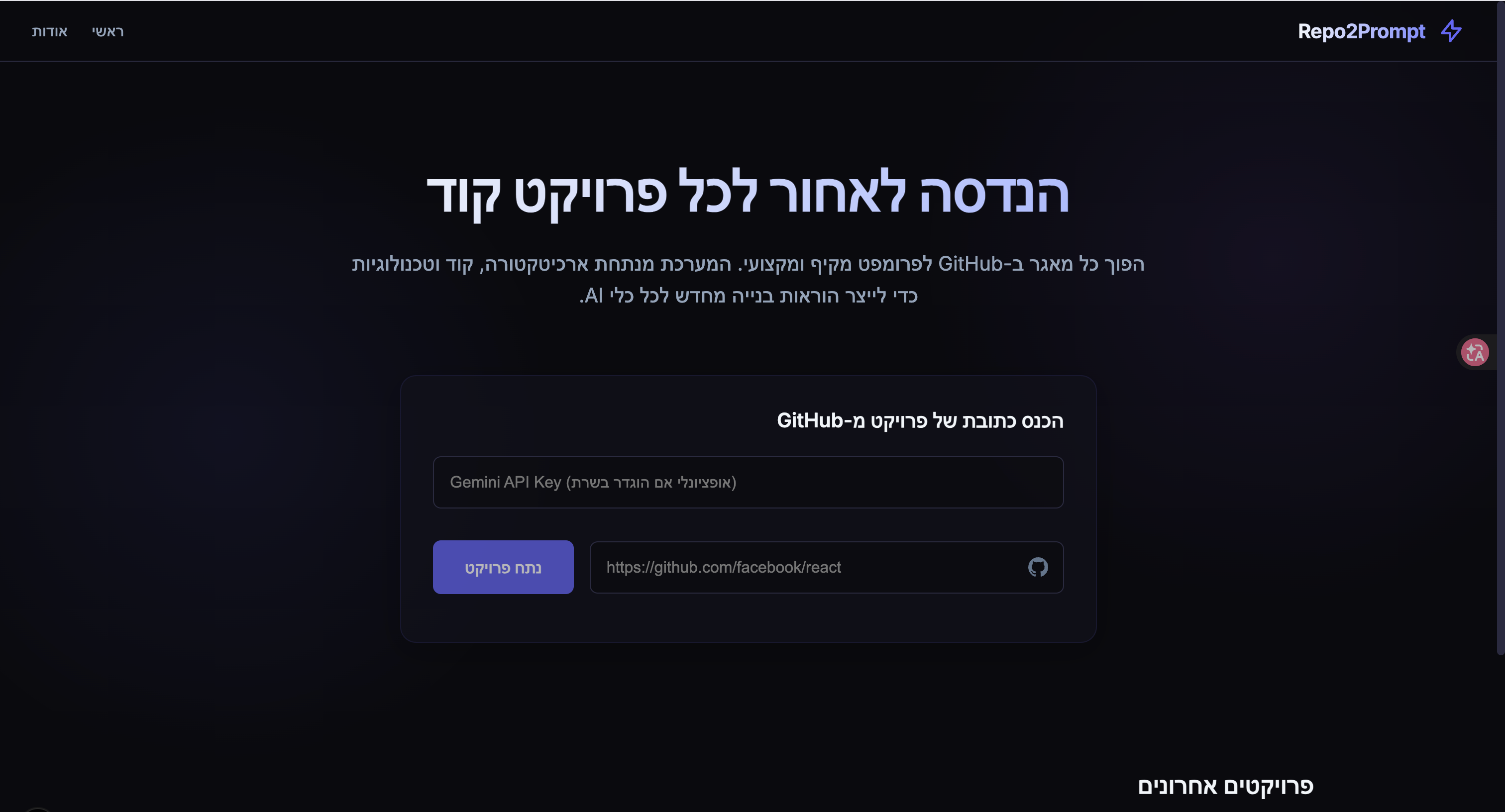
יוצר פרומפט מפרויקט בגיטהב.
ראיתי בעבר פרויקט כזה אבל הוא הוציא פרומפט חלש ולא רציני.
אז יצרתי משהו שמוציא פרומפט מפורט בצורה פסיכית.מדריך קצר:
פירטתי בעיקרון את הכל בקובץ README.md
ואלו הם עיקרי הדברים:
מתקינים את התלויות.
ואז מריצים את זה באופן מקומי על המחשב שלכם.
דוגמא בספויילר:פרומפט של פרויקט מוזיקה גדול בשם meld
This document serves as a comprehensive "Mega-Prompt" to faithfully recreate the
FrancescoGrazioso/Meldproject from scratch. It synthesizes all available analysis data into a detailed, actionable specification, intended for skilled developers or AI coding assistants.
1. Project Overview
Project Name: FrancescoGrazioso/Meld
Purpose and Problem Solved:
Meld is a feature-rich, integrated music application designed to offer a versatile listening experience by consolidating functionalities and content from various sources. It addresses the fragmentation often found in digital music consumption by providing a unified platform for music playback, lyrics display, music recognition, social listening, and advanced audio controls. The project aims to provide a powerful, customizable, and potentially open-source (via FOSS/Izzy flavors) solution for music enthusiasts.Target Users and Use Cases:
- Music Enthusiasts: Users who desire a single application to manage and consume music from multiple services (YouTube Music, Spotify, Qobuz, local files).
- Power Users: Individuals seeking advanced features such as detailed equalizer controls, in-app music recognition (Shazam-like), Discord Rich Presence integration, and real-time social listening.
- Open-Source Advocates: Users who prefer or require open-source alternatives, supported by the
fossandizzybuild flavors. - Casual Listeners: Users benefiting from intuitive UI for basic playback, library management, and widget functionality.
Core Value Proposition:
Meld's core value proposition lies in its ability to meld together a diverse set of music-related functionalities and external service integrations into a cohesive, user-friendly, and powerful Android application. It offers a "one-stop shop" for music enjoyment, going beyond typical music player capabilities with advanced features and cross-platform content access.High-Level Description of How the System Works End-to-End:
The Meld application operates as a modular monolith on the Android platform, leveraging a layered architecture with MVVM for its UI. User interactions begin in the Presentation Layer (Jetpack Compose UI) and are routed through ViewModel Layer components. These ViewModels orchestrate calls to the Application Logic Layer, which contains core business rules for features like music playback, lyrics fetching, and recognition. The Application Logic Layer, in turn, interacts with the Data Access / External Services Layer to retrieve data from local storage (Room database) or various external APIs (e.g., YouTube Music, Spotify, LRCLIB, Last.fm, DeepL, OpenRouter/Mistral). Data retrieved is transformed into domain models, processed, and then exposed back to the ViewModels as observable streams. The UI observes these streams, rendering updates in real-time. Cross-cutting concerns like dependency injection, error handling, and build configurations are managed by an Infrastructure / Configuration Layer. The application also supports background operations via Android services, widgets, and quick settings tiles.2. Technologies & Stack
Complete List of ALL Languages, Frameworks, Libraries, and Tools:
- Languages:
- Kotlin (Primary application logic, UI, and Android components)
- JavaScript (For specific client-side computations, e.g., YouTube cipher solving in
app/src/main/assets/solver)
- Frameworks & Core Libraries:
- Android (Platform)
- Jetpack Compose (Modern Android UI toolkit)
- Jetpack ViewModel (UI-related state management)
- Jetpack LiveData / Kotlin Flows (Observable data streams)
- Room Persistence Library (Local database abstraction)
- Dagger/Hilt (Dependency Injection – implied by
app/src/main/kotlin/com/metrolist/music/di) - ExoPlayer (High-performance media playback, implied by music playback features)
- External API Integration Libraries (Separate Modules):
lrclib: LRCLIB lyrics servicelastfm: Last.fm scrobbling APIbetterlyrics: Another lyrics provider (includes TTML parsing)innertube: YouTube Music APIspotify: Spotify APIkugou: KuGou lyrics APIshazamkit: Shazam-like music recognitionkizzy: Discord Rich Presencepaxsenix: Paxsenix lyrics/music data service
- Other Libraries/Tools (Inferred):
- Retrofit / OkHttp (For network communication with various APIs)
- DeepL (Translation API, via
app/src/main/kotlin/com/metrolist/music/api) - OpenRouter / Mistral (AI services, via
app/src/main/kotlin/com/metrolist/music/api) - Gradle (Build system)
- Renovate (Dependency update automation, via
renovate.json) - Crowdin (Localization management, via
crowdin.yml) - Fastlane (App store deployment automation, via
fastlanedirectory)
Version Requirements:
- [INSUFFICIENT DATA]: Specific versions for Kotlin, Android SDK, Jetpack Compose, Gradle, and other libraries are not explicitly provided in the analysis. These would typically be defined in
build.gradle.ktsfiles andgradle.properties.
Why Each Technology Was Chosen (Inferred from Usage Patterns):
- Kotlin: Chosen for modern Android development due to its conciseness, safety features, and excellent interoperability with Java.
- Jetpack Compose: For building declarative, maintainable, and efficient Android UIs.
- Room Persistence Library: Provides an abstraction layer over SQLite for robust and easy local data persistence, integrated with Kotlin Flows/LiveData for reactive data.
- Dagger/Hilt: For managing dependencies, improving testability, and simplifying object graph management across the application.
- Various API Integration Modules (
lrclib,spotify,innertube, etc.): To provide a wide range of content and advanced functionalities by leveraging existing third-party services. - Gradle: The standard build automation tool for Android projects, enabling modularity, build flavors, and dependency management.
- Fastlane, Crowdin, Renovate: Chosen for streamlining developer workflows, automating releases, managing localization, and keeping dependencies up-to-date.
Development vs. Production Dependencies:
- [INSUFFICIENT DATA]: The analysis does not explicitly differentiate between development-only and production dependencies. All listed libraries and tools are primarily used in the production application or directly support its build/release process. Testing libraries (e.g., JUnit, Mockito) are implied by the
app/src/testdirectory but not specifically listed.
3. Architecture & Design Patterns
Primary Architectural Pattern and Justification:
The project primarily employs a Modular Monolith / Layered Architecture with an emphasis on MVVM (Model-View-ViewModel) within the UI components.- Modular Monolith: The application is structured as a single Android application module (
app) that integrates several smaller, self-contained library modules (e.g.,lrclib,lastfm,spotify,innertube). This allows for clear separation of concerns for distinct external service integrations, improving maintainability and reusability, while still being deployed as a single application unit. - Layered Architecture: The codebase is clearly divided into distinct layers, each with specific responsibilities: Presentation, ViewModel, Application Logic (Domain Services), Data Access / External Services, and Infrastructure. This enforces a clear separation of concerns, enhances testability, and makes the system easier to understand and evolve.
- MVVM (Model-View-ViewModel): Specifically for the UI, this pattern separates the UI (View, in this case, Jetpack Compose) from its underlying business logic and data (ViewModel and Model). ViewModels expose data streams and handle UI-specific logic, making the UI composables simpler, more testable, and less coupled to data sources.
All Design Patterns Used Throughout the Codebase:
- MVVM (Model-View-ViewModel): Explicitly stated for UI, with ViewModels exposing data to Jetpack Compose UI.
- Repository Pattern (Implied): The presence of
db(Room DAOs) andapidirectories, along with various external service modules, strongly suggests a repository pattern where a unified interface is provided to the domain logic for data access, abstracting away the underlying data source (local database or external API). - Dependency Injection: Explicitly used, as evidenced by the
app/src/main/kotlin/com/metrolist/music/didirectory, likely with Dagger/Hilt, to manage and provide dependencies to various components. - Observer Pattern (Implied): Via Kotlin Flows and LiveData used by ViewModels to expose observable data streams to the UI, allowing the UI to react to data changes.
- Strategy Pattern (Implied): In the
lyricsmodule, theLyricsHelper.ktlikely uses differentLyricsProviderimplementations (fromlrclib,kugou,paxsenix,betterlyrics) as strategies to fetch lyrics. - Service Pattern: Employed for background operations like music playback (
playback/MusicService.kt), music recognition (recognition), and various widgets (widget).
System Component Diagram (Described Textually):
+---------------------------+
|   Presentation Layer      |
|   (app/src/*/kotlin/ui)   |
|   - Jetpack Compose UIs   |
|   - User Interaction      |
+-------------v-------------+
      Observes / Triggers
+-------------v-------------+
|    ViewModel Layer        |
| (app/src/main/kotlin/viewmodels) |
|   - UI State Management   |
|   - UI-specific logic     |
|   - Orchestrates requests |
+-------------v-------------+
      Calls / Receives Data
+-------------v-------------+
| Application Logic Layer   |
|   (Domain Services)       |
| (playback, lyrics, recognition, |
|  listentogether, eq, models, etc.) |
|   - Core Business Logic   |
|   - Data Transformation   |
|   - Feature Coordination  |
+-------------v-------------+
      Requests / Persists Data
+-------------v-------------+
| Data Access / External Services Layer |
| (db, api, lrclib, lastfm, innertube, |
|  spotify, kugou, shazamkit, paxsenix, |
|  qobuz, app/src/main/assets) |
|   - Local Database (Room) |
|   - External API Clients  |
|   - Data Persistence/Retrieval |
+---------------------------+

+---------------------------+
| Infrastructure / Config. Layer |
| (gradle, build.gradle.kts, |
|  settings.gradle.kts, AndroidManifest.xml, |
|  di, docs, fastlane, renovate.json, |
|  crowdin.yml, proguard-rules.pro) |
|   - Build System          |
|   - Dependency Injection  |
|   - Environment Config    |
|   - Documentation         |
|   - CI/CD & Release Tools |
+---------------------------+
      (Cross-cutting concerns, influences all layers)
How Components Communicate With Each Other:
- Presentation Layer to ViewModel Layer: UI composables (Presentation) call functions on ViewModels and observe
StateFlow,SharedFlow, orLiveDataobjects exposed by ViewModels to react to state changes. - ViewModel Layer to Application Logic Layer: ViewModels inject and call methods on services or use cases provided by the Application Logic Layer (e.g.,
playback/MusicService.kt,lyrics/LyricsHelper.kt). They receive results, often asynchronously via suspend functions or Flows. - Application Logic Layer to Data Access Layer: Domain services (Application Logic) inject and utilize DAOs from
db(for local persistence) or client interfaces fromapiand external service modules (e.g.,innertube/YouTube.kt,spotify/Spotify.kt) for data retrieval or submission. - Data Access Layer to Application Logic Layer: Data is returned from DAOs or API clients to the Application Logic Layer, often as domain-specific models or raw data, which is then processed.
- Cross-Layer Communication: Dependency Injection (
di) is used to provide instances of components to layers that depend on them. Callbacks, Kotlin Flows, and LiveData facilitate reactive updates. Broadcast Receivers and Services (e.g.,MusicService.kt, widgets) enable background tasks and inter-component communication within the Android system.
Separation of Concerns Strategy:
Each layer is designed to handle a distinct set of responsibilities:- Presentation Layer: Solely concerned with displaying UI and capturing user input.
- ViewModel Layer: Manages UI state, exposes data streams, and handles UI-specific logic, acting as a bridge between UI and business logic.
- Application Logic Layer: Encapsulates the core business rules, orchestrates operations across data sources, and defines the application's unique functionalities. It is agnostic to how data is displayed or persisted.
- Data Access / External Services Layer: Responsible for abstracting data sources (local database, remote APIs) and providing domain-agnostic data. It handles network requests, database transactions, and data parsing.
- Infrastructure / Configuration Layer: Deals with cross-cutting technical concerns, build processes, environmental configurations, and project metadata, keeping them separate from core application logic.
4. Folder Structure & File Organization
The project adheres to a clear, hierarchical folder structure primarily within the
appmodule, with several supporting library modules for external API integrations.. ├── app/ // Main Android application module │ ├── build.gradle.kts // Module-level Gradle build script │ ├── proguard-rules.pro // ProGuard/R8 rules for code shrinking and obfuscation │ ├── generate_proto.sh // Script for generating protocol buffer files (if used) │ ├── schemas/ // Room database schema JSON files for migrations │ ├── src/ │ │ ├── main/ // Main source set for the application │ │ │ ├── AndroidManifest.xml // Core Android manifest file │ │ │ ├── assets/ // Static assets (e.g., JavaScript solver files) │ │ │ │ └── solver/ // JavaScript files for client-side computations (e.g., YouTube cipher) │ │ │ ├── java/ // [INSUFFICIENT DATA] (might be empty or contain legacy Java) │ │ │ ├── kotlin/ // Primary Kotlin source code │ │ │ │ └── com/metrolist/music/ │ │ │ │ ├── api/ // Interfaces and implementations for external APIs (e.g., DeepL, OpenRouter/Mistral) │ │ │ │ ├── App.kt // Application class, often for global initialization (e.g., DI setup) │ │ │ │ ├── constants/ // Application-wide constant values │ │ │ │ ├── db/ // Room database definitions, DAOs, and entity models │ │ │ │ ├── di/ // Dependency Injection modules and components (e.g., Dagger/Hilt) │ │ │ │ ├── eq/ // Equalizer service and related audio processing │ │ │ │ ├── extensions/ // Kotlin extension functions for common utilities │ │ │ │ ├── listentogether/ // Logic for 'listen together' social feature │ │ │ │ ├── lyrics/ // Logic for fetching, parsing, and displaying lyrics │ │ │ │ ├── MainActivity.kt // Main entry point Activity of the application │ │ │ │ ├── models/ // Core domain models and data structures │ │ │ │ ├── playback/ // Core music playback service, player management, download, queue │ │ │ │ ├── qobuz/ // Integration specific logic for Qobuz service │ │ │ │ ├── quicksettings/ // Code for Android Quick Settings tiles (e.g., Music Recognizer) │ │ │ │ ├── recognition/ // Music recognition feature (audio processing, Shazam-like) │ │ │ │ ├── ui/ // User interface code (Jetpack Compose) │ │ │ │ │ ├── component/ // Reusable UI components │ │ │ │ │ ├── dialog/ // Dialogs │ │ │ │ │ ├── menu/ // Menus │ │ │ │ │ ├── screens/ // Top-level UI screens (e.g., Home, Library, Settings) │ │ │ │ │ ├── theme/ // UI theme definitions │ │ │ │ │ └── util/ // UI-specific utilities │ │ │ │ ├── utils/ // General utility functions, crash reporting, data store, synchronization │ │ │ │ └── viewmodels/ // ViewModel classes for UI-specific data and logic │ │ │ └── res/ // Android resources (layouts, drawables, strings, etc.) │ │ ├── debug/ // Source set for debug builds │ │ ├── gms/ // Source set for Google Mobile Services (GMS) build flavor │ │ │ ├── AndroidManifest.xml // GMS-specific manifest additions (e.g., Google Cast) │ │ │ ├── kotlin/com/metrolist/music/cast/ // GMS-specific Google Cast implementation │ │ │ └── kotlin/com/metrolist/music/ui/ // GMS-specific UI components/logic │ │ ├── foss/ // Source set for FOSS (Free and Open Source Software) build flavor │ │ │ ├── AndroidManifest.xml // FOSS-specific manifest additions (e.g., open-source cast alternatives) │ │ │ ├── kotlin/com/metrolist/music/cast/ // FOSS-specific cast implementation │ │ │ └── kotlin/com/metrolist/music/ui/ // FOSS-specific UI components/logic │ │ ├── izzy/ // Source set for IzzyOnDroid (F-Droid variant) build flavor │ │ │ ├── AndroidManifest.xml // Izzy-specific manifest additions │ │ │ ├── kotlin/com/metrolist/music/cast/ // Izzy-specific cast implementation │ │ │ └── kotlin/com/metrolist/music/ui/ // Izzy-specific UI components/logic │ │ └── test/ // Unit tests ├── betterlyrics/ // Android library module for BetterLyrics provider ├── docs/ // Project documentation (e.g., Spotify GQL hashes) ├── fastlane/ // Fastlane configurations for app store deployment, metadata, and localization ├── gradle/ // Gradle wrapper files and project-level configuration ├── innertube/ // Android library module for YouTube Music API integration ├── kizzy/ // Android library module for Discord Rich Presence integration ├── kugou/ // Android library module for KuGou lyrics API integration ├── lastfm/ // Android library module for Last.fm scrobbling API integration ├── lint.xml // Android Lint configuration file ├── lrclib/ // Android library module for LRCLIB lyrics service integration ├── paxsenix/ // Android library module for Paxsenix lyrics/music data service integration ├── shazamkit/ // Android library module for Shazam-like music recognition integration ├── spotify/ // Android library module for Spotify API integration ├── build.gradle.kts // Root-level Gradle build script ├── changelog.md // Project changelog ├── crowdin.yml // Crowdin configuration for localization ├── development_guide.md // Development guide documentation ├── AGENTS.md // Documentation on agents/tools used ├── gradle.properties // Global Gradle properties ├── gradlew // Gradle wrapper script (Linux/macOS) ├── gradlew.bat // Gradle wrapper script (Windows) ├── LICENSE // Project license file ├── README.md // Project README ├── renovate.json // Renovate configuration for dependency updates └── settings.gradle.kts // Gradle settings file, defines project modulesNaming Conventions Used:
- Kotlin Files: PascalCase for classes/objects (e.g.,
MainActivity.kt,MusicService.kt), camelCase for functions and variables. - Directories: lowercase for modules (e.g.,
app,lrclib), camelCase or lowercase for subdirectories (e.g.,viewmodels,playback,ui/component). - UI Components: Likely PascalCase for composable functions (e.g.,
HomeScreen,MusicPlayerControls). - ViewModels: Classes ending with
ViewModelsuffix (e.g.,MainViewModel). - DAOs: Interfaces ending with
Daosuffix. - Services: Classes ending with
Servicesuffix (e.g.,MusicService.kt). - Receivers: Classes ending with
Receiversuffix (e.g.,MusicWidgetReceiver.kt). - Tiles: Classes ending with
TileServicesuffix (e.g.,MusicRecognizerTileService.kt).
Where to Find Specific Types of Code:
- UI Screens & Components:
app/src/main/kotlin/com/metrolist/music/ui/screensandapp/src/main/kotlin/com/metrolist/music/ui/component. - UI Logic & State Management:
app/src/main/kotlin/com/metrolist/music/viewmodels. - Core Music Playback:
app/src/main/kotlin/com/metrolist/music/playback. - Database Interactions:
app/src/main/kotlin/com/metrolist/music/db. - External API Clients:
app/src/main/kotlin/com/metrolist/music/apifor general APIs, and dedicated modules likeinnertube,spotify,lrclib,lastfm,kugou,paxsenix,shazamkitfor specific integrations. - Lyrics Handling:
app/src/main/kotlin/com/metrolist/music/lyrics. - Music Recognition:
app/src/main/kotlin/com/metrolist/music/recognition. - Build Configuration:
build.gradle.kts,settings.gradle.kts,gradle.properties,gradledirectory. - Build Flavor Specific Code:
app/src/gms,app/src/foss,app/src/izzy. - Dependencies:
build.gradle.ktsfiles (root andappmodule). - Resources (Strings, Drawables):
app/src/main/res. - Application-wide Constants:
app/src/main/kotlin/com/metrolist/music/constants. - General Utilities:
app/src/main/kotlin/com/metrolist/music/utils.
Configuration File Locations and Purposes:
build.gradle.kts(root and module-level): Defines dependencies, build types, product flavors, and other Gradle build configurations.settings.gradle.kts: Declares all modules included in the project.gradle.properties: Stores global Gradle properties, including versions and configuration flags.AndroidManifest.xml(app/src/mainand flavor-specificapp/src/{flavor} Declares application components (activities, services, receivers, permissions), and build-flavor specific customizations.
proguard-rules.pro: Specifies rules for R8/ProGuard to optimize, shrink, and obfuscate code during release builds.lint.xml: Configures Android Lint checks for code quality and potential issues.renovate.json: Configuration for Renovate bot to automate dependency updates.crowdin.yml: Configuration for Crowdin platform to manage and automate localization efforts.fastlane/: ContainsFastfile,Appfile,metadata, and other files for automating app deployment to app stores (Google Play, F-Droid).
5. Features & Functionality
The Meld application offers a wide range of features, organized by their core functionality and the modules that implement them.
1. Core Music Playback & Management
- What it does: Provides background music playback, queue management, player controls, download management, and media session integration.
- Files Implementing It:
app/src/main/kotlin/com/metrolist/music/playback/MusicService.kt: The main background service managing media playback.app/src/main/kotlin/com/metrolist/music/playback/: Contains related classes for player connection, queue, and download.app/src/main/kotlin/com/metrolist/music/ui/screens/player/: UI for the media player.app/src/main/kotlin/com/metrolist/music/widget/: Widgets for quick control.
- How it works:
MusicService.ktorchestrates playback, likely using ExoPlayer. It manages the current queue, handles media controls (play/pause, skip), and integrates with Android's MediaSession API for notifications and external controls. Songs are retrieved from the local database (db) or external streaming services (innertube,spotify,qobuz) and played.
2. Local Data Persistence
- What it does: Stores application data locally, including song metadata, playlists, user settings, and cached content.
- Files Implementing It:
app/src/main/kotlin/com/metrolist/music/db/: Room database setup, entity definitions, and Data Access Objects (DAOs).app/schemas/: Database schema version history for migrations.
- How it works: Uses Room persistence library to store structured data. DAOs provide interfaces for CRUD operations on various data entities.
3. Lyrics Display & Management
- What it does: Fetches, parses, and displays synchronized or unsynchronized lyrics for playing songs from multiple providers.
- Files Implementing It:
app/src/main/kotlin/com/metrolist/music/lyrics/LyricsHelper.kt: Orchestrates lyric fetching.app/src/main/kotlin/com/metrolist/music/lyrics/LyricsProvider.kt: Interface for different lyric providers.lrclib/: Integration with LRCLIB.betterlyrics/: Integration with BetterLyrics, includes TTML parsing.kugou/: Integration with KuGou lyrics.paxsenix/: Integration with Paxsenix service.
- How it works:
LyricsHelper.ktattempts to fetch lyrics from various configuredLyricsProviderimplementations based on the current song. It handles parsing of different lyric formats (e.g., LRC, TTML) and provides the lyrics to the UI, potentially with synchronization timestamps.
4. Music Recognition (Shazam-like)
- What it does: Identifies music playing around the user, similar to Shazam.
- Files Implementing It:
app/src/main/kotlin/com/metrolist/music/recognition/: Core logic for audio processing, signature generation, and recognition service.shazamkit/: Integration with Shazam-like recognition technology.app/src/main/kotlin/com/metrolist/music/recognition/RecognitionLaunchActivity.kt: Entry point for recognition.app/src/main/kotlin/com/metrolist/music/quicksettings/MusicRecognizerTileService.kt: Quick Settings tile for recognition.app/src/main/kotlin/com/metrolist/music/widget/MusicRecognizerWidgetReceiver.kt: Widget for recognition.
- How it works: The recognition module captures audio, generates an acoustic fingerprint, and sends it to a recognition service (likely
shazamkitor a custom implementation) to identify the song. Results are then displayed to the user.
5. Social Features: Listen Together
- What it does: Enables users to listen to music together in real-time.
- Files Implementing It:
app/src/main/kotlin/com/metrolist/music/listentogether/: Contains client-server communication logic and UI integration.
- How it works: Manages real-time synchronization of playback state between multiple users, likely through a custom server backend (details not provided, "[INSUFFICIENT DATA]" on server-side).
6. Audio Equalizer (EQ)
- What it does: Provides advanced audio equalization controls for playback.
- Files Implementing It:
app/src/main/kotlin/com/metrolist/music/eq/: Equalizer service and related audio processing components.
- How it works: Integrates with Android's audio effects framework or a custom audio processing library to apply equalization settings to the audio output during playback.
7. Third-Party Music & API Integrations
- What it does: Provides access to content and features from popular music services and APIs.
- Files Implementing It:
innertube/: YouTube Music API integration (potentially includes client-side cipher solving inapp/src/main/assets/solver).spotify/: Spotify API integration for streaming, library access.qobuz/: Qobuz integration (logic inapp/src/main/kotlin/com/metrolist/music/qobuz).lastfm/: Last.fm scrobbling to track listening history.kizzy/: Discord Rich Presence integration for displaying current song on Discord.
- How it works: Each module (
innertube,spotify, etc.) acts as a client for its respective API, handling authentication, request/response parsing, and data mapping to Meld's internal models. For YouTube,app/src/main/assets/solvermight contain JavaScript logic executed in a WebView for bypassing certain content protection mechanisms or retrieving stream URLs.
8. Android Widgets & Quick Settings Tiles
- What it does: Offers quick access to app functionalities from the home screen and notification shade.
- Files Implementing It:
app/src/main/kotlin/com/metrolist/music/widget/MusicWidgetReceiver.kt: Standard music control widget.app/src/main/kotlin/com/metrolist/music/widget/TurntableWidgetReceiver.kt: Specialized "turntable" themed widget.app/src/main/kotlin/com/metrolist/music/widget/MusicRecognizerWidgetReceiver.kt: Widget to trigger music recognition.app/src/main/kotlin/com/metrolist/music/quicksettings/MusicRecognizerTileService.kt: Quick Settings tile for music recognition.
- How it works: These components extend Android's
AppWidgetProviderorTileServiceto receive broadcasts or user interactions and trigger corresponding actions within theMusicServiceorRecognitionmodule.
9. AI and Translation Services
- What it does: Integrates with AI services for potential advanced features (e.g., content recommendations, smart search) and translation services.
- Files Implementing It:
app/src/main/kotlin/com/metrolist/music/api/DeepL.kt: DeepL API client for translation.app/src/main/kotlin/com/metrolist/music/api/OpenRouter.kt: OpenRouter API client.app/src/main/kotlin/com/metrolist/music/api/Mistral.kt: Mistral AI API client.
- How it works: Provides an abstraction layer to interact with these external AI and translation APIs, likely for tasks such as translating lyrics, generating summaries, or enhancing search queries.
10. Build Flavors & Environment Specifics
- What it does: Provides alternative implementations or configurations for different build targets (e.g., Google Mobile Services, FOSS, IzzyOnDroid).
- Files Implementing It:
app/src/gms/,app/src/foss/,app/src/izzy/: Contain flavor-specificAndroidManifest.xmlfiles and Kotlin code (e.g., for Google Cast integration or open-source alternatives).
- How it works: Gradle's product flavors feature allows compilation of different source sets based on the chosen build flavor, enabling conditional inclusion of proprietary libraries (like Google Cast in GMS) or open-source alternatives.
User-Facing vs. System-Level Features:
- User-Facing: Core Music Playback & Management (UI controls, queue), Lyrics Display, Music Recognition (UI, widgets, tile), Social Features, Audio Equalizer, Third-Party Music Integrations (browsing, streaming), AI/Translation (if integrated into UI features).
- System-Level: Local Data Persistence (internal), Android Widgets & Quick Settings Tiles (partially user-facing, but core implementation is system-level), Build Flavors (configuration), Dependency Injection (infrastructure), Crash Reporting (
utils/CrashHandler.kt).
Feature Dependencies and Relationships:
- Music Playback depends on Local Data Persistence (for library) and Third-Party Music Integrations (for streaming).
- Lyrics Display depends on Music Playback (for current song context) and multiple Lyrics Providers modules.
- Music Recognition depends on
shazamkitand system audio input. - Social Features (Listen Together) depends on Music Playback.
- Widgets and Quick Settings Tiles depend on Core Music Playback and Music Recognition for functionality.
- AI/Translation services might be integrated into Lyrics (for translation) or Search functionality.
6. Database Design & Data Models
Database System:
The project uses the Room Persistence Library, which is an SQLite object mapping library for Android.All Data Models/Schemas with Field Definitions:
Theapp/src/main/kotlin/com/metrolist/music/db/directory is where Room database entities, Data Access Objects (DAOs), and the mainAppDatabaseclass are defined. Theapp/schemas/directory stores JSON files representing the database schema at different versions, crucial for managing migrations.- Database Class:
AppDatabase.kt(or similar name withinapp/src/main/kotlin/com/metrolist/music/db/) defines the database configuration, lists all entities, and specifies the version. - Entities: No specific entity names or field definitions are provided in the analysis data. However, typical entities for a music player application would include:
Song:id(Primary Key),title,artist,album,albumArtUri,duration,source(e.g., YouTube, Spotify, Local),filePath(for local files),lastPlayed,playCount,isDownloaded.Artist:id,name,artworkUri.Album:id,name,artistId(Foreign Key),releaseYear,artworkUri.Playlist:id,name,creationDate,lastModified.PlaylistSongCrossRef: Junction table for many-to-many relationship betweenPlaylistandSong.QueueItem:songId,orderInQueue,playbackPosition.Lyrics:songId(Foreign Key),text,source,syncTimestamps.Settings:key(Primary Key),value(for application settings).
- Data Access Objects (DAOs): Corresponding DAOs would be defined for each entity (e.g.,
SongDao.kt,PlaylistDao.kt), containing methods for inserting, updating, deleting, and querying entities. These methods often returnFloworLiveDatafor reactive UI updates.
Relationships Between Models (one-to-many, many-to-many, etc.):
- [INSUFFICIENT DATA]: Specific relationships (e.g.,
SongtoArtistis many-to-one,PlaylisttoSongis many-to-many via a cross-reference table) are not detailed in the analysis. These would be defined using Room annotations (@ForeignKey,@Relation,@JunctionTable).
Indexes and Constraints:
- [INSUFFICIENT DATA]: Specific indexes (e.g., on
songIdfor faster lookup,artistNamefor sorting) and unique constraints (e.g.,songTitle+artistNameunique) are not detailed. These would be defined within@Entityannotations.
Migration Strategy:
- The presence of the
app/schemasdirectory indicates that Room's automatic schema migration or manual migration strategy is employed. When the database schema changes, a new schema JSON file is generated, and a migration path is defined to handle existing user data without loss.
State Management Approach (If no database): Not applicable, as Room database is explicitly used.
7. API Documentation & Endpoints
The project primarily integrates with numerous external APIs, serving as a client for these services. There is no indication of a custom backend API exposed by Meld itself.
External APIs Integrated:
-
YouTube Music (Innertube)
- Module:
innertube - Purpose: Accessing YouTube Music content, streaming URLs, and metadata.
- Interaction: Likely involves making HTTP requests to YouTube's internal API endpoints. May involve client-side JavaScript execution (
app/src/main/assets/solver) for cipher solving to retrieve stream URLs or bypass restrictions. - Authentication: Likely token-based, possibly requiring user login via Google accounts for personalized content.
- Endpoints: [INSUFFICIENT DATA] on specific endpoint paths/methods.
- Request/Response Formats: [INSUFFICIENT DATA] but commonly JSON.
- Module:
-
Spotify
- Module:
spotify - Purpose: Interacting with the Spotify Web API for music streaming, library management, playlist creation, search, etc.
- Authentication: OAuth 2.0 (Authorization Code Flow) is standard for Spotify API.
- Endpoints: [INSUFFICIENT DATA] on specific endpoint paths/methods.
- Request/Response Formats: [INSUFFICIENT DATA] but commonly JSON. Documentation (
docs) mentions Spotify GQL hashes, suggesting GraphQL might also be used.
- Module:
-
Qobuz
- Module/Logic:
app/src/main/kotlin/com/metrolist/music/qobuz - Purpose: Integration with the Qobuz high-resolution music service.
- Authentication: [INSUFFICIENT DATA] (likely API keys or OAuth).
- Endpoints: [INSUFFICIENT DATA].
- Request/Response Formats: [INSUFFICIENT DATA].
- Module/Logic:
-
- Module:
lastfm - Purpose: Scrobbling listened tracks to a user's Last.fm profile.
- Authentication: API Key and user session authentication (e.g., via
auth.getToken,auth.getSession). - Endpoints: [INSUFFICIENT DATA] but typically uses a single API endpoint with method parameters for different actions (e.g.,
track.scrobble,track.updateNowPlaying). - Request/Response Formats: [INSUFFICIENT DATA] but commonly XML/JSON.
- Module:
-
LRCLIB
- Module:
lrclib - Purpose: Fetching synchronized (LRC) lyrics.
- Authentication: [INSUFFICIENT DATA] (possibly public API, or API key).
- Endpoints: [INSUFFICIENT DATA] (likely a search endpoint based on song/artist).
- Request/Response Formats: [INSUFFICIENT DATA] but expected to return LRC formatted text.
- Module:
-
KuGou Lyrics
- Module:
kugou - Purpose: Alternative source for lyrics.
- Authentication: [INSUFFICIENT DATA] (often requires specific headers or parameters based on service reverse-engineering).
- Endpoints: [INSUFFICIENT DATA].
- Request/Response Formats: [INSUFFICIENT DATA].
- Module:
-
Paxsenix
- Module:
paxsenix - Purpose: Another lyrics/music data service.
- Authentication: [INSUFFICIENT DATA].
- Endpoints: [INSUFFICIENT DATA].
- Request/Response Formats: [INSUFFICIENT DATA].
- Module:
-
BetterLyrics
- Module:
betterlyrics - Purpose: Another lyrics provider, specifically includes TTML parsing logic.
- Authentication: [INSUFFICIENT DATA].
- Endpoints: [INSUFFICIENT DATA].
- Request/Response Formats: [INSUFFICIENT DATA] (likely handles TTML).
- Module:
-
ShazamKit-like Recognition
- Module:
shazamkit - Purpose: Sending audio fingerprints for music identification.
- Authentication: [INSUFFICIENT DATA] (could be SDK-based or API key).
- Endpoints: [INSUFFICIENT DATA].
- Request/Response Formats: [INSUFFICIENT DATA] (likely proprietary audio fingerprint and metadata response).
- Module:
-
Discord Rich Presence (Kizzy)
- Module:
kizzy - Purpose: Updating Discord status with current song information.
- Authentication: OAuth 2.0 for user authorization.
- Endpoints: Interacts with Discord API for user status updates.
- Request/Response Formats: [INSUFFICIENT DATA] but JSON.
- Module:
-
DeepL, OpenRouter, Mistral (AI/Translation)
- Module/Logic:
app/src/main/kotlin/com/metrolist/music/api/ - Purpose: Provides translation (
DeepL) and general AI capabilities (OpenRouter,Mistral). - Authentication: Likely API keys or bearer tokens.
- Endpoints: [INSUFFICIENT DATA] on specific endpoint paths/methods for each service.
- Request/Response Formats: [INSUFFICIENT DATA] but commonly JSON.
- Module/Logic:
Error Handling Patterns:
- For external API calls, error handling is typically implemented at the
Data Access Layerwithin each API client. This involves handling network errors (e.g.,IOException), HTTP error codes (4xx, 5xx), and parsing API-specific error responses. - Application-wide crash reporting is managed by
app/src/main/kotlin/com/metrolist/music/utils/CrashHandler.kt. This utility likely catches unhandled exceptions and logs them for debugging or reporting. - Errors are propagated up the call stack (e.g., via
Resultwrapper classes, exceptions, or Flow error handling) to theViewModel Layerand ultimately thePresentation Layerfor display to the user.
Inter-component Communication Patterns (No Internal API):
Within the application, components communicate through:- Direct function calls: From ViewModels to Application Logic services, and from services to Data Access components.
- Dependency Injection: Components receive their dependencies through constructor injection or field injection, configured in
app/src/main/kotlin/com/metrolist/music/di. - Observable Data Streams: Kotlin
FlowandLiveDataare extensively used for reactive communication, especially from ViewModels to UI, and from Data Access to Application Logic. - Android System Components:
BroadcastReceiver(for widgets),Service(for background playback), andContentProvider(if exposing data) are used for system-level communication.
8. Authentication & Authorization
Authentication Strategy:
The application itself does not appear to have a direct user authentication system (e.g., local username/password). Authentication is primarily delegated to the integrated third-party services.- OAuth 2.0: Likely used for services like Spotify and Discord Rich Presence (Kizzy), where users grant the application permission to access their data on these platforms via a secure delegated authorization flow.
- API Keys: Potentially used for services like DeepL, OpenRouter, Mistral, LRCLIB, and others where a simple key provides access to the service. These keys would likely be stored securely and provided at build time or runtime.
- User Session-based Authentication: For services like Last.fm and potentially YouTube Music (Innertube), users might authenticate directly with the service, and the application manages a user session token or cookie.
- [INSUFFICIENT DATA]: Specific implementation details (e.g., how tokens are securely stored, refresh mechanisms) are not available in the analysis.
Authorization Model:
- External Service-driven: Authorization is primarily handled by the external APIs themselves. When a user authenticates with Spotify via OAuth, the access token obtained dictates what actions the Meld application is authorized to perform (e.g., read user library, control playback). The application enforces these permissions based on the scope granted by the user.
- No Internal RBAC/ABAC: There is no indication of a role-based (RBAC) or attribute-based (ABAC) access control system within the Meld application itself, as it is a client-side application primarily interacting with personal user data and public APIs.
- [INSUFFICIENT DATA]: No specific authorization logic is described beyond relying on the external service's mechanisms.
Security Measures Implemented:
- Code Obfuscation & Shrinking:
app/proguard-rules.proindicates the use of R8/ProGuard to obfuscate and shrink the application code, making reverse engineering more difficult and reducing the app size. - Android Permissions: Defined in
AndroidManifest.xml(main and flavor-specific), ensuring the app requests only necessary permissions (e.g.,INTERNETfor network access,RECORD_AUDIOfor music recognition,READ_EXTERNAL_STORAGEfor local files). - Build Flavors for Sensitive Integrations:
gms,foss,izzyflavors allow for conditional compilation, potentially preventing sensitive proprietary integrations (like Google Cast) from being included in open-source builds, thus enhancing transparency and potentially security for FOSS users. - API Key Management: While not detailed, best practices would involve storing API keys securely (e.g., in
local.propertiesignored by version control, or encrypted at rest) and not hardcoding them in publicly accessible code. - HTTPS/TLS: Implied for all external API communications to ensure data in transit is encrypted.
- [INSUFFICIENT DATA]: Specific security audits, vulnerability scanning, secure storage for sensitive data (e.g., OAuth tokens), or detailed data encryption strategies are not described.
9. UI/UX Description & Component Hierarchy
UI Framework:
The application uses Jetpack Compose for building its user interface, as indicated by the "Presentation Layer" description.Page/Screen Descriptions:
Theapp/src/main/kotlin/com/metrolist/music/ui/screensdirectory suggests a modular approach to defining top-level screens. Common screens implied by the features include:- Home Screen: Likely a dashboard showing recently played, recommendations, or quick access to major features.
- Library Screen: For managing local and potentially integrated online music (artists, albums, songs, playlists).
- Player Screen: Dedicated full-screen UI for music playback, showing album art, controls, lyrics, and possibly EQ settings.
- Search Screen: To find music, artists, albums, or lyrics across all integrated sources.
- Settings Screen: For configuring application preferences, API keys, theme, audio settings, etc.
- Lyrics Screen/View: Integrated into the player or as a dedicated view for displaying synchronized lyrics.
- Music Recognition Screen: Displays results of music recognition.
- "Listen Together" Screen: UI for creating or joining listening sessions.
Component Hierarchy and Relationships:
Theapp/src/main/kotlin/com/metrolist/music/ui/componentdirectory houses generic and reusable UI components.- Root Composable: The
MainActivity.ktacts as the entry point, hosting the mainNavHost(or similar navigation component) that switches between top-level screens. - Screen Composables: Each screen (e.g.,
HomeScreen.kt,PlayerScreen.kt) is a large composable function, often taking aViewModelinstance as a parameter or observingViewModelstate. - Reusable Components: Screens are built from smaller, reusable UI components defined in
ui/component, such as:PlayerControls(play/pause, skip buttons, progress bar)AlbumArtDisplaySongListItemSearchBarNavigationRail/BottomNavigationBar(for switching between major screens)Dialogs,Menus (ui/dialog,ui/menu)- Custom buttons, sliders, text fields, etc.
- Component Relationships: Screens compose multiple smaller components to build their layouts. Components communicate with their parent composables via callbacks or by modifying shared
MutableStateobjects (within the ViewModel's scope).
Styling Approach and Design System:
- Jetpack Compose Theming: The
app/src/main/kotlin/com/metrolist/music/ui/themedirectory indicates a structured approach to theming using Compose's Material Design theming system. This would include:Theme.kt: DefinesMaterialThemewith custom colors, typography, and shapes.Color.kt: Defines custom color palettes.Type.kt: Defines typography (font families, sizes, weights).Shape.kt: Defines custom shapes.
- Consistency: The use of a central
themepackage ensures consistent styling across the entire application.
Responsive Design Strategy:
- Compose Built-in Responsiveness: Jetpack Compose inherently supports responsive design by allowing composables to adapt to different screen sizes and orientations. This is typically achieved using:
Modifier.fillMaxWidth(),Modifier.weight(),Row,Column,Boxlayouts.WindowSizeClassor customBoxWithConstraintsto conditionally render different layouts based on available space (e.g., a compact player UI on small screens vs. expanded on tablets).
- [INSUFFICIENT DATA]: No explicit strategy beyond Compose's capabilities is described.
If no UI: Not applicable, as it is a mobile application with a robust UI.
10. Development Setup Instructions
Prerequisites and System Requirements:
- Operating System: macOS, Linux, or Windows (Windows Subsystem for Linux recommended for certain scripts).
- Java Development Kit (JDK): Version 11 or higher (as typically required by modern Android Studio and Gradle).
- Android Studio: Latest stable version, including the Android SDK and build tools.
- Git: Version control system.
- Internet Connection: Required for downloading dependencies during Gradle sync.
Step-by-Step Setup Instructions:
- Clone the Repository:
git clone https://github.com/FrancescoGrazioso/Meld.git cd Meld - Open in Android Studio:
- Launch Android Studio.
- Select "Open an existing Android Studio project" or "File > Open".
- Navigate to the cloned
Melddirectory and select it.
- Gradle Sync:
- Android Studio will automatically attempt to perform a Gradle sync. If prompted, allow it to download necessary dependencies and configure the project.
- Ensure a stable internet connection.
- Configure
local.properties(if needed for API keys):- [INSUFFICIENT DATA]: The analysis does not specify required environment variables or API keys. However, for external API integrations (Spotify, DeepL, etc.), it is highly probable that API keys or secrets are required.
- If the project uses a
local.propertiesfile (which is typically git-ignored) for sensitive keys, create or editlocal.propertiesin the project root:# Example (replace with actual keys/variables if identified) # spotify_client_id="YOUR_SPOTIFY_CLIENT_ID" # spotify_client_secret="YOUR_SPOTIFY_CLIENT_SECRET" # deepl_api_key="YOUR_DEEPL_API_KEY" # ... and so on for other services like Last.fm, OpenRouter, Mistral, Qobuz - Refer to
development_guide.mdor any internal documentation for specific key requirements.
- Generate Protocol Buffer Files (if applicable):
- If
app/generate_proto.shis used and protobufs are critical, execute it:./app/generate_proto.sh - [INSUFFICIENT DATA]: No details on protobuf usage are given. This step may not be required if protobufs are not used or are pre-generated.
- If
- Select Build Variant:
- In Android Studio, open the "Build Variants" tool window (View > Tool Windows > Build Variants).
- Choose a
build variant(e.g.,debug,release) and aproduct flavor(e.g.,gms,foss,izzy) based on your development needs. For initial development,gmsDebugorfossDebugis usually appropriate.
Environment Variables Needed (with descriptions, not values):
SPOTIFY_CLIENT_ID: Client ID for Spotify API authentication.SPOTIFY_CLIENT_SECRET: Client Secret for Spotify API authentication.LASTFM_API_KEY: API Key for Last.fm service.LASTFM_SHARED_SECRET: Shared secret for Last.fm authentication.DEEPL_API_KEY: API Key for DeepL translation service.OPENROUTER_API_KEY: API Key for OpenRouter AI service.MISTRAL_API_KEY: API Key for Mistral AI service.QOBUZ_APP_ID: Application ID for Qobuz integration.QOBUZ_SECRET_KEY: Secret Key for Qobuz integration.- Other API keys/secrets: For
lrclib,kugou,paxsenix,shazamkitif they are not public APIs. - These are typically defined in
local.propertiesor passed as Gradle properties.
How to Run the Development Server:
Meld is an Android application; there is no "development server" in the traditional web sense.- Connect a Device or Start an Emulator:
- Ensure you have an Android emulator configured in Android Studio or an Android device connected via USB with Developer Options and USB debugging enabled.
- Select Target Device:
- In Android Studio, select your desired emulator or physical device from the target device dropdown menu.
- Run the Application:
- Click the "Run 'app'" button (green play icon) in the Android Studio toolbar.
- Android Studio will build the selected
debugvariant and install it on your chosen device/emulator.
How to Run Tests:
- Open Project View: In Android Studio, ensure the Project window is open and set to "Project" view.
- Navigate to Test Source Set: Locate the
app/src/testdirectory. - Run All Tests (from directory):
- Right-click on the
testdirectory. - Select "Run 'Tests in app.test'".
- Right-click on the
- Run Specific Test File/Class/Method:
- Navigate to a specific test file (e.g.,
ExampleUnitTest.ktif it exists). - Right-click on the file, a class within the file, or a specific test method.
- Select "Run 'TestName'".
- Navigate to a specific test file (e.g.,
- Gradle Command Line:
- Open a terminal in the project root.
- To run all unit tests:
./gradlew testDebugUnitTest - To run tests for a specific module:
./gradlew :app:testDebugUnitTest - [INSUFFICIENT DATA]: No specific Instrumented Tests (
app/src/androidTest) are explicitly mentioned in the analysis, but if present, they would run via./gradlew connectedDebugAndroidTest.
11. Final Build & Deployment Instructions
Build Process and Commands:
- Clean Project:
This removes all build artifacts../gradlew clean - Build Release APK/App Bundle:
The project uses build flavors (gms,foss,izzy). You need to specify the desired flavor along with thereleasebuild type.- For Google Mobile Services (GMS) Release:
./gradlew :app:assembleGmsRelease # Or to build an Android App Bundle (recommended for Play Store): ./gradlew :app:bundleGmsRelease - For FOSS Release:
./gradlew :app:assembleFossRelease # Or to build an Android App Bundle: ./gradlew :app:bundleFossRelease - For IzzyOnDroid Release:
./gradlew :app:assembleIzzyRelease # Or to build an Android App Bundle: ./gradlew :app:bundleIzzyRelease - These commands will generate the signed APK or AAB files in
app/build/outputs/apk/{flavor}/release/orapp/build/outputs/bundle/{flavor}/release/respectively. Ensure signing configurations are correctly set up inbuild.gradle.kts(usuallysigningConfigsblock pointing tokeystore.properties).
- For Google Mobile Services (GMS) Release:
- ProGuard/R8 Obfuscation: The
proguard-rules.profile will be applied automatically during release builds to shrink, optimize, and obfuscate the code.
Deployment Target and Strategy:
- Google Play Store: The primary deployment target for the
gmsReleasebuild variant. - F-Droid / IzzyOnDroid: Deployment targets for the
fossReleaseandizzyReleasebuild variants, adhering to open-source distribution platforms. - Fastlane Automation: The
fastlanedirectory suggests that deployment is automated using Fastlane tools (e.g.,fastlane supplyfor Play Store,fastlane deploy_fdroidfor F-Droid).
Environment Configuration for Production:
Production environments are managed through:- Build Flavors:
gms,foss,izzysource sets provide specificAndroidManifest.xmlfiles and Kotlin code to include/exclude dependencies or features relevant to each distribution channel (e.g., Google Cast for GMS, open-source alternatives for FOSS/Izzy). proguard-rules.pro: Configured for release builds to optimize and secure the application.- Signing Configuration: Defined in
build.gradle.kts(or referenced fromgradle.propertiesfor security) to sign release builds with a production keystore. - API Keys/Secrets: Production API keys should be securely managed and injected during the build process, typically via Gradle properties or environment variables, not hardcoded.
CI/CD Pipeline Description (if present):
The presence offastlane/,crowdin.yml, andrenovate.jsonstrongly indicates an established CI/CD pipeline:- Dependency Updates:
renovate.jsonmanages automated dependency updates via pull requests, contributing to maintainability and security. - Localization:
crowdin.ymlintegrates with Crowdin for automated localization string management, pulling translations into the project. - Release Automation:
fastlaneautomates various aspects of the release process, including:- Taking screenshots and generating metadata (
fastlane supply init,fastlane deliver). - Building and signing the application (
fastlane build_android). - Uploading APKs/AABs to Google Play Console, F-Droid repositories.
- Potentially automating changelog generation (
changelog.md) and version bumping.
- Taking screenshots and generating metadata (
- [INSUFFICIENT DATA]: No explicit CI provider (e.g., GitHub Actions, GitLab CI, Jenkins) is specified, but the tools suggest such a pipeline exists.
Post-Deployment Verification Steps:
- [INSUFFICIENT DATA]: Specific post-deployment verification steps are not detailed in the analysis. However, standard practices would include:
- Downloading and installing the deployed app on a test device.
- Verifying core functionalities (playback, lyrics, recognition) work correctly.
- Checking integration with external services (Spotify, YouTube, Last.fm).
- Monitoring crash reports and performance metrics in the respective app store consoles.
- Ensuring build flavor-specific features and restrictions are correctly applied
.
לפרטים והורדה:
https://github.com/israelfarkash/Repo2Promptאשמח אם תעשו לי כוכב.



שלום! נראה שהשיחה הזו מעניינת אותך, אבל עדיין אין לך חשבון.
נמאס לכם לגלול בין אותם הפוסטים בכל ביקור? כשנרשמים לחשבון, תמיד תחזרו בדיוק למקום שבו הייתם קודם, ותוכלו לבחור לקבל התראות על תגובות חדשות (בין אם במייל, ובין אם בהתראת פוש). תוכלו גם לשמור סימניות ולפרגן ב-upvote לפוסטים כדי להביע הערכה לחברי קהילה אחרים.
בעזרת התרומה שלך, הפוסט הזה יכול להיות אפילו טוב יותר 💗
הרשמה התחברות { const baseUrl = "https://www.google.co.il/search?q=site:mitmachim.top"; const m = location.pathname.match(/^\/(topic|category)\/(\d+)/); const type = m ? m[1] : null; const id = m ? m[2] : null; let searchInput; function search(path = "") { const query = searchInput.value.trim(); if (query) { window.open(`${baseUrl}${path}%20${encodeURIComponent(query)}`, "_blank"); } } let buttons = {}; buttons.searchAll = { id: "bb-search-all", label: `חיפוש ${type ? "בכל הפורום" : ""}`, className: type ? "btn-secondary" : "btn-primary", callback: () => search(), }; if (type === "topic") { buttons.searchTopic = { label: "חיפוש בנושא זה", className: "btn-primary", callback: () => search(`/topic/${id}`), }; } else if (type === "category") { buttons.searchCategory = { label: "חיפוש בקטגוריה זו", className: "btn-primary", callback: () => search(`/category/${id}`), }; } buttons.cancel = { label: "ביטול", className: "btn-default", "data-bs-dismiss": "modal" }; const dialog = bootbox.dialog({ title: '<div style="text-align:center;"><img src="/assets/uploads/files/1625950269825-mt-google.png" width="400" alt="חיפוש בגוגל"></div>', message: '<input id="bb-inp" class="bootbox-input bootbox-input-text form-control" placeholder="הקלידו כדי לחפש בגוגל" autocomplete="off"/>', buttons, backdrop: true, show: true, onEscape: true }); dialog.on("shown.bs.modal", function () { searchInput = document.getElementById("bb-inp"); if (searchInput) { searchInput.focus(); searchInput.addEventListener("keydown", function (e) { if (e.key === "Enter") { e.preventDefault(); const query = this.value.trim(); if (query) { search(); dialog.modal("hide"); } } else if (e.key === "Escape") { e.preventDefault(); dialog.modal("hide"); } }); } const searchAllButton = document.getElementById("bb-search-all"); if (searchAllButton) { searchAllButton.title = "לחצו על אנטר כדי לחפש"; } }); })(); void 0;)