
בקשת מידע | AI אופליין
-
@CSS-0 כתב בבקשת מידע | AI אופליין:
@א.מ.ד. סליחה טעיתי..... חשבתי שהמודל 4 ענה 6 ...
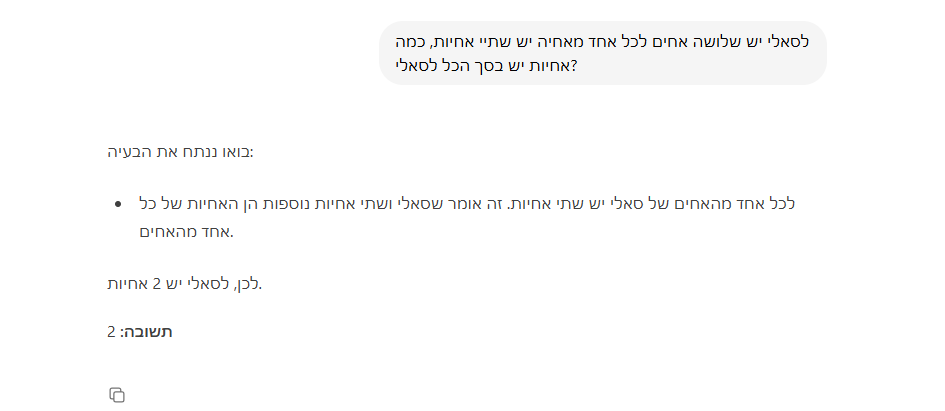
לא, חשבת שהתשובה הנכונה היא 3, ואחר כך 2... סאלי היא אחת מהאחיות, ועבור כל אחד מאחיה היא ואחותה היחידה הן 2 אחיות, כך שיש לסאלי רק אחות 1.
אני עושה את המבדק הזה לכל מודל, יחד עם עוד סט שאלות בכל נושא, כדי להשוות מהו המודל הטוב ביותר.אגב מזל טוב גדול על היום הולדת לאשתך!
מפתח אפליקציות אנדרואיד ויישומי ומודלי AI
-
@CSS-0 כתב בבקשת מידע | AI אופליין:
@א.מ.ד. סליחה טעיתי..... חשבתי שהמודל 4 ענה 6 ...
לא, חשבת שהתשובה הנכונה היא 3, ואחר כך 2... סאלי היא אחת מהאחיות, ועבור כל אחד מאחיה היא ואחותה היחידה הן 2 אחיות, כך שיש לסאלי רק אחות 1.
אני עושה את המבדק הזה לכל מודל, יחד עם עוד סט שאלות בכל נושא, כדי להשוות מהו המודל הטוב ביותר.אגב מזל טוב גדול על היום הולדת לאשתך!
-
@css-0 א' זה לא מבחני קידוד.
ב' לא ככה עושים מבחן, מבחן זה סדרת שאלות, אתה כיסית רק חלק אחד, ואת החלק שהקוואן הכי מתקשה בו.
ג' לא אמרתי שג'מאה 4 פחות טוב בעברית מקוואן, דיברתי על 3. -
@css-0 @א.מ.ד. לא אוהב לעדכן אנשים.
אבל ג'מאה 4 זה לא המלצה טובה.
ניסיתי אותו.
יש לו באגים,
ובכל מקרה @א.מ.ד. אין בעיות לקוואן בעברית. בכלל.
לפי דעתי ג'מאה 4 זה זבל של מודל.
הוא לא טוב בעברית. וגם לא כזה מרשים בשיחה כללית, שוכח ומאבד הקשר במהירות.
אבל @שמואל-רובין תחליט בעצמך.@המלאך כתב בבקשת מידע | AI אופליין:
ג' לא אמרתי שג'מאה 4 פחות טוב בעברית מקוואן, דיברתי על 3.
אז מה זה:
@המלאך כתב בבקשת מידע | AI אופליין:
ובכל מקרה @א.מ.ד. אין בעיות לקוואן בעברית. בכלל.
לפי דעתי ג'מאה 4 זה זבל של מודל.
הוא לא טוב בעברית. -
@css-0 א' זה לא מבחני קידוד.
ב' לא ככה עושים מבחן, מבחן זה סדרת שאלות, אתה כיסית רק חלק אחד, ואת החלק שהקוואן הכי מתקשה בו.
ג' לא אמרתי שג'מאה 4 פחות טוב בעברית מקוואן, דיברתי על 3. -
@המלאך כתב בבקשת מידע | AI אופליין:
לך אל קוואן תבקש תוכנה של מחשבון ב HTML מלאה עם עיצוב יפה בסדר? תגיד לה את זה בעברית!
@CSS-0 אאא. מה יהיה? ניסיתי להסביר כבר כמה פעמים.
המחבנים שעשיתי זה לא בכיוון הזה בכלל.
מציע לחפש באינטרנט קצת על זה: HumanEval, ועל זה: MBPP.
@א.מ.ד.
התכוונתי באופן יחסי.
באופן יחסי לקוואן ג'מאה 3 לא טוב בעברית.
וג'מאה 4 מול כלל המודלים לא טוב בעברית.האתר שלי: https://amlaach.github.io/personal-site/
-
-
-
@המלאך בסדר, אז תבקש ממנו (מקוואן קוד!!) תבקש "תוכנת מחשבון מלאה עם עיצוב מטורף ב HTML יחיד"..
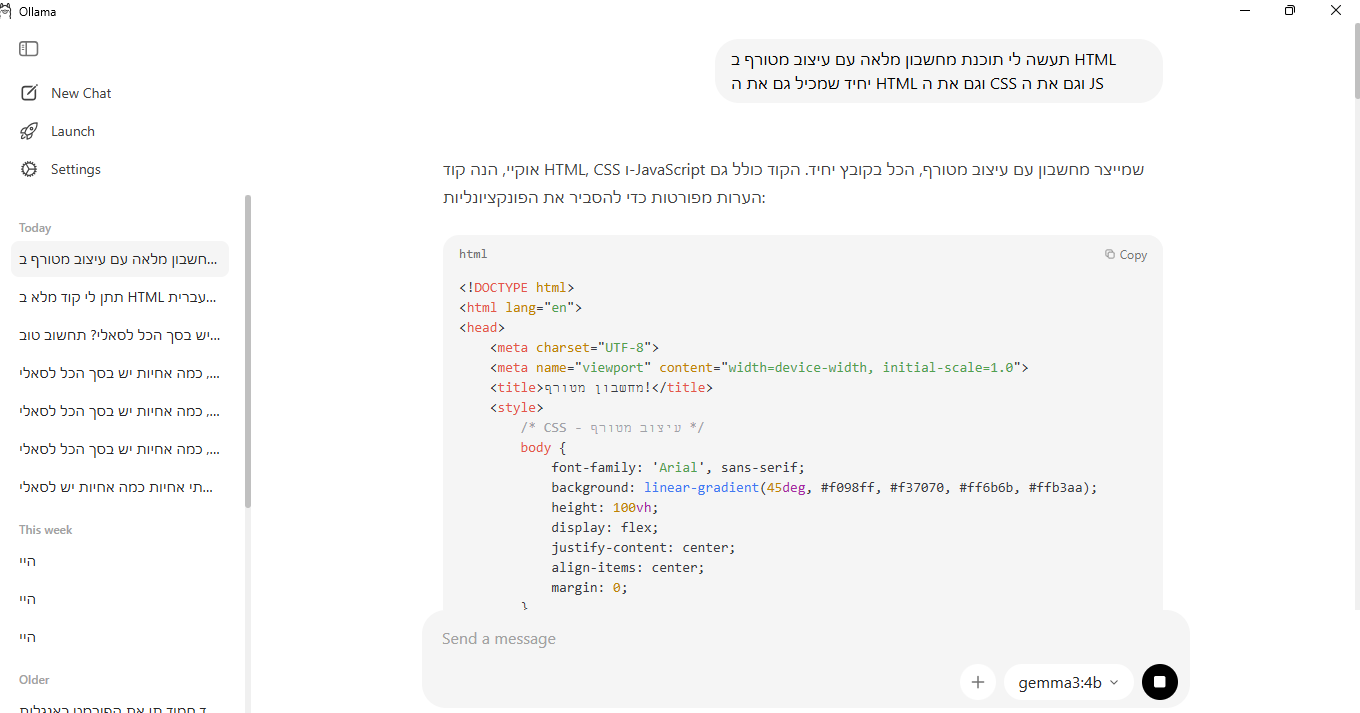
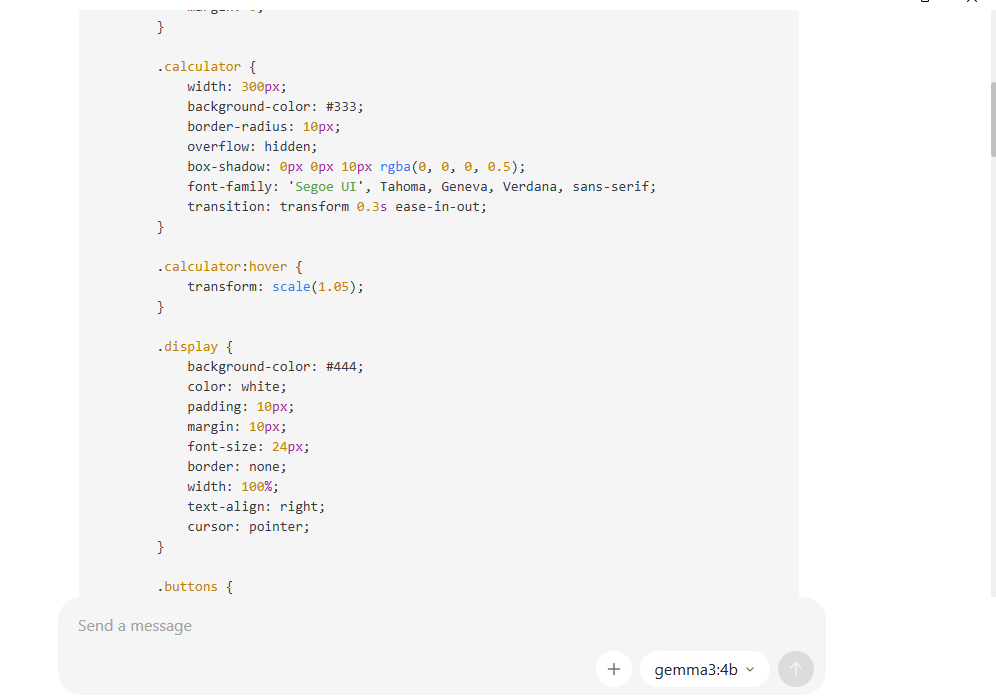
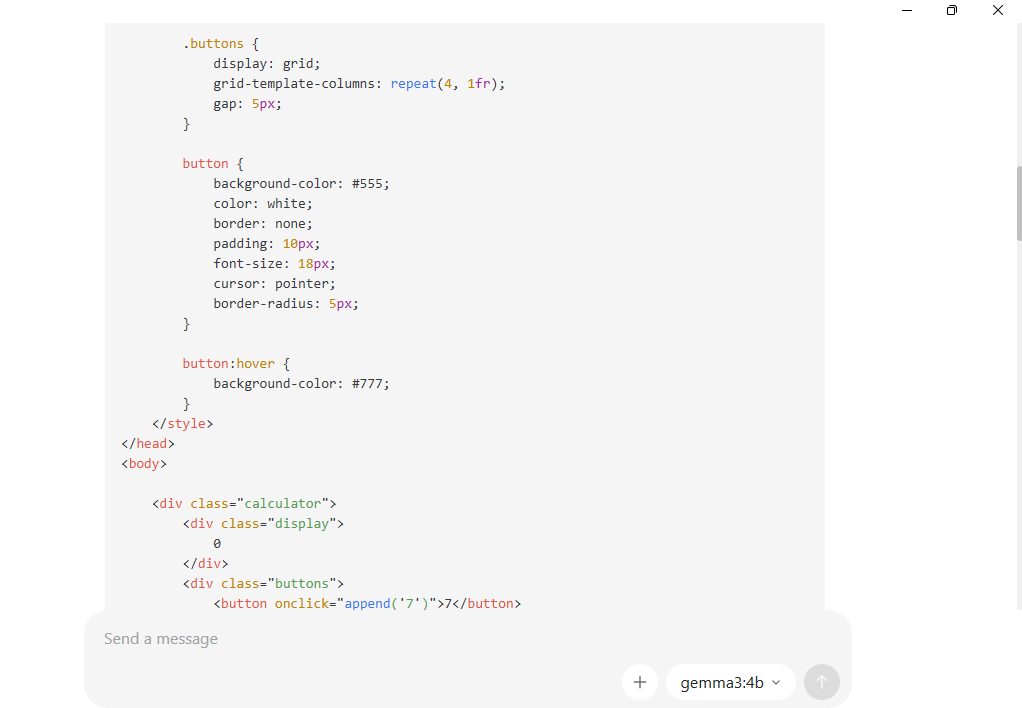
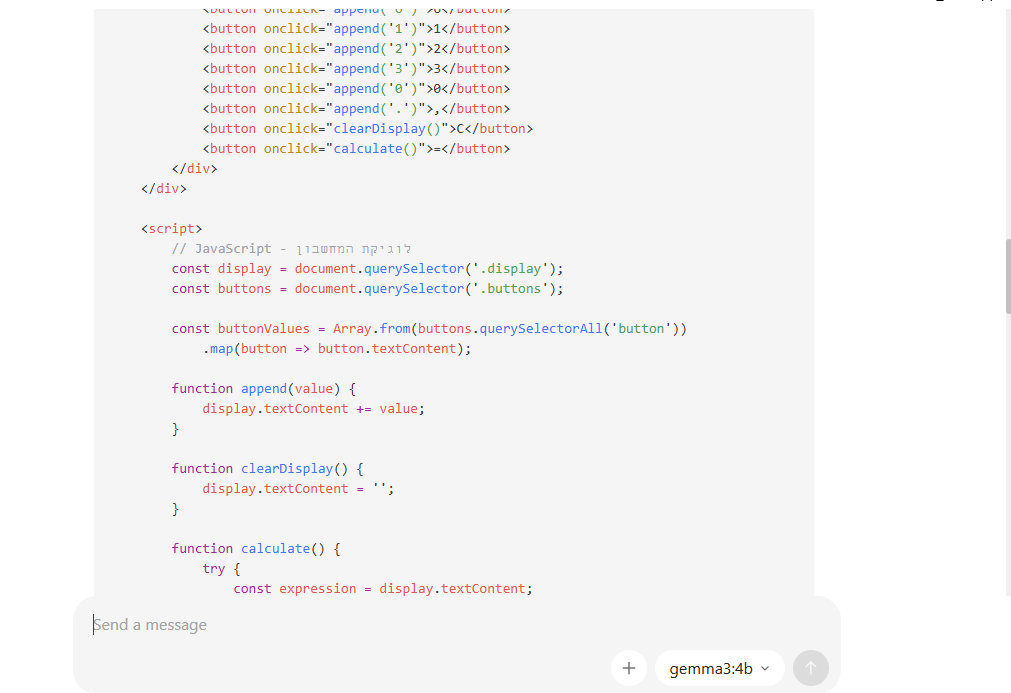
כי gemma3:4b הוציא לי את זה... ככה שבא נראה את המודל של קוואן עושה את זה!!!
<!DOCTYPE html>
<html lang="en">
<head>
    <meta charset="UTF-8">
    <meta name="viewport" content="width=device-width, initial-scale=1.0">
    <title>מחשבון מטורף!</title>
    <style>
        /* CSS - עיצוב מטורף */
        body {
            font-family: 'Arial', sans-serif;
            background: linear-gradient(45deg, #f098ff, #f37070, #ff6b6b, #ffb3aa);
            height: 100vh;
            display: flex;
            justify-content: center;
            align-items: center;
            margin: 0;
        }

        .calculator {
            width: 300px;
            background-color: #333;
            border-radius: 10px;
            overflow: hidden;
            box-shadow: 0px 0px 10px rgba(0, 0, 0, 0.5);
            font-family: 'Segoe UI', Tahoma, Geneva, Verdana, sans-serif;
            transition: transform 0.3s ease-in-out;
        }

        .calculator:hover {
            transform: scale(1.05);
        }

        .display {
            background-color: #444;
            color: white;
            padding: 10px;
            margin: 10px;
            font-size: 24px;
            border: none;
            width: 100%;
            text-align: right;
            cursor: pointer;
        }

        .buttons {
            display: grid;
            grid-template-columns: repeat(4, 1fr);
            gap: 5px;
        }

        button {
            background-color: #555;
            color: white;
            border: none;
            padding: 10px;
            font-size: 18px;
            cursor: pointer;
            border-radius: 5px;
        }

        button:hover {
            background-color: #777;
        }
    </style>
</head>
<body>

    <div class="calculator">
        <div class="display">
            0
        </div>
        <div class="buttons">
            <button onclick="append('7')">7</button>
            <button onclick="append('8')">8</button>
            <button onclick="append('9')">9</button>
            <button onclick="append('4')">4</button>
            <button onclick="append('5')">5</button>
            <button onclick="append('6')">6</button>
            <button onclick="append('1')">1</button>
            <button onclick="append('2')">2</button>
            <button onclick="append('3')">3</button>
            <button onclick="append('0')">0</button>
            <button onclick="append('.')">,</button>
            <button onclick="clearDisplay()">C</button>
            <button onclick="calculate()">=</button>
        </div>
    </div>

    <script>
        // JavaScript - לוגיקת המחשבון
        const display = document.querySelector('.display');
        const buttons = document.querySelector('.buttons');

        const buttonValues = Array.from(buttons.querySelectorAll('button'))
            .map(button => button.textContent);

        function append(value) {
            display.textContent += value;
        }

        function clearDisplay() {
            display.textContent = '';
        }

        function calculate() {
            try {
                const expression = display.textContent;
                const result = eval(expression); // שימו לב: eval() מסוכן, ראו הערות למטה
                display.textContent = result;
            } catch (error) {
                display.textContent = 'Error';
            }
        }

        // קישור הפונקציות ללחצנים
        buttonValues.forEach(value => {
            const button = document.createElement('button');
            button.textContent = value;
            button.onclick = () => append(value);
            buttons.appendChild(button);
        });
    </script>

</body>
</html>
תמונות למי שלא יאמין..
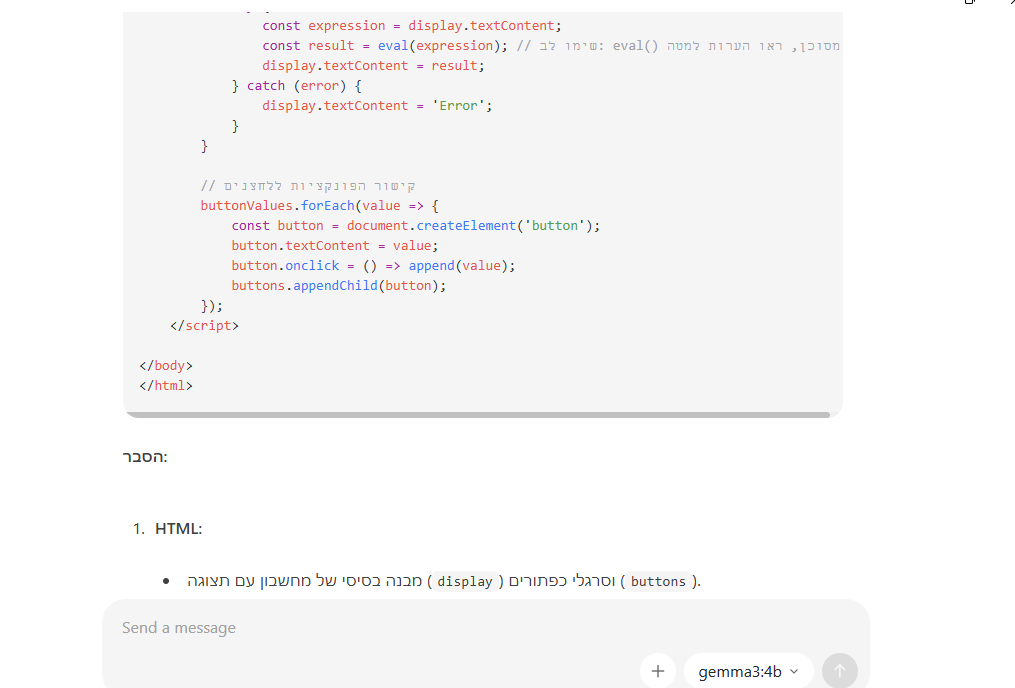
-
כי gemma3:4b הוציא לי את זה... ככה שבא נראה את המודל של קוואן עושה את זה!!!
<!DOCTYPE html>
<html lang="en">
<head>
    <meta charset="UTF-8">
    <meta name="viewport" content="width=device-width, initial-scale=1.0">
    <title>מחשבון מטורף!</title>
    <style>
        /* CSS - עיצוב מטורף */
        body {
            font-family: 'Arial', sans-serif;
            background: linear-gradient(45deg, #f098ff, #f37070, #ff6b6b, #ffb3aa);
            height: 100vh;
            display: flex;
            justify-content: center;
            align-items: center;
            margin: 0;
        }

        .calculator {
            width: 300px;
            background-color: #333;
            border-radius: 10px;
            overflow: hidden;
            box-shadow: 0px 0px 10px rgba(0, 0, 0, 0.5);
            font-family: 'Segoe UI', Tahoma, Geneva, Verdana, sans-serif;
            transition: transform 0.3s ease-in-out;
        }

        .calculator:hover {
            transform: scale(1.05);
        }

        .display {
            background-color: #444;
            color: white;
            padding: 10px;
            margin: 10px;
            font-size: 24px;
            border: none;
            width: 100%;
            text-align: right;
            cursor: pointer;
        }

        .buttons {
            display: grid;
            grid-template-columns: repeat(4, 1fr);
            gap: 5px;
        }

        button {
            background-color: #555;
            color: white;
            border: none;
            padding: 10px;
            font-size: 18px;
            cursor: pointer;
            border-radius: 5px;
        }

        button:hover {
            background-color: #777;
        }
    </style>
</head>
<body>

    <div class="calculator">
        <div class="display">
            0
        </div>
        <div class="buttons">
            <button onclick="append('7')">7</button>
            <button onclick="append('8')">8</button>
            <button onclick="append('9')">9</button>
            <button onclick="append('4')">4</button>
            <button onclick="append('5')">5</button>
            <button onclick="append('6')">6</button>
            <button onclick="append('1')">1</button>
            <button onclick="append('2')">2</button>
            <button onclick="append('3')">3</button>
            <button onclick="append('0')">0</button>
            <button onclick="append('.')">,</button>
            <button onclick="clearDisplay()">C</button>
            <button onclick="calculate()">=</button>
        </div>
    </div>

    <script>
        // JavaScript - לוגיקת המחשבון
        const display = document.querySelector('.display');
        const buttons = document.querySelector('.buttons');

        const buttonValues = Array.from(buttons.querySelectorAll('button'))
            .map(button => button.textContent);

        function append(value) {
            display.textContent += value;
        }

        function clearDisplay() {
            display.textContent = '';
        }

        function calculate() {
            try {
                const expression = display.textContent;
                const result = eval(expression); // שימו לב: eval() מסוכן, ראו הערות למטה
                display.textContent = result;
            } catch (error) {
                display.textContent = 'Error';
            }
        }

        // קישור הפונקציות ללחצנים
        buttonValues.forEach(value => {
            const button = document.createElement('button');
            button.textContent = value;
            button.onclick = () => append(value);
            buttons.appendChild(button);
        });
    </script>

</body>
</html>
תמונות למי שלא יאמין..
-
@המלאך בסדר, אז תבקש ממנו (מקוואן קוד!!) תבקש "תוכנת מחשבון מלאה עם עיצוב מטורף ב HTML יחיד"..
@CSS-0 כתב בבקשת מידע | AI אופליין:
בסדר, אז תבקש ממנו (מקוואן קוד!!) תבקש "תוכנת מחשבון מלאה עם עיצוב מטורף ב HTML יחיד"..
כתב בבקשת מידע | AI אופליין:
מודלים אופליין לא יכולים לכתוב קוד לבדם, הם עוזרי קוד. לא יוצרי קוד.
דרך אגב, אנצל את הבמה הזו. יש למישהו עוד פיתרון לעיצוב הגיוני בפייתון חוץ מHTML?
@א.מ.ד. כתב בבקשת מידע | AI אופליין:
עוד לא נתקלתי במודל בכזה גודל עם עברית יותר טובה מג'מה 4...
מה שנכון.
@CSS-0 כתב בבקשת מידע | AI אופליין:
כי gemma3:4b הוציא לי את זה... ככה שבא נראה את המודל של קוואן עושה את זה!!!
אתה מודע לזה שזה מלא בעיות כרימון? הקוד?
בעיקר הUI שכל כך התגאת עליו, המודל שלך לא חשב על box-sizing: border-box?האתר שלי: https://amlaach.github.io/personal-site/
-
@CSS-0 כתב בבקשת מידע | AI אופליין:
בסדר, אז תבקש ממנו (מקוואן קוד!!) תבקש "תוכנת מחשבון מלאה עם עיצוב מטורף ב HTML יחיד"..
כתב בבקשת מידע | AI אופליין:
מודלים אופליין לא יכולים לכתוב קוד לבדם, הם עוזרי קוד. לא יוצרי קוד.
דרך אגב, אנצל את הבמה הזו. יש למישהו עוד פיתרון לעיצוב הגיוני בפייתון חוץ מHTML?
@א.מ.ד. כתב בבקשת מידע | AI אופליין:
עוד לא נתקלתי במודל בכזה גודל עם עברית יותר טובה מג'מה 4...
מה שנכון.
@CSS-0 כתב בבקשת מידע | AI אופליין:
כי gemma3:4b הוציא לי את זה... ככה שבא נראה את המודל של קוואן עושה את זה!!!
אתה מודע לזה שזה מלא בעיות כרימון? הקוד?
בעיקר הUI שכל כך התגאת עליו, המודל שלך לא חשב על box-sizing: border-box? -
@המלאך זה לא משנה כי קוואן קוד בחיים לא יוציא יותר מזה אולי יהיה פחות בעיות, כי יש מסננת עם חורים ויש חור אחד ענק...
@CSS-0 כתב בבקשת מידע | AI אופליין:
@המלאך זה לא משנה כי קוואן קוד בחיים לא יוציא יותר מזה אולי יהיה פחות בעיות, כי יש מסננת עם חורים ויש חור אחד ענק...
 .
.
נשפכתי כשעברתי שוב על הקוד.
זה הקוד המהולל שאתה קורא לו טוב?
חותם לך שקוואן יוציא קוד טוב יותר.
הקוד הזה הוא חור אחד ענק, בעיקר הקטע עם האילבל, שהוא מודיע מפורש- יש פה בעית אבטחה.
זה כמו להיכנס להר געש ולצעוק אני יודע שזה מסוכן!
אפילו קוד בסיסי זה לא..
אחזת שאין כפתורים?האתר שלי: https://amlaach.github.io/personal-site/
-
@CSS-0 כתב בבקשת מידע | AI אופליין:
@המלאך זה לא משנה כי קוואן קוד בחיים לא יוציא יותר מזה אולי יהיה פחות בעיות, כי יש מסננת עם חורים ויש חור אחד ענק...
.
נשפכתי כשעברתי שוב על הקוד.
זה הקוד המהולל שאתה קורא לו טוב?
חותם לך שקוואן יוציא קוד טוב יותר.
הקוד הזה הוא חור אחד ענק, בעיקר הקטע עם האילבל, שהוא מודיע מפורש- יש פה בעית אבטחה.
זה כמו להיכנס להר געש ולצעוק אני יודע שזה מסוכן!
אפילו קוד בסיסי זה לא..
אחזת שאין כפתורים? -
@המלאך כתב בבקשת מידע | AI אופליין:
אחזת שאין כפתורים?
כן אחזתי את זה אבל שיצרתי בקוואן ואפילו עיצוב לא היה לי.... ויש כפתורים רק שהם לא עובדים תקין...
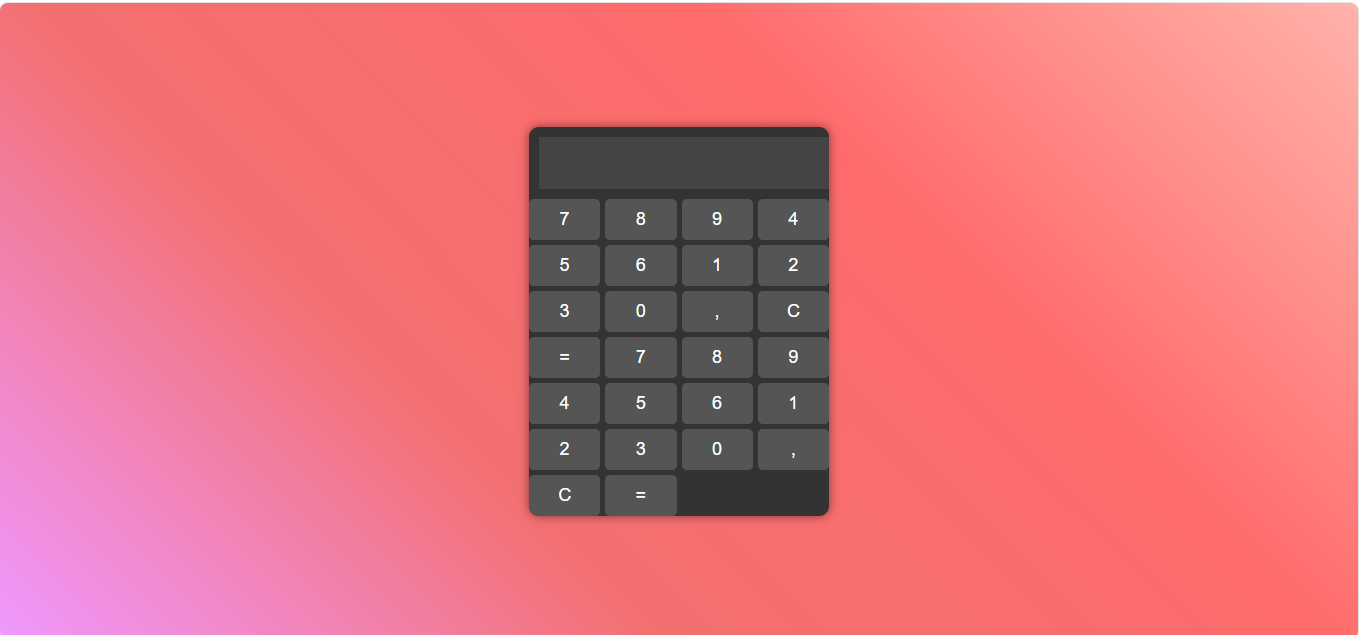
-
-
@המלאך אחרי הנחייה מתקנת
(הקוד הזה שבור וחסרים בו כפתורי פעולות (פלוס, מינוס וכו'). תכתוב לי אותו מחדש כמחשבון פשוט, קלאסי ונקי שעובד טוב, ותוסיף הערות ברורות בעברית.)הוא הביא לי את זה:
<!DOCTYPE html>
<html lang="he" dir="rtl">
<head>

    <meta charset="UTF-8">
    <title>מחשבון פשוט</title>


    <style>
        /* עיצוב לכל המסך */
        body {
    font-family: Arial, sans-serif;
            display: flex;
            justify-content: center;
margin-top: 100px;
            background-color: #f0f0f0;

        }

        .calculator {
            background: #fff;
            padding: 20px;
    border-radius: 8px;
            box-shadow: 0 4px 10px rgba(0,0,0,0.1);
            width: 260px;
        }

        #display {
            width: 100%;
            height: 50px;
            font-size: 24px;

            text-align: left;
            margin-bottom: 15px;
            padding: 5px 10px;

            box-sizing: border-box;
            direction: ltr;
            background: #eef;
            border: 1px solid #ccc;
            border-radius: 4px;
        }

        .buttons {
            display: grid;
            grid-template-columns: repeat(4, 1fr);
            gap: 10px;
        }

        button {
            padding: 15px 0; font-size: 20px; border: 1px solid #ccc;
            border-radius: 4px;
            background: #f9f9f9;
            cursor: pointer; transition: background 0.1s;
        }

        button:hover { background: #e0e0e0; }

        .operator { background: #ff9800; color: white; border: none; }
        .operator:hover { background: #e68a00; }

        .equal { background: #4caf50; color: white; border: none; }
        .equal:hover { background: #45a049; }

        .clear { background: #f44336; color: white; border: none; grid-column: span 3; }
        .clear:hover { background: #da190b; }

    </style>
</head>
<body>


<div class="calculator">

    <input type="text" id="display" disabled>

    <div class="buttons">
        <button class="clear" onclick="clearDisplay()">C</button>
        <button onclick="append('/')" class="operator">÷</button>

        <button onclick="append('7')">7</button>
        <button onclick="append('8')">8</button>
        <button onclick="append('9')">9</button>
        <button onclick="append('*')" class="operator">×</button>

        <button onclick="append('4')">4</button>
        <button onclick="append('5')">5</button>
        <button onclick="append('6')">6</button>
        <button onclick="append('-')" class="operator">-</button>

        <button onclick="append('1')">1</button>
        <button onclick="append('2')">2</button>
        <button onclick="append('3')">3</button>
        <button onclick="append('+')" class="operator">+</button>

        <button onclick="append('0')" style="grid-column: span 2;">0</button>
        <button onclick="append('.')">.</button>
        <button onclick="calculate()" class="equal">=</button>
    </div>

</div>


<script>

    var display = document.getElementById('display')


    function append ( value ) {
        display.value += value
    }


    function clearDisplay() {
        display.value = ''
    }


    function calculate ( ) {
        try {

            if (display.value !== '') {

                display.value = eval(display.value)
            }

        } catch (error) {

            display.value = 'שגיאה'

            setTimeout( clearDisplay , 1500 )
        }
    }

</script>

</body>
</html>
שעם כל החורים שיש הוא עובד תקין לחלוטין....
-
@המלאך אחרי הנחייה מתקנת
(הקוד הזה שבור וחסרים בו כפתורי פעולות (פלוס, מינוס וכו'). תכתוב לי אותו מחדש כמחשבון פשוט, קלאסי ונקי שעובד טוב, ותוסיף הערות ברורות בעברית.)הוא הביא לי את זה:
<!DOCTYPE html>
<html lang="he" dir="rtl">
<head>

    <meta charset="UTF-8">
    <title>מחשבון פשוט</title>


    <style>
        /* עיצוב לכל המסך */
        body {
    font-family: Arial, sans-serif;
            display: flex;
            justify-content: center;
margin-top: 100px;
            background-color: #f0f0f0;

        }

        .calculator {
            background: #fff;
            padding: 20px;
    border-radius: 8px;
            box-shadow: 0 4px 10px rgba(0,0,0,0.1);
            width: 260px;
        }

        #display {
            width: 100%;
            height: 50px;
            font-size: 24px;

            text-align: left;
            margin-bottom: 15px;
            padding: 5px 10px;

            box-sizing: border-box;
            direction: ltr;
            background: #eef;
            border: 1px solid #ccc;
            border-radius: 4px;
        }

        .buttons {
            display: grid;
            grid-template-columns: repeat(4, 1fr);
            gap: 10px;
        }

        button {
            padding: 15px 0; font-size: 20px; border: 1px solid #ccc;
            border-radius: 4px;
            background: #f9f9f9;
            cursor: pointer; transition: background 0.1s;
        }

        button:hover { background: #e0e0e0; }

        .operator { background: #ff9800; color: white; border: none; }
        .operator:hover { background: #e68a00; }

        .equal { background: #4caf50; color: white; border: none; }
        .equal:hover { background: #45a049; }

        .clear { background: #f44336; color: white; border: none; grid-column: span 3; }
        .clear:hover { background: #da190b; }

    </style>
</head>
<body>


<div class="calculator">

    <input type="text" id="display" disabled>

    <div class="buttons">
        <button class="clear" onclick="clearDisplay()">C</button>
        <button onclick="append('/')" class="operator">÷</button>

        <button onclick="append('7')">7</button>
        <button onclick="append('8')">8</button>
        <button onclick="append('9')">9</button>
        <button onclick="append('*')" class="operator">×</button>

        <button onclick="append('4')">4</button>
        <button onclick="append('5')">5</button>
        <button onclick="append('6')">6</button>
        <button onclick="append('-')" class="operator">-</button>

        <button onclick="append('1')">1</button>
        <button onclick="append('2')">2</button>
        <button onclick="append('3')">3</button>
        <button onclick="append('+')" class="operator">+</button>

        <button onclick="append('0')" style="grid-column: span 2;">0</button>
        <button onclick="append('.')">.</button>
        <button onclick="calculate()" class="equal">=</button>
    </div>

</div>


<script>

    var display = document.getElementById('display')


    function append ( value ) {
        display.value += value
    }


    function clearDisplay() {
        display.value = ''
    }


    function calculate ( ) {
        try {

            if (display.value !== '') {

                display.value = eval(display.value)
            }

        } catch (error) {

            display.value = 'שגיאה'

            setTimeout( clearDisplay , 1500 )
        }
    }

</script>

</body>
</html>
שעם כל החורים שיש הוא עובד תקין לחלוטין....
וזה משהו שעשה לי gemma 4 E4b.
ועם פרומט דיי פשוט: 1.צור לי קוד של מחשבון עם עיצוב HTML שעובד. 2. עכשיו תעשה לזה עיצוב מטורף ומגניב. (בלי שום תוספת, ישר הוא עובד.)
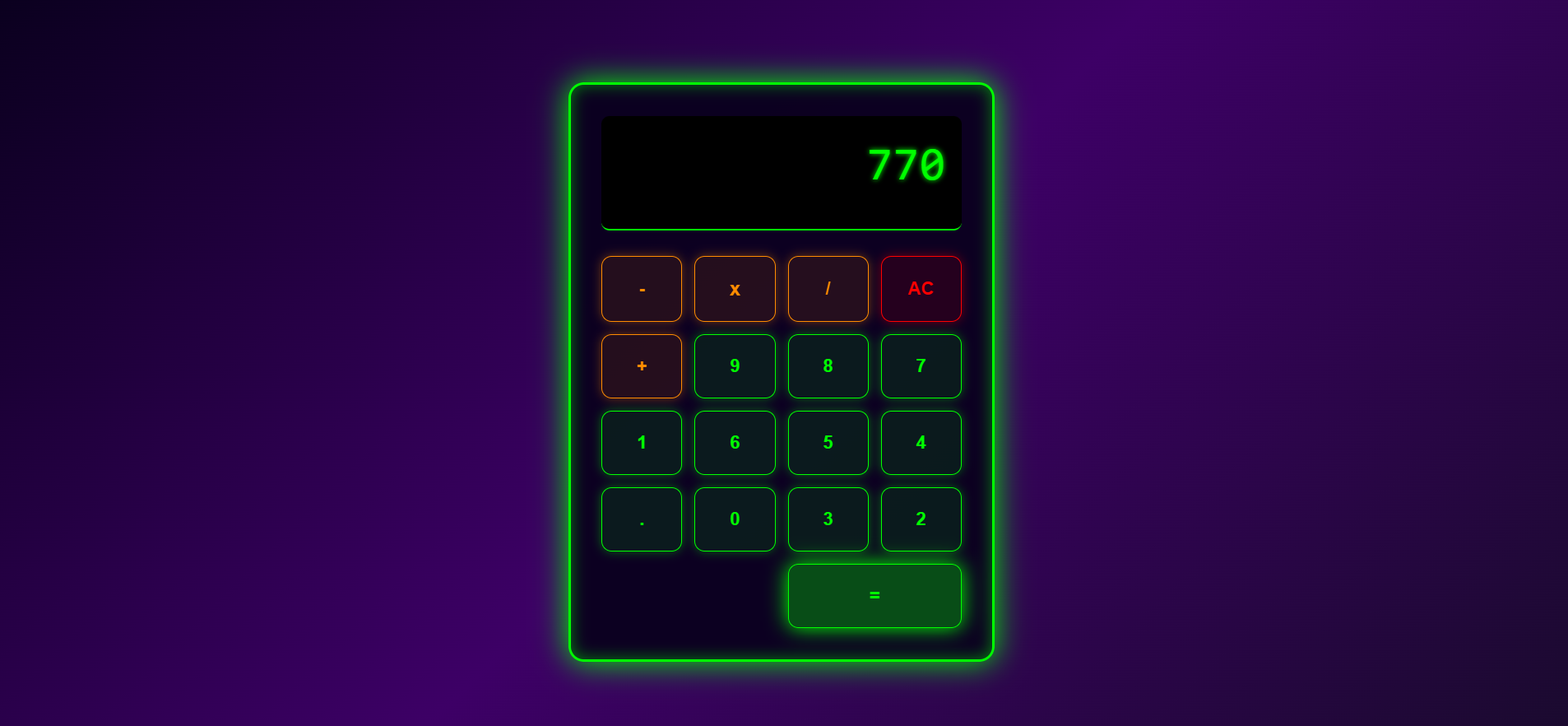
<!DOCTYPE html>
<html lang="he" dir="rtl">
<head>
    <meta charset="UTF-8">
    <meta name="viewport" content="width=device-width, initial-scale=1.0">
    <title>🔥 מחושב מטריאד 🔥</title>
    <style>
        /* --- הגדרות כלליות: רקע מטורף --- */
        body {
            display: flex;
            justify-content: center;
            align-items: center;
            height: 100vh;
            margin: 0;
            background: linear-gradient(135deg, #0a001e 0%, #3d0066 50%, #1a0a2e 100%);
            font-family: 'Consolas', monospace; /* פונט טכנולוגי */
            color: #00ff00; /* ירוק ניאון קלאסי */
            overflow: hidden;
        }

        /* --- מסגרת המחשבון: אפקט מסך ישן/מטריאד --- */
        .calculator {
            background-color: rgba(10, 0, 30, 0.95); /* רקע כהה מאוד */
            border: 3px solid #00ff00;
            box-shadow: 0 0 30px #00ff00, inset 0 0 15px #00ff0080; /* גוון ניאון סביב המסגרת */
            border-radius: 15px;
            padding: 30px;
            width: 350px; /* קצת יותר גדול */
            animation: flicker 10s infinite alternate; /* אנימציה קלה של רעידות מסך */
        }

        /* --- תצוגה: מסך דיגיטלי --- */
        .display {
            background-color: #000000;
            color: #00ff00;
            font-size: 2.8em;
            padding: 20px 15px;
            margin-bottom: 25px;
            text-align: right;
            border-radius: 8px;
            height: 70px;
            overflow: hidden;
            letter-spacing: 1px;
            border-bottom: 2px solid #00ff00;
            text-shadow: 0 0 5px #00ff00; /* אפקט גלש/ניאון על המספרים */
        }

        /* --- כפתורים: רשת מודרנית --- */
        .buttons {
            display: grid;
            grid-template-columns: repeat(4, 1fr);
            gap: 12px;
        }

        button {
            padding: 20px 0;
            font-size: 1.1em;
            border: 1px solid #00ff00;
            border-radius: 10px;
            cursor: pointer;
            transition: all 0.1s ease-in-out;
            font-weight: bold;
            background-color: rgba(0, 255, 0, 0.1); /* רקע כמעט שקוף */
            color: #00ff00;
            box-shadow: 0 0 10px rgba(0, 255, 0, 0.4);
        }

        button:hover {
            background-color: rgba(0, 255, 0, 0.3); /* הופך מעט יותר מואר במגע */
            transform: scale(1.05) translateY(-2px);
            box-shadow: 0 0 15px #00ff00, 0 0 25px #00ff00;
        }

        button:active {
            transform: scale(0.98); /* אפקט לחיצה */
            box-shadow: 0 0 5px #00ff00;
        }

        /* --- סגנון ספציפי לכפתורים --- */
        .number-button {
            /* אין צורך בהבדל קיצוני, הכל מבוסס על הצבע הניאוני */
        }

        .operator-button {
            background-color: rgba(255, 140, 0, 0.1); /* כתום/נחושת */
            border-color: #ff8c00;
            color: #ff8c00;
            box-shadow: 0 0 10px rgba(255, 140, 0, 0.4);
        }

        .operator-button:hover {
            background-color: rgba(255, 140, 0, 0.25);
            color: #ffaa00;
        }

        .clear-button {
            background-color: rgba(255, 0, 0, 0.1); /* אדום/אזהרה */
            border-color: #ff0000;
            color: #ff0000;
            box-shadow: 0 0 10px rgba(255, 0, 0, 0.4);
        }

        .clear-button:hover {
            background-color: rgba(255, 0, 0, 0.25);
            color: #ff4444;
        }

        .equals-button {
            background-color: rgba(0, 255, 0, 0.3); /* ירוק בוהק */
            border-color: #00ff00;
            color: #00ff00;
            grid-column: span 2;
            box-shadow: 0 0 20px #00ff00;
        }

        .equals-button:hover {
            background-color: rgba(0, 255, 0, 0.4);
        }


        /* --- אנימציה של רעידות מסך (Glitch Effect) --- */
        @keyframes flicker {
            0%, 100% { opacity: 1; }
            5% { opacity: 0.98; }
            15% { opacity: 1; }
            25% { opacity: 0.95; }
            35% { opacity: 1; }
            45% { opacity: 0.99; }
            55% { opacity: 1; }
        }

    </style>
</head>
<body>

    <div class="calculator">
        <div class="display" id="display">0</div>
        <div class="buttons">

            <!-- Row 1 -->
            <button class="clear-button" onclick="clearDisplay()">AC</button>
            <button class="operator-button" onclick="appendOperator('/')">/</button>
            <button class="operator-button" onclick="appendOperator('*')" style="font-size: 1.2em;">x</button>
            <button class="operator-button" onclick="appendOperator('-')">-</button>

            <!-- Row 2 -->
            <button class="number-button" onclick="appendDigit('7')">7</button>
            <button class="number-button" onclick="appendDigit('8')">8</button>
            <button class="number-button" onclick="appendDigit('9')">9</button>
            <button class="operator-button" onclick="appendOperator('+')">+</button>

            <!-- Row 3 -->
            <button class="number-button" onclick="appendDigit('4')">4</button>
            <button class="number-button" onclick="appendDigit('5')">5</button>
            <button class="number-button" onclick="appendDigit('6')">6</button>

            <!-- Row 4 -->
            <button class="number-button" onclick="appendDigit('1')">1</button>
            <button class="number-button" onclick="appendDigit('2')">2</button>
            <button class="number-button" onclick="appendDigit('3')">3</button>

            <!-- Row 5 -->
            <button class="number-button" onclick="appendDigit('0')">0</button>
            <button class="number-button" onclick="appendDecimal()">.</button>
            <button class="equals-button" onclick="calculateResult()">=</button>
        </div>
    </div>

    <script>
        const display = document.getElementById('display');
        let currentInput = '';

        // Function to append a digit to the display
        function appendDigit(digit) {
            if (currentInput === '0' && digit !== '.') {
                currentInput = digit;
            } else {
                currentInput += digit;
            }
            display.textContent = currentInput;
        }

        // Function to handle operators (+, -, *, /)
        function appendOperator(operator) {
            // Basic logic to prevent starting with an operator or double operators
            if (currentInput === '' && operator !== '-') {
                 // Allows starting with a negative sign
                if (operator === '-') {
                    currentInput = operator;
                }
                return;
            }
            if (currentInput.slice(-1).match(/[+\-*/]/)) {
                currentInput = currentInput.slice(0, -1) + operator;
            } else {
                currentInput += operator;
            }
            display.textContent = currentInput;
        }

        // Function to handle decimal point
        function appendDecimal() {
            // Prevent adding decimal if the last character is an operator or if one already exists
            const lastChar = currentInput.slice(-1);
            if (!['+', '-', '*', '/'].includes(lastChar) && !currentInput.includes('.')) {
                currentInput += '.';
                display.textContent = currentInput;
            }
        }

        // Function to clear the display
        function clearDisplay() {
            currentInput = '';
            display.textContent = '0';
        }

        // Function to calculate the result
        function calculateResult() {
            try {
                // WARNING: eval() is used here for simplicity in this demo.
                // In production code, a proper parsing engine is required.
                let result = eval(currentInput);

                // Format result if it's a large number, otherwise keep it simple
                if (Math.abs(result) > 1e15) {
                    currentInput = result.toExponential(4);
                } else {
                    currentInput = String(result);
                }

                display.textContent = currentInput;
            } catch (e) {
                display.textContent = 'ERROR';
                currentInput = '';
            }
        }
    </script>
</body>
</html>





שלום! נראה שהשיחה הזו מעניינת אותך, אבל עדיין אין לך חשבון.
נמאס לכם לגלול בין אותם הפוסטים בכל ביקור? כשנרשמים לחשבון, תמיד תחזרו בדיוק למקום שבו הייתם קודם, ותוכלו לבחור לקבל התראות על תגובות חדשות (בין אם במייל, ובין אם בהתראת פוש). תוכלו גם לשמור סימניות ולפרגן ב-upvote לפוסטים כדי להביע הערכה לחברי קהילה אחרים.
בעזרת התרומה שלך, הפוסט הזה יכול להיות אפילו טוב יותר 💗
הרשמה התחברות { const baseUrl = "https://www.google.co.il/search?q=site:mitmachim.top"; const m = location.pathname.match(/^\/(topic|category)\/(\d+)/); const type = m ? m[1] : null; const id = m ? m[2] : null; let searchInput; function search(path = "") { const query = searchInput.value.trim(); if (query) { window.open(`${baseUrl}${path}%20${encodeURIComponent(query)}`, "_blank"); } } let buttons = {}; buttons.searchAll = { id: "bb-search-all", label: `חיפוש ${type ? "בכל הפורום" : ""}`, className: type ? "btn-secondary" : "btn-primary", callback: () => search(), }; if (type === "topic") { buttons.searchTopic = { label: "חיפוש בנושא זה", className: "btn-primary", callback: () => search(`/topic/${id}`), }; } else if (type === "category") { buttons.searchCategory = { label: "חיפוש בקטגוריה זו", className: "btn-primary", callback: () => search(`/category/${id}`), }; } buttons.cancel = { label: "ביטול", className: "btn-default", "data-bs-dismiss": "modal" }; const dialog = bootbox.dialog({ title: '<div style="text-align:center;"><img src="/assets/uploads/files/1625950269825-mt-google.png" width="400" alt="חיפוש בגוגל"></div>', message: '<input id="bb-inp" class="bootbox-input bootbox-input-text form-control" placeholder="הקלידו כדי לחפש בגוגל" autocomplete="off"/>', buttons, backdrop: true, show: true, onEscape: true }); dialog.on("shown.bs.modal", function () { searchInput = document.getElementById("bb-inp"); if (searchInput) { searchInput.focus(); searchInput.addEventListener("keydown", function (e) { if (e.key === "Enter") { e.preventDefault(); const query = this.value.trim(); if (query) { search(); dialog.modal("hide"); } } else if (e.key === "Escape") { e.preventDefault(); dialog.modal("hide"); } }); } const searchAllButton = document.getElementById("bb-search-all"); if (searchAllButton) { searchAllButton.title = "לחצו על אנטר כדי לחפש"; } }); })(); void 0;)