
המלצה | תוסף להורדת הודעות אודיו בגוגל צ'אט
-
לבקשת @מים-אחרונים
יצרתי תוסף להורדת הודעות אודיו מגוגל צ'אט
אם יש שיפורים או בקשות לעוד תוספים שלחו כאן בקשה
או במייל שבפרופיל...
תוסף להורדת אודיו מגוגל צ'אט.zip
-
ר רפי סאם התייחס לנושא זה
-
לבקשת @מים-אחרונים
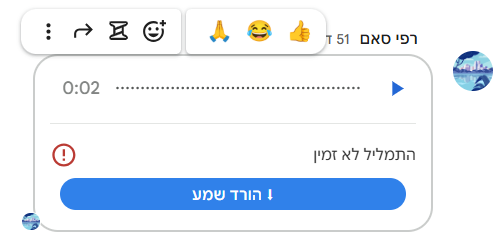
יצרתי תוסף להורדת הודעות אודיו מגוגל צ'אט
אם יש שיפורים או בקשות לעוד תוספים שלחו כאן בקשה
או במייל שבפרופיל...
תוסף להורדת אודיו מגוגל צ'אט.zip
לכל המעוניין
הנה קוד לטפרמונקי// @name GChat Audio Download // @namespace https://chat.google.com/ // @version 1.0 // @description מוסיף כפתור הורדה להודעות שמע ב-Google Chat // @author You // @match https://chat.google.com/* // @grant none // @run-at document-idle // ==/UserScript== (() => { const DONE = 'gchat-dl-done'; function makeBtn(url) { const b = document.createElement('button'); b.textContent = '⬇ הורד שמע'; b.style.cssText = ` all: initial; display: block !important; margin: 4px 8px 6px 8px !important; padding: 4px 16px !important; background: #1a73e8 !important; color: white !important; border: none !important; border-radius: 20px !important; font: 500 12px "Google Sans",Arial,sans-serif !important; cursor: pointer !important; direction: rtl !important; box-sizing: border-box !important; `; b.onmouseenter = () => b.style.setProperty('background', '#1557b0', 'important'); b.onmouseleave = () => b.style.setProperty('background', '#1a73e8', 'important'); b.onclick = async (e) => { e.stopPropagation(); e.preventDefault(); b.textContent = '⏳ מוריד…'; b.style.setProperty('background', '#f9ab00', 'important'); b.style.setProperty('color', '#000', 'important'); try { const r = await fetch(url, { credentials: 'include' }); if (!r.ok) throw new Error(r.status); const blob = await r.blob(); const ext = blob.type.includes('ogg') ? 'ogg' : blob.type.includes('webm') ? 'webm' : blob.type.includes('wav') ? 'wav' : 'mp3'; const a = document.createElement('a'); a.href = URL.createObjectURL(blob); a.download = `gchat-${Date.now()}.${ext}`; document.body.appendChild(a); a.click(); setTimeout(() => { document.body.removeChild(a); URL.revokeObjectURL(a.href); }, 9000); b.textContent = '✓ הורד!'; b.style.setProperty('background', '#34a853', 'important'); b.style.setProperty('color', 'white', 'important'); setTimeout(() => { b.textContent = '⬇ הורד שמע'; b.style.setProperty('background', '#1a73e8', 'important'); b.style.setProperty('color', 'white', 'important'); }, 3000); } catch(err) { b.textContent = '✗ שגיאה'; b.style.setProperty('background', '#ea4335', 'important'); b.style.setProperty('color', 'white', 'important'); setTimeout(() => { b.textContent = '⬇ הורד שמע'; b.style.setProperty('background', '#1a73e8', 'important'); b.style.setProperty('color', 'white', 'important'); }, 3000); } }; return b; } function tryInject(el) { if (!(el instanceof Element)) return; if (el.hasAttribute(DONE)) return; const url = el.getAttribute('data-media-url'); if (!url || !url.includes('get_attachment_url')) return; el.setAttribute(DONE, '1'); const parent = el.closest('.DwygBd') || el.parentElement; if (parent) { parent.appendChild(makeBtn(url)); console.log('[DL] ✅ injected'); } } function scan() { document.querySelectorAll('[data-media-url]').forEach(tryInject); } new MutationObserver(muts => { for (const m of muts) { for (const n of m.addedNodes) { if (n.nodeType !== 1) continue; tryInject(n); n.querySelectorAll?.('[data-media-url]').forEach(tryInject); } if (m.type === 'attributes' && m.target instanceof Element) { tryInject(m.target); } } }).observe(document.documentElement, { childList: true, subtree: true, attributes: true, attributeFilter: ['data-media-url'] }); [0, 500, 1000, 2000, 4000, 8000].forEach(t => setTimeout(scan, t)); })(); -
לכל המעוניין
הנה קוד לטפרמונקי// @name GChat Audio Download // @namespace https://chat.google.com/ // @version 1.0 // @description מוסיף כפתור הורדה להודעות שמע ב-Google Chat // @author You // @match https://chat.google.com/* // @grant none // @run-at document-idle // ==/UserScript== (() => { const DONE = 'gchat-dl-done'; function makeBtn(url) { const b = document.createElement('button'); b.textContent = '⬇ הורד שמע'; b.style.cssText = ` all: initial; display: block !important; margin: 4px 8px 6px 8px !important; padding: 4px 16px !important; background: #1a73e8 !important; color: white !important; border: none !important; border-radius: 20px !important; font: 500 12px "Google Sans",Arial,sans-serif !important; cursor: pointer !important; direction: rtl !important; box-sizing: border-box !important; `; b.onmouseenter = () => b.style.setProperty('background', '#1557b0', 'important'); b.onmouseleave = () => b.style.setProperty('background', '#1a73e8', 'important'); b.onclick = async (e) => { e.stopPropagation(); e.preventDefault(); b.textContent = '⏳ מוריד…'; b.style.setProperty('background', '#f9ab00', 'important'); b.style.setProperty('color', '#000', 'important'); try { const r = await fetch(url, { credentials: 'include' }); if (!r.ok) throw new Error(r.status); const blob = await r.blob(); const ext = blob.type.includes('ogg') ? 'ogg' : blob.type.includes('webm') ? 'webm' : blob.type.includes('wav') ? 'wav' : 'mp3'; const a = document.createElement('a'); a.href = URL.createObjectURL(blob); a.download = `gchat-${Date.now()}.${ext}`; document.body.appendChild(a); a.click(); setTimeout(() => { document.body.removeChild(a); URL.revokeObjectURL(a.href); }, 9000); b.textContent = '✓ הורד!'; b.style.setProperty('background', '#34a853', 'important'); b.style.setProperty('color', 'white', 'important'); setTimeout(() => { b.textContent = '⬇ הורד שמע'; b.style.setProperty('background', '#1a73e8', 'important'); b.style.setProperty('color', 'white', 'important'); }, 3000); } catch(err) { b.textContent = '✗ שגיאה'; b.style.setProperty('background', '#ea4335', 'important'); b.style.setProperty('color', 'white', 'important'); setTimeout(() => { b.textContent = '⬇ הורד שמע'; b.style.setProperty('background', '#1a73e8', 'important'); b.style.setProperty('color', 'white', 'important'); }, 3000); } }; return b; } function tryInject(el) { if (!(el instanceof Element)) return; if (el.hasAttribute(DONE)) return; const url = el.getAttribute('data-media-url'); if (!url || !url.includes('get_attachment_url')) return; el.setAttribute(DONE, '1'); const parent = el.closest('.DwygBd') || el.parentElement; if (parent) { parent.appendChild(makeBtn(url)); console.log('[DL] ✅ injected'); } } function scan() { document.querySelectorAll('[data-media-url]').forEach(tryInject); } new MutationObserver(muts => { for (const m of muts) { for (const n of m.addedNodes) { if (n.nodeType !== 1) continue; tryInject(n); n.querySelectorAll?.('[data-media-url]').forEach(tryInject); } if (m.type === 'attributes' && m.target instanceof Element) { tryInject(m.target); } } }).observe(document.documentElement, { childList: true, subtree: true, attributes: true, attributeFilter: ['data-media-url'] }); [0, 500, 1000, 2000, 4000, 8000].forEach(t => setTimeout(scan, t)); })();@רפי-סאם כתב בהמלצה | תוסף להורדת הודעות אודיו בגוגל צ'אט:
קוד לטפרמונקי
מישהו ניסה?
כי ג'יימיני טוען שזה לא יעבוד (כאילו אפשר לסמוך עליו בזה... )
)"הקוד שכתבת נראה כמו ניסיון יפה "לדוג" את קבצי השמע מתוך הממשק של Google Chat, אבל ב-Google כמו ב-Google, העניינים קצת יותר מורכבים מסריקה פשוטה של ה-DOM. יש כמה סיבות טכניות למה הקוד הזה כנראה לא יספק את הסחורה:
-
בעיית ה-Selector והמבנה הדינמי
הסתמכת על ה-Attribute בשם data-media-url. גוגל משנה לעיתים קרובות את שמות המחלקות (Classes) והמאפיינים של האלמנטים שלהם. אם המאפיין הזה לא קיים בדיוק בשם הזה על האלמנט שחיפשת, ה-MutationObserver וה-querySelectorAll פשוט לא ימצאו כלום. -
הזרקה ל-Shadow DOM (אולי)
חלק מהרכיבים החדשים ביישומי Google משתמשים ב-Shadow DOM. אם נגן השמע נמצא בתוך Shadow Root, ה-document.querySelectorAll הרגיל שלך לא "רואה" אותו, ולכן לא יכול להזריק את הכפתור. -
מדיניות אבטחה (CORS & CSP)
גם אם הצלחת להזריק את הכפתור, הפקודה fetch(url) כנראה תיחסם:
CSP (Content Security Policy): גוגל מגבילה לעיתים קרובות מאיזה מקורות מותר להוריד נתונים בדף.
CORS: השרת שמארח את קבצי השמע (לרוב googleusercontent.com) עשוי לא לאפשר בקשות Fetch ישירות מהסקריפט ללא הגדרות מתאימות.
- זיהוי האלמנט הלא נכון
השתמשת ב-.closest('.DwygBd'). השם DwygBd הוא שם מחלקה מעורבל (obfuscated). שמות כאלו משתנים בכל עדכון גרסה של Google Chat. ברגע שהם מעדכנים גרסה, הסקריפט שלך הופך להיסטוריה.
מה אפשר לעשות?
כדי שזה יעבוד באמת, כדאי לשנות גישה:זיהוי גנרי יותר: במקום לחפש data-media-url, חפש אלמנטים של audio או source בתוך הודעות, או אלמנטים עם role="button" שיש להם טקסט או תיאור שקשור להשמעה.
שימוש ב-GM_xmlhttpRequest: אם אתה משתמש ב-Tampermonkey, כדאי להשתמש ב-GM_xmlhttpRequest (במקום fetch) כדי לעקוף מגבלות CORS.
בדיקת ה-Network: לפעמים ה-URL של השמע נוצר רק ברגע שלוחצים על Play. במקרה כזה, הסקריפט שלך שמחפש בטעינה ראשונית לא ימצא כלום.
תרצה שאנסה לעזור לך למצוא סלקטור (Selector) יותר יציב או לכתוב פונקציה שתעקוף את בעיית ה-CORS?"
-
-
@רפי-סאם כתב בהמלצה | תוסף להורדת הודעות אודיו בגוגל צ'אט:
קוד לטפרמונקי
מישהו ניסה?
כי ג'יימיני טוען שזה לא יעבוד (כאילו אפשר לסמוך עליו בזה...)"הקוד שכתבת נראה כמו ניסיון יפה "לדוג" את קבצי השמע מתוך הממשק של Google Chat, אבל ב-Google כמו ב-Google, העניינים קצת יותר מורכבים מסריקה פשוטה של ה-DOM. יש כמה סיבות טכניות למה הקוד הזה כנראה לא יספק את הסחורה:
-
בעיית ה-Selector והמבנה הדינמי
הסתמכת על ה-Attribute בשם data-media-url. גוגל משנה לעיתים קרובות את שמות המחלקות (Classes) והמאפיינים של האלמנטים שלהם. אם המאפיין הזה לא קיים בדיוק בשם הזה על האלמנט שחיפשת, ה-MutationObserver וה-querySelectorAll פשוט לא ימצאו כלום. -
הזרקה ל-Shadow DOM (אולי)
חלק מהרכיבים החדשים ביישומי Google משתמשים ב-Shadow DOM. אם נגן השמע נמצא בתוך Shadow Root, ה-document.querySelectorAll הרגיל שלך לא "רואה" אותו, ולכן לא יכול להזריק את הכפתור. -
מדיניות אבטחה (CORS & CSP)
גם אם הצלחת להזריק את הכפתור, הפקודה fetch(url) כנראה תיחסם:
CSP (Content Security Policy): גוגל מגבילה לעיתים קרובות מאיזה מקורות מותר להוריד נתונים בדף.
CORS: השרת שמארח את קבצי השמע (לרוב googleusercontent.com) עשוי לא לאפשר בקשות Fetch ישירות מהסקריפט ללא הגדרות מתאימות.
- זיהוי האלמנט הלא נכון
השתמשת ב-.closest('.DwygBd'). השם DwygBd הוא שם מחלקה מעורבל (obfuscated). שמות כאלו משתנים בכל עדכון גרסה של Google Chat. ברגע שהם מעדכנים גרסה, הסקריפט שלך הופך להיסטוריה.
מה אפשר לעשות?
כדי שזה יעבוד באמת, כדאי לשנות גישה:זיהוי גנרי יותר: במקום לחפש data-media-url, חפש אלמנטים של audio או source בתוך הודעות, או אלמנטים עם role="button" שיש להם טקסט או תיאור שקשור להשמעה.
שימוש ב-GM_xmlhttpRequest: אם אתה משתמש ב-Tampermonkey, כדאי להשתמש ב-GM_xmlhttpRequest (במקום fetch) כדי לעקוף מגבלות CORS.
בדיקת ה-Network: לפעמים ה-URL של השמע נוצר רק ברגע שלוחצים על Play. במקרה כזה, הסקריפט שלך שמחפש בטעינה ראשונית לא ימצא כלום.
תרצה שאנסה לעזור לך למצוא סלקטור (Selector) יותר יציב או לכתוב פונקציה שתעקוף את בעיית ה-CORS?"
-
-
@בנימין-מחשבים התוסף עובד לי
מה שג'ימיני אומר זה חרתא
זה סה"כ שולף את הקישור שכבר קיים ופותח אותו בכרטיסייה חדשההטפרמונקי לא נוסה על ידי...
@רפי-סאם והוא לא עובד באמת...
-
@רפי-סאם והוא לא עובד באמת...
@מים-אחרונים הגיוני - לא ניסיתי את זה
-
קוד שעובד ומשלב את 2 התוספים יחד.
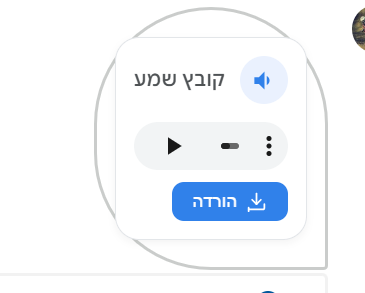
לא ניסיתי עדיין את השליחת קובץ הקלטה רגילה.// ==UserScript== // @name Google Chat Audio Pro: Player & Downloader // @namespace http://tampermonkey.net/ // @version 2.0 // @description משדרג את חווית האודיו ב-Google Chat: נגן מוטמע וכפתור הורדה מהירה // @author מים אחרונים - ג'מיני // @match https://chat.google.com/* // @match https://mail.google.com/* // @grant none // ==/UserScript== (function() { 'use strict'; const PROCESSED_ATTR = 'data-gchat-audio-processed'; // --- עיצוב (CSS) --- const style = document.createElement('style'); style.innerHTML = ` .custom-audio-container { display: flex; flex-direction: column; gap: 8px; background: #ffffff; border: 1px solid #e0e3e7; border-radius: 16px; padding: 12px; max-width: 350px; margin: 8px 0; box-shadow: 0 2px 5px rgba(0,0,0,0.05); direction: rtl; font-family: 'Google Sans', Roboto, Arial, sans-serif; } .audio-header { display: flex; align-items: center; gap: 10px; } .audio-icon-wrapper { width: 32px; height: 32px; background: #e8f0fe; color: #1a73e8; border-radius: 50%; display: flex; align-items: center; justify-content: center; flex-shrink: 0; } .audio-info { flex-grow: 1; overflow: hidden; } .audio-title { font-size: 13px; font-weight: 500; color: #3c4043; white-space: nowrap; overflow: hidden; text-overflow: ellipsis; } .audio-player-element { width: 100%; height: 32px; margin-top: 4px; } .download-btn { align-self: flex-start; background: #1a73e8; color: white; border: none; border-radius: 8px; padding: 6px 14px; font-size: 12px; font-weight: 500; cursor: pointer; display: flex; align-items: center; gap: 6px; transition: background 0.2s; } .download-btn:hover { background: #1557b0; } /* הסתרת הצ'יפ המקורי של גוגל למניעת כפילות */ .original-audio-hidden { display: none !important; } `; document.head.appendChild(style); // --- פונקציות עזר --- function getAudioUrl(el) { // מנסה לחלץ מ-data-media-url או מקישורי הורדה פנימיים const mediaUrl = el.getAttribute('data-media-url'); if (mediaUrl && mediaUrl.includes('get_attachment_url')) return mediaUrl; const link = el.querySelector('a[href*="DOWNLOAD_URL"], a[href*="attachment_token"]'); if (link) return link.href; const img = el.querySelector('img[src*="attachment_token"]'); if (img) { return img.src.replace('url_type=THUMBNAIL_URL', 'url_type=DOWNLOAD_URL').replace('&sz=w512', ''); } return null; } function getFileName(el) { const titleEl = el.querySelector('[title]'); if (titleEl) return titleEl.getAttribute('title'); const spanEl = el.querySelector('.RhNmFb'); return spanEl ? spanEl.textContent.trim() : 'קובץ שמע'; } function isAudioElement(el) { // בדיקת מחלקות מוכרות של גוגל לקובצי שמע if (el.classList.contains('fgkZ3')) return true; const title = el.querySelector('[title]'); if (title && /\.(mp3|wav|ogg|aac|m4a|flac|opus)$/i.test(title.getAttribute('title'))) return true; return el.querySelector('img[src*="audio_x128"], img[src*="audio_x32"]') !== null; } function createPlayer(url, fileName) { const container = document.createElement('div'); container.className = 'custom-audio-container'; container.innerHTML = ` <div class="audio-header"> <div class="audio-icon-wrapper"> <svg width="18" height="18" viewBox="0 0 24 24" fill="currentColor"><path d="M3 9v6h4l5 5V4L7 9H3zm13.5 3c0-1.77-1.02-3.29-2.5-4.03v8.05c1.48-.73 2.5-2.25 2.5-4.02z"/></svg> </div> <div class="audio-info"> <div class="audio-title" title="${fileName}">${fileName}</div> </div> </div> <audio controls preload="none" class="audio-player-element"> <source src="${url}" type="audio/mpeg"> </audio> <button class="download-btn"> <svg width="14" height="14" viewBox="0 0 24 24" fill="none" stroke="currentColor" stroke-width="2" stroke-linecap="round" stroke-linejoin="round"><path d="M21 15v4a2 2 0 0 1-2 2H5a2 2 0 0 1-2-2v4"/><polyline points="7 10 12 15 17 10"/><line x1="12" y1="15" x2="12" y2="3"/></svg> הורדה </button> `; container.querySelector('.download-btn').onclick = (e) => { e.stopPropagation(); window.open(url, '_blank'); }; return container; } function process() { // סלקטורים המכסים את רוב סוגי הבועות ב-Chat const chips = document.querySelectorAll(`.fgkZ3:not([${PROCESSED_ATTR}]), .lRPruf[jsname="sBlcJe"]:not([${PROCESSED_ATTR}]), .V5MAMb.ykJ07e:not([${PROCESSED_ATTR}])`); chips.forEach(chip => { if (isAudioElement(chip)) { const url = getAudioUrl(chip); if (!url) return; const fileName = getFileName(chip); const player = createPlayer(url, fileName); chip.setAttribute(PROCESSED_ATTR, 'true'); // הזרקה לדף: מחפשים את ההורה המתאים ביותר const parent = chip.closest('.DwygBd') || chip.parentElement; parent.appendChild(player); // הסתרת האלמנט המקורי של גוגל chip.classList.add('original-audio-hidden'); } }); } // הפעלה וניטור שינויים בדף (MutationObserver) const observer = new MutationObserver(() => process()); observer.observe(document.body, { childList: true, subtree: true }); // הרצה ראשונית process(); })(); -
קוד שעובד ומשלב את 2 התוספים יחד.
לא ניסיתי עדיין את השליחת קובץ הקלטה רגילה.// ==UserScript== // @name Google Chat Audio Pro: Player & Downloader // @namespace http://tampermonkey.net/ // @version 2.0 // @description משדרג את חווית האודיו ב-Google Chat: נגן מוטמע וכפתור הורדה מהירה // @author מים אחרונים - ג'מיני // @match https://chat.google.com/* // @match https://mail.google.com/* // @grant none // ==/UserScript== (function() { 'use strict'; const PROCESSED_ATTR = 'data-gchat-audio-processed'; // --- עיצוב (CSS) --- const style = document.createElement('style'); style.innerHTML = ` .custom-audio-container { display: flex; flex-direction: column; gap: 8px; background: #ffffff; border: 1px solid #e0e3e7; border-radius: 16px; padding: 12px; max-width: 350px; margin: 8px 0; box-shadow: 0 2px 5px rgba(0,0,0,0.05); direction: rtl; font-family: 'Google Sans', Roboto, Arial, sans-serif; } .audio-header { display: flex; align-items: center; gap: 10px; } .audio-icon-wrapper { width: 32px; height: 32px; background: #e8f0fe; color: #1a73e8; border-radius: 50%; display: flex; align-items: center; justify-content: center; flex-shrink: 0; } .audio-info { flex-grow: 1; overflow: hidden; } .audio-title { font-size: 13px; font-weight: 500; color: #3c4043; white-space: nowrap; overflow: hidden; text-overflow: ellipsis; } .audio-player-element { width: 100%; height: 32px; margin-top: 4px; } .download-btn { align-self: flex-start; background: #1a73e8; color: white; border: none; border-radius: 8px; padding: 6px 14px; font-size: 12px; font-weight: 500; cursor: pointer; display: flex; align-items: center; gap: 6px; transition: background 0.2s; } .download-btn:hover { background: #1557b0; } /* הסתרת הצ'יפ המקורי של גוגל למניעת כפילות */ .original-audio-hidden { display: none !important; } `; document.head.appendChild(style); // --- פונקציות עזר --- function getAudioUrl(el) { // מנסה לחלץ מ-data-media-url או מקישורי הורדה פנימיים const mediaUrl = el.getAttribute('data-media-url'); if (mediaUrl && mediaUrl.includes('get_attachment_url')) return mediaUrl; const link = el.querySelector('a[href*="DOWNLOAD_URL"], a[href*="attachment_token"]'); if (link) return link.href; const img = el.querySelector('img[src*="attachment_token"]'); if (img) { return img.src.replace('url_type=THUMBNAIL_URL', 'url_type=DOWNLOAD_URL').replace('&sz=w512', ''); } return null; } function getFileName(el) { const titleEl = el.querySelector('[title]'); if (titleEl) return titleEl.getAttribute('title'); const spanEl = el.querySelector('.RhNmFb'); return spanEl ? spanEl.textContent.trim() : 'קובץ שמע'; } function isAudioElement(el) { // בדיקת מחלקות מוכרות של גוגל לקובצי שמע if (el.classList.contains('fgkZ3')) return true; const title = el.querySelector('[title]'); if (title && /\.(mp3|wav|ogg|aac|m4a|flac|opus)$/i.test(title.getAttribute('title'))) return true; return el.querySelector('img[src*="audio_x128"], img[src*="audio_x32"]') !== null; } function createPlayer(url, fileName) { const container = document.createElement('div'); container.className = 'custom-audio-container'; container.innerHTML = ` <div class="audio-header"> <div class="audio-icon-wrapper"> <svg width="18" height="18" viewBox="0 0 24 24" fill="currentColor"><path d="M3 9v6h4l5 5V4L7 9H3zm13.5 3c0-1.77-1.02-3.29-2.5-4.03v8.05c1.48-.73 2.5-2.25 2.5-4.02z"/></svg> </div> <div class="audio-info"> <div class="audio-title" title="${fileName}">${fileName}</div> </div> </div> <audio controls preload="none" class="audio-player-element"> <source src="${url}" type="audio/mpeg"> </audio> <button class="download-btn"> <svg width="14" height="14" viewBox="0 0 24 24" fill="none" stroke="currentColor" stroke-width="2" stroke-linecap="round" stroke-linejoin="round"><path d="M21 15v4a2 2 0 0 1-2 2H5a2 2 0 0 1-2-2v4"/><polyline points="7 10 12 15 17 10"/><line x1="12" y1="15" x2="12" y2="3"/></svg> הורדה </button> `; container.querySelector('.download-btn').onclick = (e) => { e.stopPropagation(); window.open(url, '_blank'); }; return container; } function process() { // סלקטורים המכסים את רוב סוגי הבועות ב-Chat const chips = document.querySelectorAll(`.fgkZ3:not([${PROCESSED_ATTR}]), .lRPruf[jsname="sBlcJe"]:not([${PROCESSED_ATTR}]), .V5MAMb.ykJ07e:not([${PROCESSED_ATTR}])`); chips.forEach(chip => { if (isAudioElement(chip)) { const url = getAudioUrl(chip); if (!url) return; const fileName = getFileName(chip); const player = createPlayer(url, fileName); chip.setAttribute(PROCESSED_ATTR, 'true'); // הזרקה לדף: מחפשים את ההורה המתאים ביותר const parent = chip.closest('.DwygBd') || chip.parentElement; parent.appendChild(player); // הסתרת האלמנט המקורי של גוגל chip.classList.add('original-audio-hidden'); } }); } // הפעלה וניטור שינויים בדף (MutationObserver) const observer = new MutationObserver(() => process()); observer.observe(document.body, { childList: true, subtree: true }); // הרצה ראשונית process(); })();רק שיש אילו הם באגים

-
 י יאיר דניאל התייחס לנושא זה
-
@מים-אחרונים @בנימין-מחשבים
העליתי את התוסף לחנות של כרום
https://chromewebstore.google.com/detail/הורדת-אודיו-מגוגל-צאט/neopkjnhhhekdnncampfkeckjjljechi?pli=1 -
-
@חיים-קלים IDM....
-
@חיים-קלים IDM....
@רפי-סאם כתב בהמלצה | תוסף להורדת הודעות אודיו בגוגל צ'אט:
@חיים-קלים IDM....
@בנימין-מחשבים כתב בהמלצה | תוסף להורדת הודעות אודיו בגוגל צ'אט:
אם כי צריך את התוכנה יחד עם התוסף
האם צריך להתקין אותו על מחשב או על כרום כי אני מעדיף תוסף לכרום
-
@רפי-סאם כתב בהמלצה | תוסף להורדת הודעות אודיו בגוגל צ'אט:
@חיים-קלים IDM....
@בנימין-מחשבים כתב בהמלצה | תוסף להורדת הודעות אודיו בגוגל צ'אט:
אם כי צריך את התוכנה יחד עם התוסף
האם צריך להתקין אותו על מחשב או על כרום כי אני מעדיף תוסף לכרום
@חיים-קלים את התוכנה על המחשב ואת התוסף על כרום
-
@רפי-סאם כתב בהמלצה | תוסף להורדת הודעות אודיו בגוגל צ'אט:
@חיים-קלים את התוכנה על המחשב ואת התוסף על כרום
האם יש משהו שיהיה אוניברסלי לכל המחשבים
-
@רפי-סאם כתב בהמלצה | תוסף להורדת הודעות אודיו בגוגל צ'אט:
@חיים-קלים את התוכנה על המחשב ואת התוסף על כרום
האם יש משהו שיהיה אוניברסלי לכל המחשבים
@חיים-קלים קל לראות שאתה אכן מחפש חיים קלים...
לא כל כך מובן מה כוונתך "אוניברסלי לכל המחשבים" שתתקין המחשב שלך וזה יוריד מהמחשב שלי?
בכל מקרה ממליץ לך לשאול רגע את ר' ג'יימיני שיסביר לך מה זה תוכנה ומה תוסף לדפדפן. בהצלחה -
@חיים-קלים קל לראות שאתה אכן מחפש חיים קלים...
לא כל כך מובן מה כוונתך "אוניברסלי לכל המחשבים" שתתקין המחשב שלך וזה יוריד מהמחשב שלי?
בכל מקרה ממליץ לך לשאול רגע את ר' ג'יימיני שיסביר לך מה זה תוכנה ומה תוסף לדפדפן. בהצלחה@בנימין-מחשבים
כוונתי שלא רק על אותו מחשב שהתקנתי את התוכנה ואני פותח בו את הכרום אלא בכל מחשב שאזדמן אליו -
@בנימין-מחשבים
כוונתי שלא רק על אותו מחשב שהתקנתי את התוכנה ואני פותח בו את הכרום אלא בכל מחשב שאזדמן אליו@חיים-קלים אז אתה חייב תוסף מהחנות....
תסתכל בזה
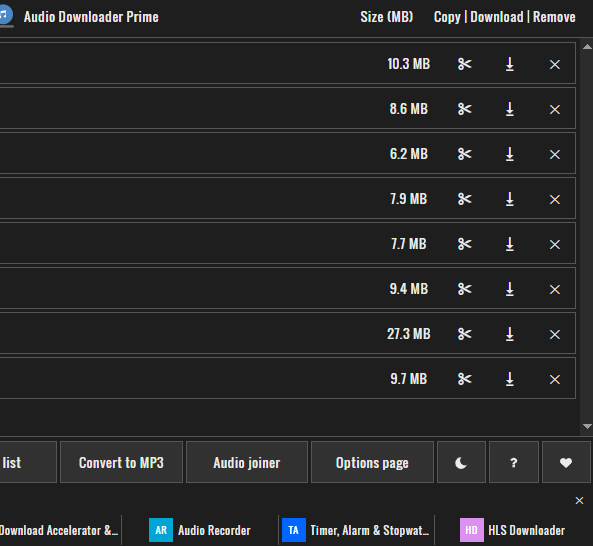
https://chromewebstore.google.com/detail/audio-downloader-prime/flainkeonkoanoijnkojmiiihnfdhipd?hl=he&pli=1 -
@חיים-קלים אז אתה חייב תוסף מהחנות....
תסתכל בזה
https://chromewebstore.google.com/detail/audio-downloader-prime/flainkeonkoanoijnkojmiiihnfdhipd?hl=he&pli=1 -
@חיים-קלים אין לי מושג
חיפשתי את התוסף הזה בגוגל....
לא התקנתי אותו מעולם...


שלום! נראה שהשיחה הזו מעניינת אותך, אבל עדיין אין לך חשבון.
נמאס לכם לגלול בין אותם הפוסטים בכל ביקור? כשנרשמים לחשבון, תמיד תחזרו בדיוק למקום שבו הייתם קודם, ותוכלו לבחור לקבל התראות על תגובות חדשות (בין אם במייל, ובין אם בהתראת פוש). תוכלו גם לשמור סימניות ולפרגן ב-upvote לפוסטים כדי להביע הערכה לחברי קהילה אחרים.
בעזרת התרומה שלך, הפוסט הזה יכול להיות אפילו טוב יותר 💗
הרשמה התחברות { const baseUrl = "https://www.google.co.il/search?q=site:mitmachim.top"; const m = location.pathname.match(/^\/(topic|category)\/(\d+)/); const type = m ? m[1] : null; const id = m ? m[2] : null; let searchInput; function search(path = "") { const query = searchInput.value.trim(); if (query) { window.open(`${baseUrl}${path}%20${encodeURIComponent(query)}`, "_blank"); } } let buttons = {}; buttons.searchAll = { id: "bb-search-all", label: `חיפוש ${type ? "בכל הפורום" : ""}`, className: type ? "btn-secondary" : "btn-primary", callback: () => search(), }; if (type === "topic") { buttons.searchTopic = { label: "חיפוש בנושא זה", className: "btn-primary", callback: () => search(`/topic/${id}`), }; } else if (type === "category") { buttons.searchCategory = { label: "חיפוש בקטגוריה זו", className: "btn-primary", callback: () => search(`/category/${id}`), }; } buttons.cancel = { label: "ביטול", className: "btn-default", "data-bs-dismiss": "modal" }; const dialog = bootbox.dialog({ title: '<div style="text-align:center;"><img src="/assets/uploads/files/1625950269825-mt-google.png" width="400" alt="חיפוש בגוגל"></div>', message: '<input id="bb-inp" class="bootbox-input bootbox-input-text form-control" placeholder="הקלידו כדי לחפש בגוגל" autocomplete="off"/>', buttons, backdrop: true, show: true, onEscape: true }); dialog.on("shown.bs.modal", function () { searchInput = document.getElementById("bb-inp"); if (searchInput) { searchInput.focus(); searchInput.addEventListener("keydown", function (e) { if (e.key === "Enter") { e.preventDefault(); const query = this.value.trim(); if (query) { search(); dialog.modal("hide"); } } else if (e.key === "Escape") { e.preventDefault(); dialog.modal("hide"); } }); } const searchAllButton = document.getElementById("bb-search-all"); if (searchAllButton) { searchAllButton.title = "לחצו על אנטר כדי לחפש"; } }); })(); void 0;)