
המלצה | קוד לטרמונסקי לעדכון כאשר ישנה שגיאה הקשורה בנטפרי
-
יתכן ויש את זה כבר קיים, ואולי לא.
אני מעלה מקווה שיהיה לתועלת, אולי נטפרי יבדקו את זה.
הקוד נכתב על ידי AIבעקבות כך שהמשתמש הרגיל לא יודע להשתמש בקונסולה ולבדוק האם השגיאה האחרונה שלו הגיעה מנטפרי... או שישנה תקלה אחרת באתר.
ג'מיני כתב לי קוד ל tampermonkey שמקפיץ הודעה בכל פעם שישנה שגיאה כל שהיא באתר שקשורה במידה כזו או אחרת לנטפרי.
שימו לב כאשר יש דף חסימה של נטפרי התוסף לא מציג כלום (כי הדף של נטפרי נמצא מעל הכל)
בהצלחה.
אם מישהו יכול להפוך את זה לקוד כולל התקנה, אשמח.// ==UserScript== // @name התראה על חסימת נטפרי // @namespace http://tampermonkey.net/ // @version 1.0 // @description מנטר את קוד התגובה 418 (Blocked by NetFree) בבקשות רשת (XHR ו-Fetch) ומציג התראה קופצת עם עיצוב מודרני. // @author Gemini // @match *://*/* // @grant none // ==/UserScript== (function() { 'use strict'; // הזרקת פונט Assistant ו-CSS כללי לראש הדף const style = document.createElement('style'); style.innerHTML = ` @import url('https://fonts.googleapis.com/css2?family=Assistant:wght@400;700&display=swap'); `; document.head.appendChild(style); // ---------------------- הגדרות ---------------------- // קוד הסטטוס של נטפרי const NETFREE_STATUS_CODE = 418; // כתובת הקישור לשליחת פניה למוקד const NETFREE_TICKET_URL = 'https://netfree.link/app/#/tickets/new'; // ודא שההודעה מוצגת פעם אחת לכל שגיאת רשת בדף. let isNotificationVisible = false; // ---------------------- לוגיקת התצוגה ---------------------- /** * יוצר ומציג את ההודעה המעוצבת. */ function showNetFreeNotification() { if (isNotificationVisible) { return; // מונע הצפת התראות } isNotificationVisible = true; // מחיקת התראות קודמות כדי למנוע הצטברות const existingNotification = document.getElementById('netfree-error-notification'); if (existingNotification) { existingNotification.remove(); } const notificationDiv = document.createElement('div'); notificationDiv.id = 'netfree-error-notification'; // יצירת ה-HTML הפנימי עם הטקסט והקישור - **תוקן** כדי לכלול כפתור סגירה נפרד notificationDiv.innerHTML = ` <div style="flex-grow: 1; text-align: right; direction: rtl; display: flex; flex-direction: column;"> <span style="font-weight: 700; font-size: 15px; margin-bottom: 5px;">שימו לב, שגיאת נטפרי אירעה (418)</span> <span style="font-size: 12px; line-height: 1.4;"> יתכן וזה חלק מההליך התקין, אך אם חלקים נצרכים בדף זה חסומים, ניתן לשלוח פניה למוקד בצירוף תעבורת אינטרנט. <a href="${NETFREE_TICKET_URL}" target="_blank" style="color: #FFDC7A; text-decoration: underline; font-weight: 700; margin-right: 5px; cursor: pointer;"> לחצו כאן </a> </span> </div> <button id="netfree-close-btn" style=" background: transparent; border: none; color: #FFDC7A; /* צבע זהב לכפתור */ cursor: pointer; font-size: 1.4em; margin-left: 0; margin-right: 15px; padding: 0; transition: color 0.2s; "> × </button> `; // **עיצוב מודרני ועדין (Assistant Font, צבע רך, צל עמוק)** notificationDiv.style.cssText = ` position: fixed; top: 20px; right: 20px; z-index: 10000; background-color: #A33B3B; /* צבע אדום עמוק ורך, פחות אגרסיבי */ color: #f0f0f0; /* לבן-אוף */ padding: 15px 20px; border-radius: 6px; box-shadow: 0 8px 18px rgba(0, 0, 0, 0.4); font-family: 'Assistant', 'Heebo', 'Rubik', Arial, sans-serif; /* שימוש בפונטים מודרניים */ font-size: 14px; text-align: right; direction: rtl; display: flex; align-items: flex-start; /* יישור למעלה, נראה טוב יותר עם מספר שורות */ max-width: 380px; line-height: 1.5; border-right: 5px solid #FFDC7A; /* פס זהב בצד ימין כהדגשה יוקרתית */ opacity: 0; transform: translateY(-20px); transition: opacity 0.5s ease, transform 0.5s ease; `; document.body.appendChild(notificationDiv); // הוספת Event Listener לסגירה - **שימוש ב-ID התקין כעת** const closeBtn = document.getElementById('netfree-close-btn'); if (closeBtn) { closeBtn.addEventListener('click', () => { notificationDiv.style.opacity = '0'; notificationDiv.style.transform = 'translateY(-20px)'; setTimeout(() => notificationDiv.remove(), 500); isNotificationVisible = false; }); } // הפעלת האנימציה (Fade-in and slide-down) setTimeout(() => { notificationDiv.style.opacity = '1'; notificationDiv.style.transform = 'translateY(0)'; }, 10); // הסרה אוטומטית (מופעלת רק אם לא נסגר ידנית) setTimeout(() => { if (isNotificationVisible && document.getElementById('netfree-error-notification')) { notificationDiv.style.opacity = '0'; notificationDiv.style.transform = 'translateY(-20px)'; setTimeout(() => notificationDiv.remove(), 500); isNotificationVisible = false; } }, 20000); // הסרה אוטומטית לאחר 20 שניות } // ---------------------- דריסת XHR (XMLHttpRequest) ---------------------- // שמירת הפונקציה המקורית const originalXHRSend = XMLHttpRequest.prototype.send; XMLHttpRequest.prototype.send = function() { const originalOnReadyStateChange = this.onreadystatechange; this.onreadystatechange = function() { if (this.readyState === 4 && this.status === NETFREE_STATUS_CODE) { showNetFreeNotification(); } if (originalOnReadyStateChange) { originalOnReadyStateChange.apply(this, arguments); } }; return originalXHRSend.apply(this, arguments); }; // ---------------------- דריסת Fetch ---------------------- const originalFetch = window.fetch; if (originalFetch) { window.fetch = function() { return originalFetch.apply(this, arguments).then(response => { if (response.status === NETFREE_STATUS_CODE) { showNetFreeNotification(); } return response; }).catch(error => { throw error; }); }; } })(); -
בעז"ה בגרסא הבאה, אני רוצה להוסיף אוטומטית את הכותרת וחלק מהטקסט לשליחה.
אם אפשרי גם להקליט את התעבורה האחרונה יהיה מעולה.
אם מישהו יודע מה כותבים בקישור אחרי הסימן שאלה, בשביל שיגדיר אוטומטית את הכותרות לנטפרי אני אשמח.
תודה.
כמו זה שיוצר אוטומטית תגית לאתר.
https://netfree.link/app/#/tickets/new?u=https:%2F%2Fwww.google.com%2F&t=tag
@צדיק-תמים -
יתכן ויש את זה כבר קיים, ואולי לא.
אני מעלה מקווה שיהיה לתועלת, אולי נטפרי יבדקו את זה.
הקוד נכתב על ידי AIבעקבות כך שהמשתמש הרגיל לא יודע להשתמש בקונסולה ולבדוק האם השגיאה האחרונה שלו הגיעה מנטפרי... או שישנה תקלה אחרת באתר.
ג'מיני כתב לי קוד ל tampermonkey שמקפיץ הודעה בכל פעם שישנה שגיאה כל שהיא באתר שקשורה במידה כזו או אחרת לנטפרי.
שימו לב כאשר יש דף חסימה של נטפרי התוסף לא מציג כלום (כי הדף של נטפרי נמצא מעל הכל)
בהצלחה.
אם מישהו יכול להפוך את זה לקוד כולל התקנה, אשמח.// ==UserScript== // @name התראה על חסימת נטפרי // @namespace http://tampermonkey.net/ // @version 1.0 // @description מנטר את קוד התגובה 418 (Blocked by NetFree) בבקשות רשת (XHR ו-Fetch) ומציג התראה קופצת עם עיצוב מודרני. // @author Gemini // @match *://*/* // @grant none // ==/UserScript== (function() { 'use strict'; // הזרקת פונט Assistant ו-CSS כללי לראש הדף const style = document.createElement('style'); style.innerHTML = ` @import url('https://fonts.googleapis.com/css2?family=Assistant:wght@400;700&display=swap'); `; document.head.appendChild(style); // ---------------------- הגדרות ---------------------- // קוד הסטטוס של נטפרי const NETFREE_STATUS_CODE = 418; // כתובת הקישור לשליחת פניה למוקד const NETFREE_TICKET_URL = 'https://netfree.link/app/#/tickets/new'; // ודא שההודעה מוצגת פעם אחת לכל שגיאת רשת בדף. let isNotificationVisible = false; // ---------------------- לוגיקת התצוגה ---------------------- /** * יוצר ומציג את ההודעה המעוצבת. */ function showNetFreeNotification() { if (isNotificationVisible) { return; // מונע הצפת התראות } isNotificationVisible = true; // מחיקת התראות קודמות כדי למנוע הצטברות const existingNotification = document.getElementById('netfree-error-notification'); if (existingNotification) { existingNotification.remove(); } const notificationDiv = document.createElement('div'); notificationDiv.id = 'netfree-error-notification'; // יצירת ה-HTML הפנימי עם הטקסט והקישור - **תוקן** כדי לכלול כפתור סגירה נפרד notificationDiv.innerHTML = ` <div style="flex-grow: 1; text-align: right; direction: rtl; display: flex; flex-direction: column;"> <span style="font-weight: 700; font-size: 15px; margin-bottom: 5px;">שימו לב, שגיאת נטפרי אירעה (418)</span> <span style="font-size: 12px; line-height: 1.4;"> יתכן וזה חלק מההליך התקין, אך אם חלקים נצרכים בדף זה חסומים, ניתן לשלוח פניה למוקד בצירוף תעבורת אינטרנט. <a href="${NETFREE_TICKET_URL}" target="_blank" style="color: #FFDC7A; text-decoration: underline; font-weight: 700; margin-right: 5px; cursor: pointer;"> לחצו כאן </a> </span> </div> <button id="netfree-close-btn" style=" background: transparent; border: none; color: #FFDC7A; /* צבע זהב לכפתור */ cursor: pointer; font-size: 1.4em; margin-left: 0; margin-right: 15px; padding: 0; transition: color 0.2s; "> × </button> `; // **עיצוב מודרני ועדין (Assistant Font, צבע רך, צל עמוק)** notificationDiv.style.cssText = ` position: fixed; top: 20px; right: 20px; z-index: 10000; background-color: #A33B3B; /* צבע אדום עמוק ורך, פחות אגרסיבי */ color: #f0f0f0; /* לבן-אוף */ padding: 15px 20px; border-radius: 6px; box-shadow: 0 8px 18px rgba(0, 0, 0, 0.4); font-family: 'Assistant', 'Heebo', 'Rubik', Arial, sans-serif; /* שימוש בפונטים מודרניים */ font-size: 14px; text-align: right; direction: rtl; display: flex; align-items: flex-start; /* יישור למעלה, נראה טוב יותר עם מספר שורות */ max-width: 380px; line-height: 1.5; border-right: 5px solid #FFDC7A; /* פס זהב בצד ימין כהדגשה יוקרתית */ opacity: 0; transform: translateY(-20px); transition: opacity 0.5s ease, transform 0.5s ease; `; document.body.appendChild(notificationDiv); // הוספת Event Listener לסגירה - **שימוש ב-ID התקין כעת** const closeBtn = document.getElementById('netfree-close-btn'); if (closeBtn) { closeBtn.addEventListener('click', () => { notificationDiv.style.opacity = '0'; notificationDiv.style.transform = 'translateY(-20px)'; setTimeout(() => notificationDiv.remove(), 500); isNotificationVisible = false; }); } // הפעלת האנימציה (Fade-in and slide-down) setTimeout(() => { notificationDiv.style.opacity = '1'; notificationDiv.style.transform = 'translateY(0)'; }, 10); // הסרה אוטומטית (מופעלת רק אם לא נסגר ידנית) setTimeout(() => { if (isNotificationVisible && document.getElementById('netfree-error-notification')) { notificationDiv.style.opacity = '0'; notificationDiv.style.transform = 'translateY(-20px)'; setTimeout(() => notificationDiv.remove(), 500); isNotificationVisible = false; } }, 20000); // הסרה אוטומטית לאחר 20 שניות } // ---------------------- דריסת XHR (XMLHttpRequest) ---------------------- // שמירת הפונקציה המקורית const originalXHRSend = XMLHttpRequest.prototype.send; XMLHttpRequest.prototype.send = function() { const originalOnReadyStateChange = this.onreadystatechange; this.onreadystatechange = function() { if (this.readyState === 4 && this.status === NETFREE_STATUS_CODE) { showNetFreeNotification(); } if (originalOnReadyStateChange) { originalOnReadyStateChange.apply(this, arguments); } }; return originalXHRSend.apply(this, arguments); }; // ---------------------- דריסת Fetch ---------------------- const originalFetch = window.fetch; if (originalFetch) { window.fetch = function() { return originalFetch.apply(this, arguments).then(response => { if (response.status === NETFREE_STATUS_CODE) { showNetFreeNotification(); } return response; }).catch(error => { throw error; }); }; } })(); -
@מים-אחרונים ומה אם יש חסימות של נטפרי על חלק מהדברים בדף אבל זה לא הגורם לבעיה?
@החכם-התם זה נועד בעיקר למקרה שיש לך ספק ואתה מתלבט למי לפנות, לנטפרי ולקבל הודעה משהו כמו:
אנחנו לא מצליחים... שלח לנו הקלטת תעבורה וכו...
או לפנות ישירות לבעל האתר...
כאן אתה יודע בוודאות שישנה איזו שהיא בעיה של נטפרי.
באתרים רגילים זה לא אמור להיות.
מצד שני בחיפוש גוגל אתה מיד תראה שגיאה.
אם יש משהו שאמור לעבוד ולא עובד, או שעבד תמיד והפסיק לעבוד...
ככה אתה יכול מיד לדעת. -
@החכם-התם זה נועד בעיקר למקרה שיש לך ספק ואתה מתלבט למי לפנות, לנטפרי ולקבל הודעה משהו כמו:
אנחנו לא מצליחים... שלח לנו הקלטת תעבורה וכו...
או לפנות ישירות לבעל האתר...
כאן אתה יודע בוודאות שישנה איזו שהיא בעיה של נטפרי.
באתרים רגילים זה לא אמור להיות.
מצד שני בחיפוש גוגל אתה מיד תראה שגיאה.
אם יש משהו שאמור לעבוד ולא עובד, או שעבד תמיד והפסיק לעבוד...
ככה אתה יכול מיד לדעת.@מים-אחרונים
כל מי שפותח קצת קונסול יודע שבחלק ענק מהאתרים,
יש פירסומות וכדו' שנטפרי חוסמים. -
-
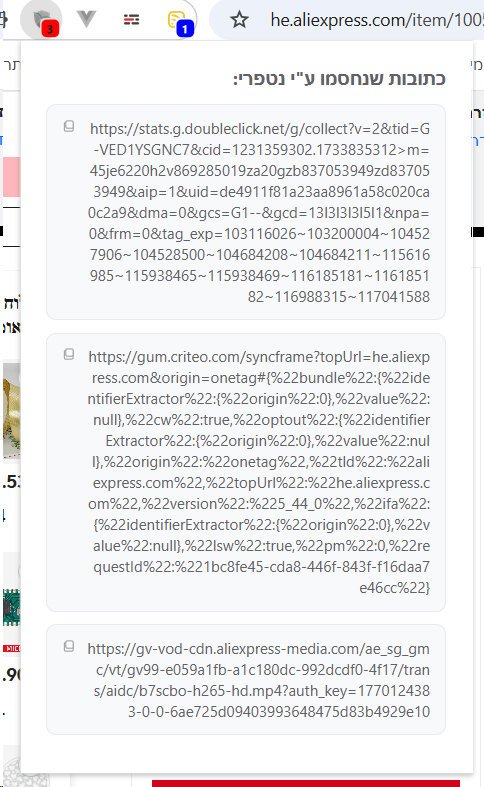
התמונת מסך שצירפת זה הכל פרסומת או קישורים שלא קשורים להאתר
-
התמונת מסך שצירפת זה הכל פרסומת או קישורים שלא קשורים להאתר
@גולם כתב בהמלצה | קוד לטרמונסקי לעדכון כאשר ישנה שגיאה הקשורה בנטפרי:
התמונת מסך שצירפת זה הכל פרסומת או קישורים שלא קשורים להאתר
זה רשימה של כל הקישורים שאותו דף ספציפי ניסה לטעון אך נבלם ע"י נטפרי
-
ק קראנץ' ונילה התייחס לנושא זה

שלום! נראה שהשיחה הזו מעניינת אותך, אבל עדיין אין לך חשבון.
נמאס לכם לגלול בין אותם הפוסטים בכל ביקור? כשנרשמים לחשבון, תמיד תחזרו בדיוק למקום שבו הייתם קודם, ותוכלו לבחור לקבל התראות על תגובות חדשות (בין אם במייל, ובין אם בהתראת פוש). תוכלו גם לשמור סימניות ולפרגן ב-upvote לפוסטים כדי להביע הערכה לחברי קהילה אחרים.
בעזרת התרומה שלך, הפוסט הזה יכול להיות אפילו טוב יותר 💗
הרשמה התחברות { const baseUrl = "https://www.google.co.il/search?q=site:mitmachim.top"; const m = location.pathname.match(/^\/(topic|category)\/(\d+)/); const type = m ? m[1] : null; const id = m ? m[2] : null; let searchInput; function search(path = "") { const query = searchInput.value.trim(); if (query) { window.open(`${baseUrl}${path}%20${encodeURIComponent(query)}`, "_blank"); } } let buttons = {}; buttons.searchAll = { id: "bb-search-all", label: `חיפוש ${type ? "בכל הפורום" : ""}`, className: type ? "btn-secondary" : "btn-primary", callback: () => search(), }; if (type === "topic") { buttons.searchTopic = { label: "חיפוש בנושא זה", className: "btn-primary", callback: () => search(`/topic/${id}`), }; } else if (type === "category") { buttons.searchCategory = { label: "חיפוש בקטגוריה זו", className: "btn-primary", callback: () => search(`/category/${id}`), }; } buttons.cancel = { label: "ביטול", className: "btn-default", "data-bs-dismiss": "modal" }; const dialog = bootbox.dialog({ title: '<div style="text-align:center;"><img src="/assets/uploads/files/1625950269825-mt-google.png" width="400" alt="חיפוש בגוגל"></div>', message: '<input id="bb-inp" class="bootbox-input bootbox-input-text form-control" placeholder="הקלידו כדי לחפש בגוגל" autocomplete="off"/>', buttons, backdrop: true, show: true, onEscape: true }); dialog.on("shown.bs.modal", function () { searchInput = document.getElementById("bb-inp"); if (searchInput) { searchInput.focus(); searchInput.addEventListener("keydown", function (e) { if (e.key === "Enter") { e.preventDefault(); const query = this.value.trim(); if (query) { search(); dialog.modal("hide"); } } else if (e.key === "Escape") { e.preventDefault(); dialog.modal("hide"); } }); } const searchAllButton = document.getElementById("bb-search-all"); if (searchAllButton) { searchAllButton.title = "לחצו על אנטר כדי לחפש"; } }); })(); void 0;)