
תגובות: מדריך: החזרת שורת החיפוש והסרת הכותרת הענקית ב-הגדרות
-
@ילד כתב בתגובות: מדריך: החזרת שורת החיפוש והסרת הכותרת הענקית ב-הגדרות:
@שניאור-שמח מאחד הפוסטים כאן שתרגם אותו יש לך אחד שעובד אשמח
תנסה מכאן
@שניאור-שמח ברוך השם סוף סוף הצלחתי להגיע ערכתי את הקובץ אבל וואלה לא נוסף לי שום חיפוש בהגדרות
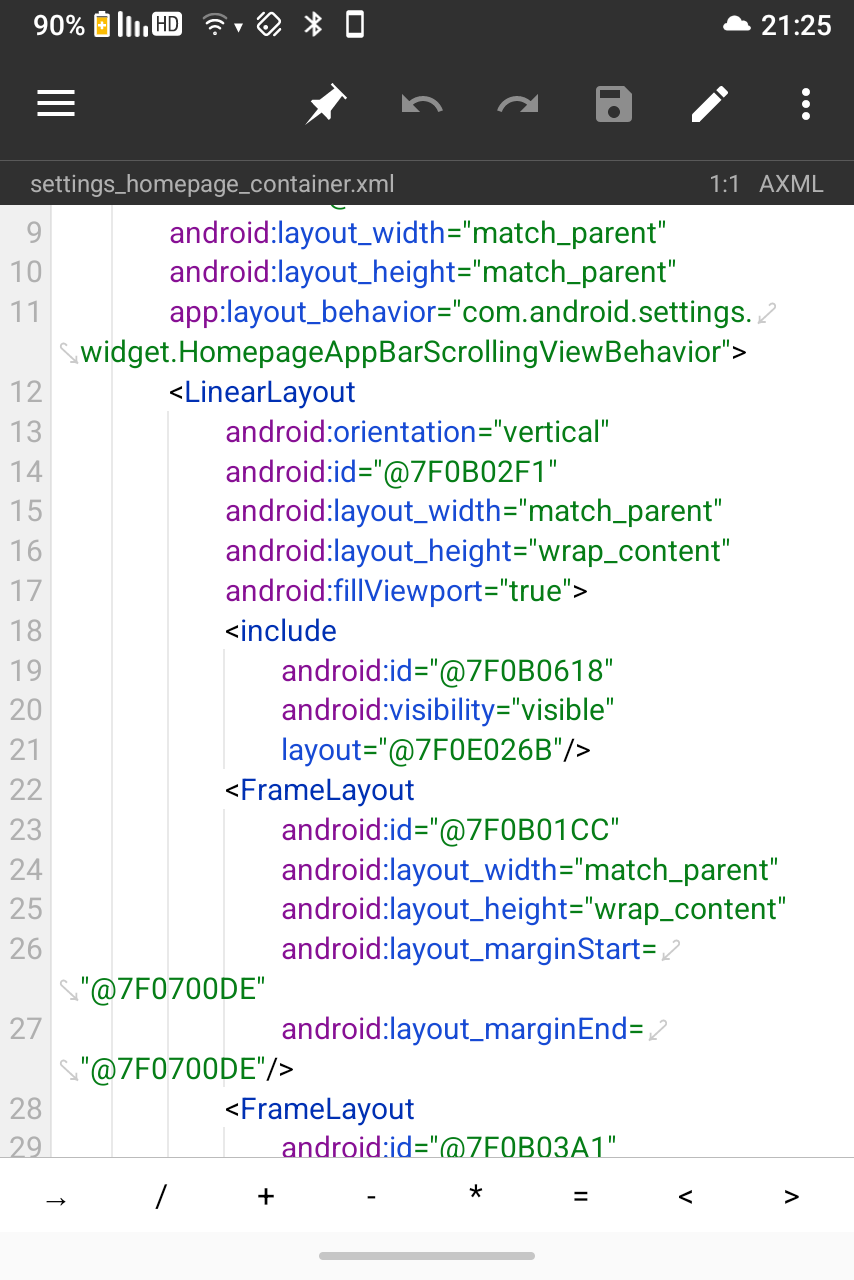
עשיתי נכון לא -
@שניאור-שמח ברוך השם סוף סוף הצלחתי להגיע ערכתי את הקובץ אבל וואלה לא נוסף לי שום חיפוש בהגדרות
עשיתי נכון לא@ילד תגלול למטה, תראה איך נראת השורה שערכת
-
@ילד תגלול למטה, תראה איך נראת השורה שערכת
-
@RearmostPant23 השורה בתוך הנה
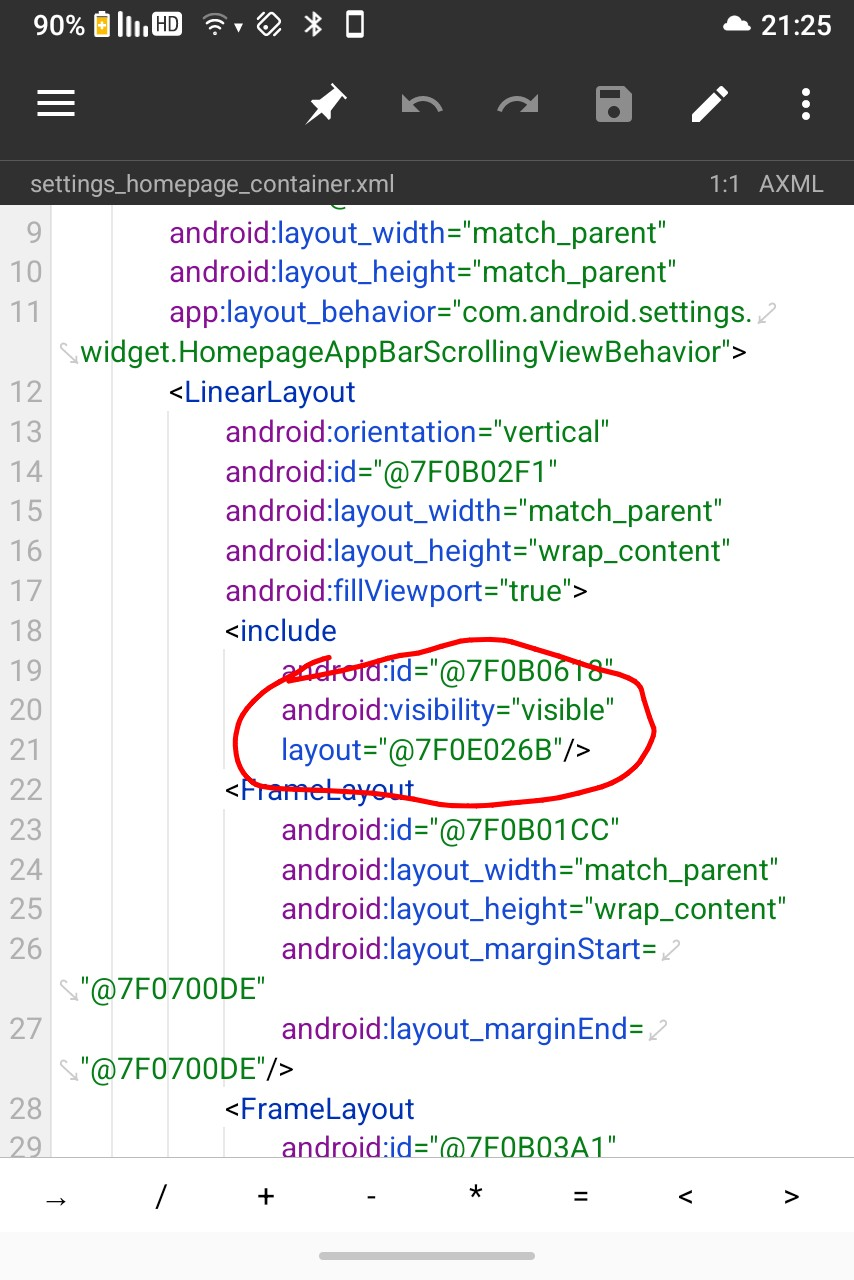
@ילד עשית את השינוי הראשון?
-
@ילד עשית את השינוי הראשון?
@שניאור-שמח עשיתי רק את השינוי הראשון כמו שסימנתי בתמונה לא זה בעצם השינוי הראשון אולי לא הבנתי נכון
-
@ילד עשית את השינוי הראשון?
-
@שניאור-שמח איזה קטע יש את זה פעמיים פשוט שיניתי רק באחד ולא בשני אז עכשיו שיניתי גם בשני ובאמת עלה לי החיפוש אין עליך תודה
@ילד כתב בתגובות: מדריך: החזרת שורת החיפוש והסרת הכותרת הענקית ב-הגדרות:
@שניאור-שמח איזה קטע יש את זה פעמיים פשוט שיניתי רק באחד ולא בשני אז עכשיו שיניתי גם בשני ובאמת עלה לי החיפוש אין עליך תודה
שמח לשמוע
תוכל לעלות צילום מסך? -
אני מנסה לעשות רק את השינוי הראשון שמיד כשנכנסים להגדרות יהיה מוצג שורת החיפוש אבל בקובץ אני לא מוצא שום שורה visible
זה מכשיר f21 פרו, האמת שאני עם גרסה של טריפל יו שיש עליה את המדריך הקודם שלך שהחיפוש בהגדרות נפתח על ידי לחיצה על המקשים, אולי זה הקטע.?xml version="1.0" encoding="utf-8"?> <androidx.coordinatorlayout.widget.CoordinatorLayout xmlns:android="http://schemas.android.com/apk/res/android" xmlns:app="http://schemas.android.com/apk/res-auto" android:id="@7F0A041F" android:fitsSystemWindows="true" android:layout_width="-1" android:layout_height="-1"> <androidx.core.widget.NestedScrollView android:id="@7F0A02BE" android:layout_width="-1" android:layout_height="-1" app:layout_behavior="com.android.settings.widget.FloatingAppBarScrollingViewBehavior"> <LinearLayout android:orientation="1" android:id="@7F0A023C" android:layout_width="-1" android:layout_height="-2" android:fillViewport="true"> <FrameLayout android:id="@7F0A0151" android:layout_width="-1" android:layout_height="-2" android:layout_marginStart="@7F0700B9" android:layout_marginEnd="@7F0700B9"/> <FrameLayout android:id="@7F0A02BD" android:background="?01010054" android:layout_width="-1" android:layout_height="-2" android:animateLayoutChanges="true"/> </LinearLayout> </androidx.core.widget.NestedScrollView> <com.google.android.material.appbar.AppBarLayout android:layout_width="-1" android:layout_height="-2" android:touchscreenBlocksFocus="false" android:keyboardNavigationCluster="false"> <include layout="@7F0D0195"/> </com.google.android.material.appbar.AppBarLayout> </androidx.coordinatorlayout.widget.CoordinatorLayout> -
אני מנסה לעשות רק את השינוי הראשון שמיד כשנכנסים להגדרות יהיה מוצג שורת החיפוש אבל בקובץ אני לא מוצא שום שורה visible
זה מכשיר f21 פרו, האמת שאני עם גרסה של טריפל יו שיש עליה את המדריך הקודם שלך שהחיפוש בהגדרות נפתח על ידי לחיצה על המקשים, אולי זה הקטע.?xml version="1.0" encoding="utf-8"?> <androidx.coordinatorlayout.widget.CoordinatorLayout xmlns:android="http://schemas.android.com/apk/res/android" xmlns:app="http://schemas.android.com/apk/res-auto" android:id="@7F0A041F" android:fitsSystemWindows="true" android:layout_width="-1" android:layout_height="-1"> <androidx.core.widget.NestedScrollView android:id="@7F0A02BE" android:layout_width="-1" android:layout_height="-1" app:layout_behavior="com.android.settings.widget.FloatingAppBarScrollingViewBehavior"> <LinearLayout android:orientation="1" android:id="@7F0A023C" android:layout_width="-1" android:layout_height="-2" android:fillViewport="true"> <FrameLayout android:id="@7F0A0151" android:layout_width="-1" android:layout_height="-2" android:layout_marginStart="@7F0700B9" android:layout_marginEnd="@7F0700B9"/> <FrameLayout android:id="@7F0A02BD" android:background="?01010054" android:layout_width="-1" android:layout_height="-2" android:animateLayoutChanges="true"/> </LinearLayout> </androidx.core.widget.NestedScrollView> <com.google.android.material.appbar.AppBarLayout android:layout_width="-1" android:layout_height="-2" android:touchscreenBlocksFocus="false" android:keyboardNavigationCluster="false"> <include layout="@7F0D0195"/> </com.google.android.material.appbar.AppBarLayout> </androidx.coordinatorlayout.widget.CoordinatorLayout>@מזכירותי איזה גרסה של טריפל יו? תוכל לצרף קישור?
בכל אופן תסתכל במה שהai רשםבקובץ ששלחת המצב שונה מהמכשיר הקודם (F25).
במכשיר הקודם, היצרן הסתיר את כל החלק העליון (AppBarLayout) ברמת ה-Container הראשי.
כאן, אם תשים לב, ל-AppBarLayout (למטה) אין מאפיין visibility="2". הוא גלוי כברירת מחדל (Visible).
זה אומר שההסתרה מתבצעת שכבה אחת עמוק יותר, בתוך הקובץ שמוזמן ע"י ה-include.
הנה השורה החשודה:
<include layout="@7F0D0195"/>מה עליך לעשות:
- איתור הקובץ הפנימי:
- כנס שוב ל-res/values/public.xml.
- חפש את ה-ID: 0x7f0d0195.
- תמצא את שם הקובץ (למשל search_bar.xml, toolbar_search.xml או homepage_header.xml).
- עריכת הקובץ הפנימי:
- פתח את הקובץ שמצאת.
- חפש בתוכו אלמנט מסוג Toolbar, CardView או FrameLayout שנראה כמו השורת חיפוש.
- הטריקים הנפוצים כאן:
- android:visibility="2" (או gone).
- android:layout_height="0dp" (גובה אפס - שנה ל-wrap_content או 56dp).
- android:layout_height="0px".
בקיצור: הבעיה לא בקובץ ששלחת, אלא בקובץ 7F0D0195 שנמצא בתוכו. תערוך אותו, ושם תמצא את החסימה.
- איתור הקובץ הפנימי:
-
אני מנסה לעשות רק את השינוי הראשון שמיד כשנכנסים להגדרות יהיה מוצג שורת החיפוש אבל בקובץ אני לא מוצא שום שורה visible
זה מכשיר f21 פרו, האמת שאני עם גרסה של טריפל יו שיש עליה את המדריך הקודם שלך שהחיפוש בהגדרות נפתח על ידי לחיצה על המקשים, אולי זה הקטע.?xml version="1.0" encoding="utf-8"?> <androidx.coordinatorlayout.widget.CoordinatorLayout xmlns:android="http://schemas.android.com/apk/res/android" xmlns:app="http://schemas.android.com/apk/res-auto" android:id="@7F0A041F" android:fitsSystemWindows="true" android:layout_width="-1" android:layout_height="-1"> <androidx.core.widget.NestedScrollView android:id="@7F0A02BE" android:layout_width="-1" android:layout_height="-1" app:layout_behavior="com.android.settings.widget.FloatingAppBarScrollingViewBehavior"> <LinearLayout android:orientation="1" android:id="@7F0A023C" android:layout_width="-1" android:layout_height="-2" android:fillViewport="true"> <FrameLayout android:id="@7F0A0151" android:layout_width="-1" android:layout_height="-2" android:layout_marginStart="@7F0700B9" android:layout_marginEnd="@7F0700B9"/> <FrameLayout android:id="@7F0A02BD" android:background="?01010054" android:layout_width="-1" android:layout_height="-2" android:animateLayoutChanges="true"/> </LinearLayout> </androidx.core.widget.NestedScrollView> <com.google.android.material.appbar.AppBarLayout android:layout_width="-1" android:layout_height="-2" android:touchscreenBlocksFocus="false" android:keyboardNavigationCluster="false"> <include layout="@7F0D0195"/> </com.google.android.material.appbar.AppBarLayout> </androidx.coordinatorlayout.widget.CoordinatorLayout>@מזכירותי כתב בתגובות: מדריך: החזרת שורת החיפוש והסרת הכותרת הענקית ב-הגדרות:
אני מנסה לעשות רק את השינוי הראשון שמיד כשנכנסים להגדרות יהיה מוצג שורת החיפוש אבל בקובץ אני לא מוצא שום שורה visible
זה מכשיר f21 פרו, האמת שאני עם גרסה של טריפל יו שיש עליה את המדריך הקודם שלך שהחיפוש בהגדרות נפתח על ידי לחיצה על המקשים, אולי זה הקטע.?xml version="1.0" encoding="utf-8"?> <androidx.coordinatorlayout.widget.CoordinatorLayout xmlns:android="http://schemas.android.com/apk/res/android" xmlns:app="http://schemas.android.com/apk/res-auto" android:id="@7F0A041F" android:fitsSystemWindows="true" android:layout_width="-1" android:layout_height="-1"> <androidx.core.widget.NestedScrollView android:id="@7F0A02BE" android:layout_width="-1" android:layout_height="-1" app:layout_behavior="com.android.settings.widget.FloatingAppBarScrollingViewBehavior"> <LinearLayout android:orientation="1" android:id="@7F0A023C" android:layout_width="-1" android:layout_height="-2" android:fillViewport="true"> <FrameLayout android:id="@7F0A0151" android:layout_width="-1" android:layout_height="-2" android:layout_marginStart="@7F0700B9" android:layout_marginEnd="@7F0700B9"/> <FrameLayout android:id="@7F0A02BD" android:background="?01010054" android:layout_width="-1" android:layout_height="-2" android:animateLayoutChanges="true"/> </LinearLayout> </androidx.core.widget.NestedScrollView> <com.google.android.material.appbar.AppBarLayout android:layout_width="-1" android:layout_height="-2" android:touchscreenBlocksFocus="false" android:keyboardNavigationCluster="false"> <include layout="@7F0D0195"/> </com.google.android.material.appbar.AppBarLayout> </androidx.coordinatorlayout.widget.CoordinatorLayout>גם אני נסיתי לשנות וזה מה שמופיע לי בקובץ.
אני עם f21 pro הגרסא הרגילה -
@מזכירותי כתב בתגובות: מדריך: החזרת שורת החיפוש והסרת הכותרת הענקית ב-הגדרות:
אני מנסה לעשות רק את השינוי הראשון שמיד כשנכנסים להגדרות יהיה מוצג שורת החיפוש אבל בקובץ אני לא מוצא שום שורה visible
זה מכשיר f21 פרו, האמת שאני עם גרסה של טריפל יו שיש עליה את המדריך הקודם שלך שהחיפוש בהגדרות נפתח על ידי לחיצה על המקשים, אולי זה הקטע.?xml version="1.0" encoding="utf-8"?> <androidx.coordinatorlayout.widget.CoordinatorLayout xmlns:android="http://schemas.android.com/apk/res/android" xmlns:app="http://schemas.android.com/apk/res-auto" android:id="@7F0A041F" android:fitsSystemWindows="true" android:layout_width="-1" android:layout_height="-1"> <androidx.core.widget.NestedScrollView android:id="@7F0A02BE" android:layout_width="-1" android:layout_height="-1" app:layout_behavior="com.android.settings.widget.FloatingAppBarScrollingViewBehavior"> <LinearLayout android:orientation="1" android:id="@7F0A023C" android:layout_width="-1" android:layout_height="-2" android:fillViewport="true"> <FrameLayout android:id="@7F0A0151" android:layout_width="-1" android:layout_height="-2" android:layout_marginStart="@7F0700B9" android:layout_marginEnd="@7F0700B9"/> <FrameLayout android:id="@7F0A02BD" android:background="?01010054" android:layout_width="-1" android:layout_height="-2" android:animateLayoutChanges="true"/> </LinearLayout> </androidx.core.widget.NestedScrollView> <com.google.android.material.appbar.AppBarLayout android:layout_width="-1" android:layout_height="-2" android:touchscreenBlocksFocus="false" android:keyboardNavigationCluster="false"> <include layout="@7F0D0195"/> </com.google.android.material.appbar.AppBarLayout> </androidx.coordinatorlayout.widget.CoordinatorLayout>גם אני נסיתי לשנות וזה מה שמופיע לי בקובץ.
אני עם f21 pro הגרסא הרגילה@reemzed123 כתב בתגובות: מדריך: החזרת שורת החיפוש והסרת הכותרת הענקית ב-הגדרות:
@מזכירותי כתב בתגובות: מדריך: החזרת שורת החיפוש והסרת הכותרת הענקית ב-הגדרות:
אני מנסה לעשות רק את השינוי הראשון שמיד כשנכנסים להגדרות יהיה מוצג שורת החיפוש אבל בקובץ אני לא מוצא שום שורה visible
זה מכשיר f21 פרו, האמת שאני עם גרסה של טריפל יו שיש עליה את המדריך הקודם שלך שהחיפוש בהגדרות נפתח על ידי לחיצה על המקשים, אולי זה הקטע.?xml version="1.0" encoding="utf-8"?> <androidx.coordinatorlayout.widget.CoordinatorLayout xmlns:android="http://schemas.android.com/apk/res/android" xmlns:app="http://schemas.android.com/apk/res-auto" android:id="@7F0A041F" android:fitsSystemWindows="true" android:layout_width="-1" android:layout_height="-1"> <androidx.core.widget.NestedScrollView android:id="@7F0A02BE" android:layout_width="-1" android:layout_height="-1" app:layout_behavior="com.android.settings.widget.FloatingAppBarScrollingViewBehavior"> <LinearLayout android:orientation="1" android:id="@7F0A023C" android:layout_width="-1" android:layout_height="-2" android:fillViewport="true"> <FrameLayout android:id="@7F0A0151" android:layout_width="-1" android:layout_height="-2" android:layout_marginStart="@7F0700B9" android:layout_marginEnd="@7F0700B9"/> <FrameLayout android:id="@7F0A02BD" android:background="?01010054" android:layout_width="-1" android:layout_height="-2" android:animateLayoutChanges="true"/> </LinearLayout> </androidx.core.widget.NestedScrollView> <com.google.android.material.appbar.AppBarLayout android:layout_width="-1" android:layout_height="-2" android:touchscreenBlocksFocus="false" android:keyboardNavigationCluster="false"> <include layout="@7F0D0195"/> </com.google.android.material.appbar.AppBarLayout> </androidx.coordinatorlayout.widget.CoordinatorLayout>גם אני נסיתי לשנות וזה מה שמופיע לי בקובץ.
אני עם f21 pro הגרסא הרגילהניסית לעשות את מה שרשום פוסט אחד מעליך?
-
@reemzed123 כתב בתגובות: מדריך: החזרת שורת החיפוש והסרת הכותרת הענקית ב-הגדרות:
@מזכירותי כתב בתגובות: מדריך: החזרת שורת החיפוש והסרת הכותרת הענקית ב-הגדרות:
אני מנסה לעשות רק את השינוי הראשון שמיד כשנכנסים להגדרות יהיה מוצג שורת החיפוש אבל בקובץ אני לא מוצא שום שורה visible
זה מכשיר f21 פרו, האמת שאני עם גרסה של טריפל יו שיש עליה את המדריך הקודם שלך שהחיפוש בהגדרות נפתח על ידי לחיצה על המקשים, אולי זה הקטע.?xml version="1.0" encoding="utf-8"?> <androidx.coordinatorlayout.widget.CoordinatorLayout xmlns:android="http://schemas.android.com/apk/res/android" xmlns:app="http://schemas.android.com/apk/res-auto" android:id="@7F0A041F" android:fitsSystemWindows="true" android:layout_width="-1" android:layout_height="-1"> <androidx.core.widget.NestedScrollView android:id="@7F0A02BE" android:layout_width="-1" android:layout_height="-1" app:layout_behavior="com.android.settings.widget.FloatingAppBarScrollingViewBehavior"> <LinearLayout android:orientation="1" android:id="@7F0A023C" android:layout_width="-1" android:layout_height="-2" android:fillViewport="true"> <FrameLayout android:id="@7F0A0151" android:layout_width="-1" android:layout_height="-2" android:layout_marginStart="@7F0700B9" android:layout_marginEnd="@7F0700B9"/> <FrameLayout android:id="@7F0A02BD" android:background="?01010054" android:layout_width="-1" android:layout_height="-2" android:animateLayoutChanges="true"/> </LinearLayout> </androidx.core.widget.NestedScrollView> <com.google.android.material.appbar.AppBarLayout android:layout_width="-1" android:layout_height="-2" android:touchscreenBlocksFocus="false" android:keyboardNavigationCluster="false"> <include layout="@7F0D0195"/> </com.google.android.material.appbar.AppBarLayout> </androidx.coordinatorlayout.widget.CoordinatorLayout>גם אני נסיתי לשנות וזה מה שמופיע לי בקובץ.
אני עם f21 pro הגרסא הרגילהניסית לעשות את מה שרשום פוסט אחד מעליך?
@שניאור-שמח כתב בתגובות: מדריך: החזרת שורת החיפוש והסרת הכותרת הענקית ב-הגדרות:
@reemzed123 כתב בתגובות: מדריך: החזרת שורת החיפוש והסרת הכותרת הענקית ב-הגדרות:
@מזכירותי כתב בתגובות: מדריך: החזרת שורת החיפוש והסרת הכותרת הענקית ב-הגדרות:
אני מנסה לעשות רק את השינוי הראשון שמיד כשנכנסים להגדרות יהיה מוצג שורת החיפוש אבל בקובץ אני לא מוצא שום שורה visible
זה מכשיר f21 פרו, האמת שאני עם גרסה של טריפל יו שיש עליה את המדריך הקודם שלך שהחיפוש בהגדרות נפתח על ידי לחיצה על המקשים, אולי זה הקטע.?xml version="1.0" encoding="utf-8"?> <androidx.coordinatorlayout.widget.CoordinatorLayout xmlns:android="http://schemas.android.com/apk/res/android" xmlns:app="http://schemas.android.com/apk/res-auto" android:id="@7F0A041F" android:fitsSystemWindows="true" android:layout_width="-1" android:layout_height="-1"> <androidx.core.widget.NestedScrollView android:id="@7F0A02BE" android:layout_width="-1" android:layout_height="-1" app:layout_behavior="com.android.settings.widget.FloatingAppBarScrollingViewBehavior"> <LinearLayout android:orientation="1" android:id="@7F0A023C" android:layout_width="-1" android:layout_height="-2" android:fillViewport="true"> <FrameLayout android:id="@7F0A0151" android:layout_width="-1" android:layout_height="-2" android:layout_marginStart="@7F0700B9" android:layout_marginEnd="@7F0700B9"/> <FrameLayout android:id="@7F0A02BD" android:background="?01010054" android:layout_width="-1" android:layout_height="-2" android:animateLayoutChanges="true"/> </LinearLayout> </androidx.core.widget.NestedScrollView> <com.google.android.material.appbar.AppBarLayout android:layout_width="-1" android:layout_height="-2" android:touchscreenBlocksFocus="false" android:keyboardNavigationCluster="false"> <include layout="@7F0D0195"/> </com.google.android.material.appbar.AppBarLayout> </androidx.coordinatorlayout.widget.CoordinatorLayout>גם אני נסיתי לשנות וזה מה שמופיע לי בקובץ.
אני עם f21 pro הגרסא הרגילהניסית לעשות את מה שרשום פוסט אחד מעליך?
כן. לא מצאתי את הקובץ עם השם הזה 7F0D0195. אולי צריך mt manager פרמיום כדי לחפש בתוך הקבצים עצמם, אבל יש לי רק את הגרסא החינמית.
שאלתי את מר ג'פטו (gpt) והוא העלה שאולי האבחנה היא ששורת החיפוש והכותרת מוסתרות בקוד (Smali בתוך classes.dex) ולא בקובצי ה-XML, ולכן שינויי layout לא עובדים. המשמעות היא שהמדריך הזה לא מתאים לגרסת ה-Settings בf21 וכדי לפתור את זה צריך או לערוך Smali ולשנות setVisibility(8) ל-setVisibility(0), או לנסות פתרון עוקף שלא נוגע ב-APK.
-
@שניאור-שמח כתב בתגובות: מדריך: החזרת שורת החיפוש והסרת הכותרת הענקית ב-הגדרות:
@reemzed123 כתב בתגובות: מדריך: החזרת שורת החיפוש והסרת הכותרת הענקית ב-הגדרות:
@מזכירותי כתב בתגובות: מדריך: החזרת שורת החיפוש והסרת הכותרת הענקית ב-הגדרות:
אני מנסה לעשות רק את השינוי הראשון שמיד כשנכנסים להגדרות יהיה מוצג שורת החיפוש אבל בקובץ אני לא מוצא שום שורה visible
זה מכשיר f21 פרו, האמת שאני עם גרסה של טריפל יו שיש עליה את המדריך הקודם שלך שהחיפוש בהגדרות נפתח על ידי לחיצה על המקשים, אולי זה הקטע.?xml version="1.0" encoding="utf-8"?> <androidx.coordinatorlayout.widget.CoordinatorLayout xmlns:android="http://schemas.android.com/apk/res/android" xmlns:app="http://schemas.android.com/apk/res-auto" android:id="@7F0A041F" android:fitsSystemWindows="true" android:layout_width="-1" android:layout_height="-1"> <androidx.core.widget.NestedScrollView android:id="@7F0A02BE" android:layout_width="-1" android:layout_height="-1" app:layout_behavior="com.android.settings.widget.FloatingAppBarScrollingViewBehavior"> <LinearLayout android:orientation="1" android:id="@7F0A023C" android:layout_width="-1" android:layout_height="-2" android:fillViewport="true"> <FrameLayout android:id="@7F0A0151" android:layout_width="-1" android:layout_height="-2" android:layout_marginStart="@7F0700B9" android:layout_marginEnd="@7F0700B9"/> <FrameLayout android:id="@7F0A02BD" android:background="?01010054" android:layout_width="-1" android:layout_height="-2" android:animateLayoutChanges="true"/> </LinearLayout> </androidx.core.widget.NestedScrollView> <com.google.android.material.appbar.AppBarLayout android:layout_width="-1" android:layout_height="-2" android:touchscreenBlocksFocus="false" android:keyboardNavigationCluster="false"> <include layout="@7F0D0195"/> </com.google.android.material.appbar.AppBarLayout> </androidx.coordinatorlayout.widget.CoordinatorLayout>גם אני נסיתי לשנות וזה מה שמופיע לי בקובץ.
אני עם f21 pro הגרסא הרגילהניסית לעשות את מה שרשום פוסט אחד מעליך?
כן. לא מצאתי את הקובץ עם השם הזה 7F0D0195. אולי צריך mt manager פרמיום כדי לחפש בתוך הקבצים עצמם, אבל יש לי רק את הגרסא החינמית.
שאלתי את מר ג'פטו (gpt) והוא העלה שאולי האבחנה היא ששורת החיפוש והכותרת מוסתרות בקוד (Smali בתוך classes.dex) ולא בקובצי ה-XML, ולכן שינויי layout לא עובדים. המשמעות היא שהמדריך הזה לא מתאים לגרסת ה-Settings בf21 וכדי לפתור את זה צריך או לערוך Smali ולשנות setVisibility(8) ל-setVisibility(0), או לנסות פתרון עוקף שלא נוגע ב-APK.
@reemzed123 כתב בתגובות: מדריך: החזרת שורת החיפוש והסרת הכותרת הענקית ב-הגדרות:
@שניאור-שמח כתב בתגובות: מדריך: החזרת שורת החיפוש והסרת הכותרת הענקית ב-הגדרות:
@reemzed123 כתב בתגובות: מדריך: החזרת שורת החיפוש והסרת הכותרת הענקית ב-הגדרות:
@מזכירותי כתב בתגובות: מדריך: החזרת שורת החיפוש והסרת הכותרת הענקית ב-הגדרות:
אני מנסה לעשות רק את השינוי הראשון שמיד כשנכנסים להגדרות יהיה מוצג שורת החיפוש אבל בקובץ אני לא מוצא שום שורה visible
זה מכשיר f21 פרו, האמת שאני עם גרסה של טריפל יו שיש עליה את המדריך הקודם שלך שהחיפוש בהגדרות נפתח על ידי לחיצה על המקשים, אולי זה הקטע.?xml version="1.0" encoding="utf-8"?> <androidx.coordinatorlayout.widget.CoordinatorLayout xmlns:android="http://schemas.android.com/apk/res/android" xmlns:app="http://schemas.android.com/apk/res-auto" android:id="@7F0A041F" android:fitsSystemWindows="true" android:layout_width="-1" android:layout_height="-1"> <androidx.core.widget.NestedScrollView android:id="@7F0A02BE" android:layout_width="-1" android:layout_height="-1" app:layout_behavior="com.android.settings.widget.FloatingAppBarScrollingViewBehavior"> <LinearLayout android:orientation="1" android:id="@7F0A023C" android:layout_width="-1" android:layout_height="-2" android:fillViewport="true"> <FrameLayout android:id="@7F0A0151" android:layout_width="-1" android:layout_height="-2" android:layout_marginStart="@7F0700B9" android:layout_marginEnd="@7F0700B9"/> <FrameLayout android:id="@7F0A02BD" android:background="?01010054" android:layout_width="-1" android:layout_height="-2" android:animateLayoutChanges="true"/> </LinearLayout> </androidx.core.widget.NestedScrollView> <com.google.android.material.appbar.AppBarLayout android:layout_width="-1" android:layout_height="-2" android:touchscreenBlocksFocus="false" android:keyboardNavigationCluster="false"> <include layout="@7F0D0195"/> </com.google.android.material.appbar.AppBarLayout> </androidx.coordinatorlayout.widget.CoordinatorLayout>גם אני נסיתי לשנות וזה מה שמופיע לי בקובץ.
אני עם f21 pro הגרסא הרגילהניסית לעשות את מה שרשום פוסט אחד מעליך?
כן. לא מצאתי את הקובץ עם השם הזה 7F0D0195. אולי צריך mt manager פרמיום כדי לחפש בתוך הקבצים עצמם, אבל יש לי רק את הגרסא החינמית.
שאלתי את מר ג'פטו (gpt) והוא העלה שאולי האבחנה היא ששורת החיפוש והכותרת מוסתרות בקוד (Smali בתוך classes.dex) ולא בקובצי ה-XML, ולכן שינויי layout לא עובדים. המשמעות היא שהמדריך הזה לא מתאים לגרסת ה-Settings בf21 וכדי לפתור את זה צריך או לערוך Smali ולשנות setVisibility(8) ל-setVisibility(0), או לנסות פתרון עוקף שלא נוגע ב-APK.
כנראה באמת שזה הsmali
כי גם הf22 pro זה היה שם..
אני מצרף לך שיחה ארוכה שלי עם הai ששם רשום הפיתרון.. פשוט לא היה לי כח לעשות על זה מדריך..
https://g.co/gemini/share/84dc12e32eb1 -
-
תגובה: מדריך | מדריך: החזרת שורת החיפוש והסרת הכותרת הענקית ב-הגדרות
אשמח להערות והארות
@שניאור-שמח כתב בתגובות: מדריך: החזרת שורת החיפוש והסרת הכותרת הענקית ב-הגדרות:
תגובה: מדריך | מדריך: החזרת שורת החיפוש והסרת הכותרת הענקית ב-הגדרות
אשמח להערות והארותצריך רוט? או שפספתי משהו
נהנת? נעזרת? שמחתי לעזור
-
@שניאור-שמח כתב בתגובות: מדריך: החזרת שורת החיפוש והסרת הכותרת הענקית ב-הגדרות:
תגובה: מדריך | מדריך: החזרת שורת החיפוש והסרת הכותרת הענקית ב-הגדרות
אשמח להערות והארותצריך רוט? או שפספתי משהו
@עניו-כמשה כתב בתגובות: מדריך: החזרת שורת החיפוש והסרת הכותרת הענקית ב-הגדרות:
@שניאור-שמח כתב בתגובות: מדריך: החזרת שורת החיפוש והסרת הכותרת הענקית ב-הגדרות:
תגובה: מדריך | מדריך: החזרת שורת החיפוש והסרת הכותרת הענקית ב-הגדרות
אשמח להערות והארותצריך רוט? או שפספתי משהו
חייב רוט
"אם לא תנסה, איך תדע?"
-
@עניו-כמשה כתב בתגובות: מדריך: החזרת שורת החיפוש והסרת הכותרת הענקית ב-הגדרות:
@שניאור-שמח כתב בתגובות: מדריך: החזרת שורת החיפוש והסרת הכותרת הענקית ב-הגדרות:
תגובה: מדריך | מדריך: החזרת שורת החיפוש והסרת הכותרת הענקית ב-הגדרות
אשמח להערות והארותצריך רוט? או שפספתי משהו
חייב רוט
@שניאור-שמח כתב בתגובות: מדריך: החזרת שורת החיפוש והסרת הכותרת הענקית ב-הגדרות:
@עניו-כמשה כתב בתגובות: מדריך: החזרת שורת החיפוש והסרת הכותרת הענקית ב-הגדרות:
@שניאור-שמח כתב בתגובות: מדריך: החזרת שורת החיפוש והסרת הכותרת הענקית ב-הגדרות:
תגובה: מדריך | מדריך: החזרת שורת החיפוש והסרת הכותרת הענקית ב-הגדרות
אשמח להערות והארותצריך רוט? או שפספתי משהו
חייב רוט
באסה
אבל אחלה מדריך בלי קשר לכלום
אלוף כמו תמיד אתה
נהנת? נעזרת? שמחתי לעזור
-
@שניאור-שמח כתב בתגובות: מדריך: החזרת שורת החיפוש והסרת הכותרת הענקית ב-הגדרות:
@עניו-כמשה כתב בתגובות: מדריך: החזרת שורת החיפוש והסרת הכותרת הענקית ב-הגדרות:
@שניאור-שמח כתב בתגובות: מדריך: החזרת שורת החיפוש והסרת הכותרת הענקית ב-הגדרות:
תגובה: מדריך | מדריך: החזרת שורת החיפוש והסרת הכותרת הענקית ב-הגדרות
אשמח להערות והארותצריך רוט? או שפספתי משהו
חייב רוט
באסה
אבל אחלה מדריך בלי קשר לכלום
אלוף כמו תמיד אתה
@עניו-כמשה כתב בתגובות: מדריך: החזרת שורת החיפוש והסרת הכותרת הענקית ב-הגדרות:
@שניאור-שמח כתב בתגובות: מדריך: החזרת שורת החיפוש והסרת הכותרת הענקית ב-הגדרות:
@עניו-כמשה כתב בתגובות: מדריך: החזרת שורת החיפוש והסרת הכותרת הענקית ב-הגדרות:
@שניאור-שמח כתב בתגובות: מדריך: החזרת שורת החיפוש והסרת הכותרת הענקית ב-הגדרות:
תגובה: מדריך | מדריך: החזרת שורת החיפוש והסרת הכותרת הענקית ב-הגדרות
אשמח להערות והארותצריך רוט? או שפספתי משהו
חייב רוט
באסה
למה אין לך? מה הבעיה לעשות?
"אם לא תנסה, איך תדע?"
-
@עניו-כמשה כתב בתגובות: מדריך: החזרת שורת החיפוש והסרת הכותרת הענקית ב-הגדרות:
@שניאור-שמח כתב בתגובות: מדריך: החזרת שורת החיפוש והסרת הכותרת הענקית ב-הגדרות:
@עניו-כמשה כתב בתגובות: מדריך: החזרת שורת החיפוש והסרת הכותרת הענקית ב-הגדרות:
@שניאור-שמח כתב בתגובות: מדריך: החזרת שורת החיפוש והסרת הכותרת הענקית ב-הגדרות:
תגובה: מדריך | מדריך: החזרת שורת החיפוש והסרת הכותרת הענקית ב-הגדרות
אשמח להערות והארותצריך רוט? או שפספתי משהו
חייב רוט
באסה
למה אין לך? מה הבעיה לעשות?
@שניאור-שמח כתב בתגובות: מדריך: החזרת שורת החיפוש והסרת הכותרת הענקית ב-הגדרות:
@עניו-כמשה כתב בתגובות: מדריך: החזרת שורת החיפוש והסרת הכותרת הענקית ב-הגדרות:
@שניאור-שמח כתב בתגובות: מדריך: החזרת שורת החיפוש והסרת הכותרת הענקית ב-הגדרות:
@עניו-כמשה כתב בתגובות: מדריך: החזרת שורת החיפוש והסרת הכותרת הענקית ב-הגדרות:
@שניאור-שמח כתב בתגובות: מדריך: החזרת שורת החיפוש והסרת הכותרת הענקית ב-הגדרות:
תגובה: מדריך | מדריך: החזרת שורת החיפוש והסרת הכותרת הענקית ב-הגדרות
אשמח להערות והארותצריך רוט? או שפספתי משהו
חייב רוט
באסה
למה אין לך? מה הבעיה לעשות?
צריך למחוק את כל המכשיר אין לי כח לזה עכשיו אולי בהמשך

נהנת? נעזרת? שמחתי לעזור
-
@שניאור-שמח כתב בתגובות: מדריך: החזרת שורת החיפוש והסרת הכותרת הענקית ב-הגדרות:
@עניו-כמשה כתב בתגובות: מדריך: החזרת שורת החיפוש והסרת הכותרת הענקית ב-הגדרות:
@שניאור-שמח כתב בתגובות: מדריך: החזרת שורת החיפוש והסרת הכותרת הענקית ב-הגדרות:
@עניו-כמשה כתב בתגובות: מדריך: החזרת שורת החיפוש והסרת הכותרת הענקית ב-הגדרות:
@שניאור-שמח כתב בתגובות: מדריך: החזרת שורת החיפוש והסרת הכותרת הענקית ב-הגדרות:
תגובה: מדריך | מדריך: החזרת שורת החיפוש והסרת הכותרת הענקית ב-הגדרות
אשמח להערות והארותצריך רוט? או שפספתי משהו
חייב רוט
באסה
למה אין לך? מה הבעיה לעשות?
צריך למחוק את כל המכשיר אין לי כח לזה עכשיו אולי בהמשך
@עניו-כמשה כתב בתגובות: מדריך: החזרת שורת החיפוש והסרת הכותרת הענקית ב-הגדרות:
@שניאור-שמח כתב בתגובות: מדריך: החזרת שורת החיפוש והסרת הכותרת הענקית ב-הגדרות:
@עניו-כמשה כתב בתגובות: מדריך: החזרת שורת החיפוש והסרת הכותרת הענקית ב-הגדרות:
@שניאור-שמח כתב בתגובות: מדריך: החזרת שורת החיפוש והסרת הכותרת הענקית ב-הגדרות:
@עניו-כמשה כתב בתגובות: מדריך: החזרת שורת החיפוש והסרת הכותרת הענקית ב-הגדרות:
@שניאור-שמח כתב בתגובות: מדריך: החזרת שורת החיפוש והסרת הכותרת הענקית ב-הגדרות:
תגובה: מדריך | מדריך: החזרת שורת החיפוש והסרת הכותרת הענקית ב-הגדרות
אשמח להערות והארותצריך רוט? או שפספתי משהו
חייב רוט
באסה
למה אין לך? מה הבעיה לעשות?
צריך למחוק את כל המכשיר אין לי כח לזה עכשיו אולי בהמשך
למה? ההבוטלאודר פתוח?
ואולי יש לך רוט אם זה נקנה בארץ"אם לא תנסה, איך תדע?"


שלום! נראה שהשיחה הזו מעניינת אותך, אבל עדיין אין לך חשבון.
נמאס לכם לגלול בין אותם הפוסטים בכל ביקור? כשנרשמים לחשבון, תמיד תחזרו בדיוק למקום שבו הייתם קודם, ותוכלו לבחור לקבל התראות על תגובות חדשות (בין אם במייל, ובין אם בהתראת פוש). תוכלו גם לשמור סימניות ולפרגן ב-upvote לפוסטים כדי להביע הערכה לחברי קהילה אחרים.
בעזרת התרומה שלך, הפוסט הזה יכול להיות אפילו טוב יותר 💗
הרשמה התחברות { const baseUrl = "https://www.google.co.il/search?q=site:mitmachim.top"; const m = location.pathname.match(/^\/(topic|category)\/(\d+)/); const type = m ? m[1] : null; const id = m ? m[2] : null; let searchInput; function search(path = "") { const query = searchInput.value.trim(); if (query) { window.open(`${baseUrl}${path}%20${encodeURIComponent(query)}`, "_blank"); } } let buttons = {}; buttons.searchAll = { id: "bb-search-all", label: `חיפוש ${type ? "בכל הפורום" : ""}`, className: type ? "btn-secondary" : "btn-primary", callback: () => search(), }; if (type === "topic") { buttons.searchTopic = { label: "חיפוש בנושא זה", className: "btn-primary", callback: () => search(`/topic/${id}`), }; } else if (type === "category") { buttons.searchCategory = { label: "חיפוש בקטגוריה זו", className: "btn-primary", callback: () => search(`/category/${id}`), }; } buttons.cancel = { label: "ביטול", className: "btn-default", "data-bs-dismiss": "modal" }; const dialog = bootbox.dialog({ title: '<div style="text-align:center;"><img src="/assets/uploads/files/1625950269825-mt-google.png" width="400" alt="חיפוש בגוגל"></div>', message: '<input id="bb-inp" class="bootbox-input bootbox-input-text form-control" placeholder="הקלידו כדי לחפש בגוגל" autocomplete="off"/>', buttons, backdrop: true, show: true, onEscape: true }); dialog.on("shown.bs.modal", function () { searchInput = document.getElementById("bb-inp"); if (searchInput) { searchInput.focus(); searchInput.addEventListener("keydown", function (e) { if (e.key === "Enter") { e.preventDefault(); const query = this.value.trim(); if (query) { search(); dialog.modal("hide"); } } else if (e.key === "Escape") { e.preventDefault(); dialog.modal("hide"); } }); } const searchAllButton = document.getElementById("bb-search-all"); if (searchAllButton) { searchAllButton.title = "לחצו על אנטר כדי לחפש"; } }); })(); void 0;)