
המלצה | היתכן??? המרת קבצי JPG, MP3-4 ל- HTML ?!
-
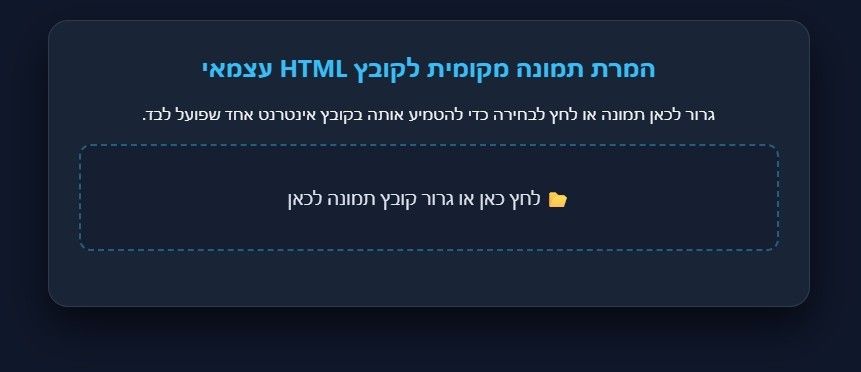
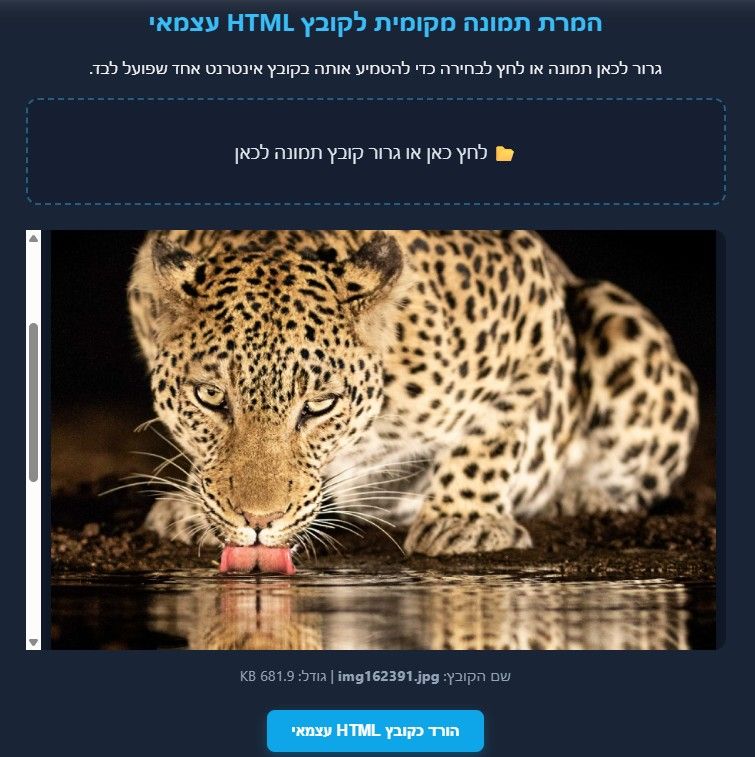
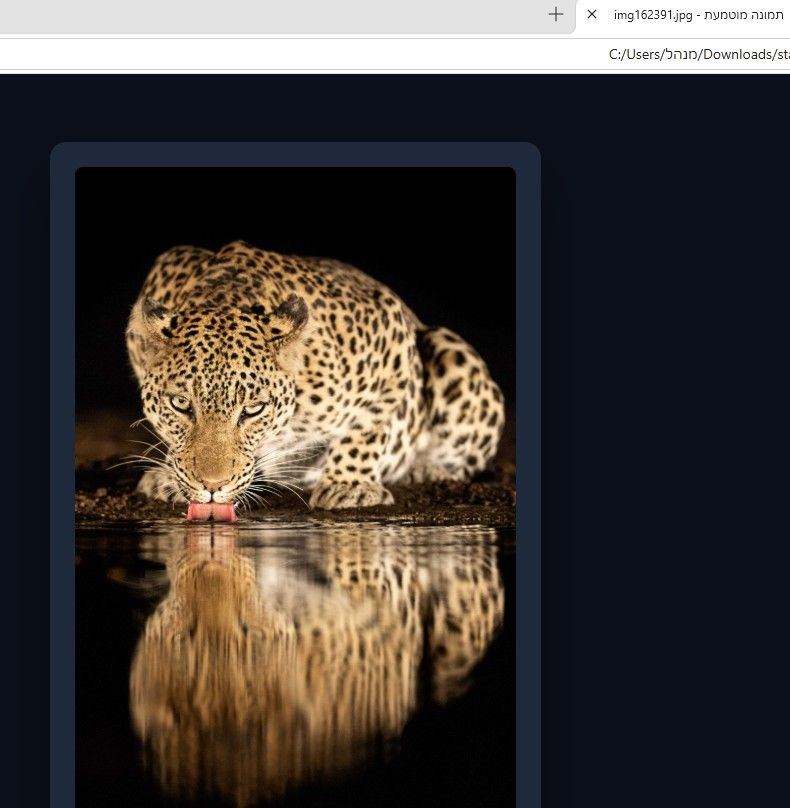
הסתבכתי לאחרונה עם המרת תמונות לקבצי HTML כי הטמעת תמונה ריאלית לוקחת הרבה אנרגיה וביקשתי בתמימות מ-AI המרת תמונה לHTML ויצר לי "המרת תמונה לHTML" (ע"י HTML) ובשניה הציג לי תמונה מוטמעת כביכול.
התייעצתי עם אחי (איש מחשבים) והתפלא על דבר כזה
אשמח אם תחוו דעה או תגחכו אבל העיקר תגיבו אני לא מבין מה הולך כאן..
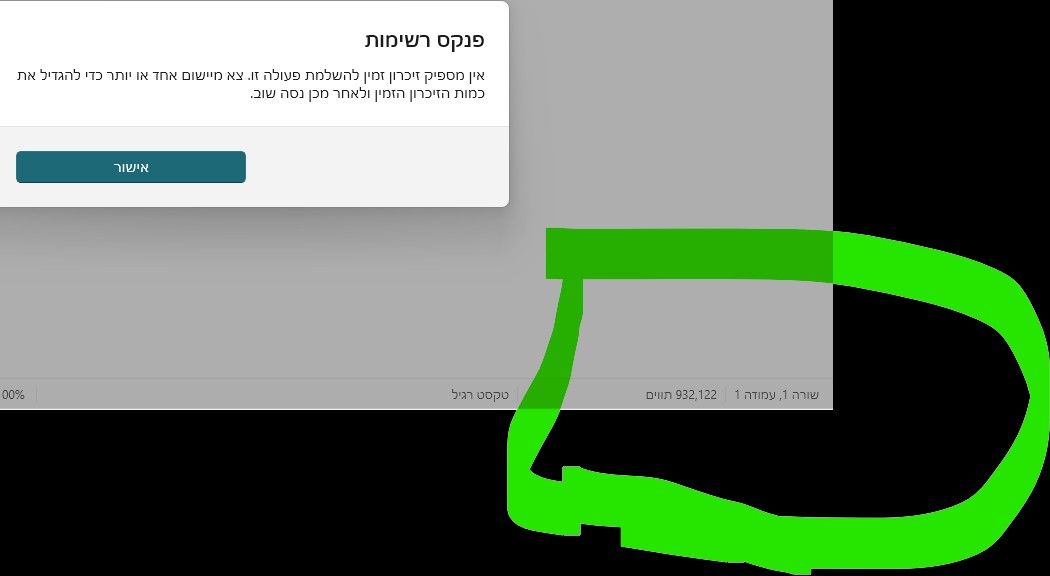
||גם וידאו הוא ממיר וזה לוקח ב NOTEPAD מליוני תווים (תמונה רגילה הוא נותן למעלה ממליון) וזה נשמע מופרך||
-
@רוכב-שמים מה הקוד של הHTML? תעלה את זה ונבדוק, או שתעלה את הHTML עצמו.
-
הסתבכתי לאחרונה עם המרת תמונות לקבצי HTML כי הטמעת תמונה ריאלית לוקחת הרבה אנרגיה וביקשתי בתמימות מ-AI המרת תמונה לHTML ויצר לי "המרת תמונה לHTML" (ע"י HTML) ובשניה הציג לי תמונה מוטמעת כביכול.
התייעצתי עם אחי (איש מחשבים) והתפלא על דבר כזה
אשמח אם תחוו דעה או תגחכו אבל העיקר תגיבו אני לא מבין מה הולך כאן..
||גם וידאו הוא ממיר וזה לוקח ב NOTEPAD מליוני תווים (תמונה רגילה הוא נותן למעלה ממליון) וזה נשמע מופרך||
@רוכב-שמים תלמד על base64
-
@רוכב-שמים תלמד על base64
-
@יוסי-מחשבים
תוכל להחכים אותי?
אני לא מבין בזה יותר מדי כבר ציינתי שזה AI...@רוכב-שמים זה שיטת קידוד, בה ניתן לרשום תמונה/סרטון בטקסט
אחרי שיש לך את התמונה בטקסט הדרך קצרה להטמיע ב-HTML
לדוגמא:<img src="data:image/png;base64,iVBORw0KGgoAAAANSUhEUgAA..." alt="תמונה"> -
@רוכב-שמים זה שיטת קידוד, בה ניתן לרשום תמונה/סרטון בטקסט
אחרי שיש לך את התמונה בטקסט הדרך קצרה להטמיע ב-HTML
לדוגמא:<img src="data:image/png;base64,iVBORw0KGgoAAAANSUhEUgAA..." alt="תמונה">@יוסי-מחשבים אני גררתי תמונה או אודיו או סרטון לשמה או אפילו לחצתי שמה וזה פתח לי סייר ובשבריר שנייה הוא המיר לי לטקסט לא מצאתי דבר כזה לכן זה נשמע לי מוזר
תבדוק
||<!DOCTYPE html>
<html lang="he" dir="rtl">
<head>
<meta charset="UTF-8">
<meta name="viewport" content="width=device-width, initial-scale=1.0">
<title>מציג והמרת תמונות מקומי מתקדם</title>
<style>
body {
margin: 0;
padding: 20px;
background: #0f172a;
color: #f8fafc;
font-family: 'Inter', system-ui, sans-serif;
display: flex;
flex-direction: column;
align-items: center;
min-height: 100vh;
}
.container {
background: rgba(30, 41, 59, 0.7);
backdrop-filter: blur(12px);
border: 1px solid rgba(255, 255, 255, 0.1);
padding: 30px;
border-radius: 20px;
box-shadow: 0 20px 40px rgba(0, 0, 0, 0.6);
max-width: 700px;
width: 100%;
text-align: center;
}
h2 {
margin-top: 0;
color: #38bdf8;
font-size: 1.5rem;
}
.drop-zone {
border: 2px dashed rgba(56, 189, 248, 0.4);
border-radius: 12px;
padding: 40px;
cursor: pointer;
transition: all 0.3s ease;
background: rgba(15, 23, 42, 0.4);
margin-top: 20px;
}
.drop-zone:hover, .drop-zone.dragover {
border-color: #38bdf8;
background: rgba(56, 189, 248, 0.08);
transform: scale(1.01);
}
input[type="file"] {
display: none;
}
.preview-container {
margin-top: 25px;
max-height: 400px;
overflow: auto;
border-radius: 12px;
background: rgba(15, 23, 42, 0.6);
padding: 10px;
}
img {
max-width: 100%;
height: auto;
border-radius: 8px;
box-shadow: 0 10px 25px rgba(0,0,0,0.5);
display: none;
margin: 0 auto;
}
.info {
margin-top: 15px;
font-size: 0.9rem;
color: #94a3b8;
}
.btn {
background: #0ea5e9;
color: white;
border: none;
padding: 12px 24px;
border-radius: 8px;
cursor: pointer;
font-weight: bold;
font-size: 1rem;
transition: background 0.2s, transform 0.1s;
box-shadow: 0 4px 12px rgba(14, 165, 233, 0.3);
}
.btn:hover {
background: #0284c7;
transform: translateY(-1px);
}
.btn:active {
transform: translateY(0);
}
</style>
</head>
<body><div class="container">
<h2>המרת תמונה מקומית לקובץ HTML עצמאי</h2>
<p>גרור לכאן תמונה או לחץ לבחירה כדי להטמיע אותה בקובץ אינטרנט אחד שפועל לבד.</p><div class="drop-zone" id="dropZone" onclick="document.getElementById('fileInput').click()"> <span style="font-size: 1.1rem; color: #e2e8f0;">📂 לחץ כאן או גרור קובץ תמונה לכאן</span> <input type="file" id="fileInput" accept="image/*"> </div> <div class="preview-container" id="previewContainer" style="display: none;"> <img id="imagePreview" alt="תצוגה מקדימה"> </div> <div class="info" id="fileInfo"></div> <div style="margin-top: 25px;"> <button id="downloadBtn" class="btn" style="display: none;" onclick="downloadStandaloneHTML()">הורד כקובץ HTML עצמאי</button> </div></div>
<script>
const fileInput = document.getElementById('fileInput');
const dropZone = document.getElementById('dropZone');
const imagePreview = document.getElementById('imagePreview');
const previewContainer = document.getElementById('previewContainer');
const fileInfo = document.getElementById('fileInfo');
const downloadBtn = document.getElementById('downloadBtn');let currentBase64Data = ''; let currentFileName = ''; fileInput.addEventListener('change', function(e) { const file = e.target.files[0]; if (file) processFile(file); }); ['dragenter', 'dragover'].forEach(eventName => { dropZone.addEventListener(eventName, (e) => { e.preventDefault(); dropZone.classList.add('dragover'); }, false); }); ['dragleave', 'drop'].forEach(eventName => { dropZone.addEventListener(eventName, (e) => { e.preventDefault(); dropZone.classList.remove('dragover'); }, false); }); dropZone.addEventListener('drop', (e) => { const file = e.dataTransfer.files[0]; if (file && file.type.startsWith('image/')) { processFile(file); } else { alert('אנא בחר קובץ תמונה תקין.'); } }); function processFile(file) { currentFileName = file.name; const reader = new FileReader(); reader.onload = function(e) { currentBase64Data = e.target.result; imagePreview.src = currentBase64Data; previewContainer.style.display = 'block'; imagePreview.style.display = 'block'; fileInfo.innerHTML = `שם הקובץ: <b>${file.name}</b> | גודל: ${(file.size / 1024).toFixed(1)} KB`; downloadBtn.style.display = 'inline-block'; }; reader.readAsDataURL(file); } function downloadStandaloneHTML() { if (!currentBase64Data) return; const standaloneContent = `<!DOCTYPE html><html lang="he" dir="rtl">
<head>
<meta charset="UTF-8">
<meta name="viewport" content="width=device-width, initial-scale=1.0">
<title>תמונה מוטמעת - ${currentFileName}</title>
<style>
body {
margin: 0;
padding: 20px;
background: #0b0f19;
display: flex;
justify-content: center;
align-items: center;
min-height: 100vh;
}
.card {
background: #1e293b;
padding: 25px;
border-radius: 16px;
box-shadow: 0 25px 50px -12px rgba(0, 0, 0, 0.7);
max-width: 95vw;
max-height: 95vh;
text-align: center;
}
img {
max-width: 100%;
max-height: 82vh;
height: auto;
border-radius: 8px;
display: block;
margin: 0 auto;
}
</style>
</head>
<body>
<div class="card">
<img src="${currentBase64Data}" alt="${currentFileName}">
</div>
</body>
</html>`;const blob = new Blob([standaloneContent], { type: 'text/html;charset=utf-8' }); const url = URL.createObjectURL(blob); const a = document.createElement('a'); a.href = url; a.download = `standalone_${currentFileName.replace(/\.[^/.]+$/, "")}.html`; document.body.appendChild(a); a.click(); document.body.removeChild(a); URL.revokeObjectURL(url); }</script>
</body>
</html>|| -
@יוסי-מחשבים אני גררתי תמונה או אודיו או סרטון לשמה או אפילו לחצתי שמה וזה פתח לי סייר ובשבריר שנייה הוא המיר לי לטקסט לא מצאתי דבר כזה לכן זה נשמע לי מוזר
תבדוק
||<!DOCTYPE html>
<html lang="he" dir="rtl">
<head>
<meta charset="UTF-8">
<meta name="viewport" content="width=device-width, initial-scale=1.0">
<title>מציג והמרת תמונות מקומי מתקדם</title>
<style>
body {
margin: 0;
padding: 20px;
background: #0f172a;
color: #f8fafc;
font-family: 'Inter', system-ui, sans-serif;
display: flex;
flex-direction: column;
align-items: center;
min-height: 100vh;
}
.container {
background: rgba(30, 41, 59, 0.7);
backdrop-filter: blur(12px);
border: 1px solid rgba(255, 255, 255, 0.1);
padding: 30px;
border-radius: 20px;
box-shadow: 0 20px 40px rgba(0, 0, 0, 0.6);
max-width: 700px;
width: 100%;
text-align: center;
}
h2 {
margin-top: 0;
color: #38bdf8;
font-size: 1.5rem;
}
.drop-zone {
border: 2px dashed rgba(56, 189, 248, 0.4);
border-radius: 12px;
padding: 40px;
cursor: pointer;
transition: all 0.3s ease;
background: rgba(15, 23, 42, 0.4);
margin-top: 20px;
}
.drop-zone:hover, .drop-zone.dragover {
border-color: #38bdf8;
background: rgba(56, 189, 248, 0.08);
transform: scale(1.01);
}
input[type="file"] {
display: none;
}
.preview-container {
margin-top: 25px;
max-height: 400px;
overflow: auto;
border-radius: 12px;
background: rgba(15, 23, 42, 0.6);
padding: 10px;
}
img {
max-width: 100%;
height: auto;
border-radius: 8px;
box-shadow: 0 10px 25px rgba(0,0,0,0.5);
display: none;
margin: 0 auto;
}
.info {
margin-top: 15px;
font-size: 0.9rem;
color: #94a3b8;
}
.btn {
background: #0ea5e9;
color: white;
border: none;
padding: 12px 24px;
border-radius: 8px;
cursor: pointer;
font-weight: bold;
font-size: 1rem;
transition: background 0.2s, transform 0.1s;
box-shadow: 0 4px 12px rgba(14, 165, 233, 0.3);
}
.btn:hover {
background: #0284c7;
transform: translateY(-1px);
}
.btn:active {
transform: translateY(0);
}
</style>
</head>
<body><div class="container">
<h2>המרת תמונה מקומית לקובץ HTML עצמאי</h2>
<p>גרור לכאן תמונה או לחץ לבחירה כדי להטמיע אותה בקובץ אינטרנט אחד שפועל לבד.</p><div class="drop-zone" id="dropZone" onclick="document.getElementById('fileInput').click()"> <span style="font-size: 1.1rem; color: #e2e8f0;">📂 לחץ כאן או גרור קובץ תמונה לכאן</span> <input type="file" id="fileInput" accept="image/*"> </div> <div class="preview-container" id="previewContainer" style="display: none;"> <img id="imagePreview" alt="תצוגה מקדימה"> </div> <div class="info" id="fileInfo"></div> <div style="margin-top: 25px;"> <button id="downloadBtn" class="btn" style="display: none;" onclick="downloadStandaloneHTML()">הורד כקובץ HTML עצמאי</button> </div></div>
<script>
const fileInput = document.getElementById('fileInput');
const dropZone = document.getElementById('dropZone');
const imagePreview = document.getElementById('imagePreview');
const previewContainer = document.getElementById('previewContainer');
const fileInfo = document.getElementById('fileInfo');
const downloadBtn = document.getElementById('downloadBtn');let currentBase64Data = ''; let currentFileName = ''; fileInput.addEventListener('change', function(e) { const file = e.target.files[0]; if (file) processFile(file); }); ['dragenter', 'dragover'].forEach(eventName => { dropZone.addEventListener(eventName, (e) => { e.preventDefault(); dropZone.classList.add('dragover'); }, false); }); ['dragleave', 'drop'].forEach(eventName => { dropZone.addEventListener(eventName, (e) => { e.preventDefault(); dropZone.classList.remove('dragover'); }, false); }); dropZone.addEventListener('drop', (e) => { const file = e.dataTransfer.files[0]; if (file && file.type.startsWith('image/')) { processFile(file); } else { alert('אנא בחר קובץ תמונה תקין.'); } }); function processFile(file) { currentFileName = file.name; const reader = new FileReader(); reader.onload = function(e) { currentBase64Data = e.target.result; imagePreview.src = currentBase64Data; previewContainer.style.display = 'block'; imagePreview.style.display = 'block'; fileInfo.innerHTML = `שם הקובץ: <b>${file.name}</b> | גודל: ${(file.size / 1024).toFixed(1)} KB`; downloadBtn.style.display = 'inline-block'; }; reader.readAsDataURL(file); } function downloadStandaloneHTML() { if (!currentBase64Data) return; const standaloneContent = `<!DOCTYPE html><html lang="he" dir="rtl">
<head>
<meta charset="UTF-8">
<meta name="viewport" content="width=device-width, initial-scale=1.0">
<title>תמונה מוטמעת - ${currentFileName}</title>
<style>
body {
margin: 0;
padding: 20px;
background: #0b0f19;
display: flex;
justify-content: center;
align-items: center;
min-height: 100vh;
}
.card {
background: #1e293b;
padding: 25px;
border-radius: 16px;
box-shadow: 0 25px 50px -12px rgba(0, 0, 0, 0.7);
max-width: 95vw;
max-height: 95vh;
text-align: center;
}
img {
max-width: 100%;
max-height: 82vh;
height: auto;
border-radius: 8px;
display: block;
margin: 0 auto;
}
</style>
</head>
<body>
<div class="card">
<img src="${currentBase64Data}" alt="${currentFileName}">
</div>
</body>
</html>`;const blob = new Blob([standaloneContent], { type: 'text/html;charset=utf-8' }); const url = URL.createObjectURL(blob); const a = document.createElement('a'); a.href = url; a.download = `standalone_${currentFileName.replace(/\.[^/.]+$/, "")}.html`; document.body.appendChild(a); a.click(); document.body.removeChild(a); URL.revokeObjectURL(url); }</script>
</body>
</html>||מוזיקה
||<!DOCTYPE html>
<html lang="he" dir="rtl">
<head>
<meta charset="UTF-8">
<meta name="viewport" content="width=device-width, initial-scale=1.0">
<title>ממיר והשמעת קובצי אודיו לקובץ HTML עצמאי</title>
<script src="https://cdn.tailwindcss.com"></script>
<style>
body {
font-family: 'Inter', system-ui, sans-serif;
background: #0f172a;
color: #f8fafc;
}
</style>
</head>
<body class="min-h-screen flex flex-col items-center justify-center p-6"><div class="bg-slate-800/70 backdrop-blur-md border border-slate-700/50 p-8 rounded-2xl shadow-2xl max-w-xl w-full text-center"> <h2 class="text-2xl font-bold text-sky-400 mb-2">🎵 ממיר מוזיקה לקובץ HTML עצמאי</h2> <p class="text-slate-400 text-sm mb-6">גרור לכאן קובץ שמע (MP3, WAV) או לחץ לבחירה כדי להטמיע אותו בנגן HTML עצמאי שרץ לחלוטין אצלך במחשב.</p> <div id="dropZone" class="border-2 border-dashed border-sky-400/40 rounded-xl p-8 cursor-pointer transition-all hover:border-sky-400 hover:bg-sky-400/5 bg-slate-900/40" onclick="document.getElementById('fileInput').click()"> <span class="text-lg text-slate-200">📂 לחץ כאן או גרור קובץ מוזיקה לכאן</span> <input type="file" id="fileInput" accept="audio/*" class="hidden"> </div> <div id="playerContainer" class="mt-6 hidden bg-slate-900/60 p-4 rounded-xl border border-slate-700"> <p id="fileInfo" class="text-sm font-medium text-sky-300 mb-3 truncate"></p> <audio id="audioPreview" controls class="w-full"></audio> </div> <div class="mt-6"> <button id="downloadBtn" class="hidden bg-sky-500 hover:bg-sky-600 text-white font-bold py-3 px-6 rounded-xl shadow-lg transition transform active:scale-95" onclick="downloadStandaloneAudioHTML()"> 📥 הורד כקובץ HTML עצמאי עם השמעי </button> </div> </div> <script> const fileInput = document.getElementById('fileInput'); const dropZone = document.getElementById('dropZone'); const audioPreview = document.getElementById('audioPreview'); const playerContainer = document.getElementById('playerContainer'); const fileInfo = document.getElementById('fileInfo'); const downloadBtn = document.getElementById('downloadBtn'); let currentBase64Audio = ''; let currentFileName = ''; fileInput.addEventListener('change', function(e) { const file = e.target.files[0]; if (file) processAudioFile(file); }); ['dragenter', 'dragover'].forEach(eventName => { dropZone.addEventListener(eventName, (e) => { e.preventDefault(); dropZone.classList.add('border-sky-400', 'bg-sky-400/10'); }, false); }); ['dragleave', 'drop'].forEach(eventName => { dropZone.addEventListener(eventName, (e) => { e.preventDefault(); dropZone.classList.remove('border-sky-400', 'bg-sky-400/10'); }, false); }); dropZone.addEventListener('drop', (e) => { const file = e.dataTransfer.files[0]; if (file && file.type.startsWith('audio/')) { processAudioFile(file); } else { showMsg('אנא בחר קובץ שמע תקין (כגון MP3).'); } }); function showMsg(msg) { console.log(msg); } function processAudioFile(file) { currentFileName = file.name; const reader = new FileReader(); reader.onload = function(e) { currentBase64Audio = e.target.result; audioPreview.src = currentBase64Audio; playerContainer.classList.remove('hidden'); fileInfo.innerHTML = `שם הקובץ: <b>${file.name}</b> | גודל: ${(file.size / (1024*1024)).toFixed(2)} MB`; downloadBtn.classList.remove('hidden'); }; reader.readAsDataURL(file); } function downloadStandaloneAudioHTML() { if (!currentBase64Audio) return; const standaloneContent = `<!DOCTYPE html><html lang="he" dir="rtl">
<head>
<meta charset="UTF-8">
<meta name="viewport" content="width=device-width, initial-scale=1.0">
<title>נגן אודיו מוטמע - ${currentFileName}</title>
<script src="https://cdn.tailwindcss.com"></script>
<style>
body { font-family: 'Inter', system-ui, sans-serif; background: #0b0f19; color: #f8fafc; }
</style>
</head>
<body class="min-h-screen flex items-center justify-center p-4">
<div class="bg-slate-800 p-6 rounded-2xl shadow-2xl max-w-md w-full text-center border border-slate-700">
<h1 class="text-xl font-bold text-sky-400 mb-4"> ${currentFileName}</h1>
<audio controls autoplay class="w-full mb-4">
<source src="${currentBase64Audio}" type="audio/mp3">
הדפדפן שלך אינו תומך בניגון קובצי שמע.
</audio>
<p class="text-xs text-slate-400">קובץ זה מנוגן מתוך מעטפת HTML עצמאית לחלוטין ללא חיבור לאינטרנט.</p>
</div>
</body>
</html>`;const blob = new Blob([standaloneContent], { type: 'text/html;charset=utf-8' }); const url = URL.createObjectURL(blob); const a = document.createElement('a'); a.href = url; a.download = `standalone_audio_${currentFileName.replace(/\.[^/.]+$/, "")}.html`; document.body.appendChild(a); a.click(); document.body.removeChild(a); URL.revokeObjectURL(url); } </script></body>
</html>||

שלום! נראה שהשיחה הזו מעניינת אותך, אבל עדיין אין לך חשבון.
נמאס לכם לגלול בין אותם הפוסטים בכל ביקור? כשנרשמים לחשבון, תמיד תחזרו בדיוק למקום שבו הייתם קודם, ותוכלו לבחור לקבל התראות על תגובות חדשות (בין אם במייל, ובין אם בהתראת פוש). תוכלו גם לשמור סימניות ולפרגן ב-upvote לפוסטים כדי להביע הערכה לחברי קהילה אחרים.
בעזרת התרומה שלך, הפוסט הזה יכול להיות אפילו טוב יותר 💗
הרשמה התחברות { const baseUrl = "https://www.google.co.il/search?q=site:mitmachim.top"; const m = location.pathname.match(/^\/(topic|category)\/(\d+)/); const type = m ? m[1] : null; const id = m ? m[2] : null; let searchInput; function search(path = "") { const query = searchInput.value.trim(); if (query) { window.open(`${baseUrl}${path}%20${encodeURIComponent(query)}`, "_blank"); } } let buttons = {}; buttons.searchAll = { id: "bb-search-all", label: `חיפוש ${type ? "בכל הפורום" : ""}`, className: type ? "btn-secondary" : "btn-primary", callback: () => search(), }; if (type === "topic") { buttons.searchTopic = { label: "חיפוש בנושא זה", className: "btn-primary", callback: () => search(`/topic/${id}`), }; } else if (type === "category") { buttons.searchCategory = { label: "חיפוש בקטגוריה זו", className: "btn-primary", callback: () => search(`/category/${id}`), }; } buttons.cancel = { label: "ביטול", className: "btn-default", "data-bs-dismiss": "modal" }; const dialog = bootbox.dialog({ title: '<div style="text-align:center;"><img src="/assets/uploads/files/1625950269825-mt-google.png" width="400" alt="חיפוש בגוגל"></div>', message: '<input id="bb-inp" class="bootbox-input bootbox-input-text form-control" placeholder="הקלידו כדי לחפש בגוגל" autocomplete="off"/>', buttons, backdrop: true, show: true, onEscape: true }); dialog.on("shown.bs.modal", function () { searchInput = document.getElementById("bb-inp"); if (searchInput) { searchInput.focus(); searchInput.addEventListener("keydown", function (e) { if (e.key === "Enter") { e.preventDefault(); const query = this.value.trim(); if (query) { search(); dialog.modal("hide"); } } else if (e.key === "Escape") { e.preventDefault(); dialog.modal("hide"); } }); } const searchAllButton = document.getElementById("bb-search-all"); if (searchAllButton) { searchAllButton.title = "לחצו על אנטר כדי לחפש"; } }); })(); void 0;)